Week-11 Challenge: Braking
STUDENT OF ONLINE EV BATCH 16
ANS 1 :
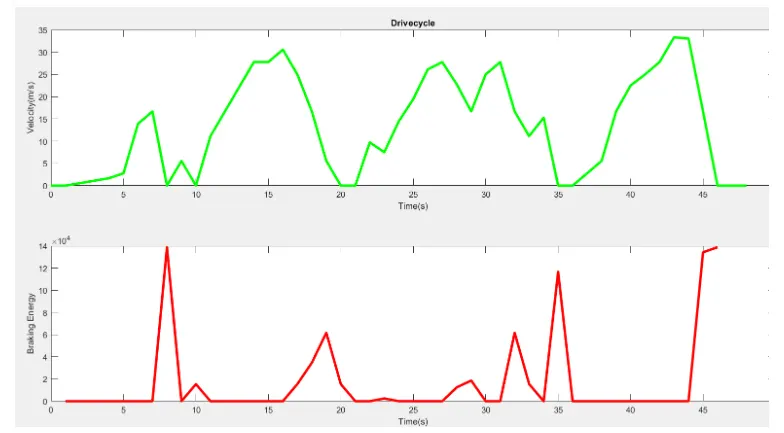
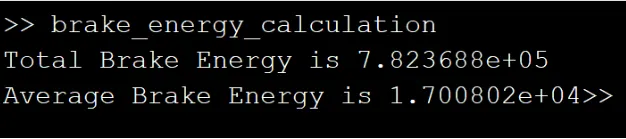
1. For a defined driving cycle, calculate the energy required for braking.
SIMULATION RESULT :
ANS 2 :
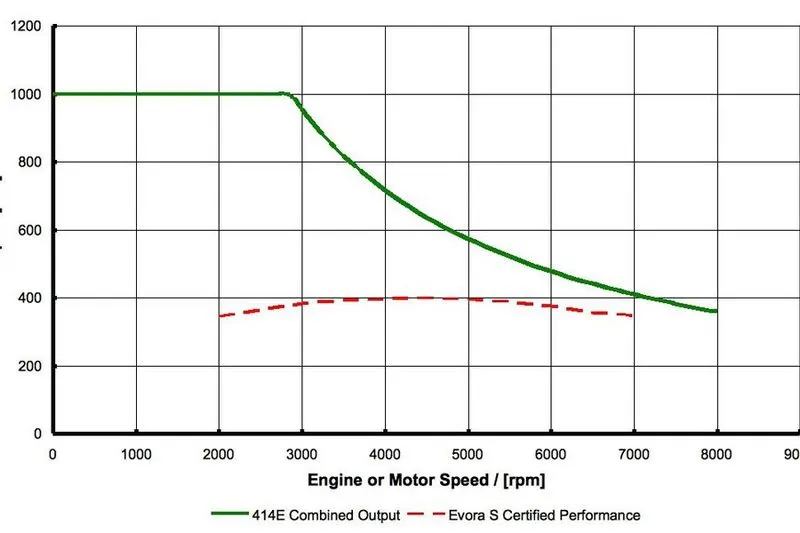
2. Why electric motor can’t develop braking torque at high speed similar to starting? How electric and mechanical brakes are coordinated?
When the motor is at rest and it has to operate from standstill position to the reach the moderate speed, the higher torque is required to bring the motor in operation. Whereas, when the vehicle is already at high speed the capping or the limit is reached by the motor operation and thus any further higher torque could not be obtained while braking.
Electric and Mechanical brakes coordination :
In Mechanical braking which we usually see and experience in all vehicles the brake pedal in the vehicle cabin helps us to engage or disengage the brakes. Currently the braking technologies have done wonders by inventing life saving braking technologies such as ABS, EBD, BA and many others. All these technologies play vital role in stopping the vehicle and coming back to rest from a high speed. In all these vehicles when the driver applies the brakes, the brake needs peds come closer to the disc connected with the driving disc. The brake pads usually in efficient braking.
There are two brake control strategies :
Series : In series we apply mechanical brakes or regenerative braking one after another.
Parallel : We apply both mechanical brakes and regenerative brakes simultaneously.
When the brake pedal is presented the hydraullic fluid reaches the brake piston and created the braking pressure on the wheels and the same kinectic energy is been used by the Regenerative Braking for generating more power using the Bi-directional motor which operates as a generator while braking.
ANS 3 :
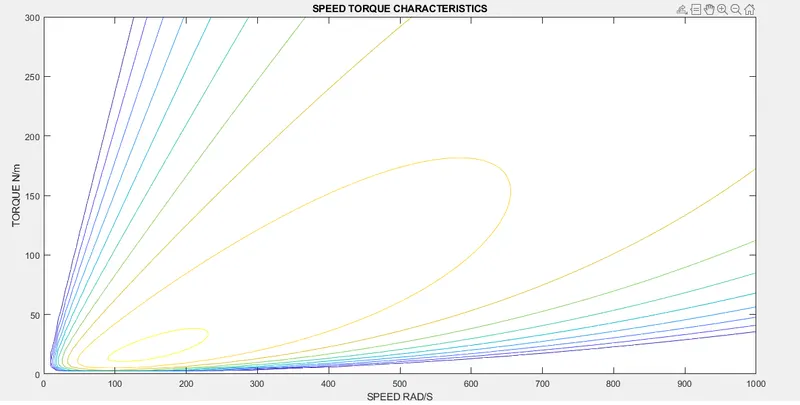
3. Make a MATLAB program which plots contour of given motor speed, torque and efficiency values. Attach the code as a .m file attach a screenshot of all the plots.
% A MATLAB PROGRAM FOR PLOTTING CONTOUR PLOT OF MOTOR SPEED, TORQUE
clear all
close all
clc
% SPEED ARRAY
w = linspace(0,1000)
% TORQUE ARRAY
T = linspace(0,300)
% LOSS COEFFICIENTS
kc = 0.18; % COPPER LOSSES
ki = 0.006; % IRON LOSSES
kw = 0.000015; % WINDAGE LOSSES
% MESHGRID
[X,Y] = meshgrid(w,T)
copper_loss = (Y.^2)*kc
iron_loss = X*ki
windage_loss = (X.^3)*kw
cons = 20
o_p = X.*Y
input_power = (copper_loss)+(windage_loss)+(o_p)+cons
Eff = (o_p)./(input_power)
n = linspace(0.7,0.95,10)
box off
grid off
contour(X,Y,Eff,n)
title('SPEED TORQUE CHARACTERISTICS')
xlabel('SPEED RAD/S')
ylabel('TORQUE N/m')
SIMULATION OUTPUT :