Week 1 Challenge
Q1. Write the steps involved to upload a .std file through web mail?
2. Name the different materials that can be designed using STAAD Pro.
3. Is it possible to capture images in STAAD Pro? If yes how?
4. Name the three ways by which you can create a model.
5. Write the steps followed to assign properties in a model.
Answer:
1. Write the steps involved to upload a .std file through web mail?
Answer:
Step 1- Open your mail
Step 2- compose your mail
Step 3- Upload your file and browse file
2. Name the different materials that can be designed using STAAD Pro.
Answer:
- ALUMINIUM
- COMPOSITE
- COMPOSITE SECTIONS
- CONCRETE
- TIMBER
- STEEL
3. Is it possible to capture images in STAAD Pro? If yes how?
Answer:
YES,
By Taking Command PICTURE
4. Name the three ways by which you can create a model.
Answer:
Analytical, Building, Physical.
5. Write the steps followed to assign properties in a model.
Answer:
Step 1: Goto PROPERTIES Tab –
Step 2: for Concrete - Define - Rectangle - enter dim in y and x
for Steel - section database - Indian - choose section.
Q2. 1. Name any six design parameter involved in RCC design.
2. What are the different cursor types available in STAAD Pro?
3. How will you generate different views for a model? State the steps involved.
4. Explain the procedure to define a “Simply Supported” condition in STAAD Pro
5. Name any five topics that you will include while creating DBR.
6. Describe the term “Multi material design” of STAAD Pro.
Answer:
1. Name any six design parameter involved in RCC design.
Answer:
Six design parameters –
- Ultimate tensile strength of steel – FU
- YIELD STRENGTH OF STEEL - FY
- EFFECTIVE LENGTH FACTOR - Kx Ky Kz
- LENGTH FOR TORSIONAL BUCKLING – LX, Ly, LZ
- Allowable L / R in compression- MAIN
- Max allowable local deflection- DFF
2. What are the different cursor types available in STAAD Pro?
Answer:
Type of cursor –
- Node cursor
- Beam cusor
- Plate cursor
- SOLID cursor
3. How will you generate different views for a model? State the steps involved.
Answer:
Goto VIEWS - Select different views front top side views etc
4. Explain the procedure to define a “Simply Supported” condition in STAAD Pro
Answer:
Supports - assign pinned support or fixed but and release degrees of freedom.
5. Name any five topics that you will include while creating DBR.
Answer:
INTRODUCTION OF PROJECT
- STRUCTURAL LAYOUT
- LOAD AND LOAD COMBINATION
- ANALYSIS AND DESIGN METHODOLOGY
- QUALITY ASSURANCE PLAN
6. Describe the term “Multi material design” of STAAD Pro.
Answer:
- STEEL
- CONCRETE
- ALUMINIIUM
- TIMBER
- COMPOSITE STRUCTURE
Q3.1. Name the structure systems in STAAD Pro? Explain each system?
2. Explain the coordinate system adopted in STAAD Pro software.
3. Elaborate DBR and its uses.
4. Explain the different types of analysis options in STAAD pro.
5. Explain the difference between Fixed and Fixed But condition.
Answer:
1. Name the structure systems in STAAD Pro? Explain each system?
Answer:
- SPACE
- PLANE
- FRAME
- TRUSS
2. Explain the coordinate system adopted in STAAD Pro software.
Answer:
X, Y, Z values are entered in coordinate system.
3. Elaborate DBR and its uses.
Answer:
- Introduction of project
- Structural layout
- Load and load combination
- Analysis and design methodology
- Quality assurance plan
4. Explain the different types of analysis options in STAAD pro
Answer:
- Perform analysis
- P delta analysis
- Push over analysis
- Non-linear analysis
- Buckling analysis etc
5. Explain the difference between Fixed and Fixed But condition.
Answer:
- ALL SIX DEGREES OF FREEDOM IS RESTRAINED
- SOME OF DEGREES OF FREEDOM IS RELEASED
Practical
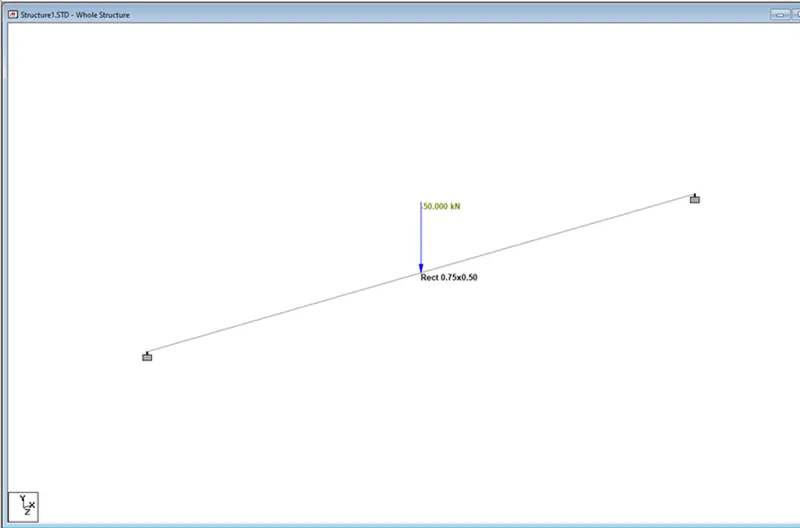
1. Create a STAAD Model with the following Specification
a. A beam of span 16m
b. Support: Fixed on one end and Roller support (Horizontal) on the other end
c. A point load of 50 kN at the mid-point
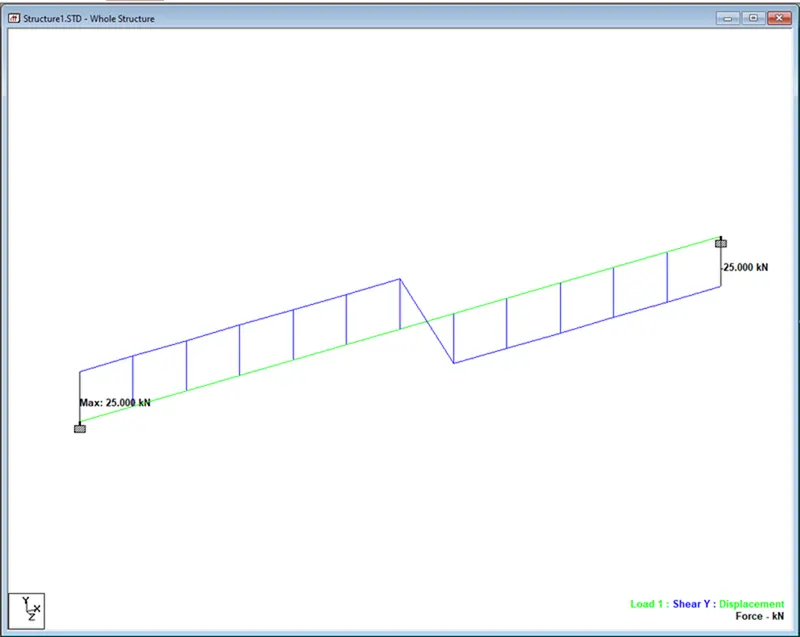
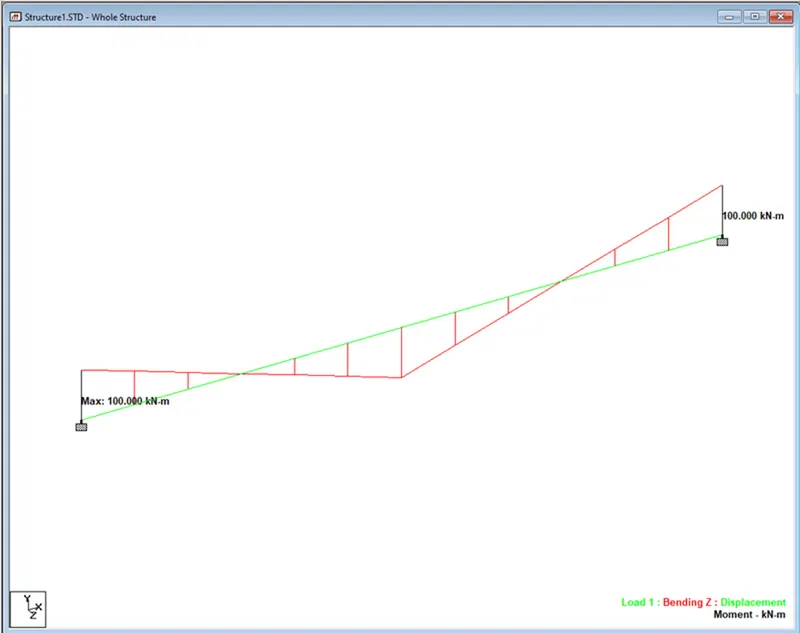
d. Draw SFD and BMD using software
Result: