Week 1 Challenge
QUE 1. 1. Write the steps involved to upload a .std file through webmail.
ANS - OPEN AND CLICK THE STAAD PRO ICON ON THE TITLE PAGE AND GO TO THE SHARE OPTION FOR SENDING
(.STD) FILE. through web mail.
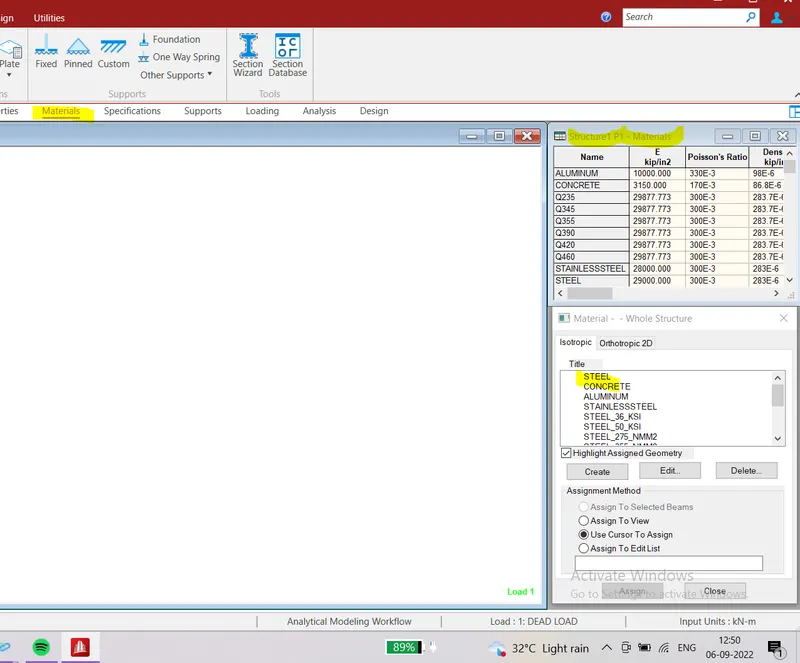
QUE 2. 2. Name the different materials that can be designed using STAAD Pro.
ANS - THE following different materials that can be used to design using staad pro.
mostly used materials is - Aluminium, concrete, steel, stainless steel
.
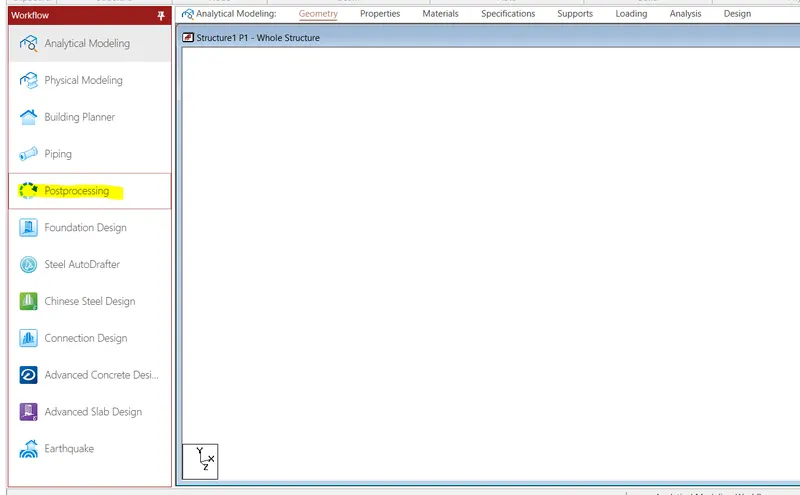
QUE - 3. Is it possible to capture images in STAAD Pro? If yes how?
ANS - CAPTURE IMAGES -
we can capture images in post-processing mode. plotting the diagram and select the take picture icon from the post-processing. icon.
QUE 4. Name the three ways by which you can create a model.
ANS - THE following are three ways in which we can create a modal.
1. using geometry - grids
2. Using prototype template
3. entering the coordinates in the grid table.
QUE 5. Write the steps followed to assign properties in a mode.
ANS. Analytical modeling - properties - choose the shape and size.
QUE . 2 (1) - 5. Write the steps followed to assign properties in a mode.
ANS. -1. Target Mean Strength (fck.)
2. Reinforcement steel grade ( fy )
3. cover depth
4. min. and max. reinforcement bar diameter.
2. What are the different cursor types available in STAAD Pro?
ANS - the following Four types of the cursor are available in stad pro.
1. nodes cursor
2. Beams cursor
3. plates cursor
4. solid cursor.
3. How will you generate different views for a model? State the steps involved
ANS. - the following steps involved different views for a model.
1. go to view - under the dynamic menu
2. choose the icon for the isometric view, top, bottom, left, front , right, and back view.
4. Explain the procedure to define a “Simply Supported” condition in STAAD Pro.
ANS - create two nodes using the grides / coordinates option
now the two nodes the end beam . SELECT THE NODES USING NODES USING CURSOR AND GO TO SUPPORTS - CREATE PINNED FOR BOTH NODES TO MAKE IT LIKE SS BEAM.
5. Name any five topics that you will include while creating DBR.
ANS - structural layout; load and combination
Analysis Method, framing plans, load calculations, design philosophy.
6. Describe the term “Multi-material design” of STAAD Pro.
ANS - staad pro has in-built option and codes to design diffrent materials like steel concrete, aluminium and timber thats why it is reffered as a multi material design.
QUE 3 -
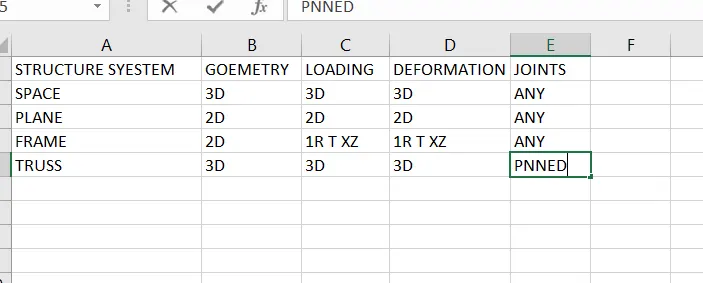
1. Name the structure systems in STAAD Pro? Explain each system?
ANS - SPACE, FRAME, PLANE, TRUSS.
2. Explain the coordinate system adopted in STAAD Pro software.
ANS - GLOBAL AXIX IN STAAD PRO IS FIXED AND NOT VARIABLE, LOCAL AXIS IS VARIABLE AND DEPAND ON MEMBER.
3. Elaborate DBR and its uses
ANS - DBR - design basis report - it is used to specify and compile the data required for analysis and design of structural elemets of the project. it depicts the assumption and specifications that are being used to develop the documents for a project. it will also help avoid the scope creep that can affect the project schedule and budget.
4. Explain the different types of analysis options in STAAD pro.
ANS - 1. Linear static analysis
2. second-order analysis
3. non - linear analysis
4. member imperfection analysis
5. pushover analysis ( deformation )
5. Explain the difference between Fixed and Fixed But conditions.
ANS - When the fixed and butt type of support is specified for that degree of freedom which are to be treated as fully restrained. staad assumes the displacements. known quantities whose value is zero. hence that degree of freedom. are not considered for the stiffness matrix. and the value is not calculated any degree of freedom are assign using the kfx through kmz terms.those treated as unknown and their displacements are calculated.if supports are subjected to artificial displacements can be considered only if they inforced. type of support is used in staad pro.
for the fixed type there no provision to specify a spring constant so if a user plans to assign her own constraint. the fixed butt type is the only choice.
6. Practical
1. Create a STAAD Model with the following Specification
a. A beam of span 16m
b. Support Fixed on one end and Roller support(Horizontal) on the other end
c. A point load of 50 kN at the mid-point
d. Draw SFD and BMD using the software.
ANS -
To draw the of beam having 16m. long span takes one node and after that take another node and create a beam between them.
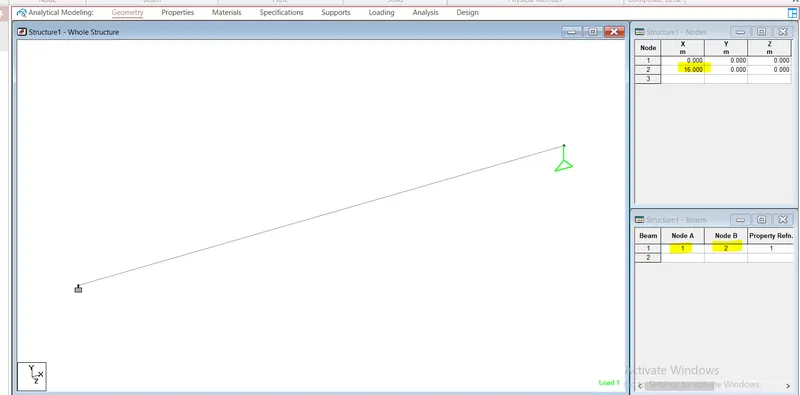
After that Assign, a two support fixed in one end and roller at another end. it will assign by clicking on both nodes.
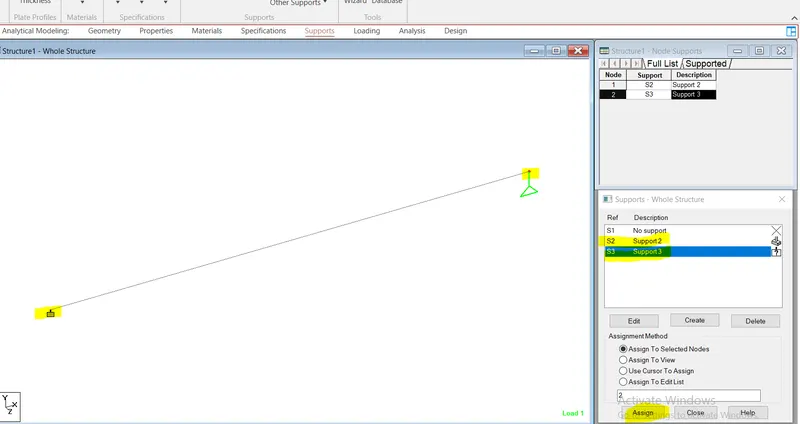
Point Load -
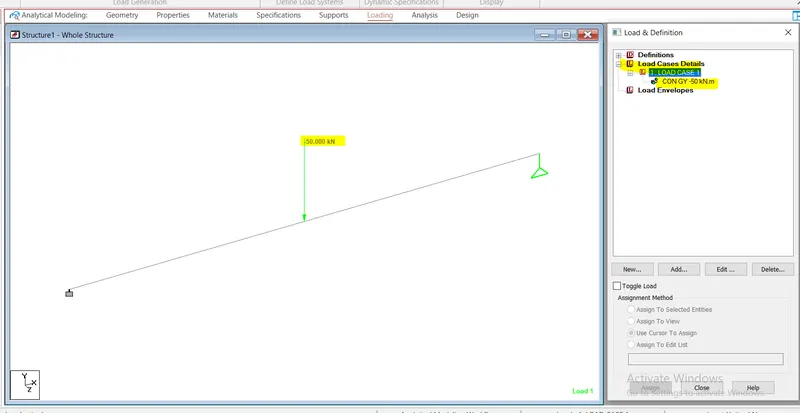
to assign a point load in center of the beam going to load section and select concentrated load and assign -50kn in y direction after that assign to in center position.
SFD / BMD - TO Show the sfd bmd click on post processing after that click on load diagrame.