Drafting of various geometries using Chamfer, Fillet tool in AutoCad
theQUE 1. DRAW P1 GOMETRY - 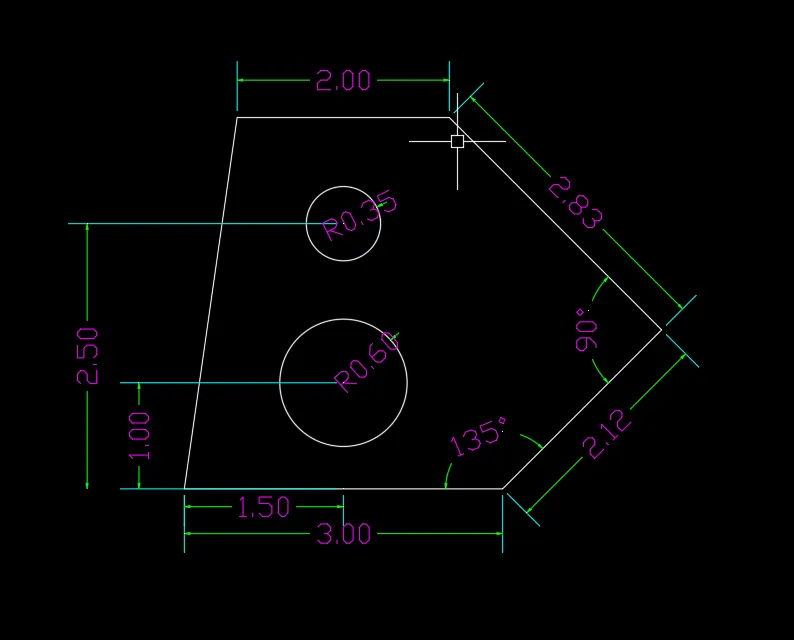
THE FOLLOWING STEPS WERTEUSE TO MAKE GOEMETRY.
1. SPECIFY FIRST POIN
2. @3,0
3. @2.12<45 IT TENDS TO 135 ANGLE
4. 2.83<45 45 ANGLE TENDS TO 90 DEGREE
5. @-2,0 CLOSE
6. FROM START POINT TAKE CENTER WHICH IS 1.50 AND MAKE TWO LINE WHICH IS 1 AND 2
7. MAKE CIRCLE FIRST WITH THE RADIUS OF .60 AND UPER CIRCLE WHICH HAVE RADIUS OF .30
QUE 2 - DRAW GOEMETRY P-2
ANS -
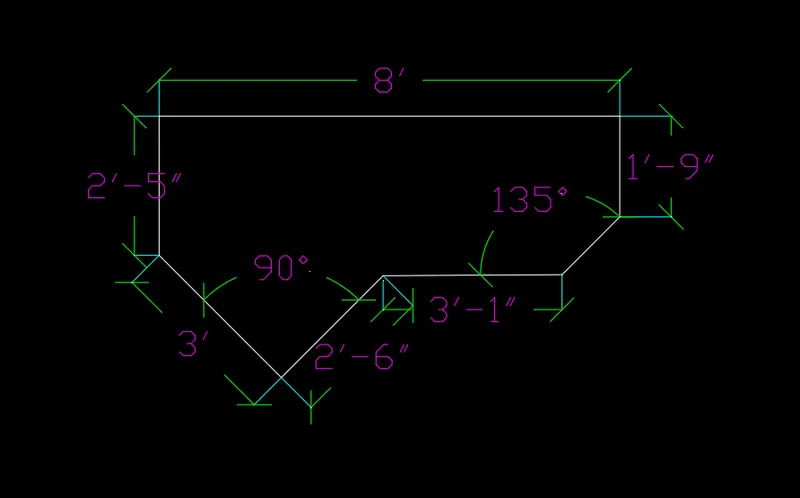
ARCHITECTURAL
THE FOLLOWING STEPS WERE USE TO DRAW ARCHITECTURAL DRAWING.
1. SPECIFY FIRST POIN IS 0
2. @8',0
3. @0,-1'9"
4. @2'10'<45
5. @-3'1",0
6. @0,2'6"<45 TENDS TO 90 DEGRE ANGLE
7. @3'<45 TENDS 90
8. @2'5" AND CLOSE TO START POINT.
QUE 3 DRAW P-3
ANS -
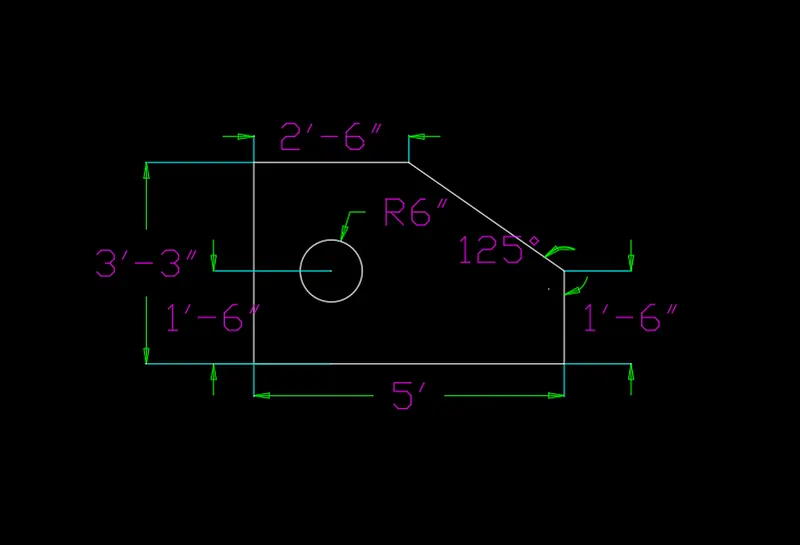
ENGINEERING
THE FOLLOWING STEPS WERE USE TO MAKE ENGINEERTING DRAWING
1. SPECIFY FIRST POINT 0
2. @5',0
3. @0,1.6"
4. ENTER CREATE NEW LINE FROM FIRST POINT
5. @0,3'3"
6. @2'6",0 CLOSE TO END POINT
7. TAKE POPINT 1'3" IN X DIRECTION AND 1'6" FROM Y DIRECTION AND MAKE 6" CIRCLE
Q
QUE 4 DRAW P-4
ANS -
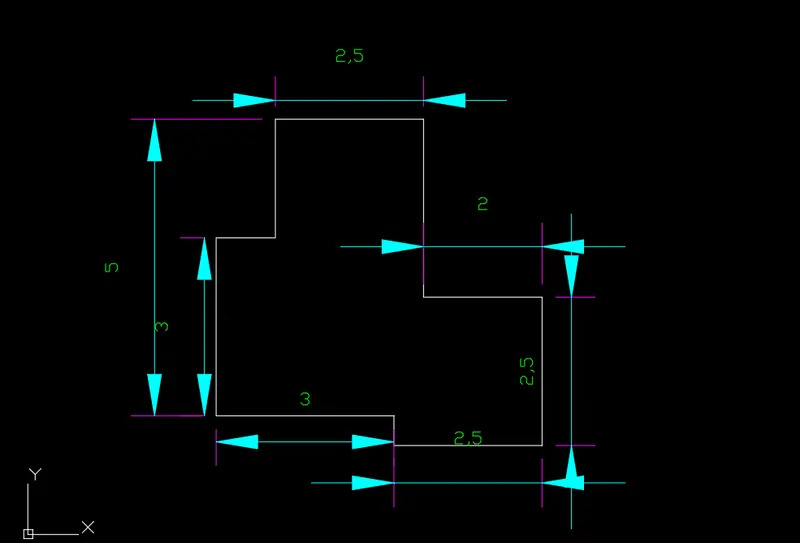
DECIMAL
the following steps were se to make decimal object
1. specify first point 1,1
2. @5.5,0
3. @0,2.5
4. @-2,0
5. @0,3
6. @-2.5,0
7. @0,-1.5
8. @-1,0
9. @0,-3
10. @3,0
11. @0,-.5 close
12. trim a extended line.
QUE 5. DRAW A P-5 OBJECT
ANS -
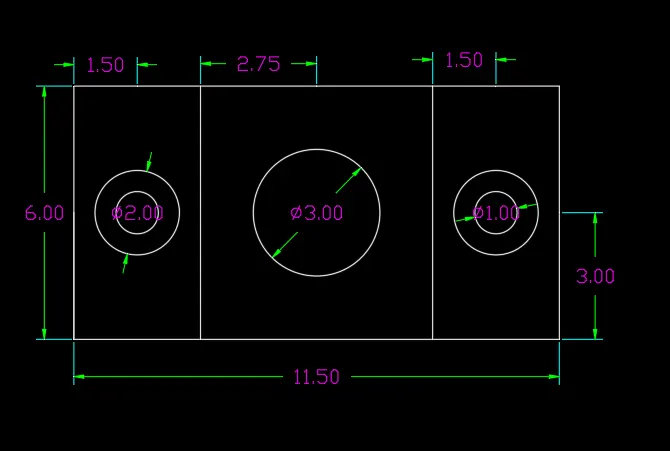
DECIMAL OBJECT
THE following steps were use to draw p-5 object.
1. specify a point
2. @11.5.0
3. @0,6
4. @-1.50,0
5. @-1.50,0
6. @-2.75,0
7. @-2.75,0
8. @-1.5,0
9. @-1.5,0
10. @0,6 close
11. take centerline frm a object 3 in y direction and 3 in y direction.
12. make a circle 1.50 distane having diameter is 2 and 1
13. make center circle having diameter of 3 at a 5.75 distance close.
14. make another two circle having 2 and one unit of diameter. from last corne at a 1.50 distance.
QUE - 6 DRAW A P-6 OBJECT
ANS -
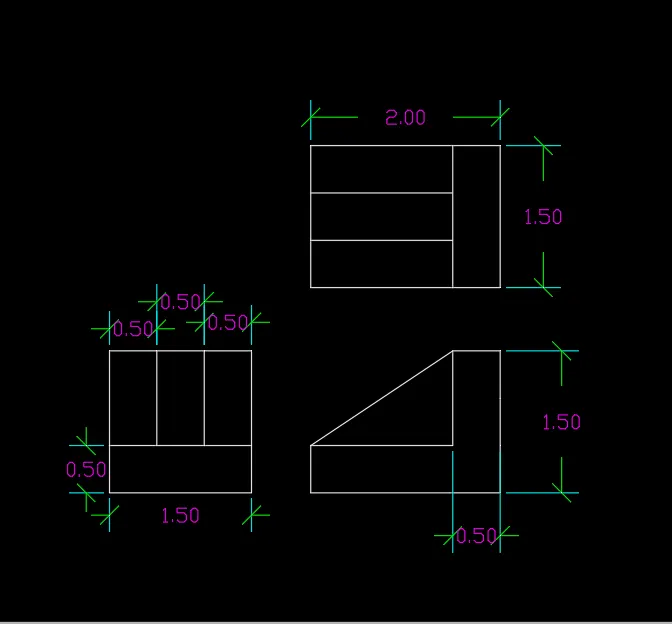
P-1 P-2 UP P-3 OBJECT
the following steps use to draw object p-1 p-2 p-3
p-1
1. specify first point of line
2. @1.50,0
3. @0,.50
4. @0,1
5. @-.5,0
6. @-.5,0
7. @-.5,0 close
8. make verticle line three time at a distance of .50
p-2
1. specify first point
2. @1.5,0
3. @.5,0
4. @0,1.5
5. @-.5,0
6. @0,-1
7. @-1.5,0 close to end point
8. make alinged line who joind both end.
p-3
1. specifying first point @1.5,0
2. @.5,0
3. @0,1.5
4. @-.5,0
5. @0,-1.5 close
6. from start point @0,.5
7. @0,.5
8. @0,.5
9. @.5,0
11. make two horizontal line in vertical direction to its cross section.
QUE -7. DRAW P-7 OBJECT
ANS -
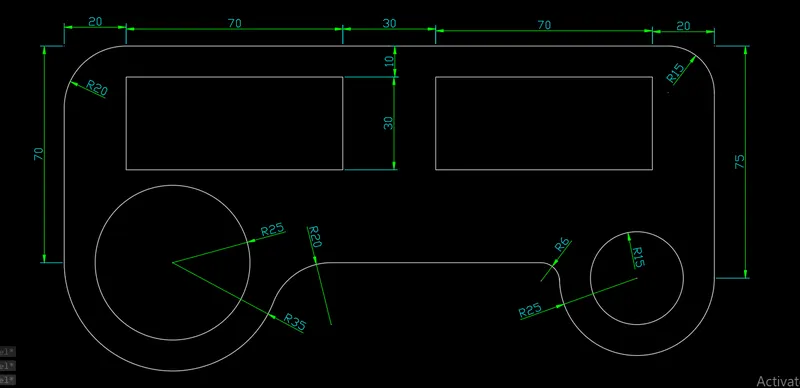
p-7 object
the following steps use to draw a p-7 object.
1. specify first point at the top side and strt drawing in x direction
2. @20,0
3. @70,0
4. @30,0
5. 70,0
6. @20,0
7. take a refrence point from both corner 20 in x direction 10 in y direction and draw a rectangle which have 70,30 leangth and width.
8. take a line from start point in y direction which have leangth 70
9. take horizontal refrence line wich is 70 length and draw a circle which radius is 35
10. from that centar point create a circle which have 25 radius.
11. from another corner take a line in y direction which have 75 leangth.
12. take a horizontal refrence point which have 50 leangth.
13. from horizontal centar line draw an circle which have radius is 25
14. from centar point we draw a another circle which have 15 radius.
15. apply fillet in all corner which have radius is 20.
QUE - 8. DRAW A P-8 OBJECT
ANS -
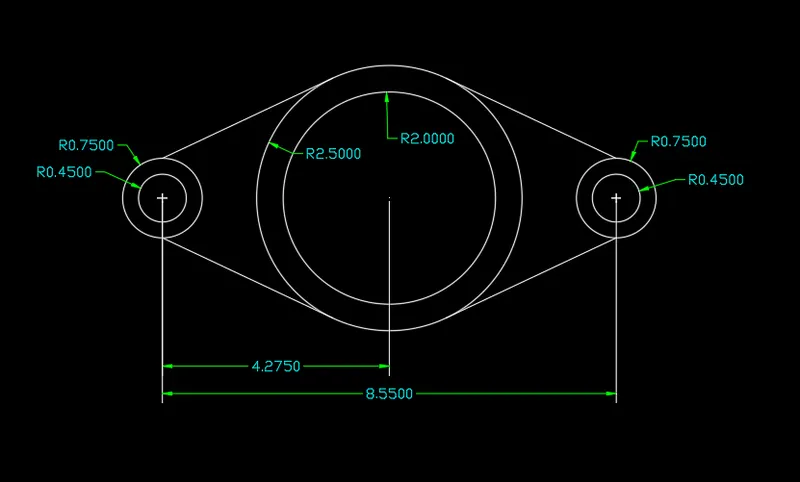
object p-8
THE FOLLOWING STEPS WERE USE TO DRAW P-8 OBJECT
1. specify first refrence point 4.720
2. draw a two circle fram end point having radiud .45 and .75
3. from start point take another refrence poin in x direction which id 4.270
4. draw two circle from end point of the horizontal line having .45 and .75 radius.
5. from centar point of the object draw two circlr having 2radius 2 and 2.5
QUE 9 DRAW A P-9 OBJECT
ANS -
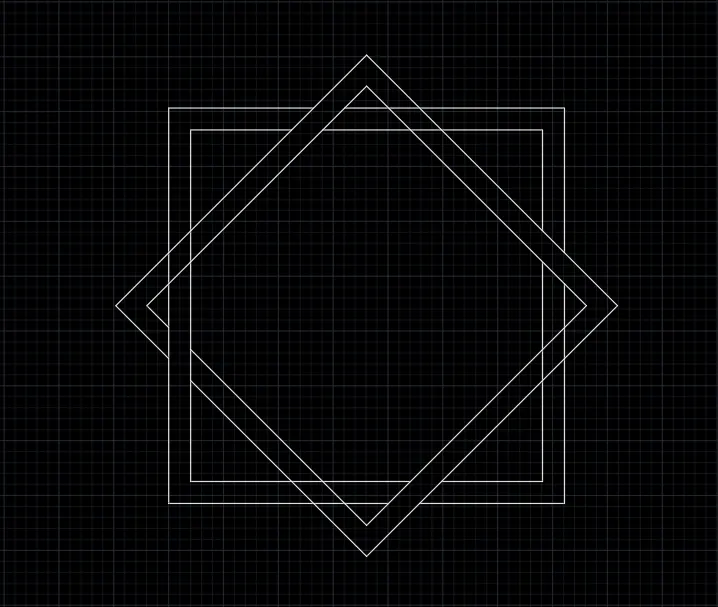
THE following object use to make p-9 object
1. draw a 10,10 rectangle
2. pick offset .20
3. draw another rectangle having 10,10 dimension from refrence to center point of thr rectangle.
4. trim use to cut inside cross line .
que 10 draw p-10 object
ans -
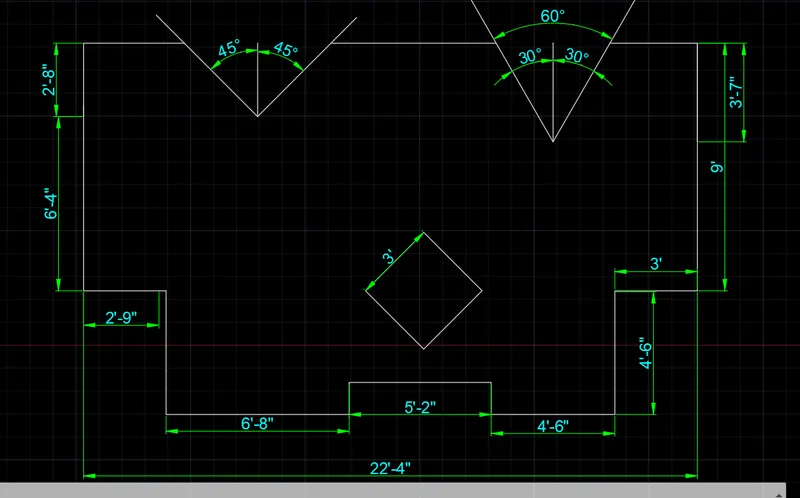
the folloing steps use to make p-10 object
1. @0,2'8"
2. @0,6'4"
3. @2'9"
4. @6'8",0
5. @0,1'2"
6. @5'2",0
7. 0,-1'2"
8. @0,4'6"
9. @3',0
10. 0,9'
11. take a refrence point in horizontal in the distance of 3'7" and create a two angle which have 30 angle
12. from another corner take horizontal refrence point at 2'8" distance and create a two angle which have 45 degree.
QUE 11. DRAW P-11 OBJECT
ANS -
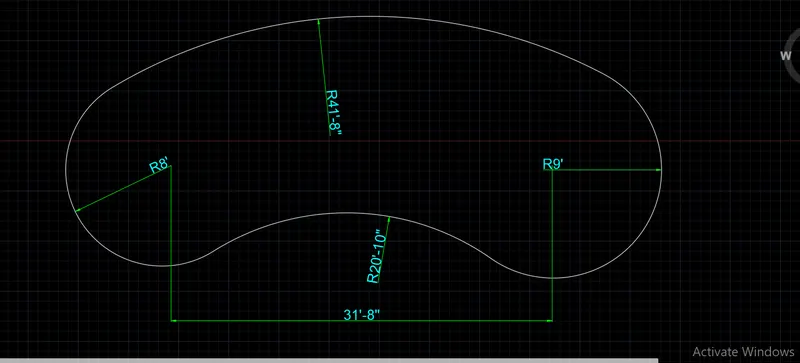
THE FOLLOWING P-11 OBJECT CRETE BY USING FOLLOWING STEPS.
1. TAKE 31'8" HORIZONTAL REFRENCE LINE
2. from left corner we make 8' circle and right hand make a 9' radius circlr
3. take small calculation 41'.8"- 8' = 33'8" and draw circle from left side having 33'8" radius.
4. from right corner we take another calculation which is 41'8"-9' = 32'" and create a circe from right corner having 32'8" and got 41'8" radius from left to right point. and trim use clear un useful object.
5. in y direction from tangent tangent radius option we draw a 20'10" circle and trim extra line .