Vasavi_External Exam_Tekla
QUESTION )
Analyze and Design a Boiler shed structure as per IS code in Tekla Structural Designer. Kindly refer to the enclosed plan and elevation given below for modelling.
ANS )
AIM: To analyze and design a building Boiler shed structure as per IS code in Tekla Structural Designer. Create a structure as per the given plan in the attachments provided.
TOOLS USED :
- Grids.
- Levels.
- File.
- Model.
- Manage property sets.
- Column.
- Beams.
- Frames.
- Loads.
- Load cases.
- Wall panels.
- Roof panels.
- Analyze.
PROCEDURE :
) open Tekla structural design and click on new.
2) then save the file with an appropriate name.
3) In the model select grid and apply grids as required. USe parallel quick
4) click on construction levels and now add levels as mentioned in the question
.
5) Now click on the manage property sets tool and create members like concrete column, steel
column and steel beams of different grades.
6)Now under the model tab select the beams tool.
7)Now you can see that there are properties of the column displayed at the properties bar although you have modified the properties it's good to go for a check for you to feel everything is according to our requirement.
8)Now click on the comm position for the initial and final point to draw the beam. Also, use the SB1 for the main beams and SB2 for the intermediate beams.
9)Now to create intermediate grid lines between the grids we use the grid tool, to place the intermediate beams.
10)Now by using the dimension tool mark the dimension of the grid lines.
11. After construction of the roof convert the beams to fully fixed support.
12)Now create wall and roof panels to the structure on all sides.
13. Now click on loads and create new loads like dead and live loads.
14. Now place live and dead load on the structure as per IS standard codes.
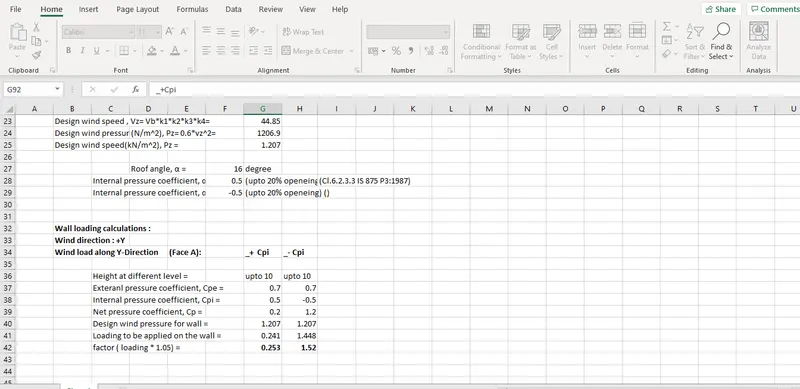
15. Now create new wind loads with both + Cpi and -Cpi values.
RESULT :
The above steps successfully executed and constructed a steel structure and added different kinds of loads and analysed the structure.