To sense the force at other end of see-saw for given variable inputs
Aim:
To sense the force at another end of see-saw for given variable inputs.
Objective:
To show other results with variables inputs given from one ends.
Simulink :
Simulink is a MATLAB based graphical program for modelling. Simulink blocks in MATLAB provide the interface for the function callers where we can call a function to get the result and plots for the function.
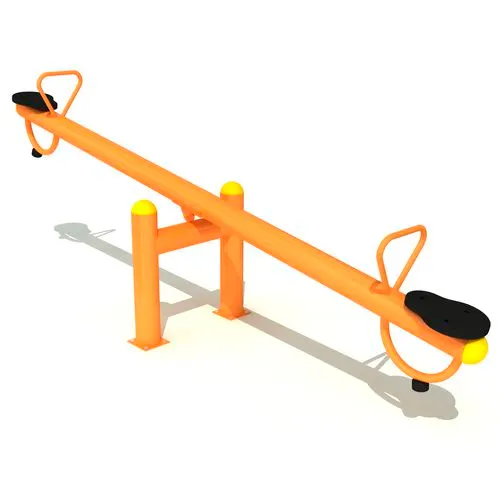
Reference figure
Block Used:
following blocks are used in Simulink to make this project
- Signal Builder
- Simulink-PS Converter
- Ideal Force Source
- Lever
- Mechanical Reference
- Ideal Force Sensor
- Mechanical Translational Reference
- Solver Configuration
- Display
- Scope
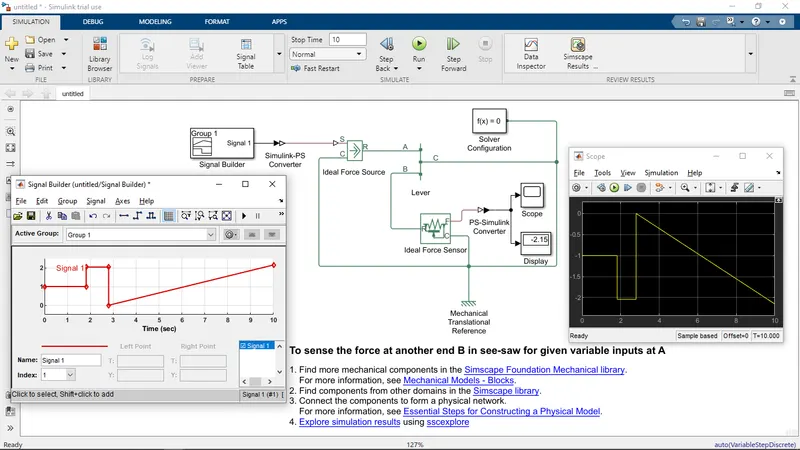
Simulink block diagram:
Simulink block diagram constructed with the help of the above blocks
here we took lever a physical model
- Inputs are given through the signal builder
- Then, Its convert the Simulink input signal to a Physical Signal
- The Ideal force source took input from the physical signal.
- The physical model deals with the given inputs from the ideal force source.
- The Ideal force sensor is output sensor for Physical Signal form lever.
- The output Converts from the input Physical Signal to a Simulink output signal.
- Mechanical translation reference is rigidity or ground to the given model.
Output:
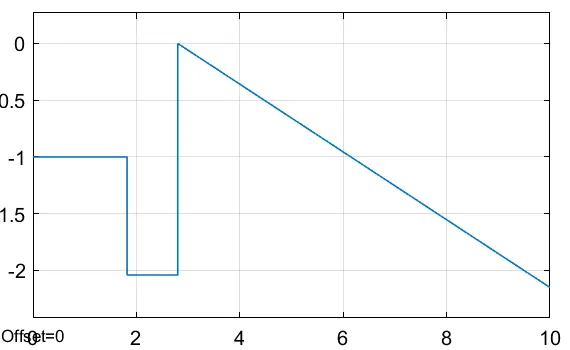
output in the form of the graph as force v/s time
Results:
The See-Saw has been successfully executed in Simulink and outputs found in terms of a graph.