Menu

IIT Certification Programs

Workshops

Projects

Blogs

Careers

Student Reviews


More

Academic Training

Informative Articles

Find Jobs

We are Hiring!


All Courses

Choose a category

Loading...

All Courses

All Courses

logo

Structural analysis of a buidling using Robot Structural Analysis

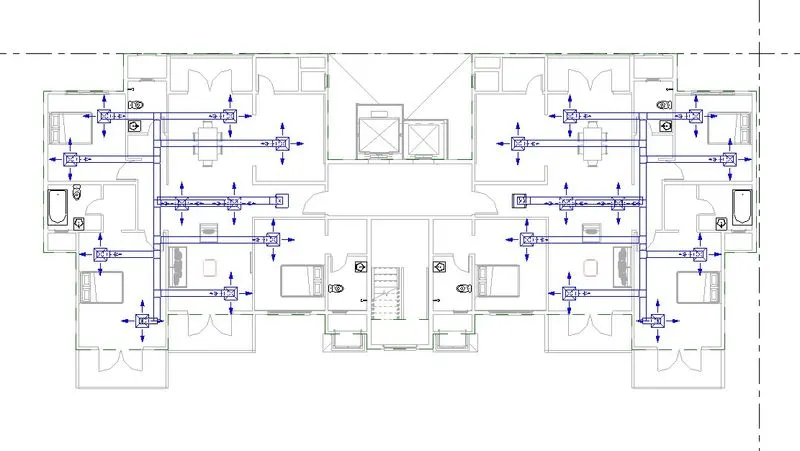
CHALLENGE WEEK - 8  REVIT   Question no. 1:What are HVAC systems? Why are they essential in the modeling of buildings Answer: HVAC is abbreviated as Heating, Ventilation and Air Conditions. It is simply can be referred as ventilation planning system. This uses various technologies to control the temparation,…

Project Details

Loading...

Leave a comment

Thanks for choosing to leave a comment. Please keep in mind that all the comments are moderated as per our comment policy, and your email will not be published for privacy reasons. Please leave a personal & meaningful conversation.

Please  login to add a comment

Other comments...

No comments yet!
Be the first to add a comment

Read more Projects by Natesh S (39)

Foundation Design using SAFE

Objective:

CHALLENGE WEEK 12 ETABS   Question no.1:  Model the isolated footing provided in week 11 challenge on SAFE. Analyze and design it to verify the size, depth and steel provided as per calculations. Answer: AIM: To model isolated footing. To verify the design according to said specification Procedure: Data…

calendar

05 Jul 2022 11:17 AM IST

  • ETABS
Read more

Design of Shallow Foundation (Isolated Footings)

Objective:

CHALLENGE WEEK 11 ETABS   Question no. 1: Design a square footing for a column size of 400x400. The compression axial load for the load combination of (1.5 DL + 1.5 LL) is 2000 KN. The safe soil bearing capacity is 150 KN/m2 at a depth of 2 metres below E.G.L. Participants are free to go for either a tapered…

calendar

28 Jun 2022 02:49 PM IST

Read more

Analysis & Design of RCC shear walls in the model using ETABS

Objective:

CHALLENGE WEEK 9 ETABS   Question no.1: The etabs file for a G+6 building is provided. Run the analysis and design the RCC shear walls (show in the etabs model). The following challenge deals specifically with the shear wall of size 300x1500 at grid A-11 in the structural model. Answer: Aim: To review the supplied…

calendar

24 Jun 2022 11:14 AM IST

Read more

Reinforcement detailing of Columns from ETABS output

Objective:

CHALLENGE WEEK 8 ETABS   Question no.1: The ETABS file for a G+4 building is provided. Run the analysis and design the RCC Moment Resisting Frame. The following challenge deals specifically with two columns at the following grid intersections. Answer: Aim: To review the supplied Etabs model To gather design details…

calendar

21 Jun 2022 12:57 PM IST

Read more

Reinforcement Detailing of Beams from ETABS output

Objective:

Aim: To review the supplied Etabs model To gather design details of the model. Resolve the said issues in the model To follow suggested parameters. Procedure: We are going to review the supplied input. Input was already developed structural model of a G+4 building. So the supplied input was openend using the Etabs applicatio.…

calendar

17 Jun 2022 01:59 PM IST

    Read more

    Project 1_Comparative study of different storey buildings for Seismic forces

    Objective:

    Project - 1 Etabs   Question no.1: Factors influencing the dynamic characteristics of a building Factors influencing the Natural Period of a building Factors influencing the Mode shape of oscillations   Aim: To create structural models of various specification using ETABS software. To follow suggested specification…

    calendar

    13 Jun 2022 01:35 PM IST

    Read more

    Modelling of 25 storey building with the specified properties using ETABS

    Objective:

    CHALLENGE WEEK - 6 Etabs   Question no.1: Model a 25 storey building on ETABS with structural properties as specified below. Ground floor or plinth floor level can be taken at a height of 1.5 metres from the base. Each of the successive 25 storeys has a storey height of 3 metres.   Aim: To model a 25storey building…

    calendar

    27 May 2022 01:05 PM IST

    Read more

    Conceptual design of a building with columns and shear walls

    Objective:

    CHALLENGE  WEEK 4  ETABS   QUESTION 1: The building shown, 20 × 35 m in plan, has columns on a 5 × 5 m grid and shear walls (with dimensions shown in m, 250 mm in thickness) in three alternative arrangements, (a), (b), (c), all with the same total cross-sectional area of the shear walls. Compare…

    calendar

    19 May 2022 12:33 PM IST

    Read more

    Concept on positioning of Columns

    Objective:

    CHALLENGE  WEEK 4  ETABS   QUESTION 1: Comment on the layout of the framing plan concerning earthquake resistance in the two horizontal directions X or Y (dots are columns, lines depict beams). Look into aspects of symmetry, redundancy and bi-directional stiffness and ductility. Answer: INVESTIGATION…

    calendar

    04 May 2022 02:43 PM IST

    Read more

    Understanding the concepts on Degrees of Freedom

    Objective:

    CHALLENGE  WEEK 3 ETABS   QUESTION 1: A five storey structure with 5 translational DOF is shown here. Each storey has mass ‘m’. The eigenvalue problem has been solved and the 5 periods of vibration Tn and their corresponding mode shapes, φn has been derived. Answer: Mass matrix (m) =  …

    calendar

    01 May 2022 03:50 PM IST

    Read more

    Calculation of Stiffness in Structural elements

    Objective:

    CHALLENGE  WEEK 2 ETABS   QUESTION 1: Compute lateral stiffness of the one story frame with an intermediate realistic stiffness of the beam. The system has 3 DOFs as shown. Assume L = 2h and Elb = Elc   Answer: Let us start this computation by substituting 1 as value for each degree of free in…

    calendar

    27 Apr 2022 01:32 PM IST

    Read more

    Identification of Cracks

    Objective:

    CHALLENGE  WEEK 1 ETABS   QUESTION 1: What is the mode of failure or damage of the beams in the figure above? Are the damages repairable? Elaborate Answer: 1(A): OBSERVATION: By observing the picture shown we can understand that concrete suffered crushing due the impact of the force. And by concrete getting…

    calendar

    21 Apr 2022 11:03 AM IST

    Read more

    Usage of Navigation tool , Timeliner and Clash Detection test using Naviswork

    Objective:

    CHALLENGE WEEK - 11 REVIT   Question no. 1: Use the Architecture/ Structure Project file developed by you in Week 6 to 8. Export the Revit architecture and structure model to Navisworks Cache file following the export settings discussed in class   AIM: To export the architecctural and structural drawing…

    calendar

    15 Apr 2022 12:22 PM IST

    Read more

    Creating Conceptual mass in REVIT and Creation of Sinusoidal curve and a Parametric stadium using Dynamo

    Objective:

    CHALLENGE WEEK - 10 REVIT   Question no. 1: Using Dynamo create a set of sinusoidal points and create a curve and create a surface out of the curve   AIM: To create a set of sinusoidal point , curve and surface for the curve using the dynamo tool. Procedure: Initially open the revit software. In the revit go…

    calendar

    12 Apr 2022 02:03 PM IST

    Read more

    Preparing Schedule & Cost Estimation for a building using REVIT

    Objective:

    CHALLENGE WEEK - 9 REVIT   Question no. 1: Use the shortcut keys in Revit discussed in class to complete the following tasks and list them below           a. Using 3D model create a section box           b. To create similar doors and windows in a floor…

    calendar

    31 Mar 2022 04:02 PM IST

    Read more

    Structural analysis of a buidling using Robot Structural Analysis

    Objective:

    CHALLENGE WEEK - 8  REVIT   Question no. 1:What are HVAC systems? Why are they essential in the modeling of buildings Answer: HVAC is abbreviated as Heating, Ventilation and Air Conditions. It is simply can be referred as ventilation planning system. This uses various technologies to control the temparation,…

    calendar

    28 Mar 2022 01:19 PM IST

    Read more

    Creating Architectural and Structural model with 3D rendering using REVIT

    Objective:

    PROJECT - 1 REVIT   Question no. 1: Select the type of structure you want to build from one of the three below:        a. Multi-Unit Residential Apartment        b. Office Buildings        c. School Answer: The model selected for the project ts a multi-Unit…

    calendar

    25 Mar 2022 01:20 PM IST

    Read more

    Usage of Collaborate tool in REVIT

    Objective:

    CHALLENGE WEEK - 6 REVIT   Question no. 1:  Open an architectural template. Using the Manage tab set project base point and project shared coordinates for the project   Aim: To create architectural project. To manage project base point and project shared coordinates. Procedure: To create a architectural…

    calendar

    15 Mar 2022 03:07 PM IST

    Read more

    Introduction to National Building Code and Steps in a Construction project

    Objective:

    CHALLENGE WEEK - 5 REVIT   Question no. 1:  Why are building codes or standards essential for the modeling/ efficiency of drawings in Revit ? Answer:   National Building Code(NBC) is a set of standard guidlines thatplays a very important role in construction of a building. This NBC code ensures the…

    calendar

    11 Mar 2022 11:48 AM IST

    Read more

    3D Creation of Celing, Roof, Architectural plan, Structural plan, Sectional view, Elevation view and Camera specific view for a house plan using REVIT

    Objective:

    CHALLENGE WEEK - 4 REVIT   Question no. 1:  Based on the project saved from Week 3, proceed from the First Floor Level. Model a Ceiling from the architecture tab above the walls at the first-floor level   Aim: To create a ceiling. The ceiling to be created in first floorlevel. Procedure: To create a ceiling.…

    calendar

    07 Mar 2022 12:36 PM IST

    Read more

    Creating Walls, Partition walls and Floors for a residential layout using REVIT

    Objective:

    CHALLENGE WEEK - 2 REVIT   Question no. 1:  Use the project file created from Week 2. Use it for this assignment. Based on your layout from week 2, using floor tool under architecture tab and select the floor with appropriate material and thickness using the property browser create a layout in the Ground floor…

    calendar

    01 Mar 2022 01:38 PM IST

    Read more

    Creating Levels, Grids, Layout and model elements for a residential unit using REVIT

    Objective:

    CHALLENGE WEEK - 2 REVIT   Question no. 1:  What is BIM? Summarize the features of BIM and benefits of using BIM over 2D CAD tools.   Aim: To explain about BIM. To Summarize the features of BIM. To List the benefits of using BIM over 2D CAD tools. Procedure: BIM simply is abbreviated as " Building…

    calendar

    24 Feb 2022 03:02 PM IST

    Read more

    Introduction to REVIT concepts

    Objective:

    CHALLENGE WEEK - 1 REVIT   Question no.1: From the file menu, create a new project (Structural / Architectural / Construction template ) and name the project appropriately   Aim: To create a new project. To name the project appropriately. Procedure: To create a project template. After opening the revit software…

    calendar

    23 Feb 2022 11:20 AM IST

    Read more

    Project 2_Creating a 3D rendered model for a Residential Building in AutoCad

    Objective:

    PROJECT 2 AutoCADD Essential   Task 1: AIM: To create a 3 dimensional model of the residential building  To create a rendered view of the developed model. To use materials and light setting. Procedure: Here in the project we are going to create a 3d model of a residential building. This is building…

    calendar

    19 Feb 2022 02:05 PM IST

      Read more

      Creating 3D Isometric view of various structural elements in AutoCAD

      Objective:

      CHALLENGE WEEK - 12 AutoCADD Essential   Question no.1: AIM: To reate a 3D Isometric View of the building To use proper view. Procedure: Open a new Autocadd file. Set the workplane in 3d view through workplan customization. The drawing to be drawn is 3D Isometric View of the building The 3D isometric view of…

      calendar

      17 Feb 2022 02:54 PM IST

        Read more

        Creating various 3D Models like Furniture, Footing, Girder, Column drop with panel and Gable Wall in AutoCad

        Objective:

        CHALLENGE WEEK - 11 AutoCADD Essential   Question no.1: AIM: To create a 3D Furniture element.  To use proper view. Procedure: Open a new Autocadd file. Set the workplane in 3d view through workplan customization. The drawing to be drawn is furniture in a shape of a cuboid. The cuboid consist of a void.…

        calendar

        11 Feb 2022 12:49 PM IST

          Read more

          Creation of Multiple viewports, Scaling the drawing and setting in Template in AutoCad

          Objective:

          CHALLENGE WEEK - 10 AutoCADD Essential   Question no.1: AIM: To create a layout of the Plan and Section A of a project. To use proper paper size. To use proposed template. Procedure: The file which contains the residential plan and elevation was chosen. The chosen plan and elevation was set in the page such that…

          calendar

          07 Feb 2022 02:54 PM IST

            Read more

            Creating Kitchen layout, Hatching of Architectural elements and sectional view of an Industrial Building in AutoCad

            Objective:

            CHALLENGE WEEK - 9 AutoCADD Essential   Question no.1: AIM: To create the layouts of the Kitchen and provide hatches pattern To use text and dimensions. Procedure: Select the line tool. A rectangle of required size was drawn whicch is the otter line of the wall of a kitchen layout. The line is offsetted for 300mm…

            calendar

            04 Feb 2022 04:42 PM IST

              Read more

              Creating Bar Bending schedule, Different Door types, and Creation of standard drawing templates using AutoCad

              Objective:

              CHALLENGE WEEK - 8 AutoCADD Essential   Question no.1: AIM: To create a template and a title block. To use text and dimensions. Procedure: Select the line tool. The title block is drawn with line tool. The title block is drawn with required spacing for the all the titles and texts. The title block and templates…

              calendar

              01 Feb 2022 03:41 PM IST

                Read more

                Project 1 _Creating an Architectural plan for the provided plot size and develop relevant basic structural drawings

                Objective:

                PROJECT 1 AutoCADD Essential   Task 1: AIM: To design and draft a layout of a residential building  To create an architectural drawing and structural drawing. To show Plan ,elevation and Sections for a plot size of 60'x20'. To show  column ,Beam, Footing plan. To use proper texts and dimensions.…

                calendar

                27 Jan 2022 11:50 AM IST

                  Read more

                  Creating a Layout, Section and Elevation with dimensions using AutoCad

                  Objective:

                  CHALLENGE WEEK - 7 AutoCADD Essential   Question no.1: AIM: To create the Plan and Sections To use proper texts and dimensions. Procedure: Select the line tool. Drawing the outline sketch of the plan. First the outter wall is drawn by of setting line to 250 and 200mm. Then the inner wall of respective places.…

                  calendar

                  25 Jan 2022 05:45 PM IST

                    Read more

                    Creating a Wardrobe detailed drawing, Floor Plan, Kitchen Layout and Column Detail using AutoCad

                    Objective:

                    CHALLENGE WEEK - 6 AutoCADD Essential   Question no.1: AIM: To draw the elevation and details of a wardrobe. To use text and dimensions. Procedure: Select the line tool. Initially the plan view or the top view of the wardrobe is sketched. Draw a rectangle of size 2800x630 And offset the rectangle to 20mm. Offset the…

                    calendar

                    21 Jan 2022 03:15 PM IST

                      Read more

                      Creation of Column Schedule and Drawing Template using AutoCad

                      Objective:

                      CHALLENGE WEEK - 4 AutoCADD Essential   Question no.1: AIM: To create a column schedule To use text and dimensions. Procedure: Create a table using Autocadd table creation tools.  Create the tabular column with 7 columns. And expected rows for the table. Then enter the texts into the tables. The texts in…

                      calendar

                      13 Jan 2022 06:29 AM IST

                        Read more

                        Creating a Residence Layout, Seating plan, Toilet and Utility room plan using AutoCad

                        Objective:

                        CHALLENGE WEEK - 4 AutoCADD Essential   Question no.1: AIM: To sketch the layout of a residence. To consider all dimensions as reference to sketch the unit plan. Procedure: First create the outter walls with the dimensions of 25' x 43'6.5" in Line. Then offset the line to 9" inner side. then off set the left edge…

                        calendar

                        06 Jan 2022 04:22 PM IST

                          Read more

                          Drafting of various geometries using Chamfer, Fillet tool in AutoCad

                          Objective:

                          CHALLENGE WEEK - 3 AutoCADD Essential   Question no.1: AIM: To draw a drawing using decimal units. The diagram to be drawn using line tool in AutoCADD software. Procedure: The value to be used to draw the drawing is in meters, hence change the units in the template in autocadd to meters. Pick the line tool. Draw a…

                          calendar

                          29 Dec 2021 11:56 AM IST

                            Read more

                            Creating a Floor plan, Footing detail and Isometric view using AutoCad

                            Objective:

                            CHALLENGE WEEK - 2 AutoCADD Essential   Question no.1: AIM: To draw a cross section of a load bearing wall over spread footing. The diagram to be drawn using line tool in AutoCADD software. Procedure: The value to be used to draw the drawing is in meters, hence change the units in the template in autocadd to meters.…

                            calendar

                            08 Dec 2021 11:18 AM IST

                              Read more

                              Creation of geometries by Coordinate system methods using AutoCad

                              Objective:

                              CHALLENGE WEEK - 1 AutoCADD Essential   Question no.1:   Aim: To Create a geometrical shape using Absolute coordinate system and Relative coordinate system in AutoCADD software. To Create geometries using the line tool. Procedure:  Absolute Coordinate system: Initially after opening the AutoCadd software…

                              calendar

                              01 Dec 2021 03:47 PM IST

                                Read more

                                Sketch a G+1 residential plan according to Vaastu Shastra and Calculation of Loads as per IS code

                                Objective:

                                PROJECT II Mix Design of Concrete   Aim of the project: To sketch a G+1 floor residential plan considering Vaastu shastra. Listing the names of required structural drawings to be provided to the site. To calculate the individual corresponding loads from the members as per IS code. Building plan: All dimensions in…

                                calendar

                                24 Nov 2021 11:53 AM IST

                                  Read more

                                  Project on Concrete Mix Design for various grades of Concrete

                                  Objective:

                                  PROJECT I Mix Design of Concrete   Task no. 1: Calculate the Concrete Mix Design for M35 grade concrete with fly ash. Solution:   Aim & Introduction: The aim of the task in project I is the calculation of mix design for M35 grade concrete with fly ash as per Indian Standard code IS10262:2009(Guidelines…

                                  calendar

                                  11 Nov 2021 11:55 AM IST

                                    Read more
                                    Showing 1 of 39 projects