Sketch a G+1 residential plan according to Vaastu Shastra and Calculation of Loads as per IS code
AIM:
To sketch a G+1 floor residential plan, according to vastu shastra, and list down the names of the structural drawings required to be provided to the site for construction.
Also, assume the sizes of the structural elements( column, beam, slab, etc) and accordingly calculate the individual corresponding lods from the members as per the IS code.
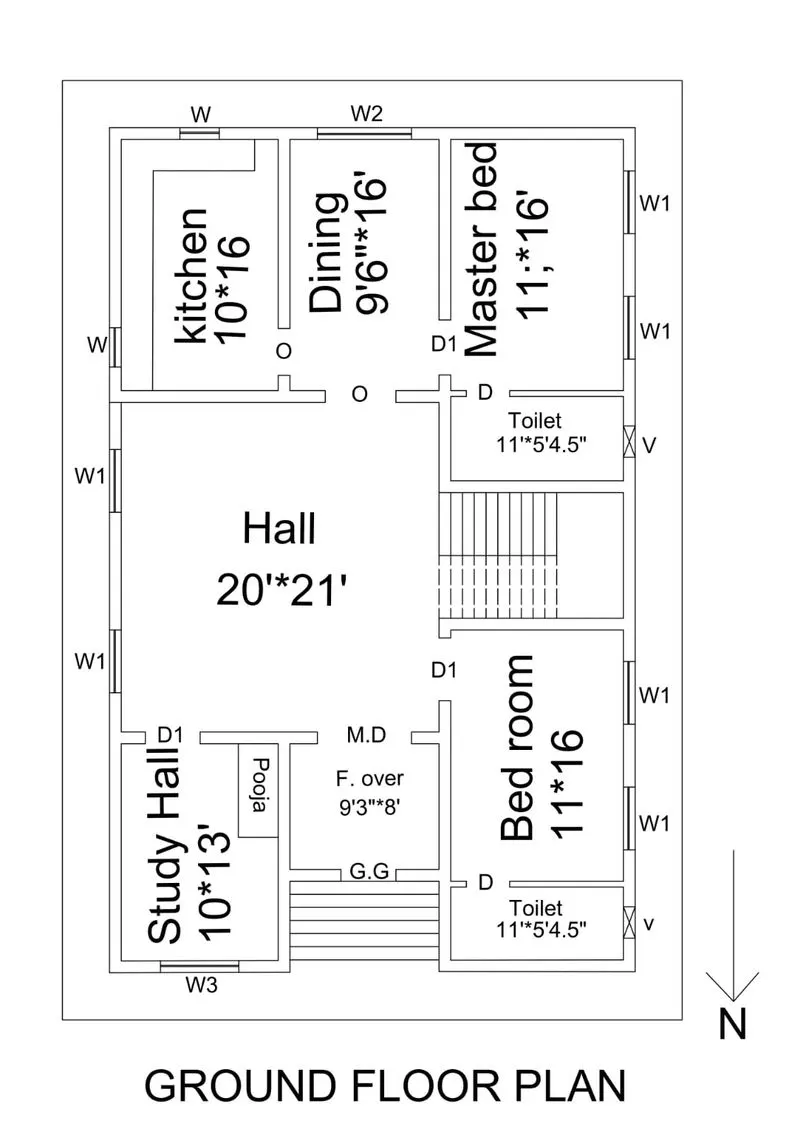
GROUND FLOOR PLAN:
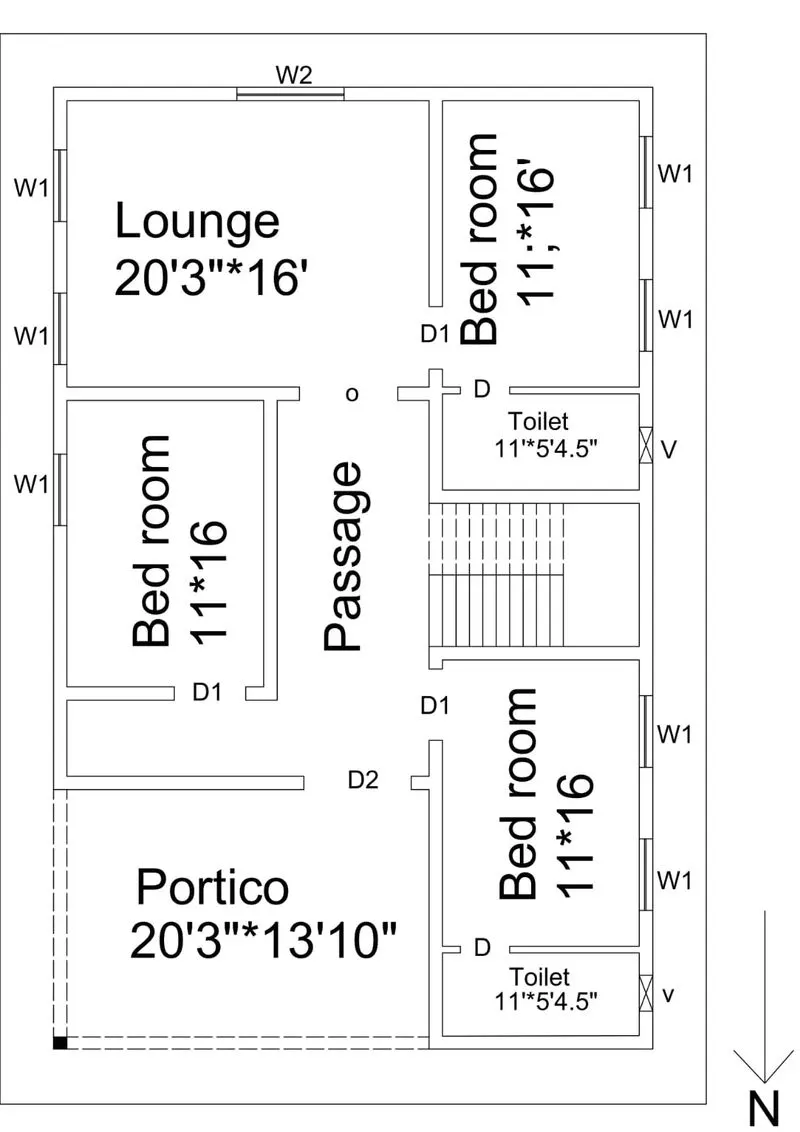
FIRST FLOOR PLAN:
OTHER DIMENSIONS:
Thickness of the wall= 230mm
Thickness of the partition wall= 115mm
Thickness of the slab= 250mm
Dimensions of the column= 300*300mm
Dimensions of the beam= 300*450mm
Height of the wall for each floor= 3m
VASTU SHASTRA PERFORMED DURING PLAN:
All doors are inward,
Entrance of the building and main doors are placed in north direction,
Mian door should be stronger and bigger than other doors,
Toilets are not placed near the kitchen,
Dining should be placed near to the kitchen and not near to main door,
Bed rooms are provided in south west and north west direction, north east should be avoided,
All rooms are rectangle in shape,
The centre of the house BRAHMASTHAN is perfect and cluster free,
Kitchen is placed in south east direction,
Toilet is in north west direction that is called vayu moolai,
Study hall is placed in north east direction,
Pooja is placed in north east facing east direction should be provided.
LIST OF DRAWINGS PROVIDED AT THE CONSTRUCTION PROJECT:
Centre line drawing.
Footing and column layout with reinforcement details.
Column schedule with reinforcement details.
Plinth beam layout with reinforcement details.
First floor beam layout with reinforcement details.
First floor slab layout with reinforcement details.
Overhead water tank design.
Plumbing details.
Electrification details.
CALCULATION OF LOADS:
1. Dead load calculation:
a.Dead load of column:
Dimension of column= 300*300mm
Height of the column= (slab thickness*2)+(height of the each floor*2)
= (0.25*2)+(3*2)
= 6.5m
Total volume of concrete= 0.3*0.3*6.5
= 0.585m^3.
Unit weight of rcc= 25KN/M^3.
Unit Weight of Building Materials used in construction works as per IS 875 (Part-1)
Dead load of column= 25*0.585
= 14.625KN.
b. Dead load of beams:
Dimensions of beam= 300*450
Total volume of beam= 0.3*0.45*1
=0.135m^3.
Unit weight of rcc=25KN/M^3.
Dead load for beam= 25*0.135
= 3.375KN.
C. Dead load for slab:
Slab is always designed for a span= 1M
So, lets consider size of the slab= 1*1M
Unit weight of the slab= 25KN/M^3
Volume of the slab= 1*1*0.25
= 0.25m^3.
Dead load for slab= 25*0.25
= 6.25KN.
D. Dead load for walls:(for external wall)
Thickness of the wall=230mm (0.23m)
Unit weight of the wall= 20KN/M^3.( as per IS 875 (Part-1))
Height of the wall= 3m* 2 floors
=6m.
Load of brick wall on beams= 6*0.23*20
= 27.6KN.
Dead load for internal partition wall:
Thickness of the wall= 150mm
Unit weight of the wall= 20KN/M^3( as per IS 875(part 1))
Height of the wall= 3m* 2 floors
Load of brick wall on beams= 6*0.15*20
= 18KN.
2. LIVE LOAD CALCULATION:
According to IS 875 (part 2)
Bed room= 2KN/m2
Living room= 2KN/m2
Bath=2KN/m2
Terrace = 3KN/m2
Toilet= 2KN/m2
Staircase= 3KN/m2
Study room= 2KN/m2
Kitchen= 2KN/m2
3. WIND LOAD CALCULATION:
wind load is designed only for the building above 10m, so here the height of the bullding is less than 10m, so the calculation of the wind load is not required as per the IS 875: 1987, part 3.
References and IS codes used for the design:
IS 875:1987, Part 1 for Dead load
IS 875:1987, Part 2 for Live load
IS 875:1987, Part 3 for Wind load
IS 456:2000, for Reinforced Concrete.
RESULT:
This building is perpeared as per vasthu considering all the concept of vasthu sastra,
The load calculations are done as per the IS code consideration.