Simulation of Forward Kinematics of a 2R robotic arm using MATLAB by Tanmay Dash
Challenge: Write a program in MATLAB to simulate the forward kinematics of a 2R Robotic Arm
Section 1: Introduction
Forward kinematics refers to the use of the kinematic equations of a robot to compute the position of the end-effector from specified values for the joint parameters. The kinematics equations of the robot are used in robotics, computer games, and animation.
The aim of this project is to code and animate the forward kinematics of a 2R (i.e. 2 Rotating link) robotic arm in MATLAB
Section 2: Mathematical modelling:
This section comprises of the geometrical concepts and the mathematical equations required to code the simulation in MATLAB.
The movement of 2R robotic arm can be demonstrated by plotting two line segments as shown in the figure below.
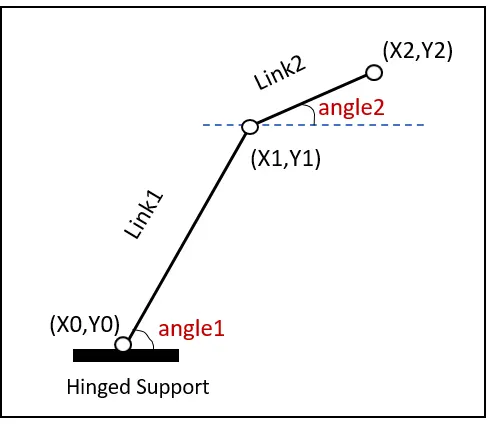
Figure 1. Illustration showing the two-joint robotic arm with the two angles, angle1 and angle2.
There are three distinct points in the figure above and by manipulating the position of these three points, desired animation can be obatined. The lines Link1 and Link2 in the figure above represents the robotic arm.
The first or the left most point is the fixed point i.e. point (x0,y0). To define the second point, the slope of the line Link1 or angle of inclination of Link1 w.r.t. to x-axis and the length of Link1 are the inputs.
The point (x1,y1) can be found by the equation
x1 = x0 + L1*cos(angle1) ........ equation 1
y1 = y0 + L1*sin(angle1) ........ equation 2
where (x0,y0) is the fixed point,
L1 is the length of Link1,
angle1 is the angle that Link1 makes with the x-axis.
Solving equation 1 & 2 will provide the values for (x1,y1).
Similar approach can be taken to find out point (x2,y2), i.e. the manipulator end of our robotic arm.
Using concept similar to equation 1 and equation 2, we get
x2 = x1 + L2*cos(angle2) ......... equation 3
y2 = y1 + L2*sin(angle2) ......... equation 4
where (x1,y1) is the end point of Link1,
L2 is the length of Link2,
angle2 is the angle that Link2 makes with the x-axis.
The locus of (x0,y0),(x1,y1) & (x2,y2) describes all points required to make the required animation. The only variables in equation 1 through 4 are angle1 and angle2. The program will aim to manipulate angle1 and angle2 values to prepare the animation.
Section 3: Algorithm
The next step is to prepare the approach to code the above matematical model in MATLAB and demonstrate the animation. For that, an algorithm is to prepared first which can be coded.
Variables:
l1 = length of Link1
l2 = lenght of Link2
x0 = x - co-ordinate of fixed point
y0 = y - co-ordinate of fixed point
x1 = x - co-ordinate of first movable point
y1 = y - co-ordinate of first movable point
x2 = x - co-ordinate of second movable point
y2 = y - co-ordinate of second movable point
angle1 = angle made by Link1 with x - axis
angle2 = angle made by Link2 with x - axis
The algorithm is as follows:
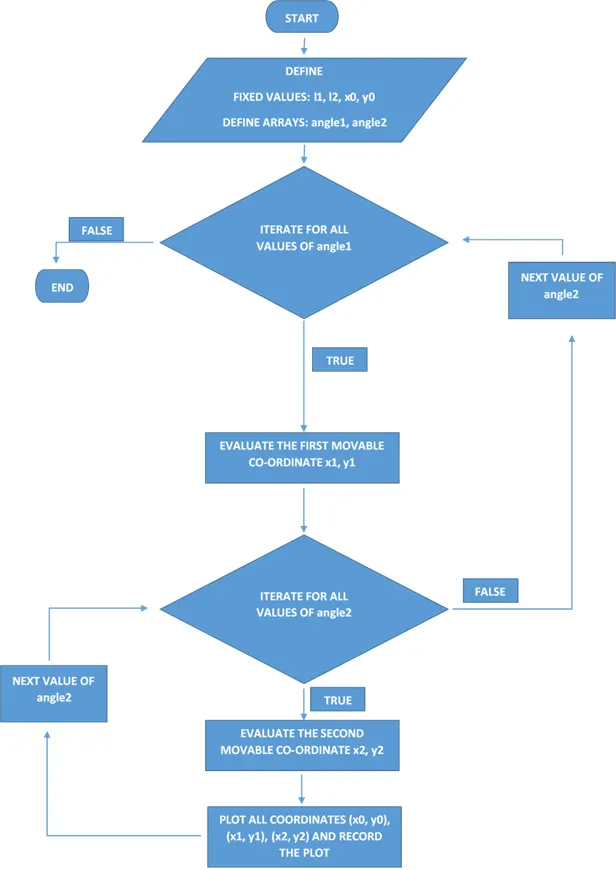
Figure 2: Algorithm for Forward kineamtics of 2R robotic arm.
Section 4: MATLAB code
clear all
close all
clc

angle1 = linspace(0,90,10);
angle2 = linspace(0,90,15);
l1 = 0.5;
l2 = 0.3;
x0 = 0;
y0 = 0;

frame = 1;
for i = 1:length(angle1)
   x1 = x0 + l1*cosd(angle1(i));
   y1 = y0 + l1*sind(angle1(i));
   for j = 1:length(angle2)
       x2 = x1 + l2*cosd(angle2(j));
       y2 = y1 + l2*sind(angle2(j));
       plot([x0 x1],[y0 y1],[x1 x2],[y1 y2],'linewidth',10);
       axis([-0.2 1 -0.2 1])
      Mov_frame(frame) = getframe(gcf);
       frame = frame+1;
   end

end

movie(Mov_frame);
video = VideoWriter('forward_kinematics_2D_robotic_arm.avi','Uncompressed AVI');
open(video)
writeVideo(video,Mov_frame)
close(video)
Code: 1
Following is the MATLAB code for the challenge.
As discussed in section 3, fixed values l1, l2, x0, y,0 and arrays angle1 and angle2 have been define.
Next, a variable "frame" has been defined which will be instrumental to recorded each plot.
For this demonstration, the concept of nested for loop will be used.
First "for" loop with variable "i", iterates the code for all values in array "angle1".
The function "length(angle1)" counts the total number of elements in "array1" and is the termination point of the loop.
When angle1 is defined, x1 and y1 can be calculated using equation 1 and equation 2 and stored in variable x1 and y1. Note that trigonometric function "cosd()" and "sind()" has been used to pass the angles in degree. The function "cos()" and "sin()" returns result for angles in radians and should not be used in the scope of this program.
For every value in loop 1, a second loop is created with variable "j", which iterates the code for all values in array "angle2".
Similar to calculation of x1 and y1, for each value of angle2, x2 and y2 can be calulated using equation 3 and equation 4.
Now that all values, i.e. x0, y0, x1, y1, x2 and y2 is know, a graph may be plotted which is achieved using plot function.
In this program, "axis" function has been used to restrict the frame of plot. Without using the axis command, the reference will keep chaging at every plot and the animation hence produced will not be useful.
At this point, we need to record each plot so that it can be turned into an animation.
A variable "Mov_frame" has been defined, which is an array containing all plots. The function getFrame(gcf) allows the array Mov_frame to store all plots and the sequence of plots is controlled by the variable "frame", that we had defined earlier.
For example, for the first iteration,
where angle1 = angle2 = 0, frame = 1, 1st plot is stored in the array Mov_frame.
After storing the plot, the value of frame is incremented by 1 so that next frame can be stored sequentially in "Mov_frame" array.
After both the loops are executed, an animation is made out of the plots stored in the array "Mov_frame" using the function "movie(Mov_frame)".
Next comes the video file which we have define in the code: "video = VideoWriter('forward_kinematics_2D_robotic_arm.avi','Uncompressed AVI');", which names and specifies the format of video.
Next we have to open the video using "open()" function, compile video using "writeVideo()" function which takes the variable "video" and the array "Mov_frame" as it's input and then close the video using "close()" function.
On executing this code, MATLAB will plot all graphs, store each frame, convert it into a video file and store the video file with ".avi" extension in the same folder as that of the code.
Section 5: Output
The output of the video can be accessed using the following links.
https://www.youtube.com/watch?v=gVmLBjk3bdU&feature=youtu.be
This concludes the challenge for writing a program in MATLAB to simulate the forward kinematics of a 2R Robotic Arm
References: