Projefct 1_Comparative study of different storey buildings for Seismic forces
AIM:- To compare
- Fundamental natural periods of building E & F as well as G & H and the significance difference.
- Fundamental natural periods of building H,J and K also as have the building have become flexible or stiff due to change in mass
- Fundamental natural period of building A, B, F and H with change in building heights
- Fundamental natural periods of building B, C and D with change in column orientation
INTRODUCTION:
- Buildings do oscillate during the occurrence of earthquake and these oscillation causes MOI forces to be induced within the structure.
- The amount of inertia induced in the structure depends upon the dynamic features of the buildings other than the occurrence of EQ.
- The mode of oscillations of the building is defined by associated Natural period and Deformed Shape in which it oscillates.
- All the buildings have its own number of natural frequencies at which it offers minimum resistance to shaking induced by external as well as internal effect.
- Each of these natural frequencies and the associated deformations shape of buildings constitute a Natural Mode of Oscillation.
AIM:1- STEPS TO BE FOLLOWED: -
Building E:
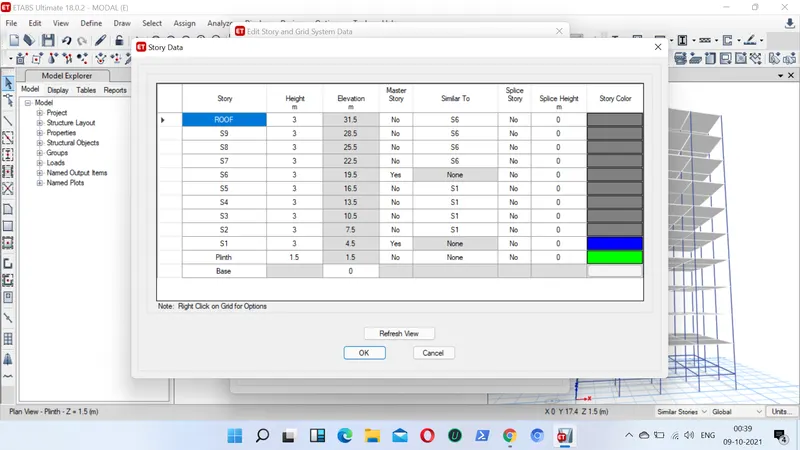
- First we have to open the etabs software and create new model
- Now we put the storey 1 and storey 6 as the master storey
- Now we will apply material properties as well as the section properties.
- we assign the column size as (600X600) for the upper 5 storeys and (400X400) for the bottom 5 storeys.
- We also assign the size of beam as (300X400) and the thickness of slab as 150mm
- In our next step we need to assign all the loads
- We assign Live Load on the slabs/ floor (Roof 1.5kn/m and all others as 3kn/m), Dead Load, Brickwall load to all the beams as 10KN/m and also seismic loads and combination loads
- we also needs to assign mass source and diaphargm (to slab/ floor)
- Now we have finally completed the analysis so we run the analysis to check the model
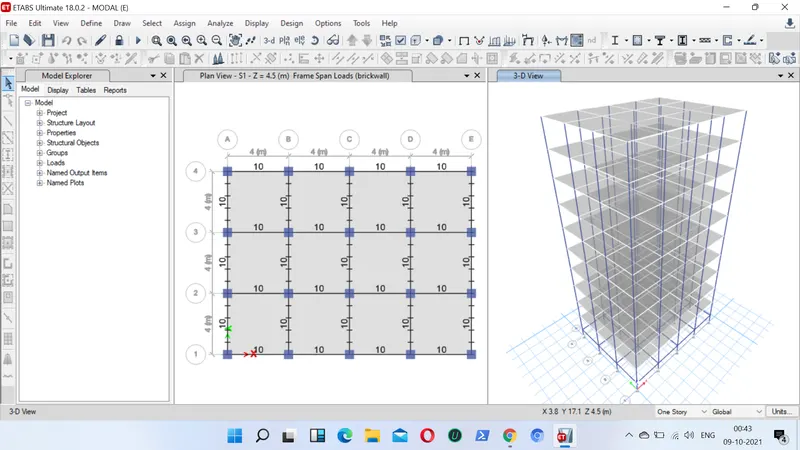
- Next we can now check the modal mass ratio table
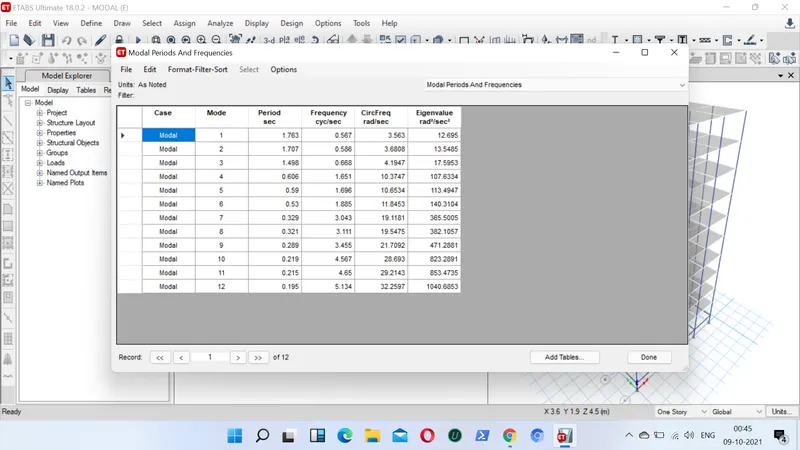
- Go to display table, select show table, select structural output, select modal response, select modal periods and frequencies table
Building F:
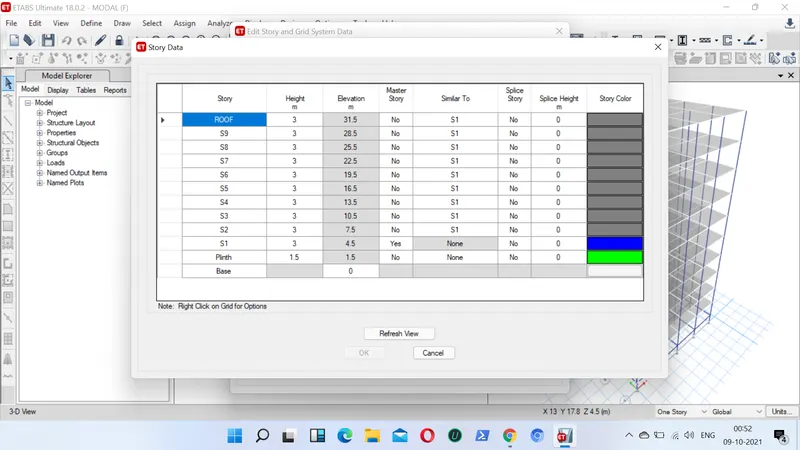
- As done previously similarly first we will again go for new model
- This time we will select master storey as storey1 only
- Next we will apply the material and section properties
- we assign beam size as (300x400)
- column size for all the floors as (600x600)
- slab thickness as 150mm from for all the floors
- next we apply all the loads
- live load ( roof=1.5KN/m , All other floors=3KN/m )
- Brick wall load= 10KN/m
- Earthquakes loads and dead loads and all the combination loads, mass source as well as diaphragm needs to be applied on the floors
- After assigning all the loads we can now go for analysis check
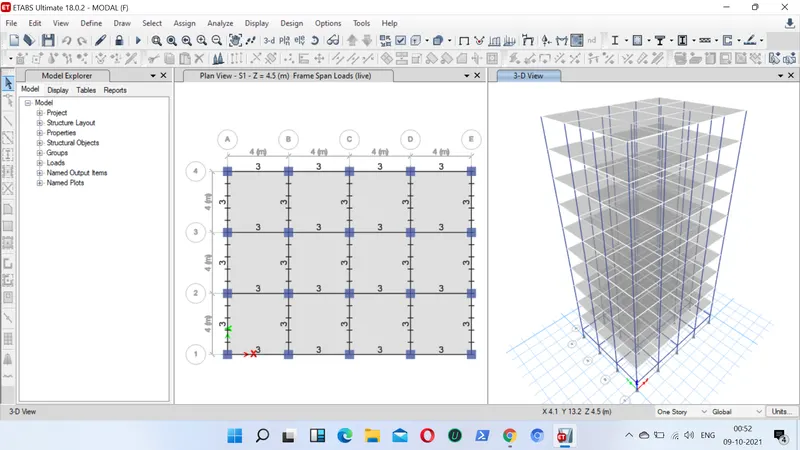
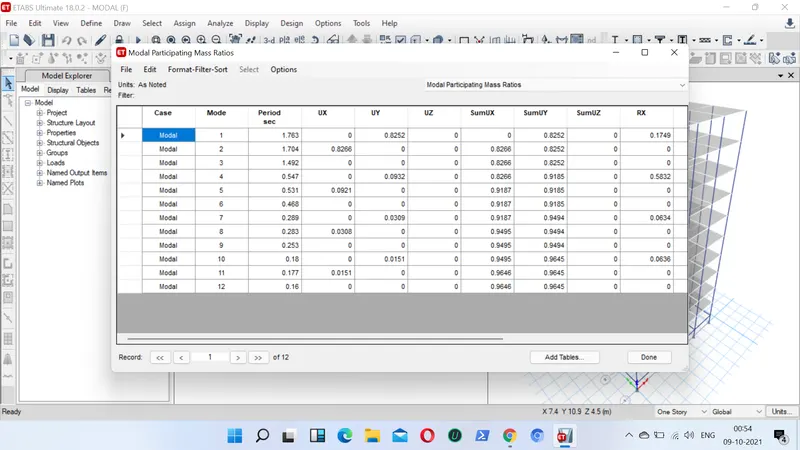
- All run analysis we can go for our mass ratio table
- go to display, show table, select structure output, mass ratio, select modal periods and frequencies ratio
Building G:
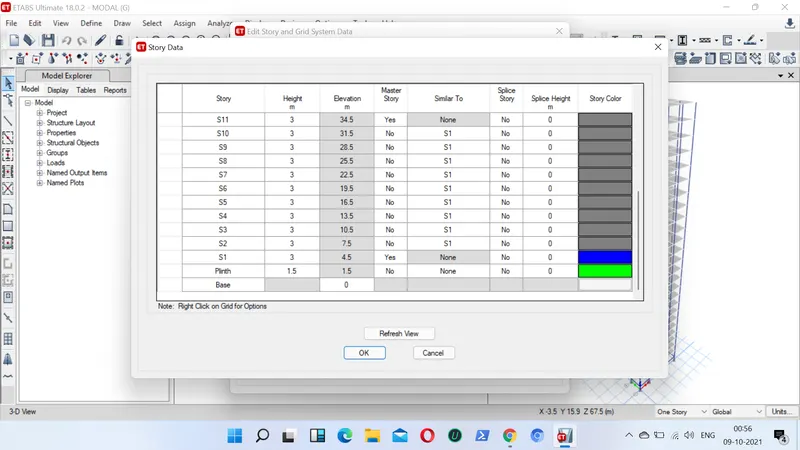
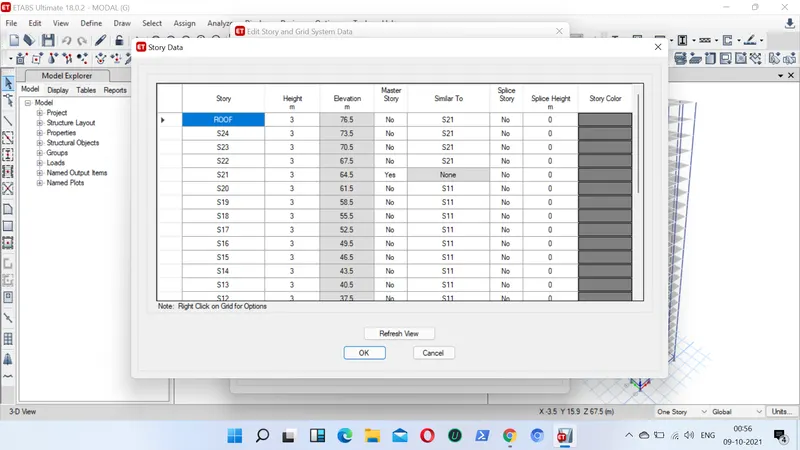
- First by opening new model we create 25 storeys in the storey data
- Next we put the storey1, storey11 ans storey 21 as master storey
- Next we have to go for assign material property section property and for assigning loads
- we assign columns size as 800x800mm for bottom 10 storeys
- we assign column size of (600x600mm) for middle 10 storeys
- we assign column size of (400x400mm) for top 5 storeys
- Next we assign beam size of (300x400) for all the storeys
- Next we go for slab of thickness 150mm for all the stireys
- Next we assign all the required loads ( LL, DL, Brickwall load and seismic loads)
- Next we also assign all the required combination loads , mass source and diaphragm to the slab
- After following all these steps now we can check our model for analysis
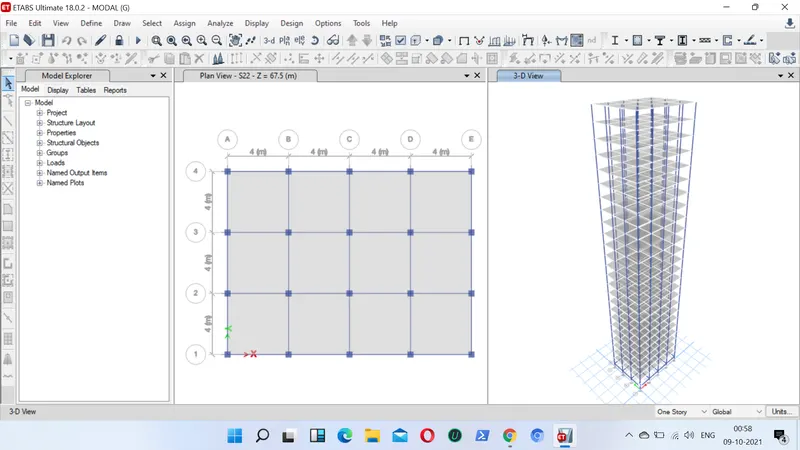
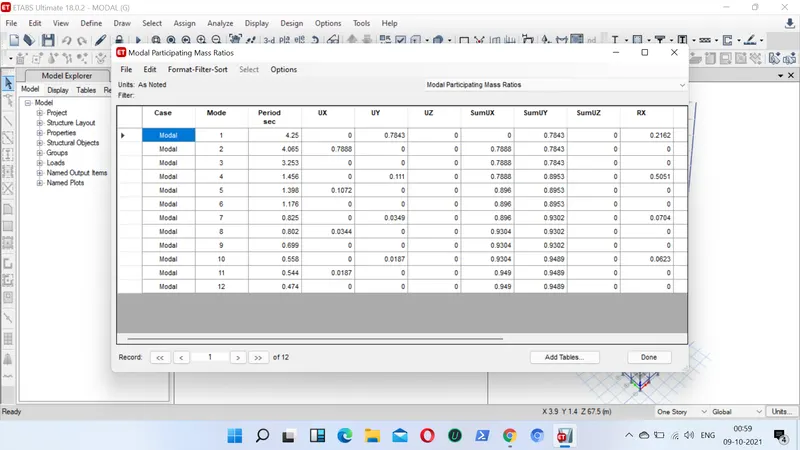
- Now we can check our required mass ratio
- Go to display, show table, Structure output, Modal mass paticipation ratio
Building H:
- First by opening new model we create 25 storeys in the storey data
- Next we put the storey1 as master storey
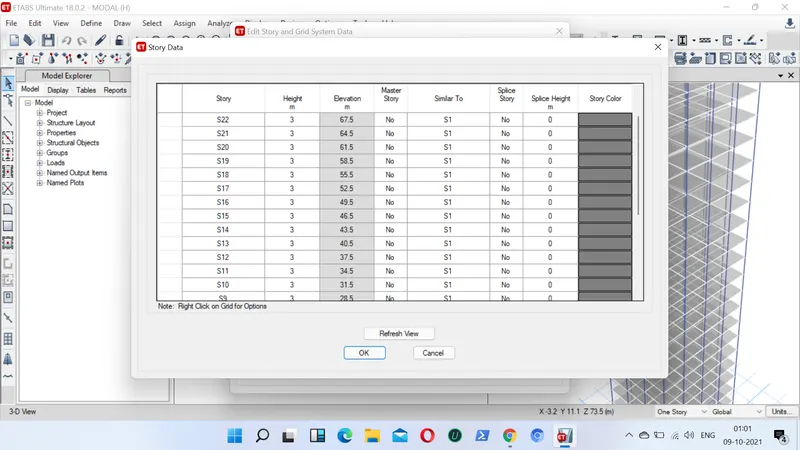
- Next we have to go for assign material property section property and for assigning loads
- we assign columns size as 800x800mm for all storeys
- Next we assign beam size of (300x400) for all the storeys
- Next we go for slab of thickness 150mm for all the stireys
- Next we assign all the required loads ( LL, DL, Brickwall load and seismic loads)
- Next we also assign all the required combination loads , mass source and diaphragm to the slab
- After following all these steps now we can check our model for analysis
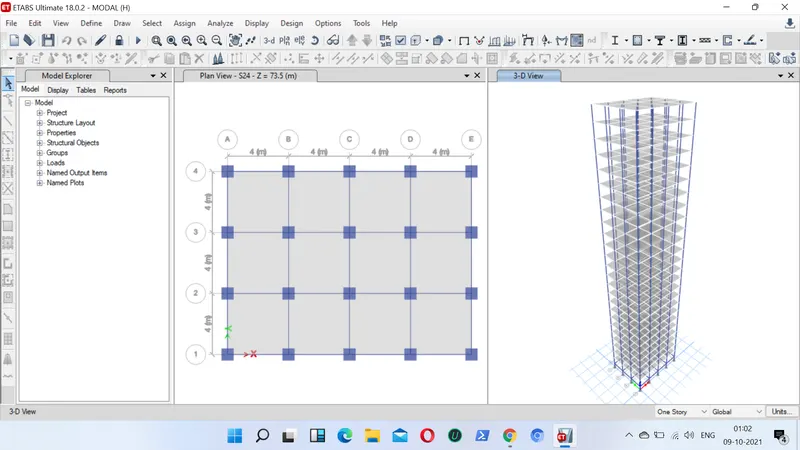
- Now we can check our required mass ratio
- Go to display, show table, Structure output, Modal periods and frequencies ratio
RESULTS:
- The fundamental natural time period of building E is T= 1.73
- The fundamental natural time period of building F is T=1.76
- The fundamental natural time period of building G is T= 4.25
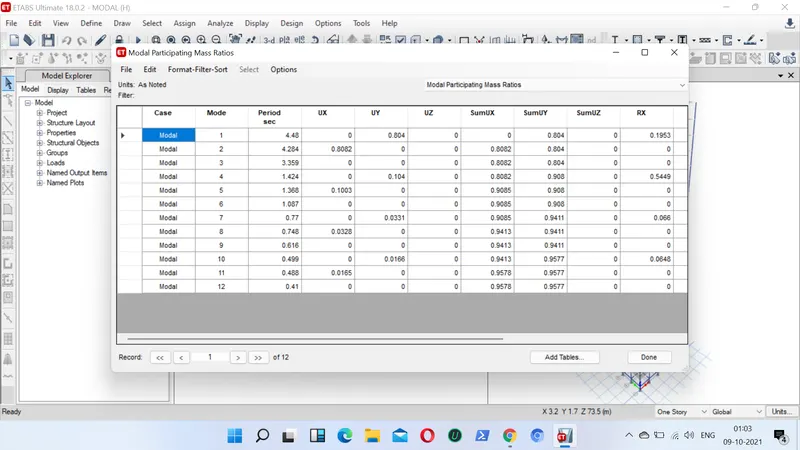
- The fundamental natural time period of building H is T=4.48
AIM:2- STEPS TO FOLLOWED:
Building H
- First by opening new model we create 25 storeys in the storey data
- Next we put the storey1 as master storey
- Next we have to go for assign material property section property and for assigning loads
- we assign columns size as 800x800mm for all the storeys
- Next we assign beam size of (300x400) for all the storeys
- Next we go for slab of thickness 150mm for all the stireys
- Next we assign all the required loads ( LL, DL, Brickwall load and seismic loads)
- Next we also assign all the required combination loads , mass source and diaphragm to the slab
- After following all these steps now we can check our model for analysis
- Now we can check our required mass ratio
- Go to display, show table, Structure output, Modal mass participation ratio
Building J
- First by opening new model we create 25 storeys in the storey data
- Next we put the storey1 as master storey
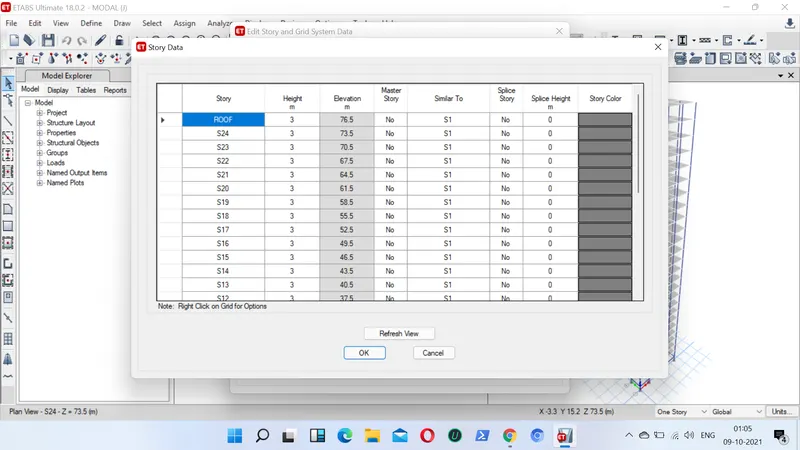
- Next, we have to go for assign material property section property and for assigning loads
- we assign columns size as 800x800mm for all the storeys
- Next, we assign beam size of (300x400) for all the storeys
- Next, we go for slab of thickness 150mm for all the storeys
- Next we assign all the required loads (LL, DL, Brick wall load and seismic loads)
- Next we increase the live load by 10%
- Next, we also assign all the required combination loads, mass source and diaphragm to the slab
- After following all these steps now, we can check our model for analysis
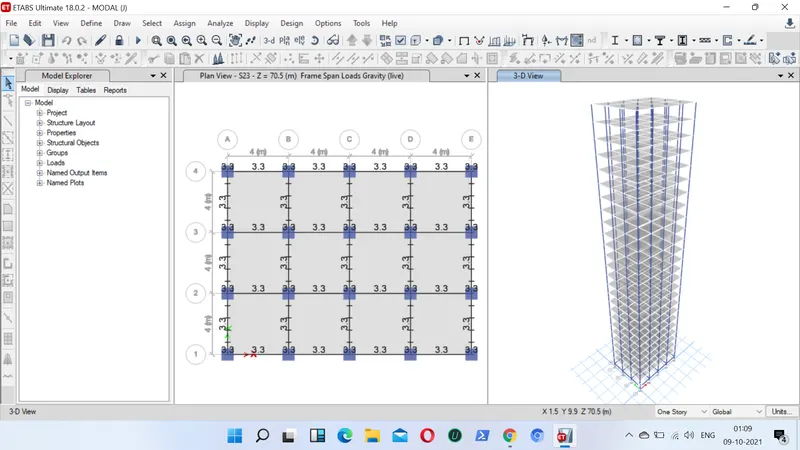
- Now we can check our required mass ratio
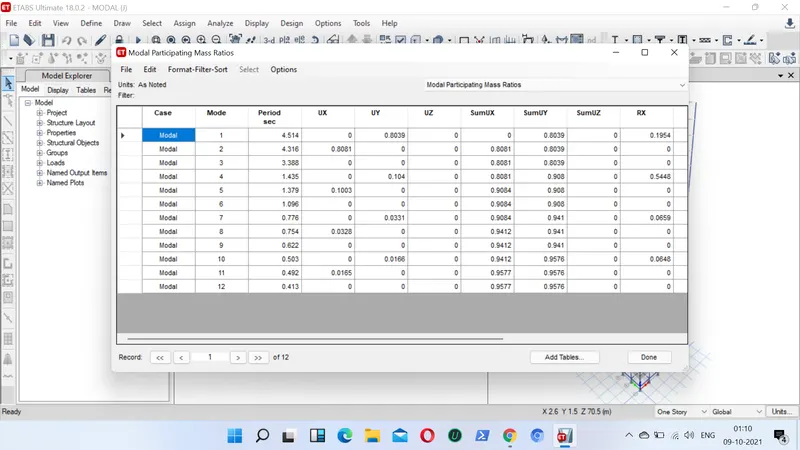
- Go to display, show table, Structure output, Modal mass periods and frequencies ratio
Building K
- First by opening new model we create 25 storeys in the storey data
- Next, we put the storey1, storey11 and storey 21 as master storey
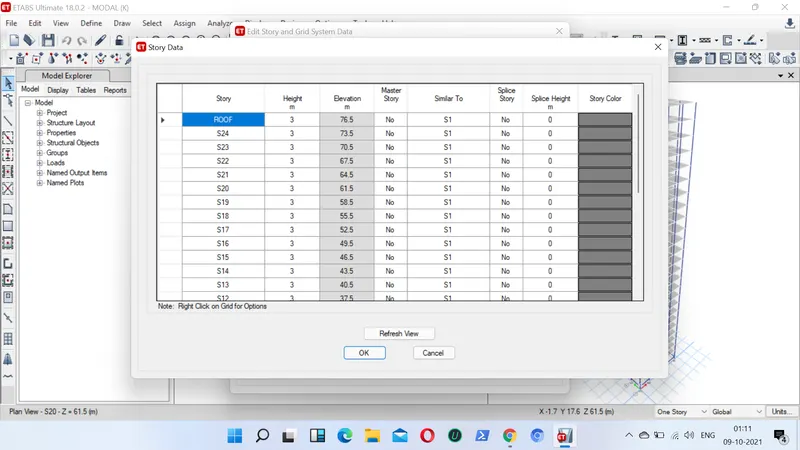
- Next, we have to go for assign material property section property and for assigning loads
- we assign columns size as 800x800mm for all the storeys
- Next, we assign beam size of (300x400) for all the storeys
- Next, we go for slab of thickness 150mm for all the stireys
- Next we assign all the required loads ( LL, DL, Brickwall load and seismic loads)
- Next we increase the live load by 20%
- Next we also assign all the required combination loads , mass source and diaphragm to the slab
- After following all these steps now we can check our model for analysis
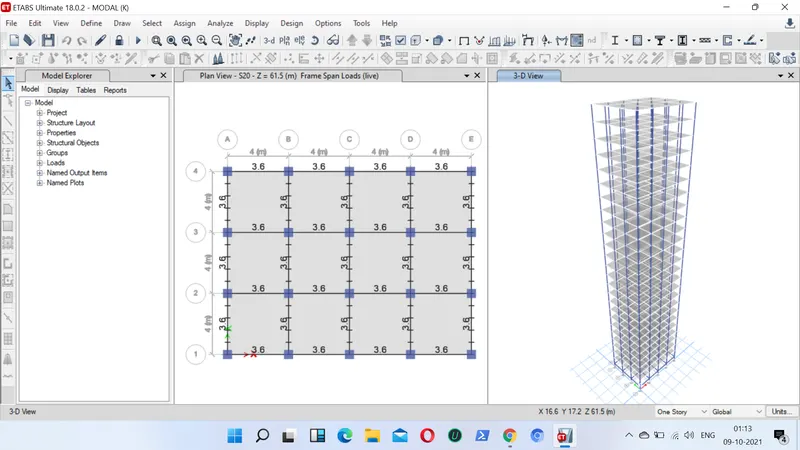
- Now we can check our required mass ratio
- Go to display, show table, Structure output, Modal time period ratio
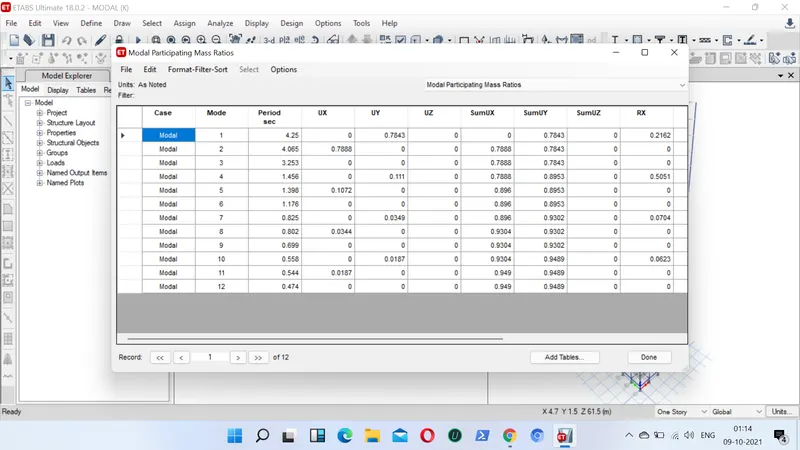
RESULTS:
- The fundamental natural time period of building H is T= 4.48
- The fundamental natural time period of building J is T=4.51
- The fundamental natural time period of building K is T= 4.25
AIM:3- STEPS TO BE FOLLOWED:
Building A:
- First by opening new model we create 2 storeys in the storey data
- Next we put the storey1 as master storey
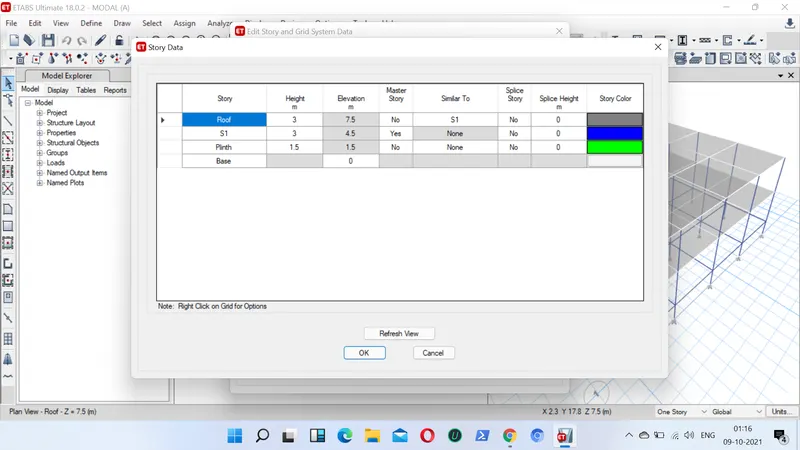
- Next we have to go for assign material property section property and for assigning loads
- we assign column size of (400x400mm) for all storeys
- Next we assign beam size of (300x400) for all the storeys
- Next we go for slab of thickness 150mm for all the storeys
- Next we assign all the required loads ( LL, DL, Brickwall load and seismic loads)
- Next we also assign all the required combination loads , mass source and diaphragm to the slab
- After following all these steps now we can check our model for analysis
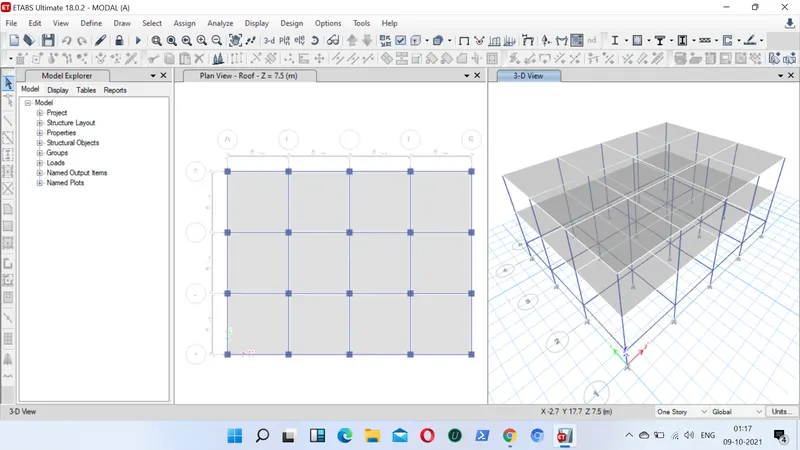
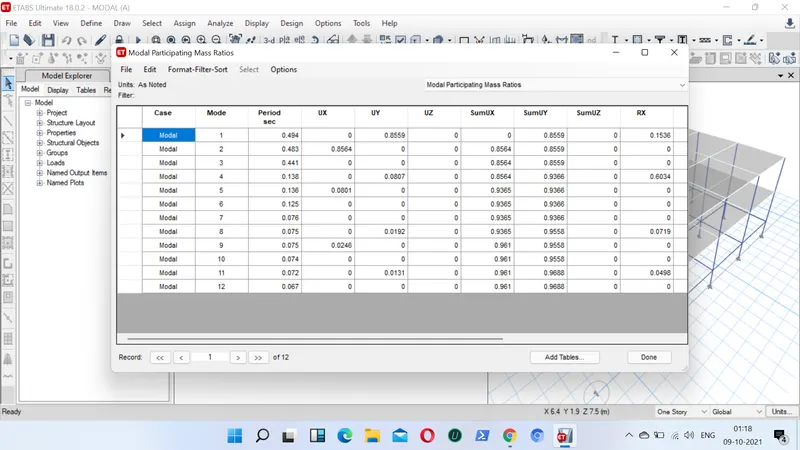
- Now we can check our required mass ratio
- Go to display, show table, Structure output, Modal mass time periods
Building B:
- First by opening new model we create 5 storeys in the storey data
- Next we put the storey1 as master storey
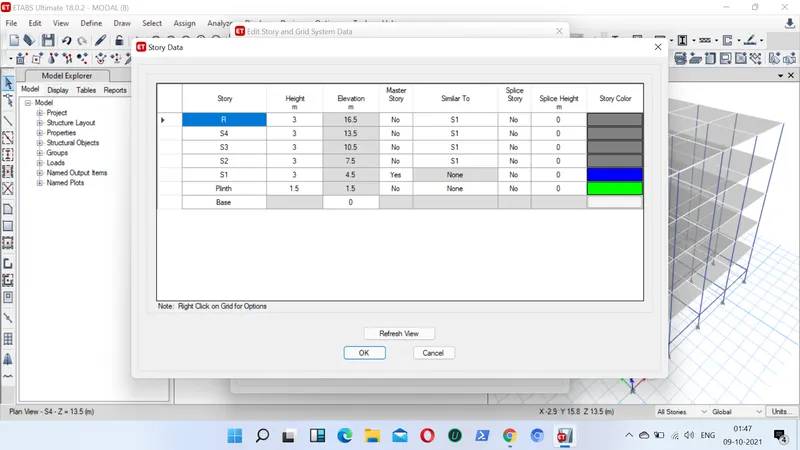
- Next we have to go for assign material property section property and for assigning loads
- we assign column size of (400x400mm) for all 5 storeys
- Next we assign beam size of (300x400) for all the storeys
- Next we go for slab of thickness 150mm for all the stireys
- Next we assign all the required loads ( LL, DL, Brickwall load and seismic loads)
- Next we also assign all the required combination loads , mass source and diaphragm to the slab
- After following all these steps now we can check our model for analysis
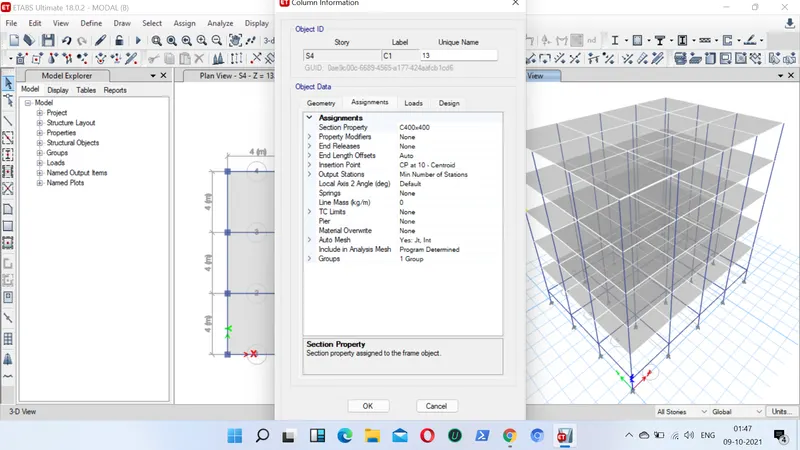
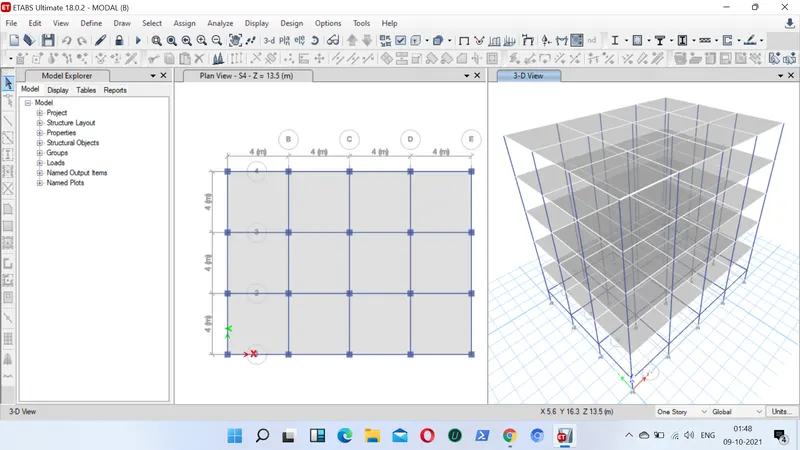
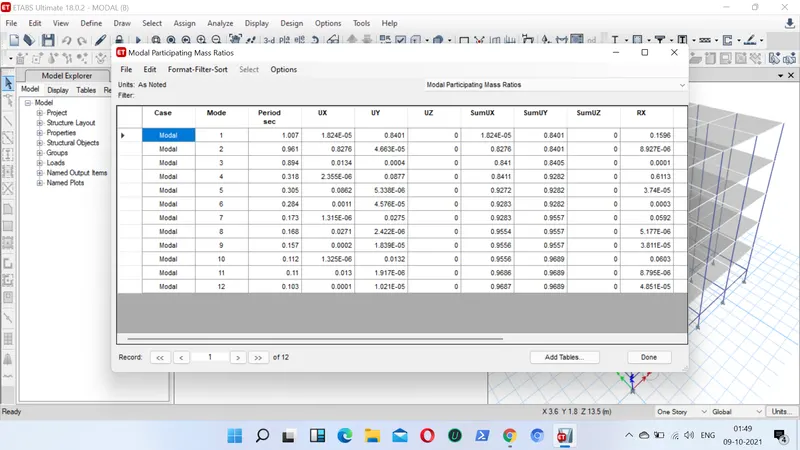
- Now we can check our required mass ratio
- Go to display, show table, Structure output, Modal mass time period
Building F:
- First by opening new model we create 10 storeys in the storey data
- Next we put the storey1 as master storey
- Next we have to go for assign material property section property and for assigning loads
- we assign column size of (600x600mm) for middle 10 storeys
- Next we assign beam size of (300x400) for all the storeys
- Next we go for slab of thickness 150mm for all the storeys
- Next we assign all the required loads ( LL, DL, Brickwall load and seismic loads)
- Next we also assign all the required combination loads , mass source and diaphragm to the slab
- After following all these steps now we can check our model for analysis
- Now we can check our required mass ratio
- Go to display, show table, Structure output, Modal mass time period
Building H:
- First by opening new model we create 25 storeys in the storey data
- Next we put the storey1 as master storey
- Next we have to go for assign material property section property and for assigning loads
- we assign columns size as 800x800mm for bottom 10 storeys
- Next we assign beam size of (300x400) for all the storeys
- Next we go for slab of thickness 150mm for all the stireys
- Next we assign all the required loads ( LL, DL, Brickwall load and seismic loads)
- Next we also assign all the required combination loads , mass source and diaphragm to the slab
- After following all these steps now we can check our model for analysis
- Now we can check our required mass ratio
- Go to display, show table, Structure output, Modal mass paticipation ratio
RESULTS:
- The fundamental natural time period of building A is T= 0.5
- The fundamental natural time period of building B is T=1.007
- The fundamental natural time period of building F is T= 1.75
- The fundamental natural time period of building H is T= 4.45
AIM:4- STEPS TO BE FOLLOWED:
Building B:
- First by opening new model we create 5 storeys in the storey data
- Next we put the storey1 as master storey
- Next we have to go for assign material property section property and for assigning loads
- we assign column size of (400x400mm) for all 5 storeys
- Next we assign beam size of (300x400) for all the storeys
- Next we go for slab of thickness 150mm for all the storeys
- Next we assign all the required loads ( LL, DL, Brickwall load and seismic loads)
- Next we also assign all the required combination loads , mass source and diaphragm to the slab
- After following all these steps now we can check our model for analysis
- Now we can check our required mass ratio
- Go to display, show table, Structure output, Modal mass time period
Building C:
- First by opening new model we create 5 storeys in the storey data
- Next we put the storey1 as master storey
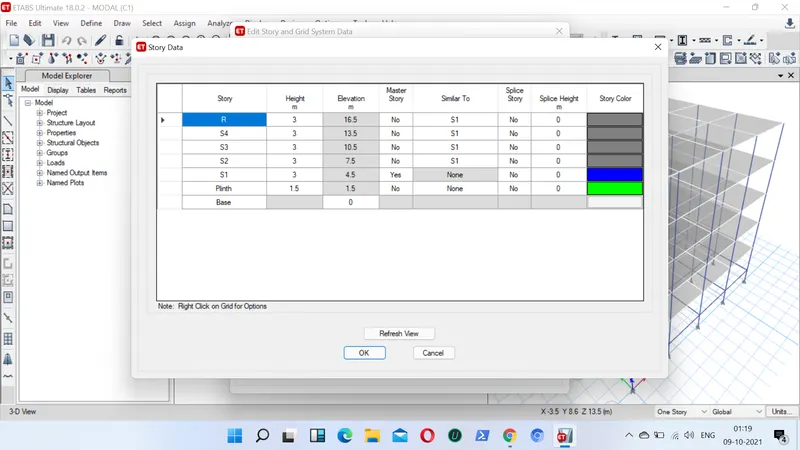
- Next we have to go for assign material property section property and for assigning loads
- we assign column size of (550x300mm) for all 5 storeys
- Next we assign beam size of (300x400) for all the storeys
- Next we go for slab of thickness 150mm for all the storeys
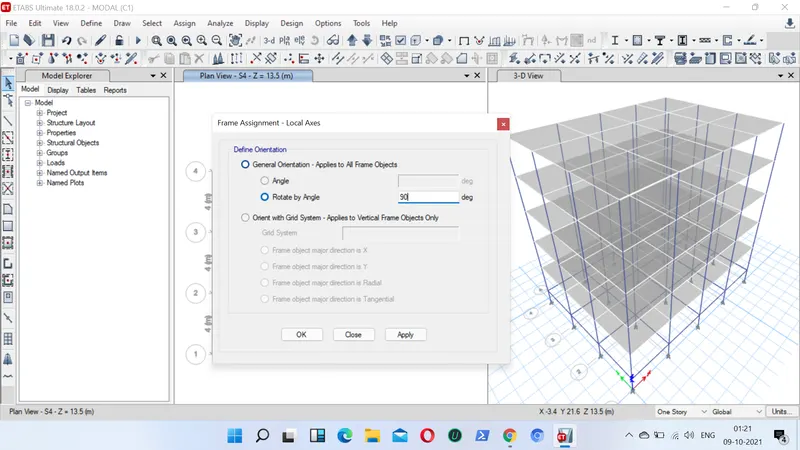
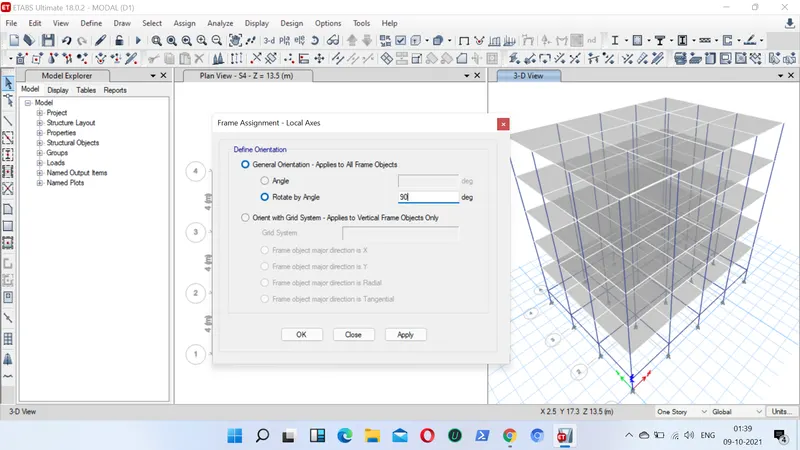
- Next go to assign, select frame, select local axis and rotate it to 90 degrees
- Next we assign all the required loads ( LL, DL, Brickwall load and seismic loads)
- Next we also assign all the required combination loads , mass source and diaphragm to the slab
- After following all these steps now we can check our model for analysis
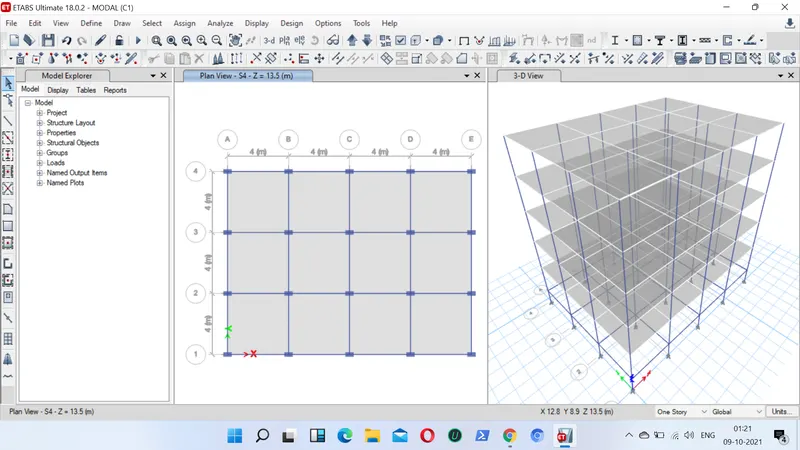
- Now we can check our required mass ratio
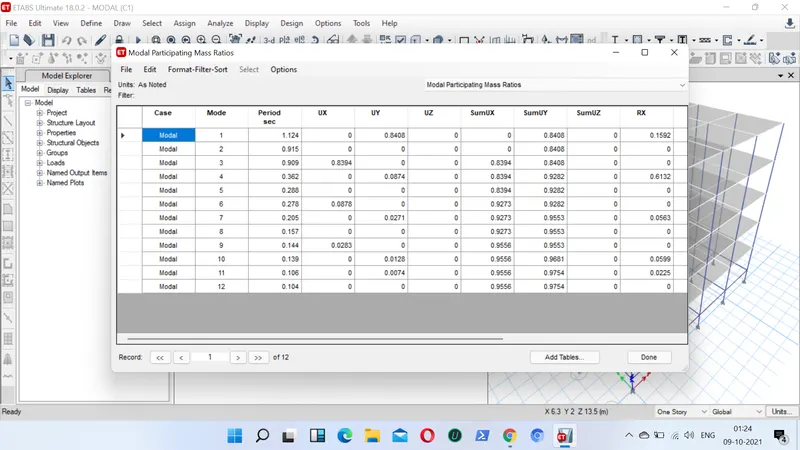
- Go to display, show table, Structure output, Modal mass time periods
Building D:
- First by opening new model we create 5 storeys in the storey data
- Next we put the storey1 as master storey
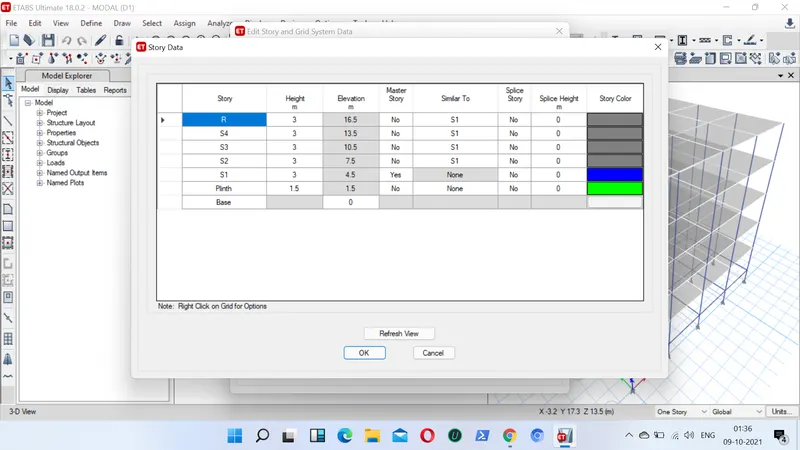
- Next we have to go for assign material property section property and for assigning loads
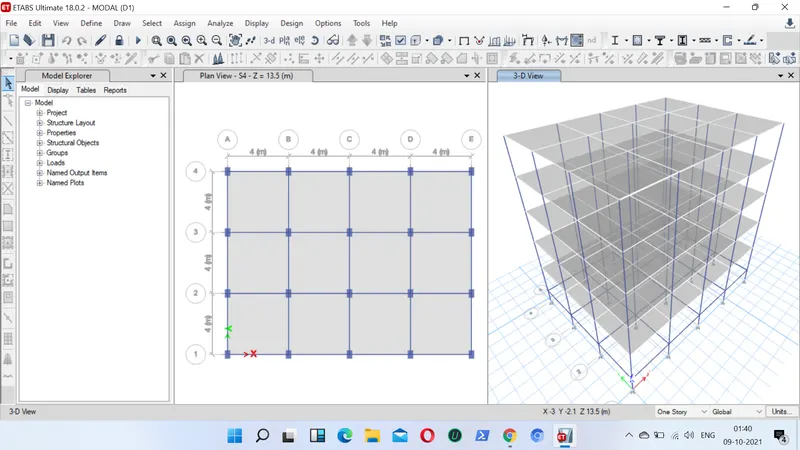
- we assign columns size as 360x550mm for all storeys
- Next we assign beam size of (300x400) for all the storeys
- Next we go for slab of thickness 150mm for all the storeys
- Next go to assign, select frame, select local axis and rotate it to 90 degrees
- Next we assign all the required loads ( LL, DL, Brickwall load and seismic loads)
- Next we also assign all the required combination loads , mass source and diaphragm to the slab
- After following all these steps now we can check our model for analysis
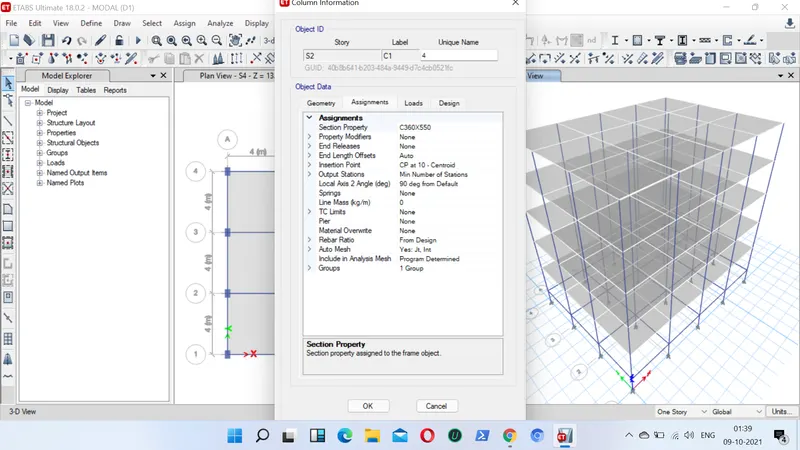
- Now we can check our required mass ratio
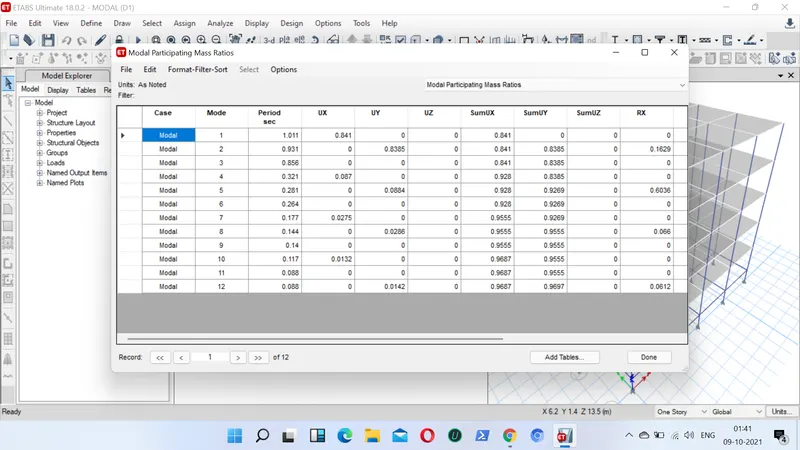
- Go to display, show table, Structure output, Modal mass time periods
RESULTS:
- The fundamental natural time period of building B is T= 1.007
- The fundamental natural time period of building C is T=1.124
- The fundamental natural time period of building D is T= 1.011
Final Result:
1) Fundamental natural time periods of buildings E & F as well as G & H and the significance difference between fundamental time periods.
- The fundamental natural time period of building E is T= 1.73
- The fundamental natural time period of building F is T=1.76
- The fundamental natural time period of building G is T= 4.25
- The fundamental natural time period of building H is T=4.48
- In the building E we use different columns sizes but in building F there is only column size for the complete structure.
- Similarly we use three different column sizes for building G and one Single column size for building H.
- Hence this creates the significant difference between the time periods.
2) Fundamental natural time periods of building. And the buildings flexibility and stiffness due to change in mass.
- The fundamental natural time period of building H is T= 4.48
- The fundamental natural time period of building J is T=4.51
- The fundamental natural time period of building K is T= 4.25
- When the mass of the building increases the natural time period also increases
- Similarly when imposed load at j by 10% and at k by 20% increases the time period also gets differ.
3) Fundamental natural time period of buildings A, B, F ans H with change in building height.
- The fundamental natural time period of building A is T= 0.5
- The fundamental natural time period of building B is T=1.007
- The fundamental natural time period of building F is T= 1.75
- The fundamental natural time period of building H is T= 4.45
4) Fundamental natural time periods of buildings B, C and D with change in columns orientation.
- The fundamental natural time period of building B is T= 1.007
- The fundamental natural time period of building C is T=1.124
- The fundamental natural time period of building D is T= 1.011
- Hence, the time periods of buildings shall be increased due to the change in column orientation.