Project - Design a Hospital Management system
Project- Design a Hospital Management System
Development of the project:
- Hospital Management System or HMS is designed to improve the management and quality of the hospital in the areas of clinical practices and process analysis as well as activity-based costing
- It is used to help in the development of an organization to improve its effectiveness and quality of work
- HMS system can be entered using a username and password and can be accessed by an Admin, Doctor, and Receptionist. The data processing is very fast and is well protected for personal use.
- The hospital management system is
- Powerful
- Flexible
- Easy to use
- Developed and designed to deliver real benefits to the hospitals
Design of the HMS
- In this project of Hospital Management System, it includes registration of patients, storing their details in the system by using a database and web-based technology such as javascript
- Facility
- It has a facility to give a unique id to every patient
- Store the details of every patient and staff manually
- Enables doctors and admin to view and modify their appointment schedules
- Purpose-
- The purpose of this Hospital Management System project is to computerize all the details of patients and the hospital
Benefits of this Hospital Management System project
- Appointment booking
- It will help patients to cut the long queue which will save their time
- Automated email and text message reminder is equipped with the system
- Role-based access control
- Only necessary information can be allowed access by the employees which will motivate the employee to perform their job duties effectively and hence; increases the data security and integrity
- Overall cost reduction
- It basically cuts down the paper costs of all the data that will be computerized
- For physical servers, no separate cost is required
- Data Accuracy
- Human errors get removed
- Data security
- Helps to maintain the patient records in private because it is restricted to access through role-based control
- Revenue management
- It makes daily auditing simple and helps with the financial and statistical aspects
Technologies used
Web-based technology
- HTML
- Allows the user to produce web pages that include text, graphics and hyperlinks
- Integrated JSP
- Structure text-based information in a document
- Javascript
- JDK 1.8
- Java is secure,fast, and reliable
- It can be used from laptops to data centers, game consoles to scientific supercomputers, or cell phones to the internet
- JRE 1.8
- It is a JAVA runtime environment to basically run the Java Application and the system
- Mysql server
- Mysql server is used for database connectivity and management
- Relational database management
- Developed by Microsoft as a databases Server
- More functionality to a JSP page which is consist of HTML tags and JSP tags
- Function
- Storing
- Retrieving of data requested by software applications
- CSS(Cascading Style Sheets)
- It is a style sheet language
- Used for describing the presentation of the document in a written markup language
- Visual style web pages use it the most and user interfaces are written in HTML or XHTML
- It can be applied to any XML document
- JDK 1.8
System requirements
User interfaces
- HTTP - protocol shall be used
- Port number used will be 80
- In IPv4 format, there should be a logical address of the system
Hardware interfaces
- Desktop/Laptop -
- It will help to give information when patients ask the information about doctors, lab test or medicine available for the lab test, etc
- A very efficient computer is required to perform this action otherwise patients have to wait for a long time to get what they ask for
- Laser Printer
- To print patient info
- Wifi router
- For internetwork operations inside of a hospital
- Data transmission from the PC to a server
H/W requirement
- 2GB to 4 GB RAM
- Core i5 processor
- 1 TB hard disk space (Server Machine)
- 20 GB hard disk space(Terminal machine)
Software interfaces
- JDK 1.8
- Mysql server
- OS windows 7/8/10/11
- Common OS and very user friendly
- JRE 1.8
S/W requirement
- Windows 7,8 or above
- JRE 1.8
- Mysql server
Back end:
- MYSQL
Development environment/tools
- NetBeans IDE 8.2 & Xampp
Communication interfaces
- Network Interface Card(NIC)
- Computer hardware component
- Allows a computer to connect to a network
- Can be used for both wireless and wired connections
- TCP/IP protocol
- Net service provider to share and access information over the internet
- Ethernet
- For Local Area networks (LANs)
- Frame-based computer network technology
- CAT 5 network cable
- It has high signal integrity
Front-end Development
- To provide access to the registered users only
- Allow registration for new patients
- To enable patients to view their record
- Enable the patient to update their record
- To generate the timing and date of the appointment
- Confirmation by the doctor
- Payment options for patients
- Schedule modification by the patients
- Access to the patient's record by Admin
- Admin can verify the payment and generate Receipt/Bill
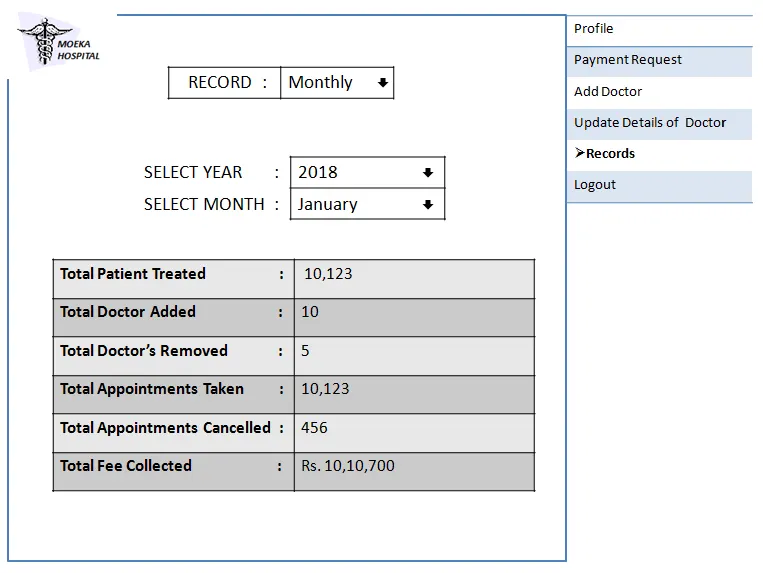
- Month/yearly records can be viewed by the Admin
Modules
The modules of the entire project
Admin module
- Admins
- Patient management
- Admin activity
- Doctor Management
User module
- Doctors
- Appointment
- deleteDoctor
- addDoctor
- patientDetails
- updateDoctor
- searchDoctor
- viewDoctor
- Patient
- addPatient
- deletePatient
- searchPatient
- updatePatient
- viewPatient
- patientActivity
The architecture of the Hospital Management System project:
Description Use case
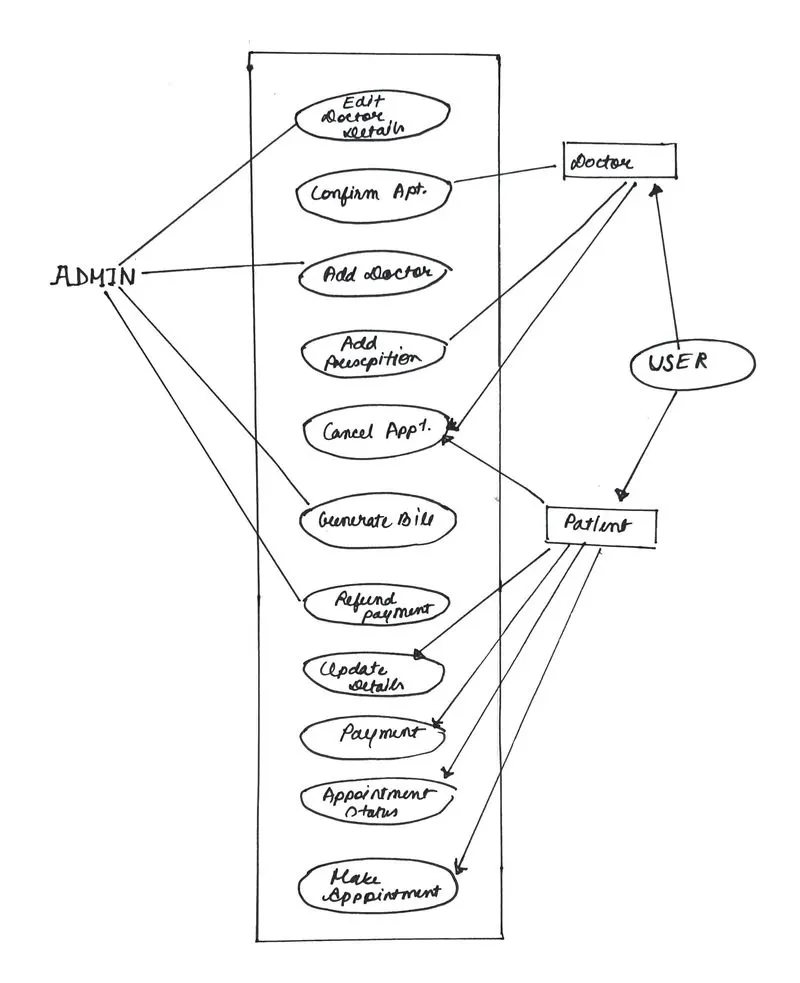
Fig: Diagram showing Use case scenerio of the Hospital Management System
Patient
Registration
- Description
- A new patient can register themselves and add their details like
- Name
- Age
- Gender
- Blood group
- Data entry made in the HMS database
- A new patient can register themselves and add their details like
- Precondition
- Must be new patient
- Prompt user to fill necessary fields
- MAIN FLOW OF EVENTS
- The registration form will get displayed
- Patients select the sign up and can log in to the module
- The patient fill the required details
- Postcondition
- The recorded data of the patient added to the database
Updation
- Description
- Enable the patient to update his/her details. Changes should be reflected
- Precondition
- Registered patient
- Cannot update the details after the treatment starts
- MAIN FLOW OF EVENTS
- Patients can log in to the system
- They can view their record
- The update can be selected by the patient
- Patients may change if they require to change necessary fields
- Update details can be popped up
- Postcondition
- Patient records are updated in the HMS database
Appointment
- Description
- List of doctors shown
- Timing and dates available of the doctors
- Enables patient to select the most suitable doctor and date of appointment
- Cancellation of appointment by the patient
- Precondition
- Registered patient
- Patients can fix appointments for one particular department at a time
- MAIN FLOW OF EVENT
- Log in to the system
- His/Her record view
- Create/Cancellation of appointment
- Postcondition
- Details of the patient displayed
- A new appointment is fixed or an existing appointment gets canceled
- The HMS database is updated
Payment
- Description
- Users can pay a consultation fee to the doctor online
- Precondition
- Registered patient
- For the patient who don't want to pay online can pay by case
- MAIN FLOW OF EVENT
- log in to the system
- View the patient's record.
- After confirmation of the appointment by the doctor go for the payment
- Postcondition
- Receipt displayed
- HMS database updated
Doctor
- Description
- The doctor can view the record of the patient and get it updated and add the description of the treatment plan given to the patient
- Precondition
- Registered doctor
- A doctor cannot modify qualification
- The hospital manages the details
- MAIN FLOW OF EVENTS
- Doctor logs in
- May select to view Patients where their treatment history displayed
- Add a description of the patient's treatment
- They may select appointment details
- A doctor can confirm or cancel the appointment
- Post-condition
- Database updated
Admin
- Description
- Add doctor
- Update the doctor's details
- Verify the payment or generated bill/Receipt
- Pre-condition
- Admin must log in with their credentials
- MAIN FLOW OF EVENT
- Admin login to the system
- They may add a new doctor
- Admin can view the doctor's record
- Doctor ID entered
- Doctor details are displayed and update the details
- Admin can basically verify the payment submitted by the patient and generate bill/Receipt
- Post-condition
- HMS database is updated
Data design
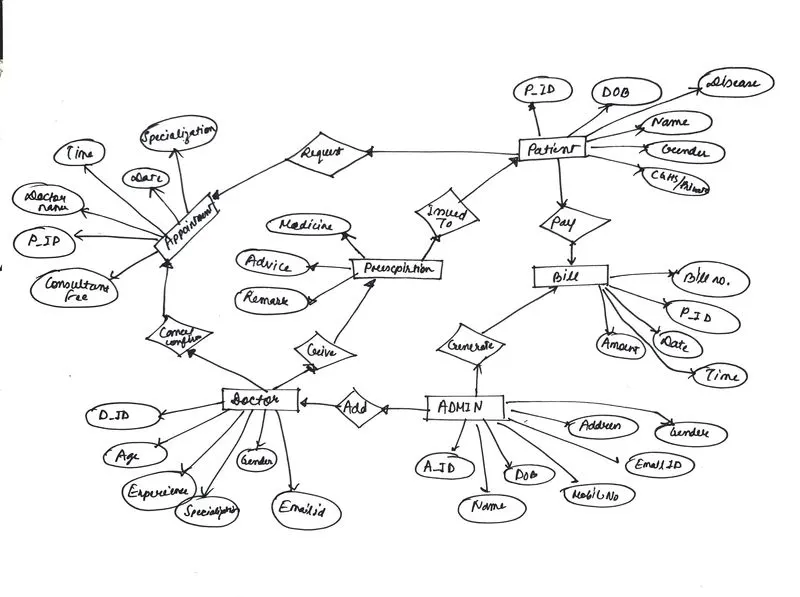
- The design of the data contains the data type, constraints, and description of the data used for the patient's details, appointment details, and bills as well as the doctor's details, prescription given, and how the admin manages the data
- The varchar_50 datatype can store a maximum of 50 characters of data in the database MySQL server
Table1: Patient
|
S NO.
|
COLUMN NAME
|
DATA TYPE
|
CONSTRAINTS
|
DESCRIPTION |
|
1. |
P_ID |
Varchar(50) |
Primary Key |
Contains Unique Id |
|
2. |
Name |
Varchar(50) |
- |
Contains Name |
|
3. |
DOB |
Varchar(50) |
- |
Contains Date Of Birth |
|
4. |
Gender |
Varchar(50) |
- |
Contains Gender |
|
5. |
Blood Group |
Varchar(50) |
- |
Contains Blood Group |
|
6. |
Email ID |
Varchar(50) |
- |
Contains Email Id |
|
7. |
Address |
Varchar(50) |
- |
Contains Address |
|
8. |
Mobile No. |
Integer |
- |
Contains Mobile No. |
|
9. |
CGHS/Private |
Varchar(50) |
- |
Contains Category |
Table2: Appointment
|
S NO.
|
COLUMN NAME
|
DATA TYPE
|
CONSTRAINTS
|
DESCRIPTION |
|
1. |
P_ID |
Varchar(50) |
Primary Key |
Contains Unique Id Patient |
|
2. |
Specialization |
Varchar(50) |
- |
Contains Name of the Department in which Patient wants to visit |
|
3. |
Doctor’s Name |
Varchar(50) |
- |
Contains Doctor Name Patient Wants To Visit |
|
4. |
Consultant Fee |
Integer |
- |
Contains Consultant Fee Of Doctor |
|
5. |
Date |
Date |
- |
Contains Date For The Appointment |
|
6. |
Time |
Time |
- |
Contains Time For The Appointment |
Table 3: Doctor
|
S NO.
|
COLUMN NAME
|
DATA TYPE
|
CONSTRAINTS
|
DESCRIPTION |
|
1. |
D_ID |
Varchar(50) |
Primary Key |
Contains unique ID |
|
2. |
Age |
Integer |
- |
Contains age |
|
3. |
Gender |
Varchar(50) |
- |
Contains gender |
|
4. |
Specialization |
Varchar(50) |
- |
Contains specialization |
|
5. |
Experience |
Varchar(50) |
- |
Contains experience of the doctor (In months) |
|
6. |
Language |
Varchar(50) |
- |
Contains in how many languages doctor can speak. |
|
7. |
Mobile No. |
Integer |
- |
Contains mobile number |
|
8. |
Email ID |
Varchar(50) |
- |
Contains Email Id |
|
9. |
Schedule |
Varchar(50) |
- |
Contains day and time for which the doctor is available |
Table 4: Prescription
|
S NO.
|
COLUMN NAME
|
DATA TYPE
|
CONSTRAINTS
|
DESCRIPTION |
|
1. |
D_ID |
Varchar(50) |
- |
Contains unique ID |
|
2. |
P_ID |
Varchar(50) |
Primary Key |
Contains unique ID |
|
3. |
Medicine |
Varchar(50) |
Contains name of the medicine. |
|
|
4. |
Remark |
Varchar(50) |
Contains Remark given by the doctor for the patient. |
|
|
5. |
Advice |
Varchar(50) |
Contains any advice for the patient. |
Table 5: Admin
|
S NO.
|
COLUMN NAME
|
DATA TYPE
|
CONSTRAINTS
|
DESCRIPTION |
|
1. |
A_ID |
Varchar(50) |
Primary Key |
Contains unique ID. |
|
2. |
Name |
Varchar(50) |
- |
Contains Name |
|
3. |
DOB |
Varchar(50) |
- |
Contains Date Of Birth |
|
4. |
Gender |
Varchar(50) |
- |
Contains Gender |
|
5. |
Email ID |
Varchar(50) |
- |
Contains Email Id |
|
6. |
Mobile No. |
Integer |
- |
Contains Mobile No. |
|
7. |
Address |
Varchar(50) |
- |
Contains Address |
Table 6: Bill
|
S NO.
|
COLUMN NAME
|
DATA TYPE
|
CONSTRAINTS
|
DESCRIPTION |
|
1. |
P_ID |
Varchar(50) |
- |
Contains unique ID. |
|
2. |
Bill No. |
Varchar(50 |
Primary Key |
Contains number of the bill. |
|
3. |
Date |
Varchar(50 |
- |
Contains Date of The bill. |
|
4. |
Time |
Varchar(50 |
- |
Contains Time of the bill generated. |
|
5. |
Amount |
Int |
- |
Contains amount of the bill. |
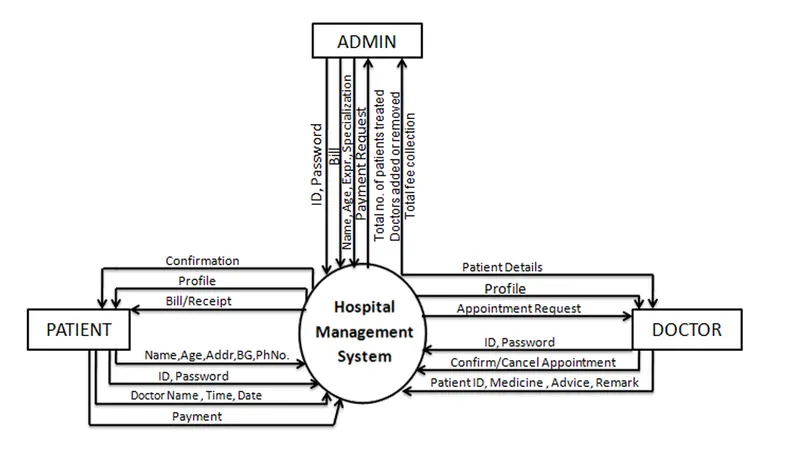
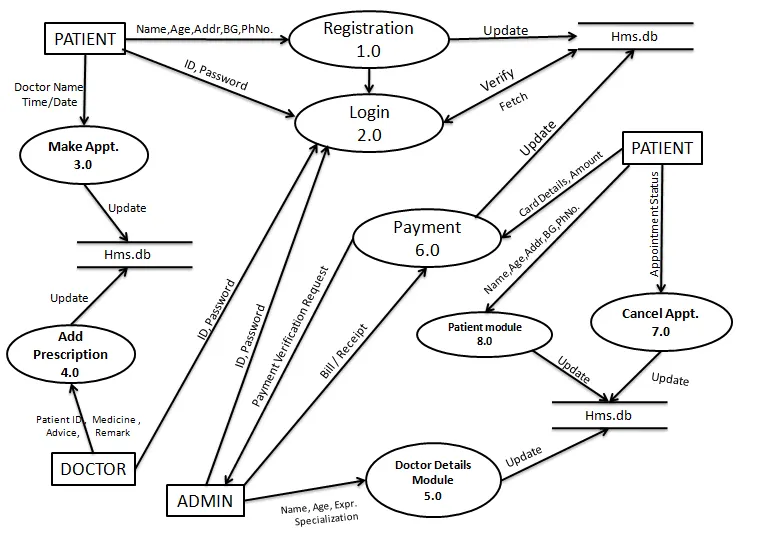
Fig: Data flow diagram of the whole project system
ER Diagram
Source code snippets with flowchart
The implemented source code used in this project is available on the open source www.itsourcecode.com platform by angel Jude Suarez
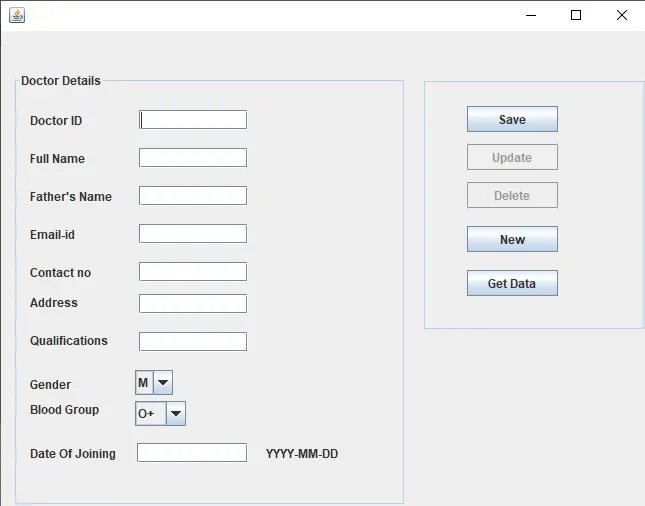
Doctor details module
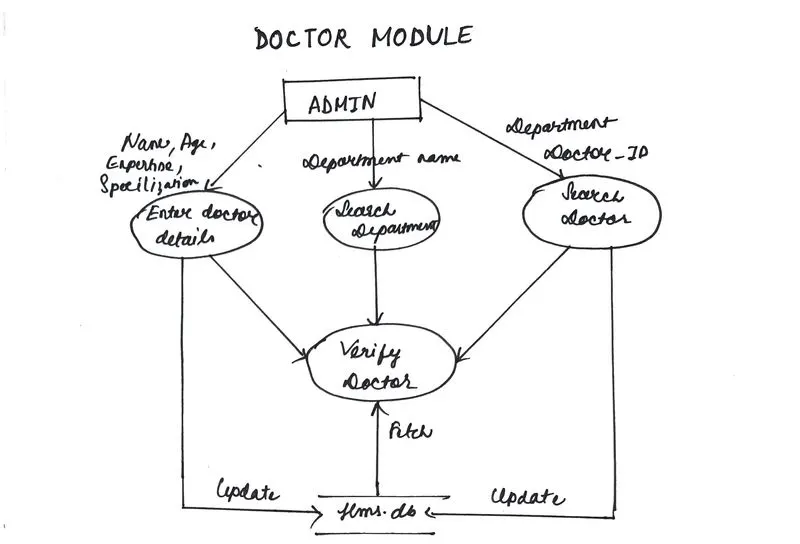
- In the doctor, module admin enters the doctor's details
- Age
- Name
- Expertise
- Specialization
- Search department name
- Search doctor ID in the department
- Verify the doctor
- HMS database update
Fig: Flowchart doctors module
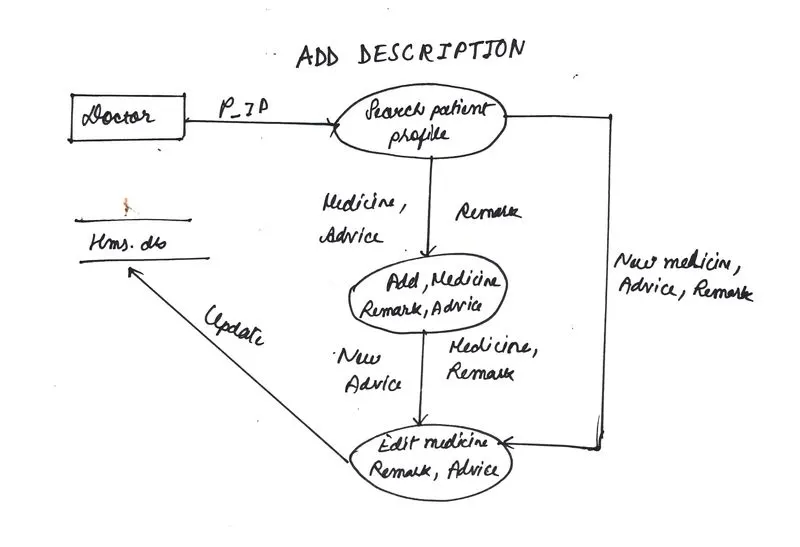
- Add Description
- The doctor searches the patient's profile
- Medicine advice and remarks added
- Edit the medical advice and remarks
- Updated into the HMS database
Fig: Flowchart of add Description
package LEP.uzair.HMS.Hospital;
import java.util.ArrayList;

public class Doctor {
 private String  doctorName;
 private String  doctorSpeciality;
 String  doctorStatus;
 ArrayList doctorPatientList= new ArrayList();
 Doctor(String c, String cc)
 {
     this.doctorName=c;
     this.doctorSpeciality=cc;

 }
 public String  getDoctorName()
 {
     return doctorName;
 }

 public ArrayList getDoctorPatientList()
 {
     return doctorPatientList;
 }

 public void addPatientsToDoctor(Patient o)
 {
     doctorPatientList.add(o);
 }
 public void clearPatientsToDoctor()
 {
     doctorPatientList.clear();
 }

 String getDoctorspeciality()
 {
     return doctorSpeciality;
 }
 public String toString()
 {
     return (doctorName+""+doctorSpeciality);
 }

}
Patient details module
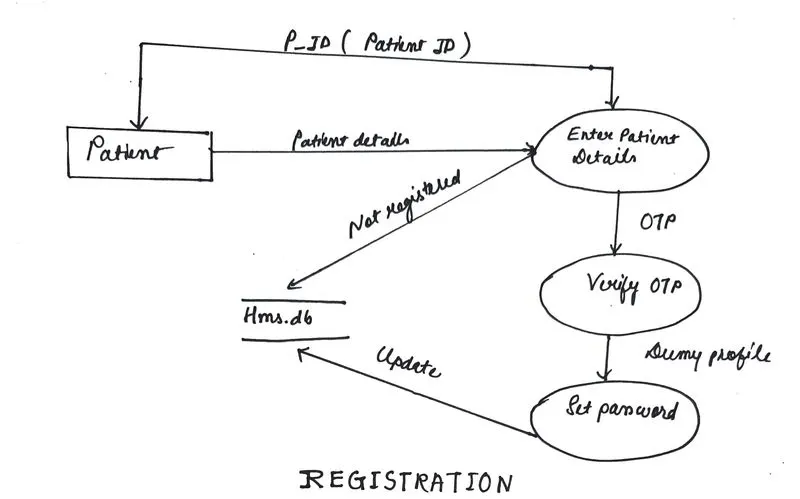
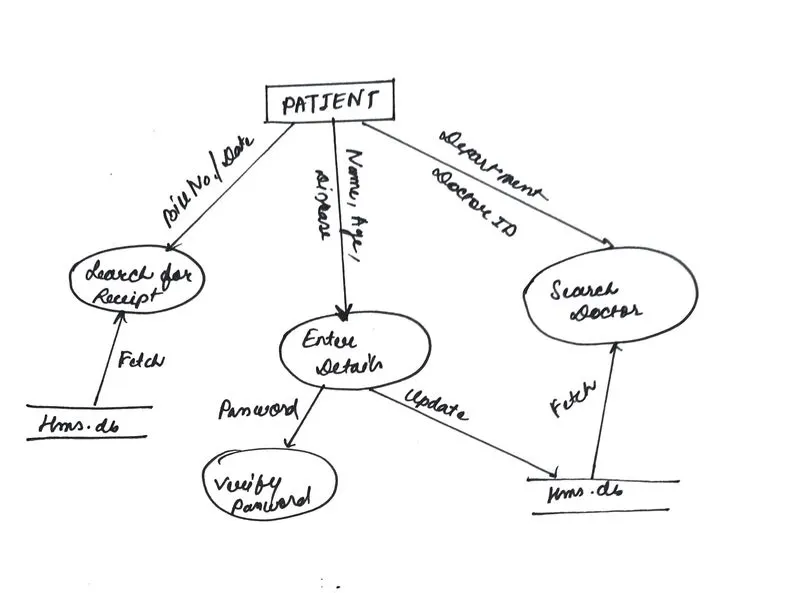
- Registration
- Enter the patient details P_registration
- Enter the details- patient name,patient details,patient disease
- Verify otp
- Set password
- Updated in the HMS database
Fig: Flowchart of the patient registration
Source code for entering patient details and patient registration
package LEP.uzair.HMS.Hospital;

public class Patient {
    private String patientName;
    private int patientAge;
    private String  patientGender;
    private String disease;
    Patient (String patientName, int patientAge,String patientGender, String disease)
    {
        this.patientName= patientName;
        this.patientGender= patientGender;
        this.patientAge=patientAge;
        this.disease=disease;
    }

    public String getDisease()
    {return disease;}

    public String toString()
    {
        return (patientName+""+patientAge+""+patientGender +" "+ disease);
    }
}- Login
- P_ID password
- Verify the ID and password
- Patiient_id entered
- Fetch in the HMS database
- Profile fetched
- Login initiated
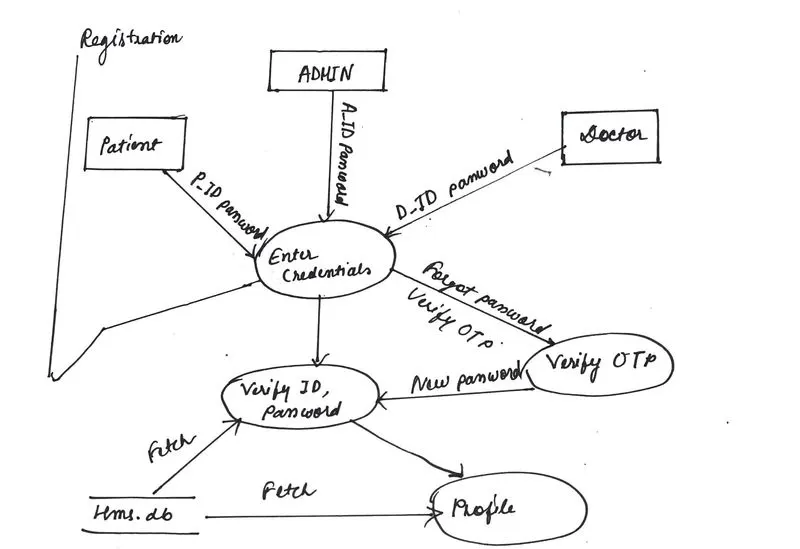
Fig: Login flowchart
Hospital details module
- To get the array list of doctors and patients and select the patient associated with the disease specialist doctor
- As an example, ENT specialist doctor's finding is given in the code
Source code
package LEP.uzair.HMS.Hospital;
import java.util.ArrayList;
import java.util.Scanner;

public class Hospital {
 int doctorCount = 0;
 int patientCount=0;
 ArrayList doctorList = new ArrayList();
 ArrayList  patientList = new ArrayList();
 public void start() {
  @SuppressWarnings("resource")
  Scanner input = new Scanner(System.in);
  char YesOrNo = 'Y';
  while (YesOrNo  =='Y'){
   System.out.print("\tQ:What do you want to do?\n\n");
   System.out.print("\t\t1 :  Add doctor\n\n");
   System.out.print("\t\t2 : Show doctors\n\n");
   System.out.print("\t\t3 : Add patient\n\n");
   System.out.print("\t\t4 : Assign doctor to patients\n\n");
   System.out.print("\t\t5 : Doctor and their patients\n\n");

   System.out.println("\t\t\tYou Select : ");
   String switchChoice=input.next();
   switch (Integer.parseInt(switchChoice))
   {
    case 1: {
     @SuppressWarnings("resource")

     Scanner input1 = new Scanner(System.in);
     String tempName;
     String  tempSpeciality;

     System.out.print("Enter Doctor Name");
     tempName = input1.nextLine();
     tempName = tempName + " ";

     System.out.print("Select Doctor Speciality\n1: Opthalmologist \n2: Surgeon \n3: ENT");
     Scanner input2 = new Scanner(System.in);
     int tempSpecNo = input1.nextInt();
     if(tempSpecNo==1){
      tempSpeciality="Opthalmologist";
     }else if(tempSpecNo==2){
      tempSpeciality="Surgeon";
     }else if(tempSpecNo==3){
      tempSpeciality="ENT";
     }else{
      tempSpeciality=" ";
     }
     Doctor o1 = new Doctor(tempName,tempSpeciality);
     doctorList.add(doctorCount,o1);
     doctorCount++;
     break;
    }
    case 2: {
     showDoctors();
     break;
    }
    case 3: {
     @SuppressWarnings("resource")

     Scanner input1 = new Scanner(System.in);
     String tempName,tempGender, tempDisease;
     int tempAge;

     System.out.print("Enter Patient Name");
     tempName = input1.nextLine();
     tempName = tempName + " ";

     System.out.print("Enter Patient Age");
     @SuppressWarnings("resource")
     Scanner input2 = new Scanner(System.in);
     tempAge = input2.nextInt();

     System.out.print("Enter Patient Gender");
     @SuppressWarnings("resource")
     Scanner input3 = new Scanner(System.in);
     tempGender = input3.nextLine();
     tempGender = " " + tempGender + " ";

//     System.out.print("Enter Patient Disease");//eye , heart patient , earnose ,
//     @SuppressWarnings("resource")
//     Scanner input4 = new Scanner(System.in);
//     tempDisease = input4.nextLine();

     System.out.print("Select Patient Disease\n1: eye \n2: heart patient \n3: earnose");
     Scanner input4 = new Scanner(System.in);
     int tempSpecNo = input4.nextInt();
     if(tempSpecNo==1){
      tempDisease="eye";
     }else if(tempSpecNo==2){
      tempDisease="heart patient";
     }else if(tempSpecNo==3){
      tempDisease="earnose";
     }else{
      tempDisease=" ";
     }

     Patient p1 = new Patient(tempName,tempAge,tempGender, tempDisease);

     patientList.add(patientCount,p1);
     patientCount++;
     break;
//                    System.out.println(showPatients());
    }
    case 4: {
     assignDoctor();
     break;
    }
    case 5: {
     System.out.print("Enter Doctor ID > 0 AND <= "+Integer.toString(doctorCount));
     @SuppressWarnings("resource")
     Scanner in = new Scanner(System.in);
     int i = in.nextInt();
     i=i--;
     System.out.println("\n \n \n "+ ""+doctorList.get(i).getDoctorName()+""+doctorList.get(i).getDoctorPatientList());
     break;
    }
    default: {
     System.out.println("Invalid Selection");
      break;
    }
   }
   System.out.println("\n\tDo u want to Do some thing Else \n\t\tY = yes\n\t\tN = No\n");
   System.out.println("You Select : ");
   YesOrNo =(input.next()).charAt(0);
   if(Character.isLowerCase(YesOrNo )){
    YesOrNo =Character.toUpperCase(YesOrNo );
   }
  }//End While
 }// End Start()


   public void showDoctors()
  {
      for(int i = 0 ; i<doctorCount;i++ ){
       System.out.println(doctorList.get(i)+"\n");
      }
  }
  public ArrayList showPatients()
  {
      return patientList;
  }

  public void assignDoctor()
  {

   for (Patient x: patientList)
   {
    for (Doctor y: doctorList)
    {
     if (x.getDisease().equals("eye"))
     {
      if (y.getDoctorspeciality().equals("Opthalmologist"))
      {
       y.addPatientsToDoctor(x);
       System.out.println("\n Docter(Opthalmologist) Added  With Patient with Eye disease");
      }
     }
     if (x.getDisease().equals("heart patient"))
     {
      if (y.getDoctorspeciality().equals("Surgeon"))
      {
       y.addPatientsToDoctor(x);
       System.out.println("\n Docter(Surgeon) Added  With Patient with heart disease");
      }
     }
     if (x.getDisease().equals("earnose"))
     {
      if (y.getDoctorspeciality().equals("ENT"))
      {
       y.addPatientsToDoctor(x);
       System.out.println("\n Docter(ENT) Added  With Patient with earnose disease");
      }
     }
    }
   }
  }
Main.java
package LEP.uzair.HMS.main;
import LEP.uzair.HMS.start.Start;

public class MyMain {

 public static void main(String[] args) {
  //Static Function Demonstration
  Start.StartHms();
 }
}
Admission details module
- Edit doctor details
- Add doctor
- Generate bill
- Refund payment
- Update details
- Patient
- Payment
- Appointment status
- Make Appointment
- Cancellation of appointment
- Patient
Fig: Patient admission details flowchart
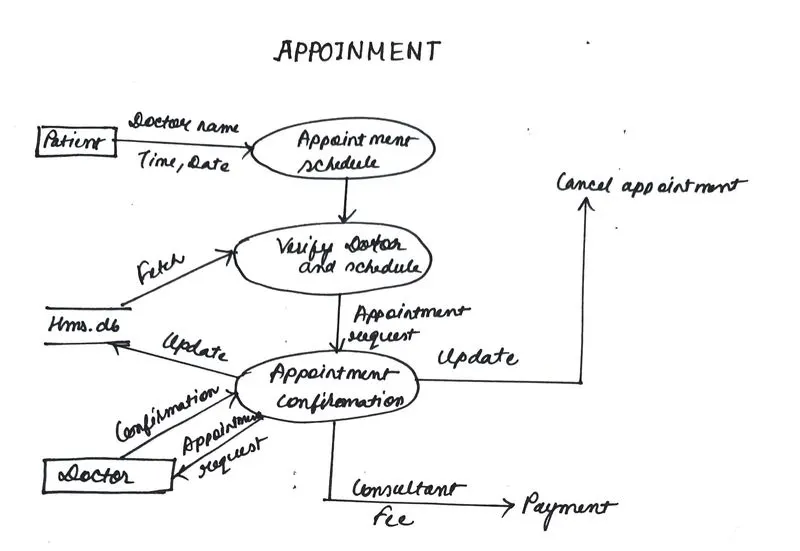
- Appointment
- The patient can enter the doctor's name and time and date
- Verify the doctor and schedule
- Confirmation of appointment by the doctor update jb the database
- The appointment did not confirm and was updated as a canceled appointment
- Appointment confirmation consultant fee payment
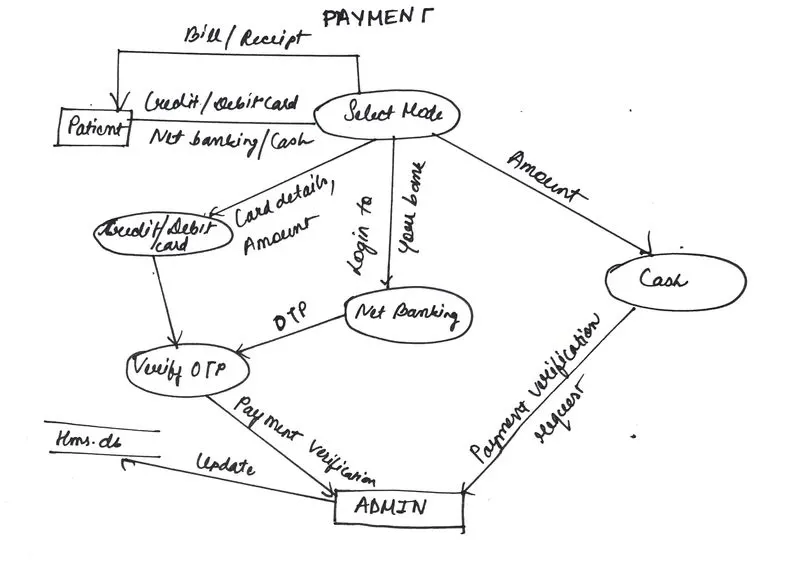
- Payment
- Select the node by the patient for
- bill/Receipt
- Credit/debit card/Net banking/Cash
- After selecting the mode verify the OTP
- Admin receives the payment, verifies the request
- Updated into the HMS server database
- Payment verification request by cash and admin updated it into the database
- Select the node by the patient for
Book appointment module
enum Status { confirm , cancel} ;

int Department, Date , Time, mode, ch;                           char Dr_Name(50);

cout<< Enter The Information :
cin>> Department;
	cin>>Dr_Name;
cin>> Date; cin>> Time;
	book Appointment = cancel;

cout<<Mode; cout<<1.Cash; cout<<2.Debit Card/Credit Card
cout<<3.Net Banking 	 	 	        	 	           cout<>mode;

	if(mode==1)
{
	 	 Generate a Receipt and send confirmation message;
}
	else if(mode == 2)
{
	 	Enter Card Details
	 	Make Payment
	 	Send confirmation message
}
else
{
	 	Enter Account Details
	              Make Payment
	 	Send confirmation message
	} //end if

Send appointment Request to the doctor

Doctor will check the Appointment Requests;        	 	           cout<<Mode;  cout<<1.Confirm;
	 cout<<2.Cancel;
 cout<>ch;

	if(ch==1)
{
	 	Appointment = Confirm;
	 	Send a Confirm Message to the patient.
	 }
else
{
	 	Send a Cancel Message to the patient.
	}//end if
SAMPLE SNAPSHOTS OF THE HMS system
Doctor's detail module
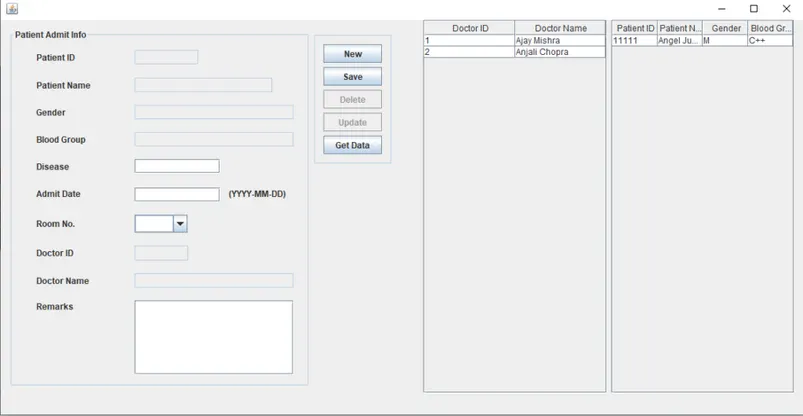
Patient admit Info
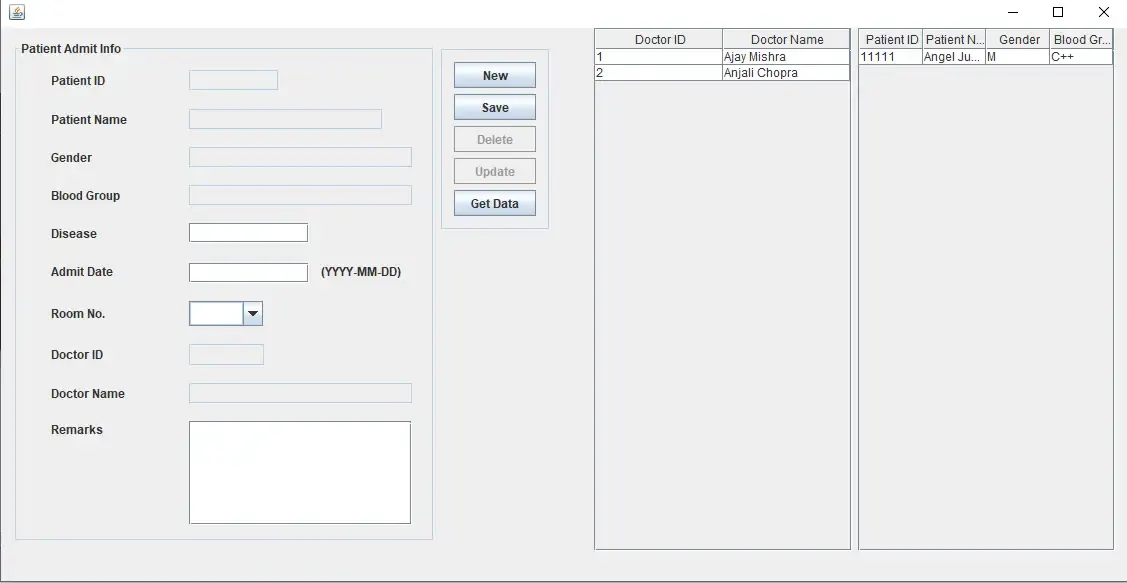
Patient billing module
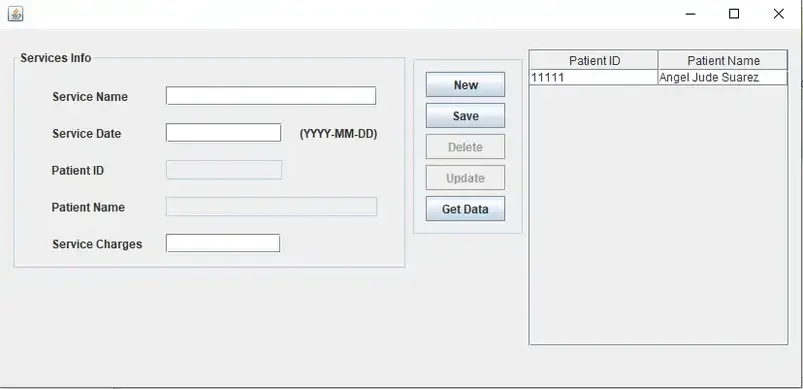
Patient services info
HOMEPAGE screenshot of the designed Hospital Management System of Moeka Hospital

FIGURE 1: SELECT LOGIN in the homepage
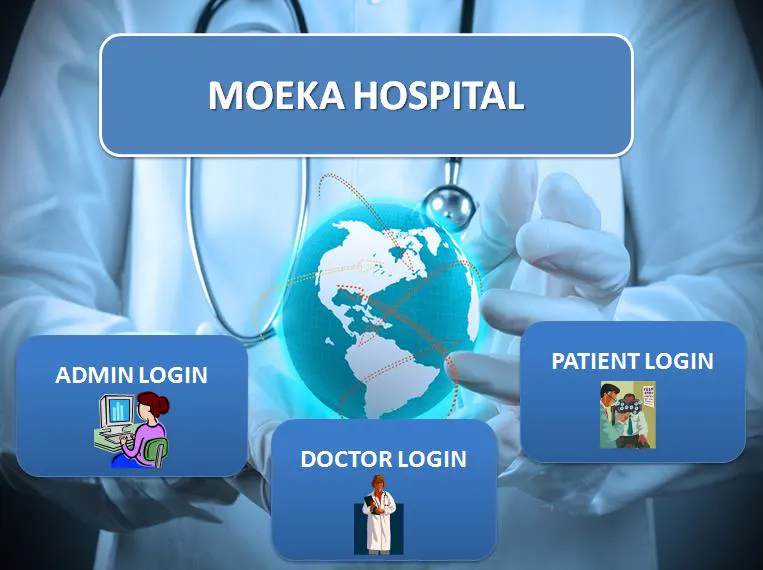
FIGURE 2 PATIENT LOGIN PAGE
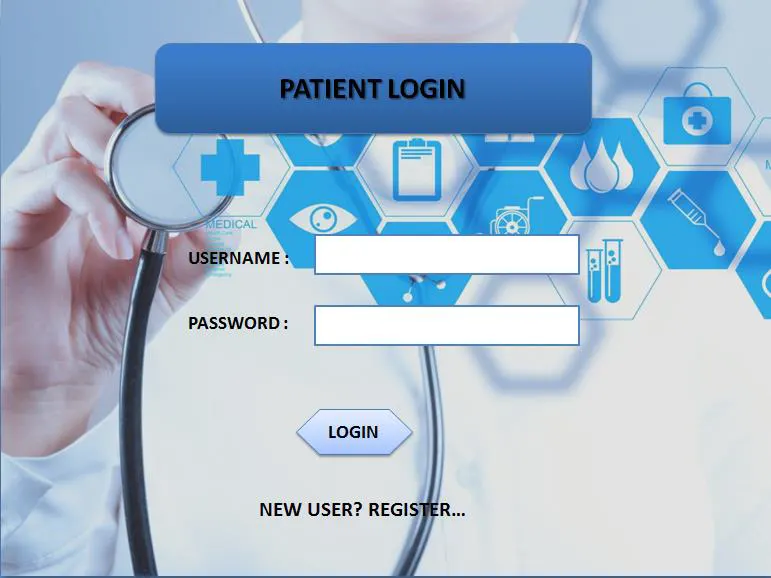
FIGURE 2 REGISTRATION
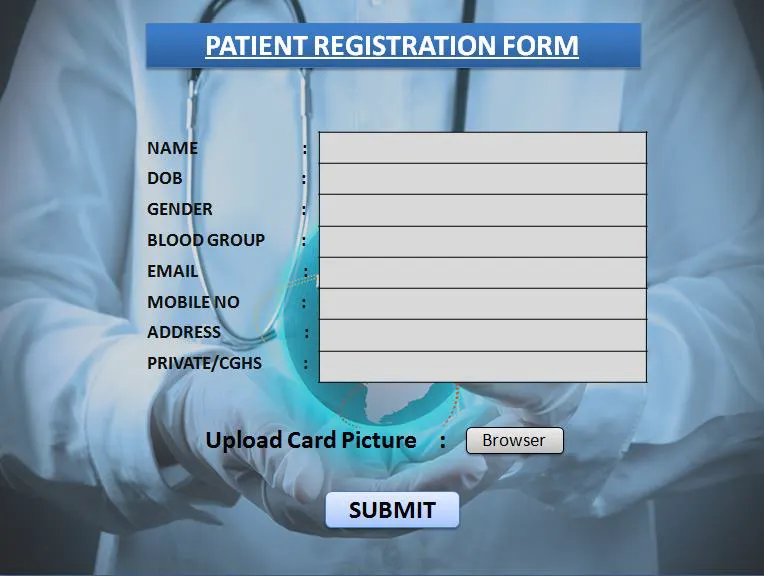
FIGURE 3 PATIENT PROFILE
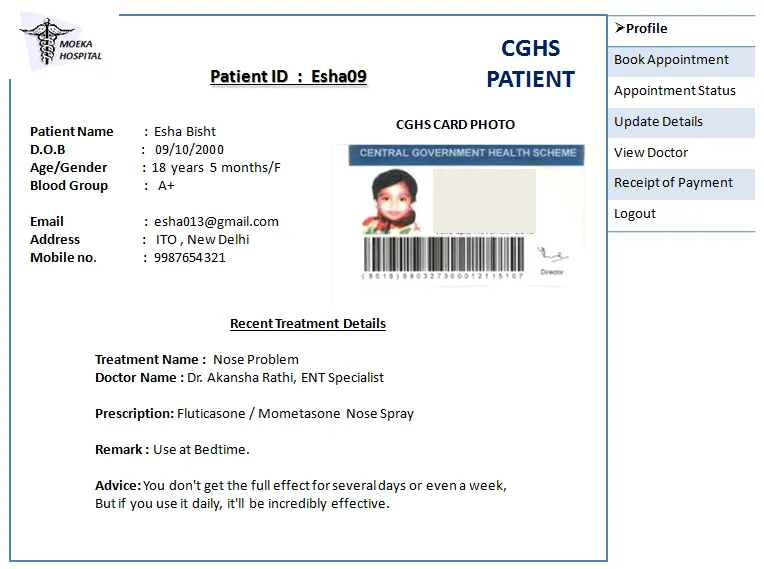
FIGURE 4 PATIENT UPDATE DETAILS
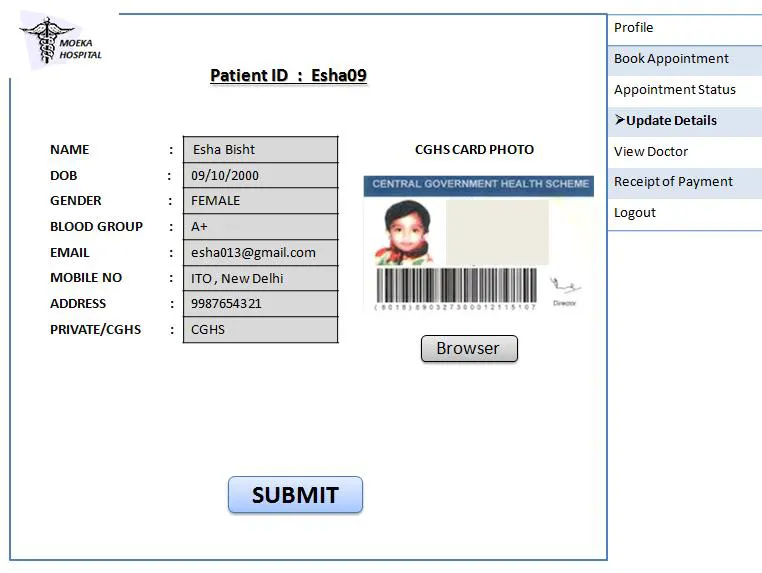
FIGURE 5 PATIENT BOOK APPOINTMENT
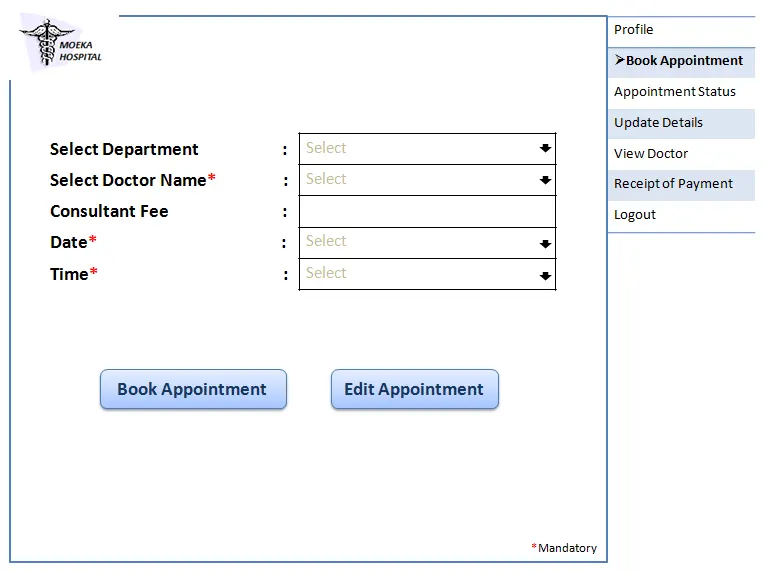
FIGURE 5 PATIENT APPOINTMENT STATUS
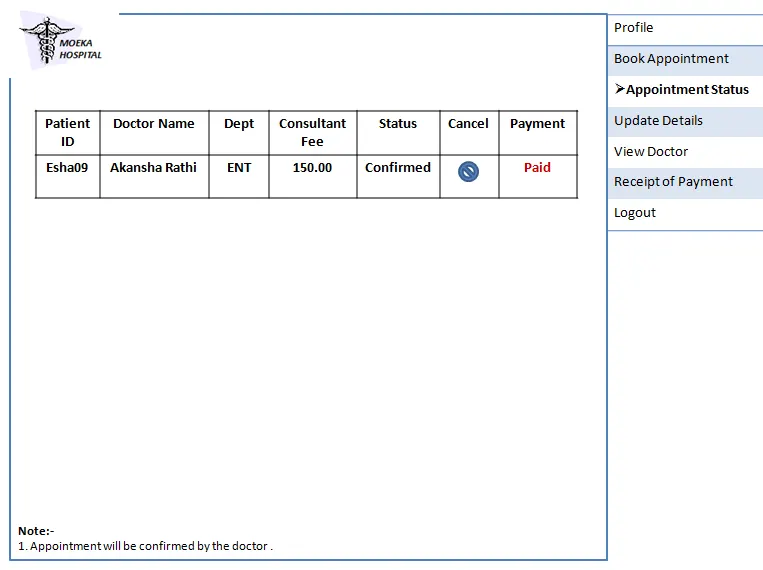
FIGURE 6 PATIENT CANCEL APPOINTMENT
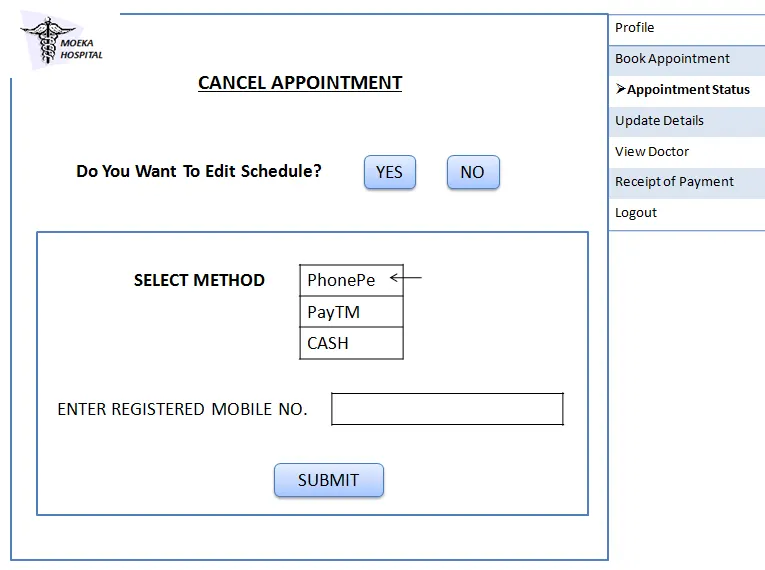
FIGURE 7 PAYMENT
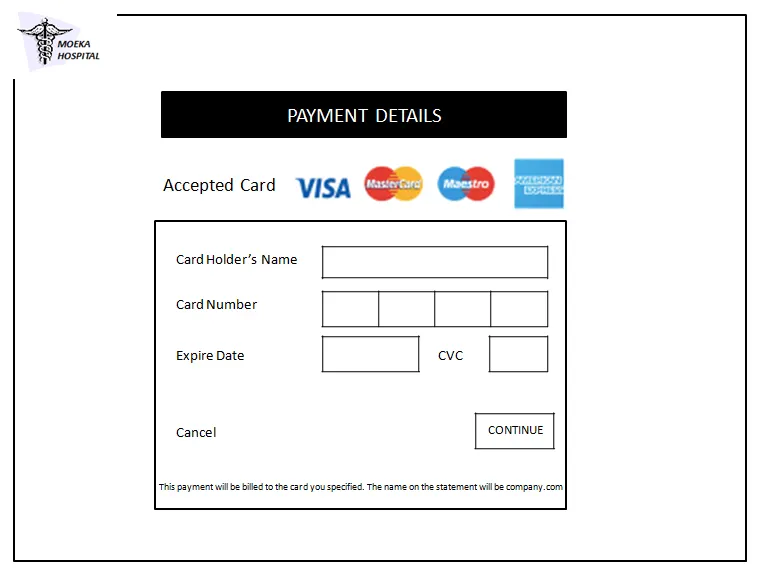
FIGURE 8 PATIENT PAYMENT RECIPET
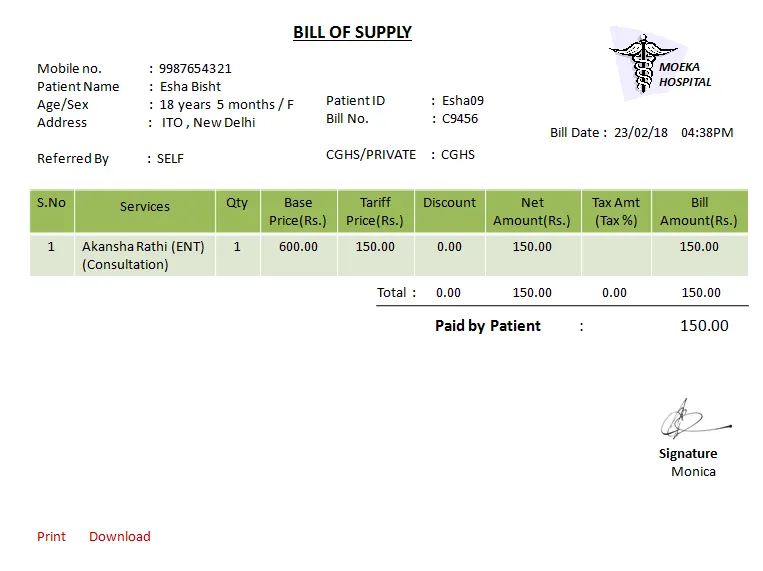
FIGURE 9 PATIENT VIEW PAYMENT HISTORY
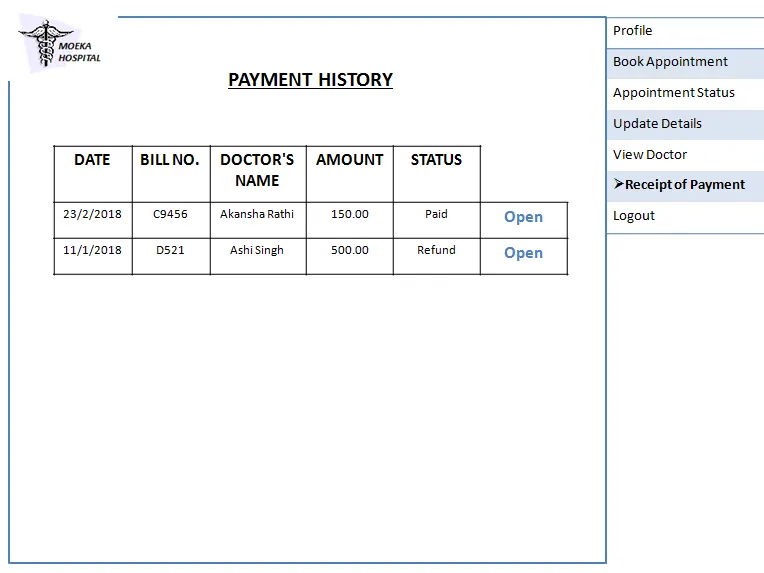
FIGURE 10 PATIENT VIEW DOCTORS
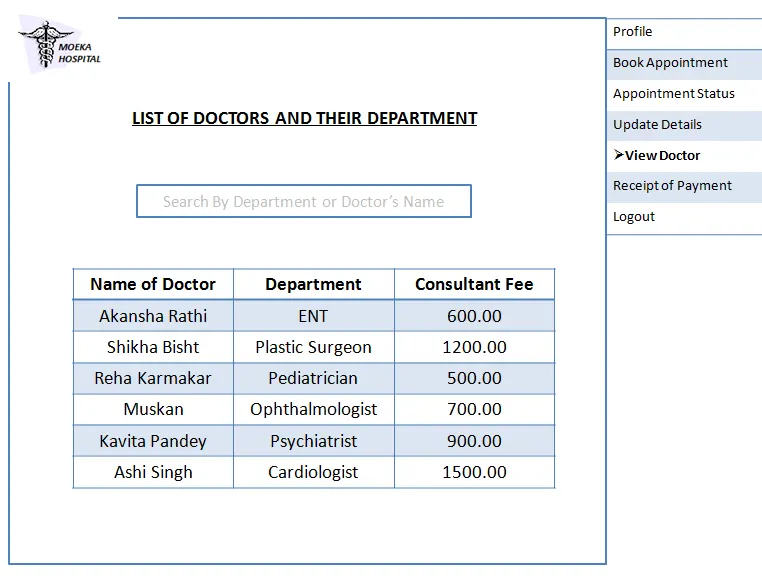
FIGURE 11 DOCTOR LOGIN PAGE
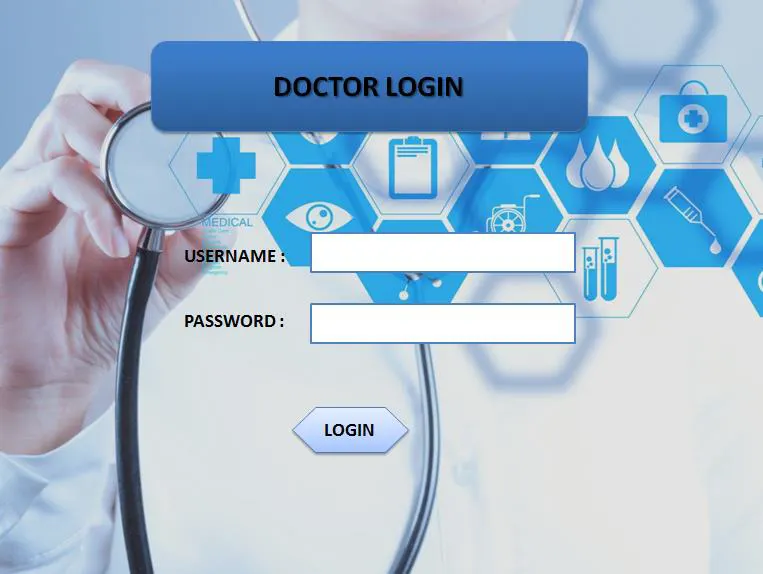
FIGURE 12 DOCTOR PROFILE
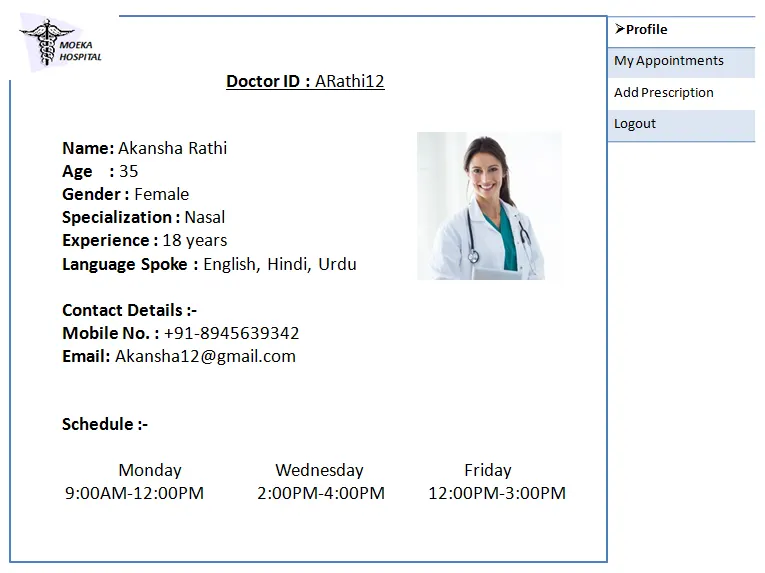
FIGURE 13 DOCTOR VIEW APPOINTMENT
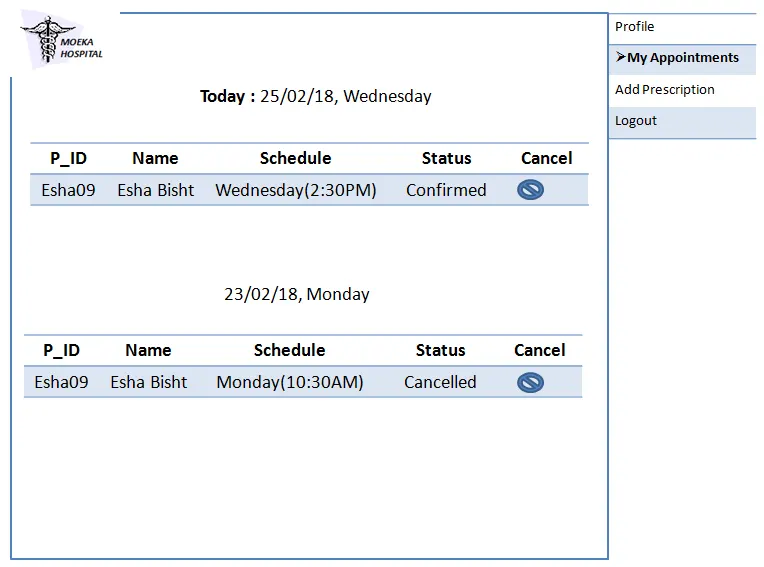
FIGURE 14 ADMIN LOGIN PAGE
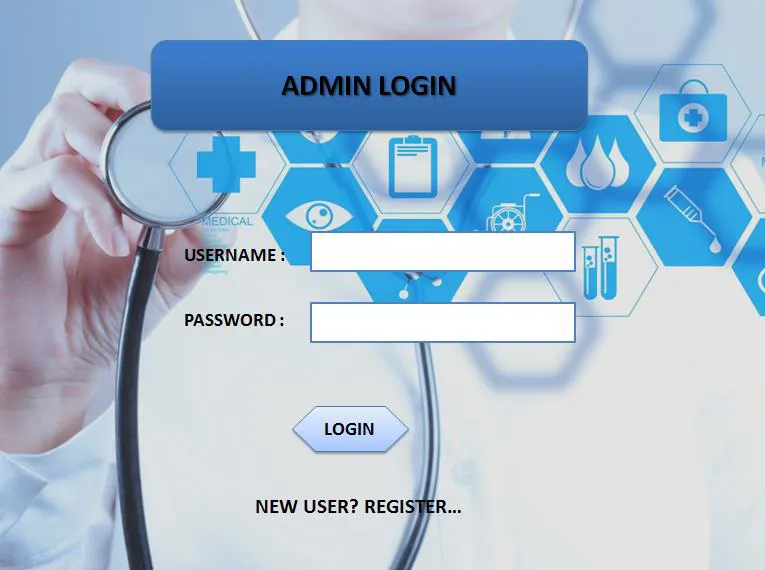
FIGURE 15 ADMIN ADD DOCTOR
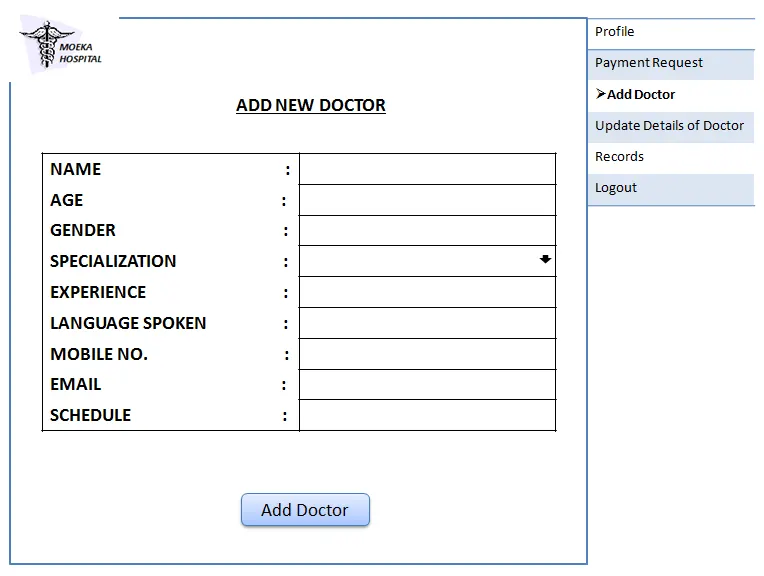
FIGURE 15 ADMIN UPDATE DOCTOR DETAILS
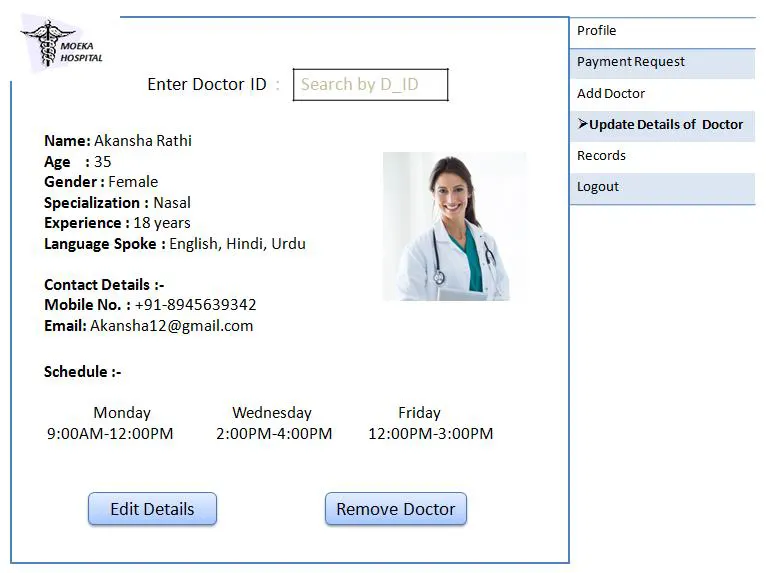
FIGURE 16 ADMIN PAYMENT REQUEST
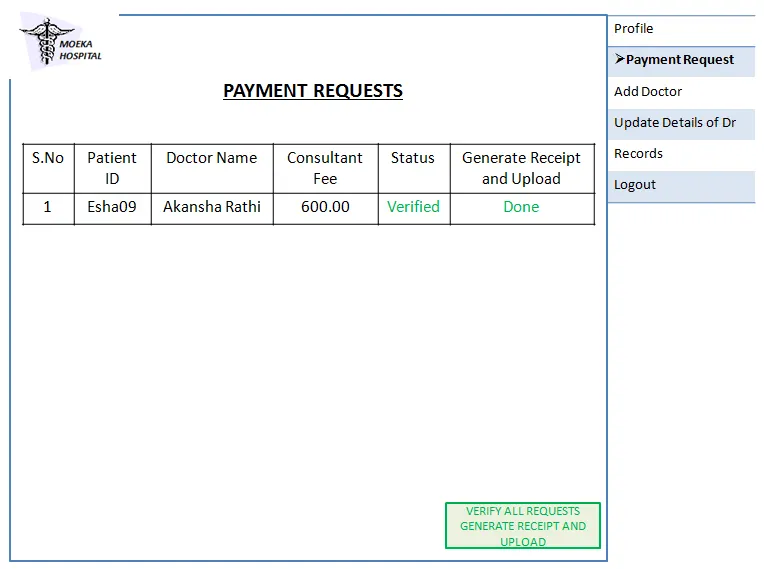
FIGURE 17 ADMIN VIEW RECORDS
Conclusion
- Hospital management system data will be secured because the details of the patients are entered electronically
- Using this application the patient's history can be retrieved within a single click
- Information processing will be faster and hence guarantees the accurate management of the patient details
- It reduces the human effort which ultimately increases the accuracy speed
- The HMS system is essential to maintain the details about the doctors, patients, etc
- By using this project work this maintaining work becomes very easy and we can save a lot of time
- It will enable the demands of patient care with improving response time because it automatically generated the process of collecting, collating, and retrieving the information of the patient.
- The system is convenient, easy to use, and saves the time of the hospital as well as money and resources
Source:
http://proprogrammershub.blogspot.com/2014/12/hospital-management-system-project-in.html?m=1
https://www.academia.edu/29078722/Hospital_Management_System_Design_and_Implementation
https://selleo.com/blog/how-to-build-a-hospital-management-system
https://mocdoc.in/blog/a-detailed-view-of-hospital-management-system-hms