Project - Design a Hospital Management system
Project - Design a Hospital Management system
Introduction:
The healthcare sector is a vital component of our economy. However, the management and administration of healthcare facilities can often be complex and challenging. In order to streamline operations, enhance patient care, and improve overall efficiency, the development of a Hospital Management System (HMS) becomes crucial. The significance of healthcare extends to the general welfare of society. With the rise of technology, the healthcare industry has witnessed a transformative shift. In this context, the hospital management system (HMS) has emerged as a dynamic technological advancement. It offers healthcare facilities a holistic solution for gathering patient information, safeguarding vital records, automating scheduling, and other essential functionalities.
Moreover, the HMS project will emphasize the importance of data security and privacy. Patient information is highly sensitive, and the system will adhere to strict data protection regulations to ensure the confidentiality and integrity of patient records. Robust security measures, such as user authentication, role-based access control, and data encryption, will be implemented to safeguard patient data from unauthorized access or breaches.
This HMS project will also address the need for comprehensive reporting and analytics. By providing detailed reports on patient statistics, financial analysis, inventory management, and operational performance, hospital administrators and decision-makers will have access to valuable insights to make informed decisions, identify areas for improvement, and optimize resource allocation.
This project will make you realize the enormous healthcare benefits of the hospital management system.
Aim of the project: To develop a comprehensive software solution that brings about a revolutionary change in the operations of hospitals and healthcare facilities.
Objectives of the project: To Improve patient care, Enhance operational efficiency, Ensure data security, reduce operating costs, and Facilitate informed decision-making of the Hospital Management System.
Hospital Management System (HMS):
Let's understand a Hospital Management System (HMS), also known as a hospital information system, is a software solution that aids in the efficient management of operations in a hospital or medical care facility. It integrates various departments into a single network to streamline resource allocation and improve overall functionality.
The primary component of a hospital information management system is the computer-based patient record (CPR), which stores and maintains patients' medical and treatment history. This system benefits a multidisciplinary team of healthcare professionals, including doctors, nurses, pharmacists, and business managers.
For instance, nursing staff can enter patient data into a centralized database whenever they perform tasks such as repositioning patients or administering medication. This enables seamless communication and access to accurate patient information, reducing errors caused by miscommunication among medical professionals.
The HIM department has embraced technology to enhance efficiency and streamline processes. With a hospital information management system, all patient records can be easily accessed and managed on a single platform, providing a comprehensive view of each patient's journey.
An important aspect of a hospital information management system is its adaptability to meet emerging challenges and advancements in healthcare technology. It continually evolves to address new requirements and ensure optimal performance.
The Hospital Management System (HMS) functions as a comprehensive software solution that integrates various modules and features to streamline the operations and processes within a healthcare facility.
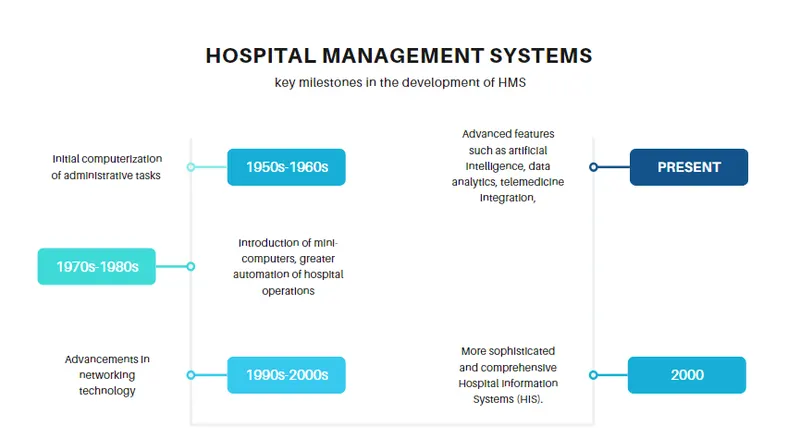
The history of Hospital Management Systems (HMS) can be traced back to the emergence of computer technology and its application in healthcare. Here is a brief overview of the key milestones in the development of HMS:
1950s-1960s: The advent of computers paved the way for the initial computerization of administrative tasks in hospitals. Basic systems were introduced to manage patient registration, billing, and appointment scheduling, often using mainframe computers.
1970s-1980s: The introduction of mini-computers and the development of more advanced software allowed for greater automation of hospital operations. Basic electronic medical record (EMR) systems began to emerge, enabling the storage and retrieval of patient information.
1990s-2000s: The widespread adoption of the internet and advancements in networking technology led to the development of web-based hospital management systems. These systems allowed for remote access to patient data, improved communication among healthcare providers, and streamlined administrative processes.
2000s-Present: The evolution of technology and the growing need for integrated healthcare solutions have led to the development of more sophisticated and comprehensive Hospital Information Systems (HIS). These systems incorporate various modules for different areas of hospital management, including EMR/EHR, billing, scheduling, pharmacy, laboratory, and more. The use of cloud computing has also gained popularity, enabling hospitals to store and access data securely from anywhere.
Today, Hospital Management Systems continue to evolve, incorporating advanced features such as artificial intelligence, data analytics, telemedicine integration, and interoperability with other healthcare systems. The focus is on improving patient care, enhancing operational efficiency, ensuring data security, and facilitating informed decision-making.
It is important to note that the specific advancements and milestones in the history of HMS may vary across different regions and healthcare systems, as the adoption and implementation of technology can vary based on local factors and healthcare infrastructure.
Benefits of a health information system or a hospital management system:
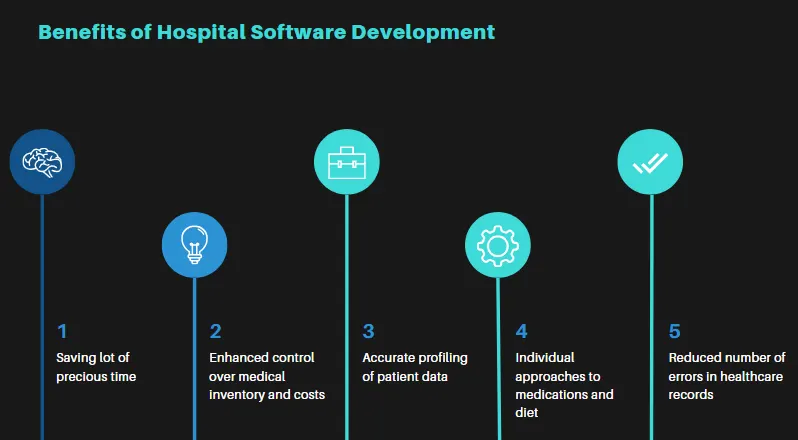
- Access to patient data improved with the implementation of an information system
- Efficient handling of clinical, administrative, and financial information
- Improved practice as a result of better decision making
- Helps in generating automatically generated reports.
- Improved patient care
- Reduced medical errors
- Enhanced patient satisfaction, leading to reduced readmissions and rehospitalization rates
Here is an overview of how the HMS typically functions:
1. Patient Management: The HMS allows efficient management of patient information, including registration, scheduling appointments, maintaining electronic health records (EHR), and tracking medical history.
2. Appointment and Scheduling: It facilitates the scheduling of patient appointments, enables online booking, and provides reminders to patients and staff about upcoming appointments.
3. Electronic Medical Records (EMR): The HMS stores and manages patient medical records electronically, ensuring easy accessibility, accurate documentation, and secure storage of medical data.
4. Billing and Insurance: It handles billing processes, including invoicing patients, managing insurance claims, and generating financial reports. It also integrates with insurance systems to verify coverage and process claims.
5. Pharmacy and Inventory Management: The system tracks medication inventory, manages prescriptions, generates alerts for low stock, and supports efficient pharmacy operations.
6. Laboratory and Diagnostic Integration: It enables seamless integration with laboratory and diagnostic equipment, automates test requests, stores test results, and facilitates easy retrieval of patient reports.
7. Staff and Resource Management: The HMS assists in managing staff schedules, assigning tasks, tracking attendance, and optimizing resource allocation to ensure efficient operation of the healthcare facility.
8. Reporting and Analytics: The system generates comprehensive reports and analytics on various aspects such as patient flow, revenue, resource utilization, and clinical outcomes, providing valuable insights for decision-making and performance evaluation.
9. Security and Privacy: The HMS incorporates robust security measures to protect patient data, including role-based access control, encryption, and audit trails to ensure compliance with data protection regulations.
10. Integration and Interoperability: It supports integration with other healthcare systems, such as electronic health record systems, laboratory information systems, and billing systems, enabling seamless data exchange and interoperability.
Overall, the HMS aims to enhance the efficiency, accuracy, and quality of healthcare services by streamlining processes, improving patient care, optimizing resource utilization, and ensuring data security and privacy.
Notable Features of a Health Information System or a Hospital Management Software:
- Hospital Management System (HMS) is software that manages electronic medical records, laboratory tests, radiology images, and pharmacy records.
- It efficiently handles patient data, enabling hospitals to provide better care and services.
- Cloud-based hospital management software is becoming popular due to its user-friendly approach and easy access from multiple devices.
- It allows users to access and utilize the software on desktops, laptops, smartphones, and tablets.
Types of hospital management systems :
1. Application Service Provider (ASP) or Cloud-based Hospital Management System (HMS) is a software solution that is hosted and accessed over the internet. Instead of installing the software on individual computers or servers within the hospital premises, the system is hosted on remote servers maintained by a service provider.
Here are the key points about ASP/Cloud-based Hospital Management System:
- Accessibility: Users can access the system securely from anywhere with an internet connection, using various devices such as desktop computers, laptops, tablets, or smartphones. This allows for flexibility and convenience in managing hospital operations.
- Scalability: Cloud-based HMS offers scalability, as the service provider can easily adjust the system's resources and storage capacity based on the hospital's changing needs. This eliminates the need for the hospital to invest in additional hardware or infrastructure.
- Cost-effectiveness: By using a cloud-based HMS, hospitals can reduce upfront costs associated with hardware procurement, software licensing, and maintenance. They typically pay a subscription fee or usage-based pricing, which helps in better budget management.
- Data Security: Reputable ASP/Cloud service providers prioritize data security and employ robust measures to protect sensitive patient information. This includes encryption, regular backups, firewalls, and access controls, ensuring that data is stored and transmitted securely.
- System Updates and Maintenance: The service provider takes care of system updates, maintenance, and backups, relieving the hospital's IT staff from these tasks. This ensures that the hospital is using the latest version of the software and avoids disruptions in service.
- Integration and Interoperability: Cloud-based HMS often supports integration with other healthcare systems and electronic health record (EHR) platforms, allowing for seamless sharing of patient data across different systems. This promotes interoperability and collaboration among healthcare providers.
- Disaster Recovery: Cloud-based systems offer built-in disaster recovery mechanisms, such as data backups and redundant infrastructure. This helps in safeguarding patient data and ensures business continuity in case of unforeseen events or system failures.
- Support and Training: ASP/Cloud-based HMS providers typically offer customer support and training to assist hospitals in using the system effectively. This helps in onboarding staff and maximizing the benefits of the software.
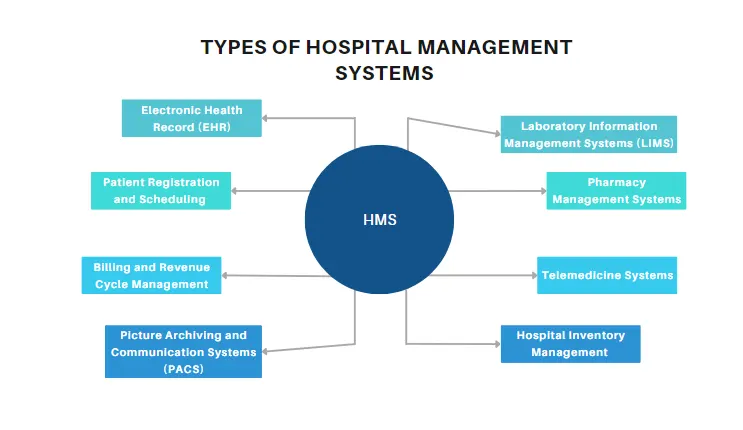
2. Integrated Hospital Management System: This type of system integrates various modules and functionalities into a single platform, including patient management, billing and invoicing, appointment scheduling, inventory management, and more.
3. Electronic Medical Records (EMR) System: EMR systems focus on managing and organizing patient medical records digitally, allowing for easy retrieval and analysis of patient data.
4. Laboratory Information System (LIS): LIS manages laboratory processes and data, including test orders, results, specimen tracking, quality control, and interfacing with diagnostic equipment.
5. Radiology Information System (RIS): RIS is specifically designed to handle radiology and imaging workflows, including scheduling appointments, managing images and reports, and facilitating communication between radiologists and referring physicians.
6. Pharmacy Management System: This system streamlines pharmacy operations by automating medication dispensing, inventory management, drug interaction checking, and prescription management.
7. Appointment and Scheduling System: These systems simplify the process of scheduling patient appointments, managing physician schedules, and sending automated reminders to patients.
8. Billing and Financial Management System: This system handles financial aspects such as billing, insurance claims processing, payment tracking, and revenue management.
9. Patient Portal: Patient portals provide a secure online platform for patients to access their medical records, schedule appointments, communicate with healthcare providers, and view test results.
10. Telehealth and Remote Patient Monitoring Systems: These systems enable remote consultations, virtual visits, and remote monitoring of patient's health conditions, allowing for improved accessibility and continuity of care.
11. Analytics and Reporting System: This type of system collects and analyzes data from various hospital departments to generate insights and reports, aiding in decision-making and performance evaluation.
Different Modules of Hospital Management System:
1. Appointment Management: Digitize appointment booking with the patient portal.
2. Patient Management: Acquire, engage with, and manage patients.
3. Facility Management: Maintain data from multiple departments and branches.
4. staff Management: Record and maintain staff information digitally.
5. Supply Management: Track the availability of medical stocks.
6. Finacial Management: Monitor hospital expense and revenue.
7. Insurance Management: Furnish and validate insurance details.
8. Laboratory Management: Generate and share lab results with patients.
9. Report Management: Analyze metrics in real-time with easy-to-read reports.
10. Vaccination Management: Keep track of the complete vaccination program.
11. Support Management: Collect and resolve patient inquiries, requests, and feedback.
Developing a basic Healthcare Management System (HMS)
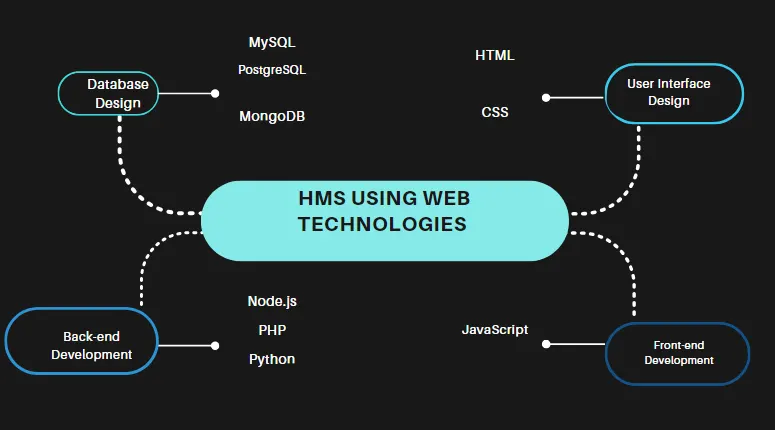
Developing a basic Healthcare Management System (HMS) using web technologies like HTML, JavaScript, and a database requires a comprehensive approach and knowledge of these technologies. Here is a high-level overview of the steps involved:
1. Requirements Gathering: Understand the specific requirements and functionalities of the HMS, such as patient management, appointment scheduling, medical record management, billing, etc.
2. Database Design: Design a database schema to store the necessary data, including tables for patients, doctors, appointments, medical records, etc. Choose a suitable database system like MySQL, PostgreSQL, or MongoDB.
When designing a database schema for a Healthcare Management System (HMS), it's essential to consider the necessary data entities and their relationships. Here's a sample database schema design that includes tables for patients, doctors, appointments, and medical records:
1. Patients Table:
- patient_id (Primary Key)
- first_name
- last_name
- date_of_birth
- gender
- contact_number
- address
2. Doctors Table:
- doctor_id (Primary Key)
- first_name
- last_name
- specialization
- contact_number
- email
3. Appointments Table:
- appointment_id (Primary Key)
- patient_id (Foreign Key referencing Patients table)
- doctor_id (Foreign Key referencing Doctors table)
- appointment_date
- appointment_time
- status (e.g., scheduled, canceled, completed)
4. Medical Records Table:
- record_id (Primary Key)
- patient_id (Foreign Key referencing Patients table)
- doctor_id (Foreign Key referencing Doctors table)
- appointment_id (Foreign Key referencing Appointments table)
- diagnosis
- prescription
- test_results
The database schema for a hospital management system, including tables for patients, doctors, appointments, and medical records.
This example uses MySQL as the database system:
-- Table: patients
CREATE TABLE patients (
id INT PRIMARY KEY AUTO_INCREMENT,
name VARCHAR(100) NOT NULL,
gender ENUM('Male', 'Female', 'Other') NOT NULL,
dob DATE NOT NULL,
address VARCHAR(255) NOT NULL,
contact_number VARCHAR(15) NOT NULL
);
-- Table: doctors
CREATE TABLE doctors (
id INT PRIMARY KEY AUTO_INCREMENT,
name VARCHAR(100) NOT NULL,
specialization VARCHAR(100) NOT NULL,
contact_number VARCHAR(15) NOT NULL
);
-- Table: appointments
CREATE TABLE appointments (
id INT PRIMARY KEY AUTO_INCREMENT,
patient_id INT NOT NULL,
doctor_id INT NOT NULL,
appointment_date DATETIME NOT NULL,
remarks VARCHAR(255),
FOREIGN KEY (patient_id) REFERENCES patients(id),
FOREIGN KEY (doctor_id) REFERENCES doctors(id)
);
-- Table: medical_records
CREATE TABLE medical_records (
id INT PRIMARY KEY AUTO_INCREMENT,
patient_id INT NOT NULL,
doctor_id INT NOT NULL,
record_date DATETIME NOT NULL,
diagnosis VARCHAR(255),
prescription VARCHAR(255),
FOREIGN KEY (patient_id) REFERENCES patients(id),
FOREIGN KEY (doctor_id) REFERENCES doctors(id)
);
the patients table stores information about patients, including their name, gender, date of birth, address, and contact number. The doctors table stores information about doctors, including their name, specialization, and contact number.
The appointments table keeps track of appointments, including the patient ID, doctor ID, appointment date, and optional remarks. The medical_records table stores medical records, including the patient ID, doctor ID, record date, diagnosis, and prescription.
As for the choice of database system, we can consider popular options like MySQL, PostgreSQL, or MongoDB. Each has its own strengths and considerations:
- MySQL: A widely used relational database management system known for its performance, scalability, and ease of use.
- PostgreSQL: Another powerful and feature-rich relational database system that offers advanced functionalities and strong data integrity.
- MongoDB: A NoSQL database system that provides flexibility in handling unstructured data and scalability for large-scale applications.
The selection of the database system should be based on factors such as the volume of data, expected usage patterns, and data relationships.
3. User Interface Design: Create HTML and CSS templates for the user interface of the HMS, including pages for registration, login, dashboard, patient management, appointment scheduling, etc. Ensure the design is user-friendly and intuitive.
Html code: HTML code with added functionalities for creating appointments, login pages for doctors and administrators, and forms for adding patients and writing reports.
<!DOCTYPE html>
<html>
<head>
<title>HMS - Dashboard</title>
<link rel="stylesheet" type="text/css" href="style.css">
</head>
<body>
<header>
<h1>HMS - Hospital Management System</h1>
</header>
<nav>
<ul>
<li><a href="index.html">Home</a></li>
<li><a href="login.html">Login</a></li>
<li><a href="register.html">Register</a></li>
<li><a href="dashboard.html">Dashboard</a></li>
</ul>
</nav>
<section>
<h2>Welcome to the Dashboard</h2>
<p>This is the dashboard page of the Hospital Management System.</p>
<h3>Create Appointment</h3>
<form action="create_appointment.php" method="POST">
<label for="patient_name">Patient Name:</label>
<input type="text" name="patient_name" required><br>
<label for="doctor">Doctor:</label>
<select name="doctor" required>
<option value="Dr. Smith">Dr. Smith</option>
<option value="Dr. Johnson">Dr. Johnson</option>
<option value="Dr. Brown">Dr. Brown</option>
</select><br>
<label for="appointment_date">Appointment Date:</label>
<input type="date" name="appointment_date" required><br>
<input type="submit" value="Create Appointment">
</form>
<h3>Doctor Login</h3>
<form action="doctor_login.php" method="POST">
<label for="doctor_username">Username:</label>
<input type="text" name="doctor_username" required><br>
<label for="doctor_password">Password:</label>
<input type="password" name="doctor_password" required><br>
<input type="submit" value="Login">
</form>
<h3>Administrator Login</h3>
<form action="admin_login.php" method="POST">
<label for="admin_username">Username:</label>
<input type="text" name="admin_username" required><br>
<label for="admin_password">Password:</label>
<input type="password" name="admin_password" required><br>
<input type="submit" value="Login">
</form>
</section>
<footer>
<p>© 2023 HMS. All rights reserved.</p>
</footer>
</body>
</html>
HMS - Hospital Management System
Welcome to the Dashboard
This is the dashboard page of the Hospital Management System.
Create Appointment
Doctor Login
Administrator Login
CSS Template (style.css):
body {
font-family: Arial, sans-serif;
margin: 0;
padding: 0;
}
header {
background-color: #333;
color: #fff;
padding: 20px;
}
nav {
background-color: #666;
color: #fff;
padding: 10px;
}
nav ul {
list-style-type: none;
margin: 0;
padding: 0;
}
nav ul li {
display: inline;
margin-right: 10px;
}
nav ul li a {
color: #fff;
text-decoration: none;
}
section {
padding: 20px;
}
footer {
background-color: #333;
color: #fff;
padding: 10px;
text-align: center;
}
4. Front-end Development: Use JavaScript to add interactivity to the web pages. Implement features like form validation, data retrieval from the backend, dynamic updating of UI elements, etc.
5. Back-end Development: Build the server-side logic using a server-side language like Node.js, PHP, or Python. Implement APIs for handling user authentication, data storage and retrieval, appointment scheduling, billing calculations, etc.
6. Integration: Connect the front-end and back-end components by making API calls to fetch and update data. Ensure proper data validation and error handling.
7. Testing: Perform unit testing and integration testing to identify and fix any bugs or issues in the system. Test the HMS on different devices and browsers to ensure compatibility.
8. Deployment: Host the HMS on a web server or a cloud platform. Configure the server environment and database settings. Secure the system by implementing appropriate authentication and authorization mechanisms.
9. Maintenance and Updates: Regularly monitor the system for performance, security, and stability. Apply updates and enhancements as needed based on user feedback and evolving requirements.
It's important to note that developing a comprehensive Healthcare Management System requires a deep understanding of web development and databases. It's recommended to seek professional assistance or collaborate with experienced developers to ensure the system meets industry standards and regulations.
A hospital management system incorporates various technologies to streamline and automate the operations of a healthcare facility. Some of the key technologies used in hospital management systems include:
1. Web Technologies: Hospital management systems are often built using web technologies such as HTML, CSS, and JavaScript. These technologies enable the development of user-friendly interfaces accessible through web browsers, allowing healthcare providers to access and manage information from anywhere with an internet connection.
2. Database Systems: Hospital management systems rely on robust database systems to store and manage vast amounts of patient data, medical records, inventory information, and other relevant data. Popular database systems used in hospital management include MySQL, PostgreSQL, and Oracle.
3. Integration Technologies: Hospital management systems need to integrate with various third-party systems and devices such as laboratory equipment, radiology machines, billing systems, and electronic health record (EHR) systems. Integration technologies like Application Programming Interfaces (APIs) and Health Level 7 (HL7) standards are utilized to facilitate seamless data exchange between different systems.
4. Mobile Technologies: With the widespread use of smartphones and tablets, mobile technologies play a vital role in hospital management systems. Mobile apps allow healthcare providers to access patient information, view schedules, and perform tasks on the go, enhancing efficiency and accessibility.
5. Cloud Computing: Cloud-based hospital management systems are gaining popularity due to their scalability, cost-effectiveness, and easy accessibility. Cloud technologies enable healthcare providers to store and access data securely on remote servers, reducing the need for on-site infrastructure and facilitating remote collaboration.
6. Artificial Intelligence (AI) and Machine Learning (ML): AI and ML technologies are increasingly being integrated into hospital management systems to automate tasks, analyze large datasets, and provide valuable insights. These technologies can help with tasks like predictive analytics, diagnosis support, and optimizing resource allocation.
7. Security Technologies: Hospital management systems handle sensitive patient data, making security a top priority. Technologies such as encryption, secure authentication, and access control mechanisms are implemented to protect patient information and ensure compliance with data privacy regulations.
source code snippets of different modules with explanation in brief:
1. File I/O Module:
- Description: This module allows you to interact with files on your computer.
- Example functions: `open()` for opening a file, `read()` for reading the contents of a file, `write()` for writing data to a file, `close()` for closing a file.
2. Math Module:
- Description: This module provides mathematical functions and operations.
- Example functions: `sqrt()` for calculating the square root of a number, `sin()` for calculating the sine of an angle, `ceil()` for rounding up to the nearest integer, `floor()` for rounding down to the nearest integer.
3. DateTime Module:
- Description: This module allows you to work with dates and times.
- Example functions: `datetime()` for creating a datetime object, `strftime()` for formatting dates and times, `today()` for getting the current date, `timedelta()` for performing operations with dates and times.
4. Random Module:
- Description: This module provides functions for generating random numbers and values.
- Example functions: `random()` for generating a random float between 0 and 1, `randint()` for generating a random integer within a specified range, `choice()` for selecting a random element from a sequence, `shuffle()` for shuffling the elements of a sequence.
5. String Module:
- Description: This module provides functions for working with strings.
- Example functions: `upper()` for converting a string to uppercase, `lower()` for converting a string to lowercase, `split()` for splitting a string into a list of substrings, `join()` for concatenating a list of strings into a single string.
Each programming language may have its own set of modules with different functions and purposes.
Reference:
1. https://datamateindia.com/a-complete-overview-of-hospital-management-system/