Project - Design a Hospital Management system
Hospital Management System:
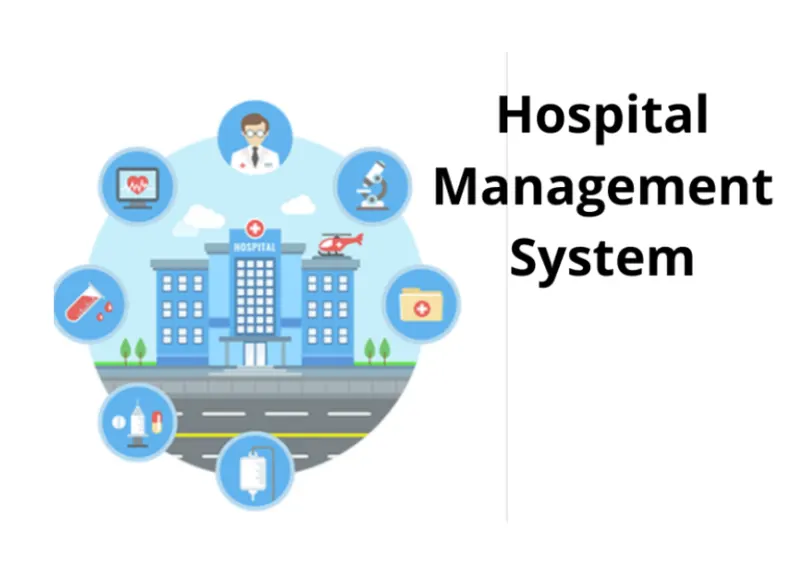
Healthcare management is exactly what the name implies. It’s the overall management of a healthcare facility, such as a clinic or hospital. A healthcare manager is in charge of ensuring a healthcare facility is running as it should in terms of budget, the goals of the facility’s practitioners and the needs of the community. A person in charge of healthcare management oversees the day-to-day operations of the facility.
This individual also acts as a spokesperson when providing information to the media. The person in charge of healthcare management also collaborates with medical staff leaders on issues such as medical equipment, department budgets, planning ways to ensure the facility meets their goals and maintaining a good relationship with doctors, nurses, and all department heads. The healthcare manager also makes decisions about performance evaluations, staff expectations, budgeting, social media updates, and billing.
You might imagine hospital managers when you think of careers in healthcare management. However, these jobs exist at every level. For people who prefer a smaller operation, a job as an office manager may be right. Similarly, those with degrees in healthcare management also have the option of working as home health agency managers.
These managers have a variety of responsibilities. Like managers in just about every field, they will handle the scheduling of care workers like nurses and CNAs. They also will make sure patients receive quality care. In order to do this, they may design patient care surveys and address any patient complaints that arise.
“Healthcare management” is an umbrella term that covers a wide variety of job titles. Clinical directors, healthcare supervisors, health coordinators, and nursing home facilitators often have degrees in healthcare management. And while you may think of healthcare managers as people who work at hospitals or in private practice, they may also work at colleges or universities, public health centers, urgent care clinics, insurance companies, or pharmaceutical companies.
There are also more specialized areas of healthcare management that those with healthcare management degrees may want to look into. A great example is health information management. Nearly every type of healthcare practice — from hospitals to urgent care centers to general practitioner’s offices — maintains a database of patient health information. These databases are maintained by a variety of professionals. IT specialists design the databases themselves, doctors and other employees input health information, and medical billing and coding specialists make sure that procedures are properly coded for insurance purposes.
Health facilities need someone to look at the big picture and make sure that the databases are functioning as a whole. They may oversee each individual aspect of the database. For instance, a health information manager will work with cybersecurity. analysts to make sure the database is secure enough to protect patient information from leaks. They also may work with doctors and nurses to optimize documentation of procedures and clinic visits. And in order to make sure databases perform optimally, they regularly assess the data collection and documentation process.
Data Flow Diagram (DFD)
A Data flow diagram is a graph showing the flow of data values from their sources in objects through processes that transform them to their destination in other objects. A DFD also known as “bubble chart”, has the purpose of clarifying the system requirements and identifying major transformation that will become programs in system design.So, it is the starting point of the design phase that functionally decomposes the requirements specifications down to the lowest level of detail. A DFD consists of a series of bubbles joined by lines.
DFD uses a number of symbols to represent systems. Most Data flow modeling method use 4 kinds of symbols to represent four kinds of system components:
- Process: A process shows a transformation or manipulation of data flows within the system.
- External identity: External entities are outside the system, but they either supply input data into the system or use system output.
- Data flow: A data flow shows flow of information from source to destination. A data flow is represented by a line, with arrowhead showing the direction of flow.
- Database: Database is a huge collection of data. It is used for storage purpose.
As per the figure attached below (Figure name: Level 0 DFD, Level 1 DFD and Level 2 DFD) the different modules are discussed below.
Administration module:
Input: User Name, Password
Process Definition: - Login to the system
Output: If login is successful then administrator can view and update the records.
Inpatient module:
Hospital Management System
Input: Inpatient detail
Process Definition: Information about the treatment given to the patients who are admitted.
Output: Information about the patient.
Interface with other module: - The inpatient details are necessary for lab reports and billing.
Outpatient module:
Input: Outpatient detail
Process Definition: This module has the information about the treatment given to the patient who are came to check up.
Output: Information about the patient.
Interface with other module: - The outpatient details are necessary for lab reports and billing.
Lab module:
Input: Patient ID, Category
Process Definition: Laboratory reports of the patient.
Output: Lab report and charge.
Interface with other module: This module requires information from inpatient and outpatient modules.
Billing module:
Input: Patient ID
Process Definition: Calculates bill and deduct amount if any card facility is available.
Output: Bill.
Interface with other module: Billing module requires information from inpatient and outpatient modules.
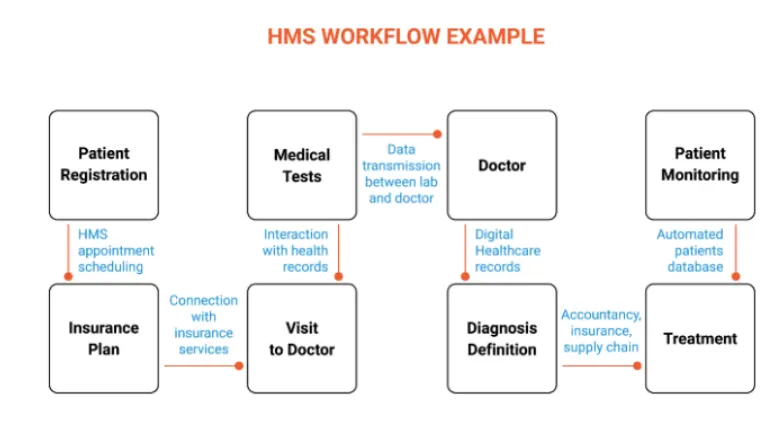
To develop the front-end of a healthcare management system (HMS) with basic functionalities like creating appointments, we will need to use web technologies such as HTML, CSS, and JavaScript. Here is an outline of how you could go about building this functionality:
- Design the user interface (UI) for creating appointments. This will involve creating the layout and visual design of the appointment creation form, as well as any other UI elements that will be needed (e.g. navigation menu, header, footer). You can use HTML and CSS to create the structure and styling of the UI.
- Implement the appointment creation form using HTML. This will involve creating the form fields and labels that will be needed to collect information about the appointment (e.g. patient name, appointment date, appointment time). You can use the form and input elements in HTML to create the form.
- Add JavaScript code to handle form submissions and validate input. This will involve writing JavaScript code to handle the event of the form being submitted, as well as validating the input to ensure that it is in the correct format (e.g. date is in the future, time is in a valid format). You can use JavaScript event listeners and regular expressions to implement this functionality.
- Implement the login pages for doctors and administrators. This will involve creating separate login pages for doctors and administrators, each with their own set of form fields and validation rules. You can use similar techniques as above to build these pages.
- Test the front-end functionality. This will involve testing the appointment creation form and login pages to ensure that they are functioning as expected and are free of errors.
7 Steps to Build a Doctor Appointment App
The design and custom development of an online doctor appointment system is not a trivial task. Here are our recommendations that will help you develop a doctor appointment app that will succeed.
STEP 1: GET YOUR DOCTOR DATABASE READY
If you think of it, the development of a healthcare app is akin to on-demand doctor app development. From the user’s standpoint, what you offer is a marketplace, and doctors (and their services) are the product. And the way the user orders a product is by doctor appointment scheduling.
So, the first thing you need to do is ensure you have the product. If you are working with a specific clinic, do you have a database of doctors? Will you be able to access it via APIs?
You might want to explore publicly available doctor databases and APIs:
- 1upHealth
- Doctor.com
- BetterDoctor
- Doctor Database
STEP 2: VERIFY A PROTOTYPE
Once you have decided on the app’s data sources, the next item on your doctor on-demand app development agenda is a prototype. You need to develop the visuals of all screens in the app and verify its features with a clickthrough prototype.
Please note that the driving force for UI/UX iterations should be the feedback from your medical staff and test users. Make sure to bring in qualified personnel to verify online doctor consultation app development from the providers’ side.
STEP 3: REVIEW OFF-THE-SHELF SCHEDULING TOOLS
When you create a doctor scheduling app, the most time-consuming chunk will be developing a scheduling engine. That’s if you build it from scratch. A better option, however, is to pick an off-the-shelf scheduling API like those provided by Acuity, Timekit, or OnSched.
Using these or similar APIs, you can significantly speed up the custom mobile app development process, but mind that this choice will influence your UI. The thing with scheduling APIs / SDKs is that they don’t provide too much flexibility with the look and feel of a calendar.
That’s not to say, though, that you can’t use these tools to make your app look unique. It’ll just take more than a simple plug-in integration.
You are welcome to check out more plug-and-play solutions to accelerate your app development.
STEP 4: CODE
The boring stuff still needs to take place for your appointment app to materialize. As for us, we love that part, and we know how to turn it into a captivating experience for you too. Our development team moves with quick iterations and keeps the coding process entirely transparent for you by holding regular meetings. That way, you can easily track the project’s progress and make all the right calls in time.
Since you’ll need to code the web and mobile parts of your doctor booking app, we advise that you do this in sync to avoid prolonged code refactoring later on. In the process, your software development team will not only code the medical staff scheduling software but also build APIs to integrate the app with medical records.
If you want to build doctor appointment app for Android and iOS, using cross-platform development tools like React Native or Flutter will help you optimize the budget.
import datetime
Code:
def getdate():
# to get date and time
return datetime.datetime.now()
def selectname():
name = {1: "Nilesh", 2: "Shanu"}
b = {1: "Food", 2: "Exercise"}
for key, value in name.items():
# taking input of name
print("Press", key, "for", value, "\n", end="")
n = int(input("type here.."))
if n > 2:
print("error select 1 or 2")
exit()
else:
return n
def select_file_action():
a = {1: "Log", 2: "Retrieve"}
for key, value in a.items():
# taking input of function that user wants to
# do (either log or retrieve)
print("Press", key, "for", value, "\n", end="")
x = int(input("type here.."))
if x > 2:
print("error select 1 or 2")
exit()
else:
return x
def select_task():
b = {1: "Food", 2: "Exercise"}
for key, value in b.items():
# ask user to choose between food
# and exercise
print("Press", key, "for", value, "\n", end="")
y = int(input("type here.."))
if y > 2:
print("error select 1 or 2")
exit()
else:
return y
def action(n, x, y):
# condition no 1
if n == 1 and x == 1 and y == 1:
value = input("type here\n")
with open("nilesh food.txt", "a") as nileshfood:
# printing date and time
nileshfood.write(str([str(getdate())]) + ": " + value + "\n")
print("successfully written")
# condition no 2
elif n == 1 and x == 1 and y == 2:
value = input("type here\n")
# printing date and time
with open("nilesh exercise.txt", "a") as nileshexercise:
# printing date and time
nileshexercise.write(str([str(getdate())]) + ": " + value + "\n")
print("successfully written")
# condition 3
elif n == 2 and x == 1 and y == 1:
value = input("type here\n")
# printing date and time
with open("shanu food.txt", "a") as shanufood:
# printing date and time
shanufood.write(str([str(getdate())]) + ": " + value + "\n")
print("successfully written")
# condition 4
elif n == 2 and x == 1 and y == 2:
value = input("type here\n")
# printing date and time
with open("shanu exercise.txt", "a") as shanuexercise:
# printing date and time
shanuexercise.write(str([str(getdate())]) + ": " + value + "\n")
print("successfully written")
# condition 5
elif n == 1 and x == 2 and y == 1:
# printing date and time
with open("nilesh food.txt", "r") as nileshfood:
a = nileshfood.read()
print(a)
# condition no 6
elif n == 1 and x == 2 and y == 2:
# printing date and time
with open("nilesh exercise.txt", "r") as nileshexercise:
a = nileshexercise.read()
print(a)
# condition no 7
elif n == 2 and x == 2 and y == 1:
# printing date and time
with open("shanu food.txt", "r") as shanufood:
a = shanufood.read()
print(a)
# condition no 8
elif n == 2 and x == 2 and y == 2:
# printing date and time
with open("shanu exercise.txt", "r") as shanuexercise:
a = shanuexercise.read()
print(a)
n = selectname()
x = select_file_action()
y = select_task()
action(n, x, y)
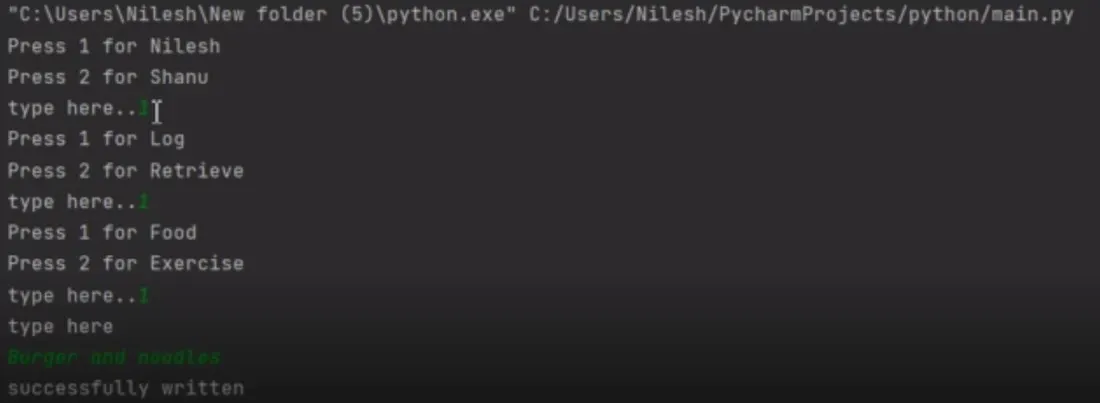
Output:
STEP 5: FACTOR IN HIPAA COMPLIANCE
As you continue to create a doctor appointment app, make sure you build it using a secure architecture aligned with the HIPAA regulations, especially HIPAA compliant video conferencing and messaging. Some of the things you need to consider:
- PHI data encryption
- SSL connections
- HIPAA-as-a-Service cloud platforms
- HITECH Act, GDPR, and other regulations
Related: How to Build a HIPAA Compliant App Development
STEP 6: TEST
Of course, you can’t make a doctor booking app without testing it thoroughly. In real life, the quality assurance phase begins simultaneously with coding and follows every development sprint. However, final testing covers all app functionality and includes such things as stress testing, security, and unit tests.
Related: The Complete Guide to User Testing: Steps, Tools, Best Practices
STEP 7: RELEASE AND MAINTAIN
And the last step is releasing the app so that users can make a doctor appointment. However, adding mobile apps to app stores and moving the web dashboard to a “live” server, e.g. on the AWS (Amazon Web Services) environment, is not the end of the story.
You will need to update the app regularly to support new mobile OS versions and enhance its functionality, depending on the user feedback.
As you can see, the design and development of online doctor appointment system can be quite tricky, and it’s advisable to consult with experts before starting such a project.
This is a high-level outline of how we can go about developing a basic healthcare management system using web technologies, a database, and other technologies:
- Define the requirements and scope of the HMS. This will involve identifying the key features and functions that the HMS should have, as well as the target user group (e.g. patients, doctors, administrators).
- Choose the appropriate web technology stack for the HMS. This will involve selecting the programming language(s), framework(s), database(s), and other tools and technologies that will be used to build and deploy the HMS.
- Design the database schema for the HMS. This will involve creating tables, fields, and relationships to represent the data that the HMS will need to store and manage, such as patient records, appointment schedules, and medication lists.
- Implement the HMS front-end using web technologies. This will involve building the user interface (UI) and user experience (UX) of the HMS using HTML, CSS, JavaScript, and any other front-end frameworks or libraries that are required.
- Implement the HMS back-end using web technologies and a database. This will involve writing server-side code to handle requests from the front-end, retrieve and manipulate data from the database, and provide a response to the front-end.
- Test and debug the HMS. This will involve identifying and fixing any issues that arise during the development process, as well as conducting user acceptance testing to ensure that the HMS meets the requirements and is usable by the target user group.
- Deploy the HMS. This will involve setting up the necessary infrastructure (e.g. web servers, database servers) and configurations to make the HMS available to users over the internet.
The features of HMS are:
- Appointment Management: For hospitals having their own site, appointment widgets will be integrated onto the site. Patients visiting the hospital’s website can book online appointments with ease.
- Billing Management: Integrated Billing with treatments, Lab and Radiology. Alerts will be sent on Discount Authorisation. Automatic due capture, Option to bill before and after consultation.
- Prescription Management: Manage commonly and recently used medicines. Option to show medicines available in the pharmacy. SMS prescriptions to Patients.
- Discharge Summary: Template based Discharge Summary. ICD10 integration. Option to prevent discharge summary till IP bill is closed.
- Operation Theatre Management: Automatic notification can be sent to customers on test results. Lab notifications like email, SMS of the test reports sent from the Automated Lab notification module.
- Pharmacy Management: Comprehensive Pharmacy Management handles stock, Prescription Integration, Ward Request, Stock Management, Stock Moment and intelligent reports.
- Lab Management: Comprehensive Lab Management handles complete order management, Custom Reports, Smart Notifications, Credit Settlement, detailed MIS Reports, Analytics and App for Phlebotomist.