Project 8
Optical Flow is a method to estimate the apparent flow of scene points from a sequence of images taken in quick succession.
Lucas Kanade Optical Flow method assumes flow is locally smooth and Neighboring pixels have same displacement. Optical flow is estimated by solving optical flow equations for all the pixels in the neighborhood using Least Squares method.
Procedure:
1) A video capture object is created using cv2.VideoCapture()
2) The first frame is then read using capture.read()
Lucas Kanade is a sparse optical flow method which estimates the flow for the selected set of interest points. The interest points is selected using Shi-Thomasi feature detector. cv2.goodFeaturesToTrack() is used to find the feature points using Shi-Thomasi feature detector.
3) The feature points for the first frame is detected using the Shi-Thomasi detector. find_features() detects the keypoints using cv2.goodFeaturesToTrack().
4) While loop is initiated to read and perform operations on successive frames of the video
5) From the previous frame image, current frame image and detected keypoints the Lucas Kanade optical flow is computed for the first sequence in the video
6) Similarly for each further sequences the optical flow is computed
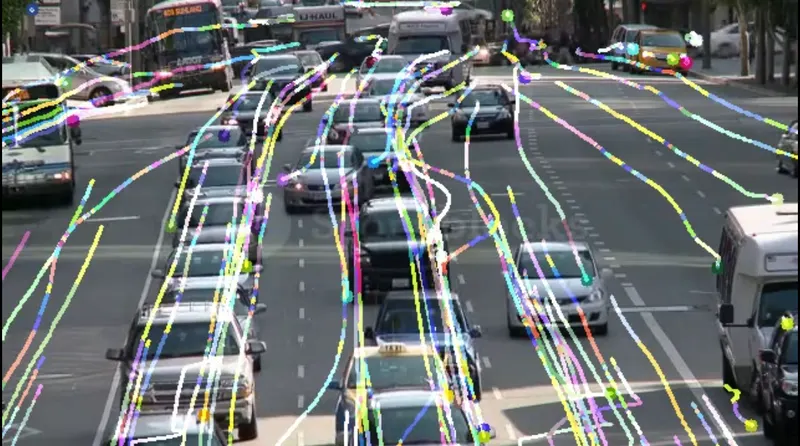
7) For each optical flow computed a line is drawn using cv2.line() and detected points in each frame are marked using cv2.circle()
8) The line and circle drawn are then added to the original frames
9) The output is displayed using cv.imshow()
10) Also the output is appended to a list to covert it to a video
10) After iterating through all the frames the while loop is terminated
11) Finally the output frames are written into a video using cv2.VideoWriter() and writing by appending through each output frame
Code:
# Import the required libraries
import cv2
import numpy as np

# cv2.goodFeaturesToTrack is used find the features using Shi-Tomasi corner detector algorithm
def find_features(gray_image):
    # gray_image - Input image in which features has to be detected
    # maxCorners - If there are more than 100 corners detected, then only strongest 100 is returned
    # qualityLevel - To determine the minimum accepted quality of a corner
    # minDistance - Minimum distance between two corners
    # points - Returns the feature points using Shi-Thomasi corner detection algorithm
    points = cv2.goodFeaturesToTrack(gray_image,mask = None, maxCorners = 100,qualityLevel = 0.2,minDistance = 10,blockSize = 7)
    return points

# Preforms Lukas Kanade Optical flow
def LK_model(gray_t_1,gray_t,prev_points):
    # gray_t_1 - Previous frame image in gray scale
    # gray_t - Current frame image in gray scale
    # winSize - Size of search window
    # maxLevel - Maximum pyramid level. Since set to 2, three levels of pyramid are used
    # criteria - Termination criteria for algorithm when max number of iterations is reached or search window moves less than criteria
    # The function returns the next points, status whether correspondance is found and the error
    points,status,error = cv2.calcOpticalFlowPyrLK(gray_t_1,gray_t,prev_points,None,winSize = (20,20),maxLevel=2,criteria = (cv2.TERM_CRITERIA_EPS | cv2.TERM_CRITERIA_COUNT, 10, 0.04))
    return (points,status,error)

capture = cv2.VideoCapture("traffic.mp4")       # Creating a video capture object
color = np.random.randint(0,255,(100,3))       # Creating a list of 100 BGR value to draw lines for each feature
ret,prev_frame = capture.read()                # Reads the video
# ret - Boolean value; True if frame is detected and read
# prev_frame - frame read in BGR format
prev_gray= cv2.cvtColor(prev_frame,cv2.COLOR_BGR2GRAY)        # Initialize the first frame to prev_gray in gray scale
prev_points = find_features(prev_gray)         # Find the features (keypoints) in the frame
mask_image = np.zeros_like(prev_frame)         # Intialize a mask image with zeroes of size prev_frame
output_frames = []

while(True):
    ret,frame = capture.read()   # Reads the video
    # ret - Boolean value; True if frame is detected and read
    # frame - frame read in BGR format

    if not ret:
        break         # If no frame is detected the while loop is terminated

    current_gray = cv2.cvtColor(frame,cv2.COLOR_BGR2GRAY)         # Converting the current frame to gray scale
    current_points,status,error = LK_model(prev_gray,current_gray,prev_points)    # Previous frame, current frame and previous detected points are passed
    # LK_model returns the current points,status whether corresponding feature is found and error

    if current_points is not None:
        current_points = current_points[status ==1]                 # Storing only the points with status as 1 (points for which corresponding feature is found)
        old_points = prev_points[status==1]

    for i, (current,prev) in enumerate(zip(current_points,old_points)):    # Iterating through each point
        a,b = current.ravel()
        c,d = prev.ravel()
        mask_image = cv2.line(mask_image,(int(a),int(b)),(int(c),int(d)),color[i].tolist(),2)   # Draws a line between previous point and current point each in different color
        frame = cv2.circle(frame,(int(a),int(b)),5,color[i].tolist(),-1)  # Draw a circle for each current point

    img = cv2.add(frame,mask_image)       # Adding the frame and mask_image to dispay the lines on the video itself

    cv2.imshow('frame',img)              # Displaying each output frame
    output_frames.append(img)        # Storing all the output frames in a array
    # To close the video if esc is pressed
    k = cv2.waitKey(5)
    if k ==27:
        break

    prev_gray = current_gray.copy()       # Current frame is copied to prev_gray
    prev_points = current_points.reshape(-1,1,2)        # Current points is stored in prev_points

capture.release()                 #Release the capture object

cv2.destroyAllWindows()           # Close all the windows

height,width,_ = img.shape         # Get the height and width of image
size = (width,height)              # Store the width, height as tuple

# Creating object for Writing the video
output = cv2.VideoWriter('Output_Opticalflow.mp4',cv2.VideoWriter_fourcc('F','M','P','4'), 30, size)

# Writing the video by iterating through each frame
for image in output_frames:
    output.write(image)
Output: