Project 2
Prewitt Filter
1) The image is first smoothened to remove noise using Gaussian blur.
2) The filtered image is convolved with the horizontal and vertical prewitt filter using cv.filter2D function
3) The resultant array is converted back to 8-bit image format using cv2.ConvertScaleAbs function
4) The horizontal and vertical edges are added using cv2.addWeighted function giving equal weightage to both (0.5 and 0.5)
Laplacian Filter
1) The image is first smoothened to remove noise using Gaussian blur.
2) Laplacian filter can be done using cv2.Laplacian function
Gray Scale image is given as input, ddepth is given as cv2.CV_16S because the input is in cv2.CV_8U
(On convolving if the resutant values is outside the range 0-255 the values overflow, to avoid overflow cv2.CV_16S is used instead of desired cv2.CV_8U ) The edges has very low pixel values and not visible, To increase it the scaling factor of 2 is used
3) The resultant image is converted back to 8-bit image format using cv2.ConvertScaleAbs function
COMPARISION
Prewitt Filter is based on first order derivative whereas Laplacian filter is based on second order derivative. First order derivative (Prewitt filter) generally produces thicker edges in an image. Second order derivative (Laplacian filter) gives stronger response to to even fine details. Hence Laplacian filter is generally better than Prewitt filter. Even in our image Laplacian filter has detected fine and thin edges as highlighted.
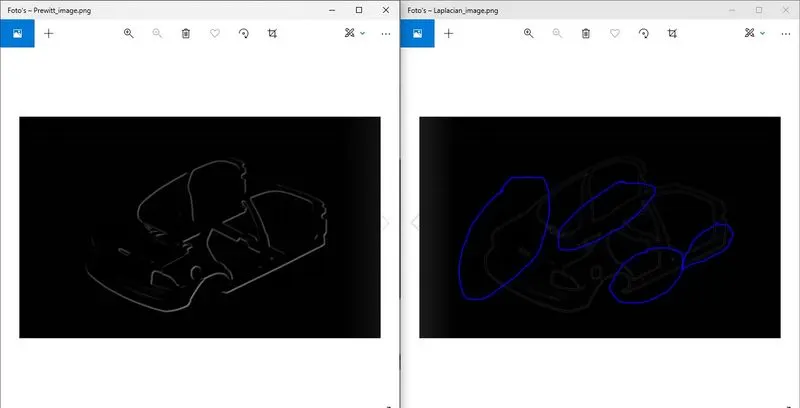
Note: The stronger response to fine details make the Laplacian filter very sensitive to noise. Hence it generally filtered using Gaussian Blur first to remove noise and then Laplacian filter is applied
# In[1]:


import cv2


# In[2]:


import numpy as np


# In[3]:


# Read a image
# [flag = (1:Color image), (0: Greyscale image), (-1: Unchanged imaged :: Useful for transparency in png)]
def read_image(image_path,flag):
    image=cv2.imread(image_path,flag)
    return image


# In[4]:


# Display a image
def dis_image(window_name,read_image):
    cv2.imshow(window_name,read_image)
    cv2.waitKey(0)


# In[5]:


# Save a image
def save_image(image_name,image):
    cv2.imwrite(image_name,image)


# In[6]:


input_image = read_image('Challenge.png',1)   #To read the image as color image


# In[7]:


def gaussian_filter(image,filter_size,sigma):
    filtered_image = cv2.GaussianBlur(image,(filter_size,filter_size),sigma)  #GaussianBlur is used to smoothen the image before edge detection
    return filtered_image


# In[8]:


def Prewitt_filter(image):
    image = gaussian_filter(image,5,5)
    vertical_filter = np.array([[-1,0,1],[-1,0,1],[-1,0,1]])                #Matrix to filter the vertical edges
    horizontal_filter = np.array([[-1,-1,-1],[0,0,0],[1,1,1]])              #Matrix to filter the horizontal edges
    vertical_filtered =cv2.filter2D(image,-1,vertical_filter)               #Convloving the matrix over the image
    horizontal_filtered=cv2.filter2D(image,-1,horizontal_filter)
    abs_grad_x = cv2.convertScaleAbs(vertical_filtered)                     #Coverting filtered image to desired 8-bit format
    abs_grad_y = cv2.convertScaleAbs(horizontal_filtered)
    grad = cv2.addWeighted(abs_grad_x,0.5,abs_grad_y,0.5,0)                 #Adding the horizontal and vertical edges
    return grad


# In[9]:


gray_image = cv2.cvtColor(input_image,cv2.COLOR_BGR2GRAY)                  #Coverting the image from BGR to Gray Scale format
prewitt_edges = Prewitt_filter(gray_image)
cv2.imshow('Prewitt_image',prewitt_edges)                                  #Display edge detection done by Prewitt filter
cv2.waitKey(0)


# In[10]:


save_image('Prewitt_image.png',prewitt_edges)                             # Save the Prewitt filter image


# In[11]:


gray_image = cv2.cvtColor(input_image,cv2.COLOR_BGR2GRAY)
gray_image = gaussian_filter(gray_image,5,5)
laplacian_edges = cv2.Laplacian(gray_image,ddepth=cv2.CV_16S,ksize=1,scale = 2)

# Gray Scale image is given as input, ddepth is given as cv2.CV_16S because the input is in cv2.CV_8U
# (On convolving if the resutant values is outside the range 0-255, to avoid overflow cv2.CV_16S is used instead of desired cv2.CV_8U )
# The edges has very low pixel values and not visible, To increase it the scaling factor of 2 is used


# In[12]:


final_laplacian_edges=cv2.convertScaleAbs(laplacian_edges)        # Converting the image back to 8-bit format


# In[13]:


cv2.imshow('Laplacian_Edge',final_laplacian_edges)                 # Displaying the edge detected using Laplacian filter
cv2.waitKey(0)


# In[14]:


save_image('Laplacian_image.png',final_laplacian_edges)           # Saving the Laplacian filter image


# In[15]:


#Comparision
prewitt_edges=cv2.resize(prewitt_edges,(697,427))
final_laplacian_edges=cv2.resize(final_laplacian_edges,(697,427))
cv2.imshow('Comparision',np.hstack((prewitt_edges,final_laplacian_edges)))
cv2.waitKey(0)