Project 2 - V&V SW Analysis II
TBrun
It is a unit/integration test tool, providing a complete verification environment for the automated generation
and management of test harnesses and unit/integration tests.
TBVision
TBVision is used to visualize coding standard violations and software flaws in the context of the original source
code.
TBExtreme
It revolutionises unit testing by using the information gathered by LDRA Testbed to provide a totally
automated solution for test vector generation.
1. Perform Static Code Review Analysis for
“C:\**\LDRA_workarea\Examples\C_Testbed_examples\Testrain\Testrain.c” Generate Code review report and
upload them.
STATIC CODE ANALYSIS
By using static code analysis, you can help developers find errors before they compile or run the code and
alert them about any other issues, such as a lack of inline documentation, bad coding standards, security
issues, performance issues, and so on.
Path : “C:\**\LDRA_workarea\Examples\C_Testbed_examples\Testrain\Testrain.c”.
Procedure: For TBrun
Open TBrun-> Source-> Single file-> Testrain.c(select path as mentioned)-> create a sequence-> Select
White box-> Run static analysis-> Extreme Test-> Run Tabular Extreme-> generate test manager report,
dynamic coverage, regression report.
For TBVision
Open TBVision-> Source-> Single file-> Testrain.c(select path as mentioned)-> Run Static Analysis->
View-> Generate TB reports-> Test Manager report
By right clicking on Testrain.c -> C coding standards-> MISRA C 2012 and CERT C 2016.
REPORTS
Reports generated from TBrun are:
1. Test Manager Report
2. Regression Report
3. Dynamic Coverage Analysis
In the above mentioned reports, there are few standard violations. To overcome this, Code Review report is
generated for above mentioned path.
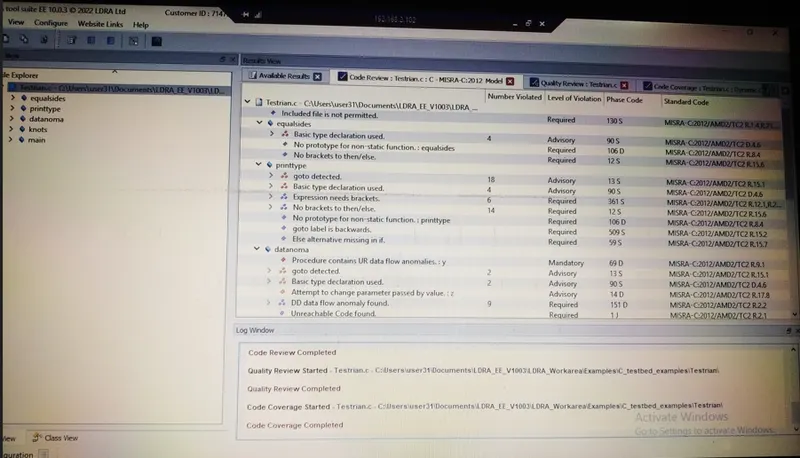
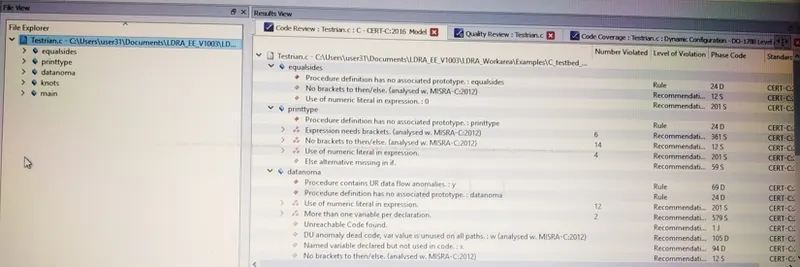
Code Review report is generated using TBVision and select the coding standards MISRA C or CERT C.
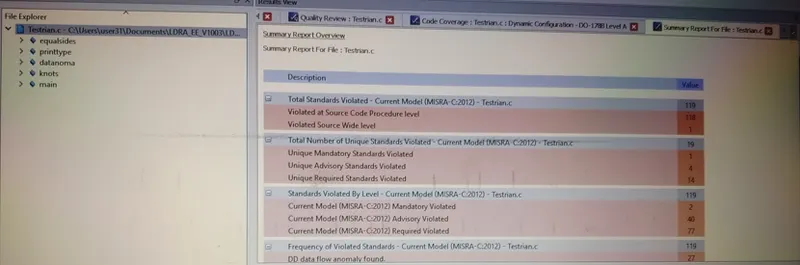
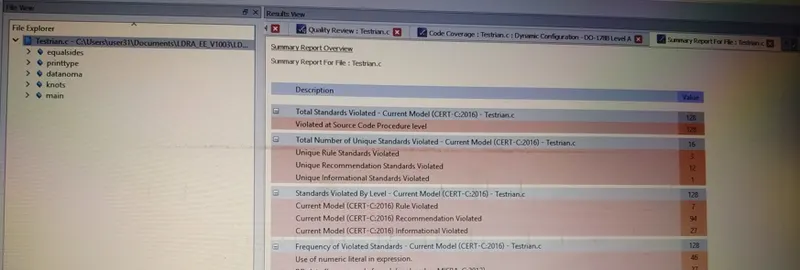
The Snapshots of code review report and summary report are attached.
MISRA C : 2012 coding standard
Summary Report
CERT C : 2016 coding standard
Summary Report
2. Perform Integration testing by including all the .C files available in the folder location
C:\**\LDRA_workarea\Examples\Toolsuite\Cashregister_6.0\ Source\Cashregister.c
A)Create the test cases manually as well as automatically using TBExtreme and upload the reports.
B)store the test cases as .tcf file. Upload the location image where the .tcf file is stored.
INTEGRATION TESTING
In this testing, two or more units of a program are combined and tested as a group. A typical software
project consists of multiple software modules, coded by different programmers. The purpose of this level of
testing is to expose defects in the interaction between these software modules when they are integrated.
A) Creating test cases using TBExtreme
Path : C:\user48\LDRA_workarea\Examples\Toolsuite\Cashregister_6.0\ Source
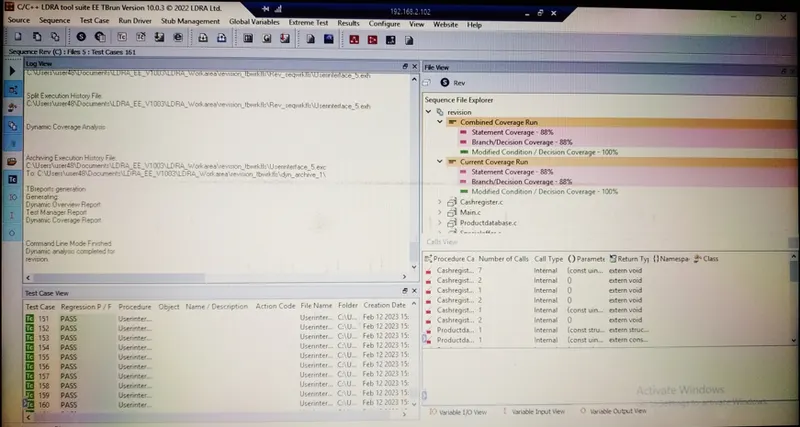
AUTOMATIC TESTING
Procedure : Source-> Multiple files-> Create a Set-> Select new set property as SYSTEM->
Add all the .c files of Source(Cashregister_6.0)-> Run LDRA testbed analysis-> Set is created with all the .c
files-> Create a sequence and stubs -> Choose White Box-> Run Static Analysis-> Extreme Test-> Run
Tabular Extreme test-> Results-> Generate Test manager, Dynamic coverage and Regression reports.
Below figure is the Snapshot of White box/ Automatic testing.
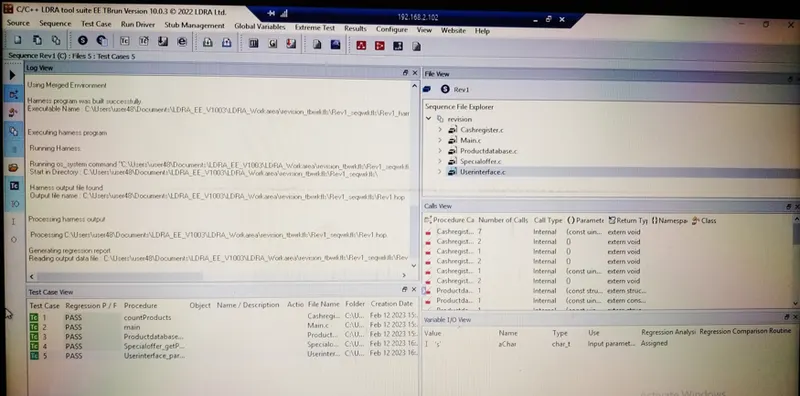
MANUAL TESTING
Procedure : Source-> Multiple files-> Create a Set-> Select new set property as SYSTEM->
Add all the .c files of Source(Cashregister_6.0)-> Run LDRA testbed analysis-> Set is created with all the .c
files-> Create a sequence and stubs -> Choose Black Box-> Run Static Analysis-> Create new test cases for
each .c file-> Run Driver-> Results-> Generate Test manager and Regression reports.
Below figure is the Snapshot of Black Box/ Manual testing - Test cases are created manually.
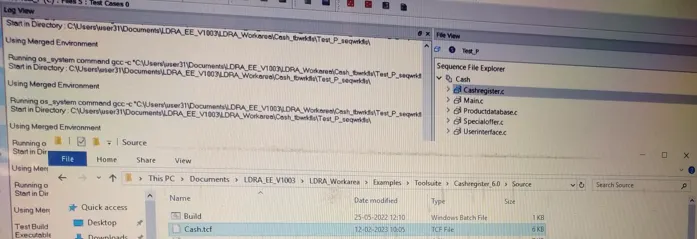
B) Location image of .tcf file
Source-> Multiple files-> Create a Set-> Select new set property as SYSTEM->
Add all the .c files of Source(Cashregister_6.0)-> Run LDRA testbed analysis-> Set is created with all the .c
files. Source-> Save File/Set as tcf-> save the name as .tcf
The .tcf file is created in the location as :
C:\user31\LDRA_workarea\Examples\Toolsuite\Cashregister_6.0\ Source\Cash.tcf