Project 2 - Measuring distance of an object using ultrasonic sensor (HC-SR04)
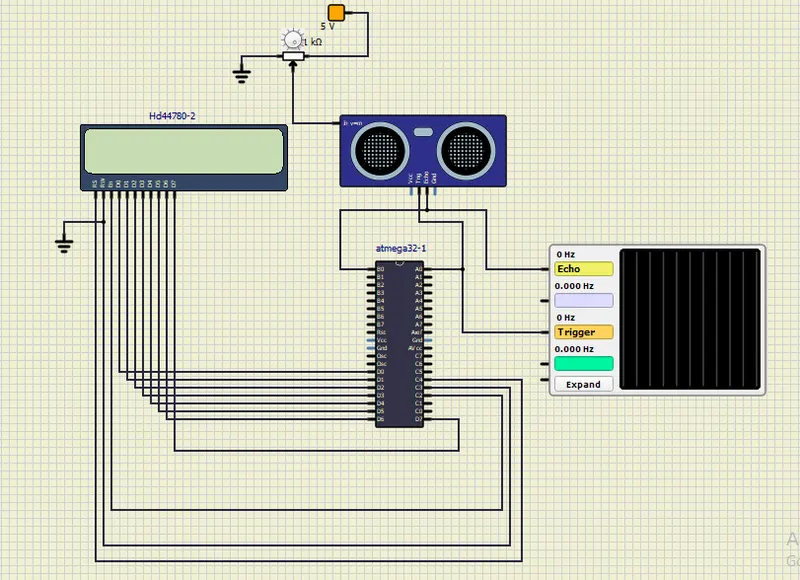
CIRCUIT
CODE
#include <avr/io.h> //we are using the I/O registers of AVR
#define F_CPU 16000000ul //define CPU frequency
#include <util/delay.h> //delay function
#include <avr/interrupt.h> //we are using external interrupt pin
#include
#include
#define lcd_data_dir DDRD // define LCD data port direction
#define lcd_command_dir DDRC // define LCD command port direction
#define lcd_data_port PORTD //define LCD data port
#define lcd_command_port PORTC // define LCD data port
#define EN PC2 // define enable
#define RW PC3 // define read/write
#define RS PC4 // define register select
void lcd_command(char); // LCD command write function
void lcd_char(char); // LCD data write function
void lcd_init(void); // LCD initialize function
void lcd_string(char*); // send string to LCD
void lcd_string_xy (char,char,char*); // send row position
void lcd_command (char cmd) // LCD command write function
{
lcd_data_port = cmd; // write command to LCD data port
lcd_command_port&=~((1<<RS)|(1<<RW)); // make RS low and RW low
lcd_command_port|= (1<<EN); // high to low transition on EN
_delay_ms(1); // delay provided
lcd_command_port&=~(1<<EN);
_delay_ms(2); // delay provided
}
void lcd_char(char char_data) // LCD data write function
{
lcd_data_port= char_data; // write data to LCD data port
lcd_command_port&=~(1<<RW); // make RW low(write)
lcd_command_port|=((1<<EN)|(1<<RS)); // make RS high and high to low transition
_delay_ms(1); // delay provided
lcd_command_port&=~(1<<EN);
_delay_ms(1); // delay provided
}
void lcd_init(void) // LCD initialize function
{
lcd_command_dir|= (1<<RS)|(1<<RW)|(1<<EN); // LCD command port direction as output
lcd_data_dir = 0xff; //make LCD data port direction as output
_delay_ms(20); // wait
lcd_command(0x38); // 16x2 LCD 8 bit
lcd_command(0x0C); // display On
lcd_command(0x06); // auto increment cursor
lcd_command(0x01); // clear LCD command
lcd_command(0x80); // 8 is the line and 0 is other position
}
void lcd_string(char *str) // send string to LCD function
{
int i;
for(i=0;str[i]!=0;i++) // sending each char string till the null
{
lcd_char (str[i]); // call LCD data write
}
}
void lcd_string_xy(char row,char pos,char *str) // send string to LCD function
{
if (row == 1)
lcd_command((pos & 0x0f)|0x80);
else if (row == 2)
lcd_command((pos & 0x0f)|(0xC0));
lcd_string(str); // call LCD string function
}
#define trigger_pin PA0 // trigger pin
int TimerOverFlow = 0;
ISR(TIMER1_OVF_vect)
{
TimerOverFlow++; // increment timer overflow count
}
int main (void)
{
char string[10];
long count;
double distance;
DDRA = 0x01; // make trigger pin as output
PORTB = 0xff; // pull-up turn on
lcd_init();
lcd_string_xy(1,0,"ultrasonic");
sei(); // enable global interrupt
TIMSK = (1<< TOIE1); // enable timer 1 overflow interrupt
TCCR1A = 0; // set all bit to zero normal position
while(1)
{
PORTA |= (1<< trigger_pin);
_delay_ms(10);
PORTA &=(~(1<< trigger_pin));
TCNT1 = 0; //clear timer counter
TCCR1B = 0x41; // capture on rising edge,no prescalar
TIFR = 1<<ICF1; // clear ICP flag
TIFR = 1<<TOV1; // clear timer overflow flag
while ((TIFR & (1<<ICF1)) == 0); // wait for rising edge
TCNT1 = 0; //clear timer counter
TCCR1B = 0x01; // capture on falling edge , no prescalar
TIFR = 1<<ICF1; // clear ICP flag
TIFR = 1<<TOV1; // clear timer overflow flag
TimerOverFlow = 0; // clear timer overflow count
while ((TIFR & (1<< ICF1))== 0); // wait for falling edge
count = ICR1 +(65535 * TimerOverFlow); // take count
distance = (double)count/466.47;
dtostrf(distance,2,2,string); // distance to string
strcat(string,"cm"); // count unit
lcd_string_xy(2,0,"dist= ");
lcd_string_xy(2,7,string); // print distance
_delay_ms(200);
}
}
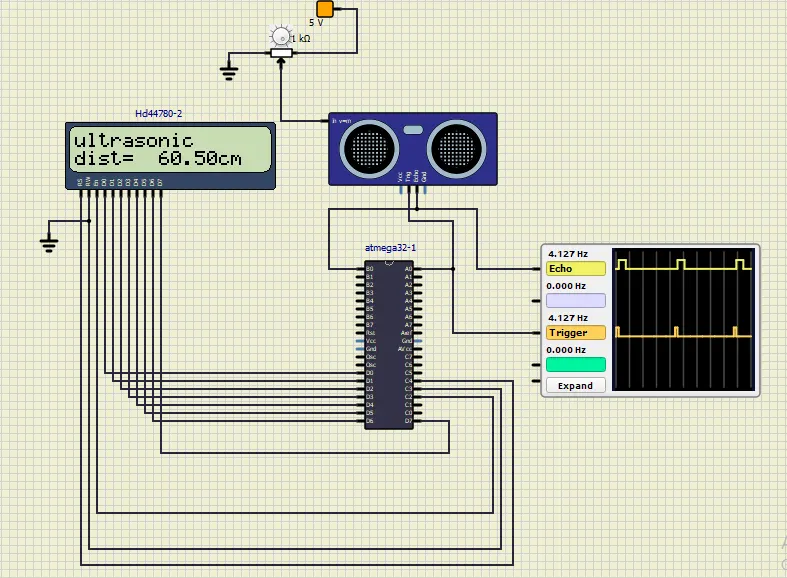
OUTPUT
Input of Sensor is connected to potentiometer which controls the clock signal.
Trigger Pin acts as output and Echo pin is connected to external clock.