Project 2 - Measuring the distance of an object using ultrasonic sensor and also smoothen the sensor data using moving average filter
Aim: To implement the code for “Measuring distance of an object using ultrasonic distance sensor (28015 Ping) and also smoothen the sensor data using moving average filter”.
Theory:
Ultrasonic Sensor - HC-SR04
An HC-SR04 ultrasonic distance sensor actually consists of two ultrasonic transducers.
One acts as a transmitter that converts the electrical signal into 40 KHz ultrasonic sound pulses. The other acts as a receiver and listens for the transmitted pulses. When the receiver receives these pulses, it produces an output pulse whose width is proportional to the distance of the object in front. This sensor provides excellent non-contact range detection between 2 cm to 400 cm (~13 feet) with an accuracy of 3 mm.
Since it operates on 5 volts, it can be connected directly to an Arduino or any other 5V logic microcontroller.
Pin Diagram:
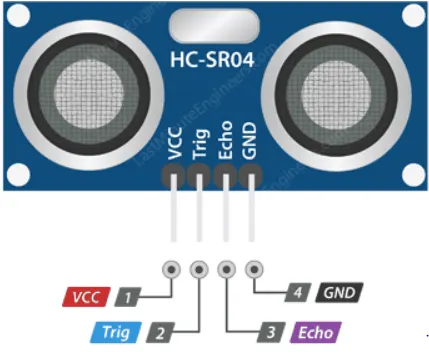
1. VCC supplies power to the HC-SR04 ultrasonic sensor. You can connect it to the 5V output from your Arduino.
2. Trig (Trigger) pin is used to trigger ultrasonic sound pulses. By setting this pin to HIGH for 10µs, the sensor initiates an ultrasonic burst.
3. Echo pin goes high when the ultrasonic burst is transmitted and remains high until the sensor receives an echo, after which it goes low. By measuring the time the Echo pin stays high, the distance can be calculated.
4. GND is the ground pin. Connect it to the ground of the Arduino.
Technical Specifications
Here are the specifications:
| Operating Voltage | DC 5V |
| Operating Current | 15mA |
| Operating Frequency | 40KHz |
| Max Range | 4m |
| Min Range | 2cm |
| Ranging Accuracy | 3mm |
| Measuring Angle | 15 degree |
| Trigger Input Signal | 10µS TTL pulse |
| Dimension | 45 x 20 x 15mm |
Working of HC-SR04:
It all starts when the trigger pin is set HIGH for 10µs. In response, the sensor transmits an ultrasonic burst of eight pulses at 40 kHz. This 8-pulse pattern is specially designed so that the receiver can distinguish the transmitted pulses from ambient ultrasonic noise.
These eight ultrasonic pulses travel through the air away from the transmitter. Meanwhile, the echo pin goes HIGH to initiate the echo-back signal.
- If those pulses are not reflected back, the echo signal times out and goes low after 38ms (38 milliseconds). Thus a pulse of 38ms indicates no obstruction within the range of the sensor.
- If those pulses are reflected back, the echo pin goes low as soon as the signal is received. This generates a pulse on the echo pin whose width varies from 150 µs to 25 ms depending on the time taken to receive the signal.
The width of the received pulse is used to calculate the distance from the reflected object. This can be worked out using the simple distance-speed-time equation.
Distance = Speed x Time.
The speed of sound is 340 m/s. To calculate the distance we need to convert the speed of sound into cm/µs. It is 0.034 cm/μs.
Distance in cm:
Distance = 0.034 cm/μs * Time
The echo pulse indicates the time it takes for the signal to be sent and reflected back. So to get the distance, you have to divide your result by two.
Distance = (0.034 cm/μs * Time) /2 or Distance = (0.034 cm/μs * Time *0.5).
Distance in inches:
Distance = (0.034 cm/μs * Time *0.5) /2.54
Code:
/* Project2 */

#include <Adafruit_LiquidCrystal.h>
Adafruit_LiquidCrystal lcd(0);

int trig = 10;	//Trigger Pin of Ultrasonic Sensor
int echo = 9;	//Echo Pin of Ultrasonic Sensor
float speed = 0.0347; //340 m/s
float dist;
float Time;

void setup()
{
  pinMode(trig, OUTPUT); //configure trigger Pin of Ultrasonic Sensor as Output
  pinMode(echo, INPUT); //configure echo Pin of Ultrasonic Sensor as Output
  lcd.begin(16,2); //initialize LCD
  lcd.setCursor(0,0); //LCD cursor to first line
  lcd.print("AVR Project 2");
  delay(10); // delay to hold the lcd data
  lcd.clear();
}

void loop()
{
  // 8 40 KHz signal for 10 uS
  digitalWrite(trig,HIGH);
  delayMicroseconds(10);
  digitalWrite(trig,LOW);
  Time = pulseIn(echo,HIGH);
  dist = (speed * Time * 0.5); //distance in cm
  dist = dist / 2.54; //distance in inch

  //To print on LCD
  lcd.setCursor(0,0); //LCD cursor to first line
  lcd.print("Distance :");
  lcd.setCursor(6,1); //LCD cursor to second line
  lcd.print(dist);
  lcd.print(" inch");

  delay(100); //to hold the lcd data
  lcd.clear();	//to clear LCD screen
}
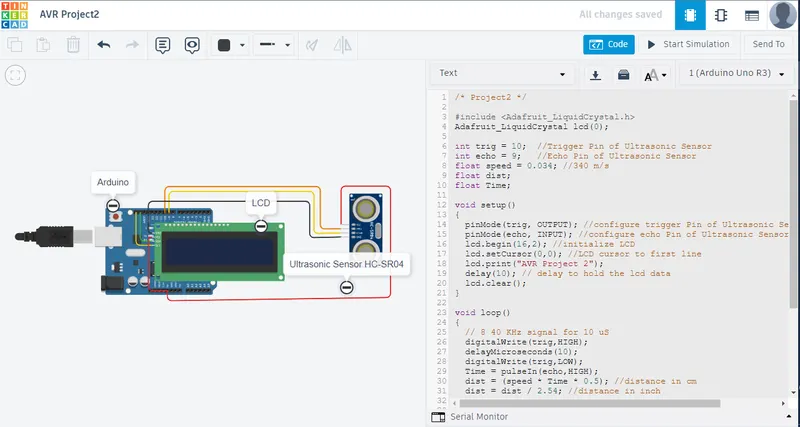
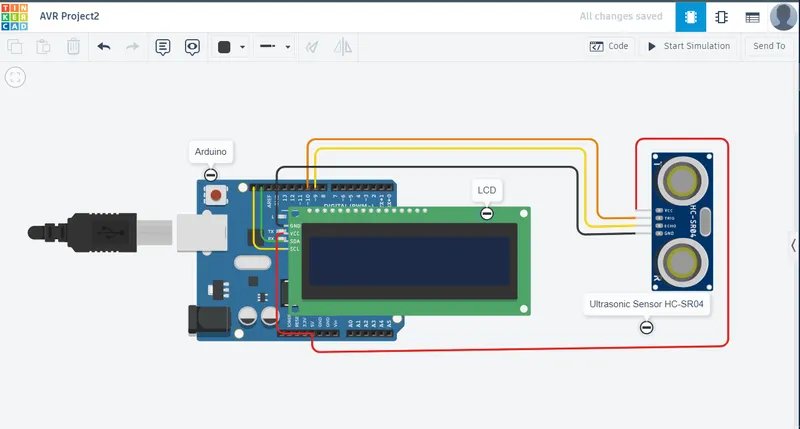
TinkerCAD Circuit
Output:
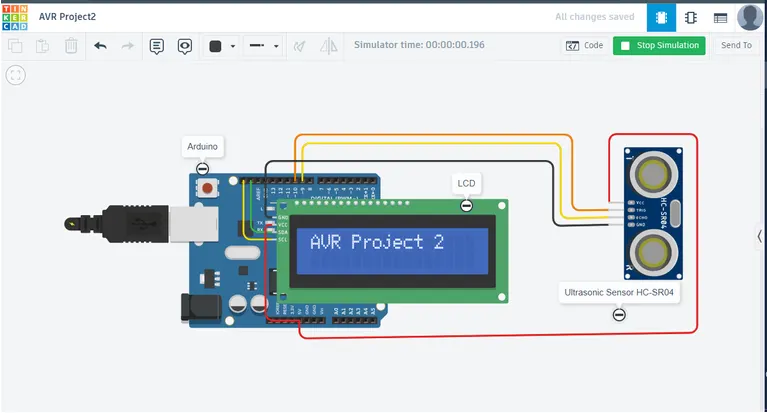
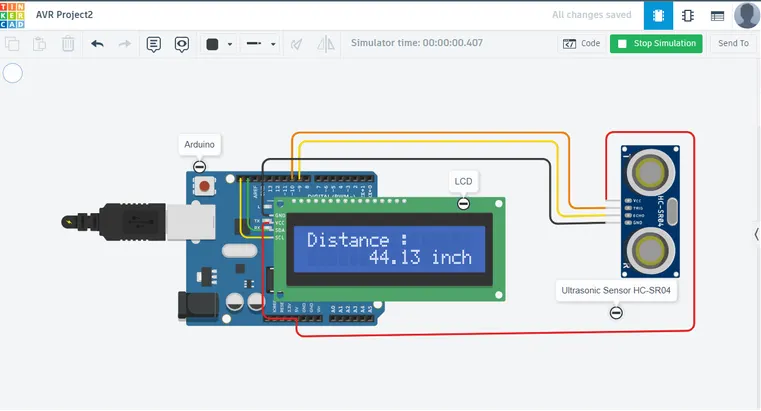
Result:
- Learned about ultrasonic sensor working, pin diagram, and connections to Arduino.
- Measured the distance in inches of an object using an Ultrasonic Distance Sensor.