Project 2 - Measuring the distance of an object using ultrasonic sensor and also smoothen the sensor data using moving average filter
Project 2 - Measuring the distance of an object using ultrasonic sensor and also smoothen the sensor data using moving average filter
Overview of the Project:
In this project the implementation of code for “Measuring distance of an object using ultrasonic distance sensor (28015 Ping) and also smoothen the sensor data using moving average filter”.
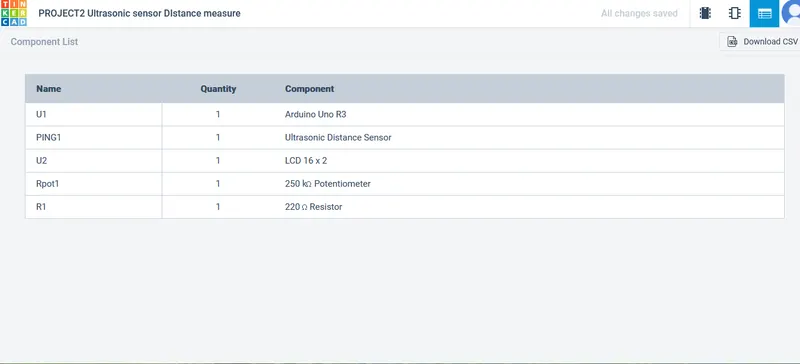
COMPONENT LIST:
BLOCK DIAGRAM:
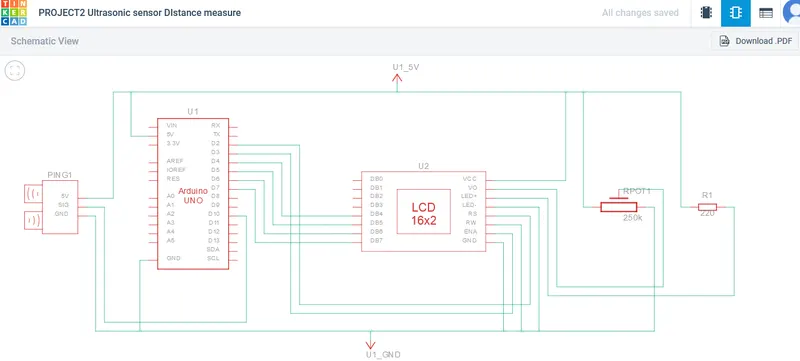
SCHEMATIC DIAGRAM:
WORKING:
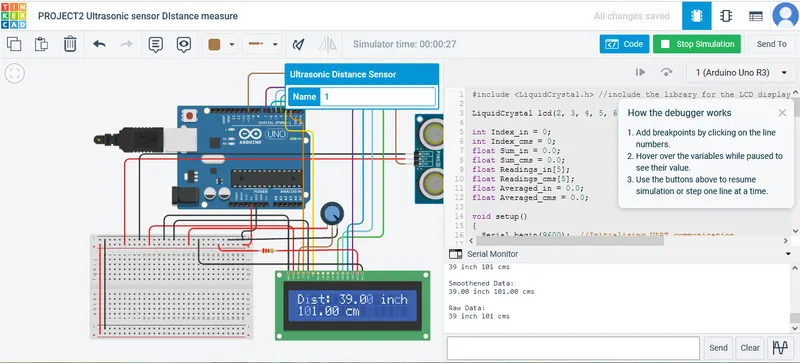
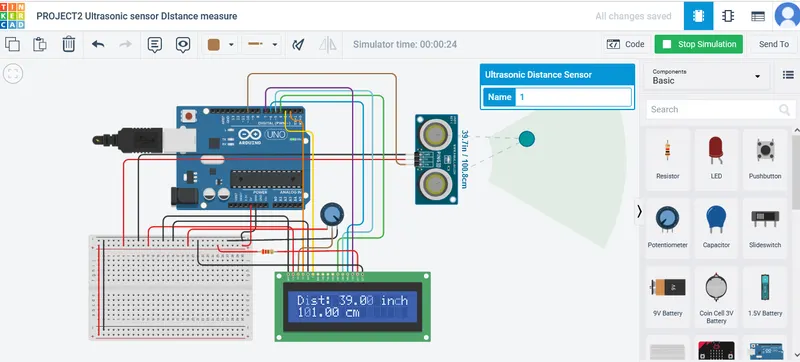
From the above connection diagram we understood that the ultrasonic sensor is connected to the arduino and the arduino program uses moving average filter.A moving average filter is a type of digital filter that calculates the average of a set of data points. The moving average filter is a simple and efficient way to smooth out noise in data. It is often used in signal processing applications, such as audio and video processing.The filtered data will be displayed using the LCD DISPLAY.
ARDUINO CODE:
#include <LiquidCrystal.h> //including the library for the LCD display
LiquidCrystal lcd(2, 3, 4, 5, 6, 7); //initializing the LCD display
int Index_in = 0; //Intialise Index_in as zero.This index is used to keep track of the current position in the Readings_in array
int Index_cms = 0; //Intialise Index_cms as zero.This index is used to keep track of the current position in the Readings_cms array
float Sum_in = 0.0; //Intialise the Sum_in as zero.This is used to calculate the summation of the inch readings and it stored in Averaged_in
float Sum_cms = 0.0; //Intialise the Sum_cms as zero.This is used to calculate the summation of the cms readings and it stored in Averaged_cms
float Readings_in[5]; //intialising the array Readings_in of 5 floating-point values that stores the last 5 sensor readings in inches.
float Readings_cms[5]; //intialising the array Readings_cms of 5 floating-point values that stores the last 5 sensor readings in cms.
float Averaged_in = 0.0; //intialising Averaged_in as zero. floating-point variable stores the averaged sensor reading in inches.
float Averaged_cms = 0.0; //intialising Averaged_cms as zero.floating-point variable stores the averaged sensor reading in cms.
void setup()
{
Serial.begin(9600); //Initializing UART communication
lcd.begin(16, 2); //initialize the LCD display 16*2
}
void loop() //main loop of the program. It will run indefinitely until the Arduino is turned off.
{
long duration, inches, cm; //Declaration of variables duration, inches and cm .Used to store ping duration and distance of object in inches and cm.
pinMode(10, OUTPUT); //Using Aduino pin 10 to send a pulse ultrasonic sensor.
digitalWrite(10, LOW); //setting the pin 10 to LOW. This is done to ensure that the ultrasonic sensor is not sending a pulse when the program starts.
delayMicroseconds(2); //delay for 2 microseconds. This is done to allow the ultrasonic sensor to stabilize before sending a pulse.
digitalWrite(10, HIGH); //setting the pin 10 to HIGH. This sends a pulse to the ultrasonic sensor.
delayMicroseconds(5); //delay for 2 microseconds. This is done to allow the ultrasonic sensor to send the pulse and receive the echo.
digitalWrite(10, LOW); //setting the pin 10 to LOW. This stops the ultrasonic sensor from sending a pulse.
pinMode(10, INPUT); //Using the same pin 10 as input to read echo from the sensor.
duration = pulseIn(10, HIGH); //Reads the echo pulse width. The echo pulse width is the time it takes for the ultrasonic sensor to receive the echo.
inches = microsecondsToInches(duration); //Converting duration into distance in inches
cm = microsecondsToCentimeters(duration); //Converting duration into distance in cms
//Implementation of moving average filter for smoothening the inches data
Sum_in = Sum_in - Readings_in[Index_in];
//above line subtracts the previous value at the current index (Readings_in[Index_in])from the sum of all readings so far (Sum_in). It removes the oldest reading from the sum.
Readings_in[Index_in] = inches; //line updates the value at the current index (Index_in) in the array Readings_in with the latest distance reading in inches (inches ).
Sum_in = Sum_in + inches; //line adds the latest distance reading in inches (inches) to the sum of all readings so far (Sum_in). It includes the new reading in the sum.
Index_in = (Index_in+1)%5; //This line increase index (Index_in) value by 1.This ensures that the readings are stored cyclically in the array, replacing the oldest readings with the newest ones.
Averaged_in = Sum_in/5; //This line calculates the average distance in inches (Averaged_in) by dividing the sum of the last 5 readings (Sum_in) by 5, the( total number of readings.)
delay(25); //This line introduces a delay of 25 milliseconds between each iteration of the loop.
//Implementation of moving average filter for smoothening the cms data
Sum_cms = Sum_cms - Readings_cms[Index_cms];
//above line subtracts the previous value at the current index (Readings_cms[Index_cms])from the sum of all readings so far (Sum_cms). It removes the oldest reading from the sum.
Readings_cms[Index_cms] = cm; //line updates the value at the current index (Index_cms) in the array Readings_cms with the latest distance reading in cms (cms).
Sum_cms = Sum_cms + cm; //line adds the latest distance reading in cms (cms) to the sum of all readings so far (Sum_cms). It includes the new reading in the sum.
Index_cms = (Index_cms+1)%5;
//This line increase index (Index_cms) value 1.This ensures that the readings are stored cyclically in the array, replacing the oldest readings with the newest ones.
Averaged_cms = Sum_cms/5;
//This line calculates the average distance in inches (Averaged_in) by dividing the sum of the last 5 readings (Sum_in) by 5, the total number of readings.
delay(25); //This line introduces a delay of 25 milliseconds between each iteration of the loop.
Serial.println(); //This line prints an empty line to the serial monitor.used to create a visual separation between different sets of data.
Serial.println("Raw Data: "); //This line prints the text "Raw Data: " to the serial monitor. It serves as a label or header for the raw distance data that will be printed next.
Serial.print(inches); //This line prints the value of the inches variable, which represents the distance in inches, to the serial monitor.
Serial.print(cm); //This line prints the value of the cms variable, which represents the distance in cms, to the serial monitor.
Serial.println(" cms "); //This line prints the text " cms " to the serial monitor. It serves as a label to indicate that the previous value represents centimeters.
Serial.println(); //This line prints an empty line to the serial monitor.
delay(500); //delay for 500milliseconds
Serial.println("Smoothened Data: "); //Printing the smoothened data from the filter
Serial.print(Averaged_in); //This line prints the value (Averaged_in) of the variable,represents the smoothed distance in inches.
Serial.print(" in "); //This line prints the text " in " to the serial monitor.
Serial.print(Averaged_cms); //This line prints the value of the Averaged_cms variable, which represents the smoothed distance in centimeters, to the serial monitor.
Serial.print(" cms"); //This line prints the text " in " to the serial monitor.
Serial.println(); //This line prints an empty line to the serial monitor.
//Display the distance on the LCD display
lcd.setCursor(0, 0); //This line sets the cursor position on the LCD display to column 0 (first column) and row 0 (first row).
lcd.print("Dist: "); //this line print the "Dist;" in the display
lcd.print(Averaged_in); //this line print the Averaged-in value from the filter to the lcd
lcd.print(" in "); //this line print the "in;" in the display
lcd.setCursor(0, 1); //This line sets the cursor position on the LCD display to column 0 (first column) and row 1 (second row).
lcd.print(Averaged_cms); //this line print the Averaged-cms value from the filter to the lcd
lcd.print(" cm "); //this line print the " cm " in the display
delay(500); //Delay for 500milliseconds
}
long microsecondsToInches(long microseconds)
//Function that takes a long value representing the echo pulse width in microseconds and returns a long value representing the distance in inches.
{
return microseconds / 73.746 / 2;
//The value 73.746 is the speed of sound in inches per microsecond.The value 2 is used because the ultrasonic sensor sends out a pulse and then listens for the echo.
}
long microsecondsToCentimeters(long microseconds)
//Function that takes a long value representing the echo pulse width in microseconds and returns a long value representing the distance in cms.
{
return microseconds / 29 / 2;
//The value 29 is the speed of sound in centimeters per microsecond.The value 2 is used because the ultrasonic sensor sends out a pulse and then listens for the echo.
}
WORKING DIAGRAM:
OUTPUT IN LCD DISPLAY:
OUTPUT IN SERIAL MONITOR: