Project 2 - Measuring the distance of an object using ultrasonic sensor and also smoothen the sensor data using moving average filter
Description
To implement this project, we will need an Ultrasonic Distance Sensor (28015 Ping), an Arduino board, and a computer with Arduino IDE installed.
The first step is to connect the Ultrasonic Distance Sensor to the Arduino board. Connect the VCC pin of the sensor to the 5V pin of the Arduino board, connect the GND pin to the GND pin of the Arduino board, and finally connect the Trig and Echo pins of the sensor to the digital pins of the Arduino board.
Once the hardware is connected, we need to write the code to measure the distance using the Ultrasonic Distance Sensor and smoothen the sensor data using the Moving Average filter technique.
To measure the distance using the Ultrasonic Distance Sensor, we will first send a trigger pulse of 10 microseconds to the Trig pin of the sensor. This will start the measurement of the distance. The sensor will then send an ultrasonic wave towards the object and wait for it to bounce back. The time taken by the wave to travel to the object and bounce back will be measured by the sensor and sent to the Echo pin of the sensor as a pulse. We can calculate the distance by using the formula:
distance = (time taken by the wave * speed of sound in air) / 2
To smoothen the sensor data using the Moving Average filter technique, we will take a moving window of a certain size, say 5. We will store the last 5 distance measurements in an array and take the average of those measurements. This will eliminate the high-frequency variations from the sensor data and give us a smooth distance measurement.
Finally, we will display the distance measurement and the smoothened sensor data on the serial monitor of the Arduino IDE. We can also add an LCD display to display the data in real-time.
Overall, this project will enable us to measure the distance of an object using the Ultrasonic Distance Sensor and eliminate the high-frequency jitters from the sensor data using the Moving Average filter technique.
Simulation
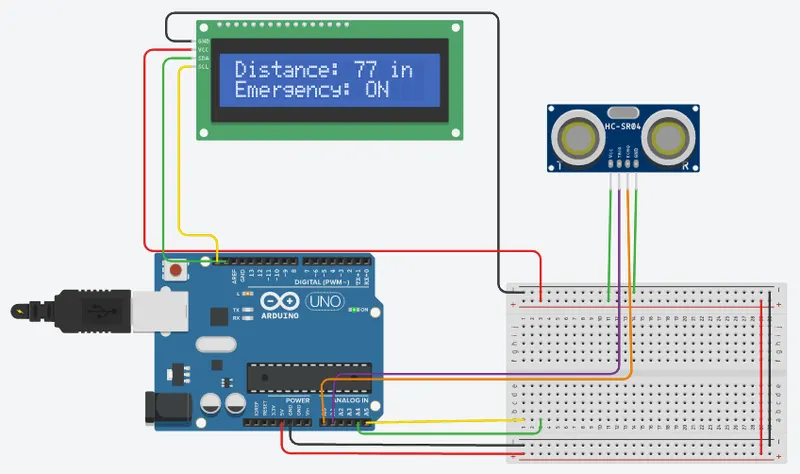
Code:
#include <Wire.h>
#include <LiquidCrystal_I2C.h> // Include LiquidCrystal_I2C library
const int trigPin = A1;
const int echoPin = A0;
const int ledPin = 13;
const int emergencySwitch = 2;
const int i2cAddress = 0x20; // I2C address of the LCD display
const int numReadings = 10; // Number of readings to take for moving average
const int displayWidth = 16; // Number of characters in one line of the display
int readings[numReadings]; // Array to store readings for moving average
int index = 0; // Index of the current reading in the array
long duration, distance;
boolean emergencyFlag = false;
// Initialize the LCD display
LiquidCrystal_I2C lcd(i2cAddress, 16, 2);
void setup() {
pinMode(trigPin, OUTPUT);
pinMode(echoPin, INPUT);
pinMode(ledPin, OUTPUT);
pinMode(emergencySwitch, INPUT_PULLUP);
lcd.init(); // Initialize the LCD display
lcd.backlight(); // Turn on the backlight of the LCD display
lcd.setCursor(0,0);
lcd.print("Distance: ");
}
void loop() {
long totalDistance = 0;
// Take multiple readings for moving average
for (int i = 0; i < numReadings; i++) {
digitalWrite(trigPin, LOW);
delayMicroseconds(2);
digitalWrite(trigPin, HIGH);
delayMicroseconds(10);
digitalWrite(trigPin, LOW);
duration = pulseIn(echoPin, HIGH);
distance = duration / 58.2;
// Add the reading to the total distance
totalDistance += distance;
delay(50);
}
// Calculate the average distance
int averageDistance = totalDistance / numReadings;
// Store the average distance in the readings array for moving average
readings[index] = averageDistance;
index++;
// If the index exceeds the array size, start over at the beginning
if (index >= numReadings) {
index = 0;
}
// Calculate the moving average
int movingAverage = 0;
for (int i = 0; i < numReadings; i++) {
movingAverage += readings[i];
}
movingAverage /= numReadings;
// Check if emergency switch is pressed
if (digitalRead(emergencySwitch) == LOW) {
digitalWrite(ledPin, HIGH);
emergencyFlag = true;
} else {
digitalWrite(ledPin, (millis() / 1000) % 2); // Blink the LED
emergencyFlag = false;
}
// Print the distance and emergency status on the LCD display
lcd.setCursor(0, 0);
lcd.print("Distance: ");
lcd.print(movingAverage);
lcd.print(" in");
lcd.setCursor(0, 1);
lcd.print("Emergency: ");
if (emergencyFlag) {
lcd.print("ON ");
} else {
lcd.print("OFF");
}
}