Project 1 - Interfacing a 16*2 LCD with Arduino using I2C protocol
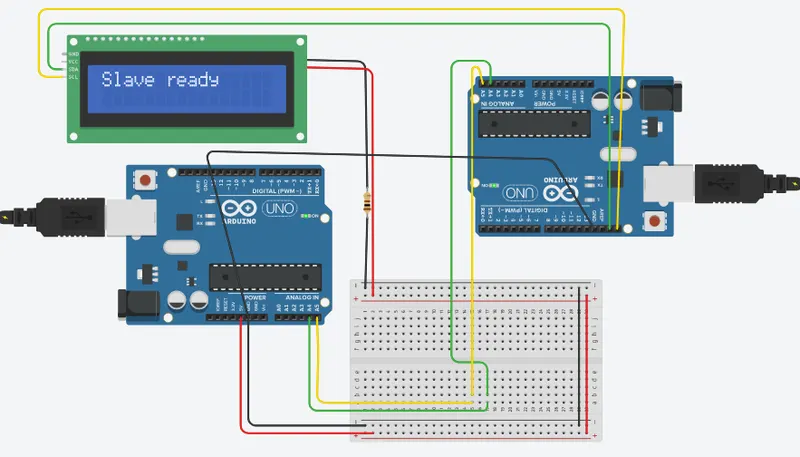
Interfacing a 16x2 LCD with two Arduinos (Master and Slave) using I2C communication protocol:
Master Arduino Code:
- Include the Wire.h library.
- Initialize the Wire library with the begin() function.
- Define the I2C address of the Slave Arduino.
- In the setup function, begin the serial communication and LCD initialization.
- In the loop function, read input from the serial monitor and write the message to the I2C bus using the Wire library.
Slave Arduino Code:
- Include the Wire.h and LiquidCrystal_I2C.h libraries.
- Initialize the Wire library with the begin() function.
- In the setup function, begin the serial communication, LCD initialization and set the Slave Arduino I2C address using the Wire library.
- In the loop function, read data from the I2C bus using the Wire library and display it on the LCD screen using the LiquidCrystal_I2C library.
Here is the sample code for Master and Slave Arduinos:
Master Arduino Code:
#include
#define SLAVE_ADDRESS 0x09 // Slave address
void setup() {
Wire.begin();
Serial.begin(9600);
}
void loop()
{
String message;
// Wait for user to input message
while (Serial.available() == 0)
{
delay(50);
}
// Read user message from Serial
message = Serial.readStringUntil('n');
// Send message to slave Arduino
Wire.beginTransmission(SLAVE_ADDRESS);
Wire.write(message.c_str(),message.length()); // Write the message as a string of bytes
Wire.endTransmission();
// Print sent message on Serial
Serial.print("Sent message: ");
Serial.println(message);
delay(10);
}
Slave Code
#include
#include
#define SLAVE_ADDRESS 0x09
LiquidCrystal_I2C lcd(0x20, 16, 2);
void setup() {
Wire.begin(SLAVE_ADDRESS);
Wire.onReceive(receiveData);
lcd.init();
lcd.backlight();
lcd.setCursor(0,0);
lcd.print("Slave ready");
}
void loop() {
// Do nothing in the main loop
}
void receiveData(int len) {
String message = "";
while (Wire.available()) {
message += (char)Wire.read();
}
lcd.clear();
lcd.setCursor(0,0);
lcd.print(message);
}