Project 2 - Measuring the distance of an object using ultrasonic sensor and also smoothen the sensor data using moving average filter
QUESTION:
--> Measuring the distance of an object using ultrasonic sensor and also smoothen the sensor data using moving average filter
SOLUTION:
--> Overview of the Project:
In this project the implementation of code for “Measuring distance of an object using ultrasonic distance sensor (28015 Ping) and also smoothen the sensor data using moving average filter”.
--> Goals:
- Measuring the distance in terms of inches of an object using Ultrasonic Distance Sensor (28015 Ping).
- The sensor data is smoothened by using Moving average filter technique to eliminate the high frequency variations from the sensor data.
--> Key Highlights of the Project:
- Measuring the distance travelled by the wave to the object and gets bounced back from the object to sensor.
- Smoothening the sensor data by moving average filter technique, the filter has a window of certain size. That window determines that how many data the filter can take.
--> Deliverables of this project:
- The distance travelled by a wave to the object for which we want to measure the distance using Ultrasonic Distance Sensor (28015 Ping).
- Eliminate the high frequency jitters from the sensor data by Moving Average filter to smoothen the sensor data.
--> Expected Outcomes:
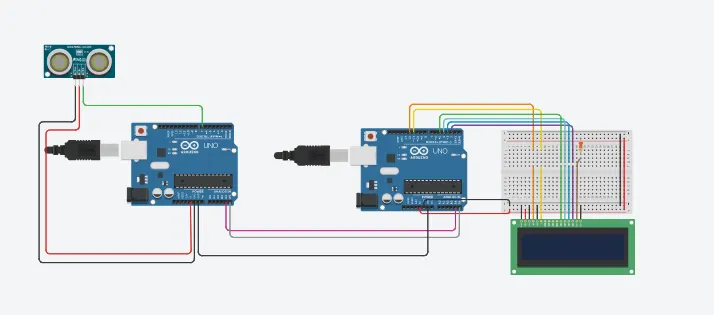
The students will get the Knowledge on Ultrasonic sensor (28015 Ping) to measure the distance travelled by wave to the object, the hardware connection of 2 Arduino’s connected to the sensor and smoothening the sensor data by removing high frequency variations using Moving Average Filter Technique.
--> TINKERCAD LINK:
--> CIRCUIT:
--> CODE:
MASTER CODE:
//MASTER CODE


#include <Wire.h> // library for I2C communication
#define signalPin 7

long duration, inches, cm;

void setup()

{
  Wire.begin();  //initializing the I2C communication
  Serial.begin(9600);
 }


void loop()
{

 // The Signalpin is triggered by a HIGH pulse of 2 microseconds.
  // Give a short LOW pulse beforehand to ensure a clean HIGH pulse:
  pinMode(signalPin, OUTPUT);

  digitalWrite(signalPin, LOW);
  delayMicroseconds(2);
  digitalWrite(signalPin, HIGH);
  delayMicroseconds(5);
  digitalWrite(signalPin, LOW);

  //The same pin is used to read the signal from the Signalpin:
  //a HIGH pulse whose duration is the time(in microseconds) from the sending of the pin
  // to the reception of its echo off of an object.
  pinMode(signalPin, INPUT);
  duration = pulseIn(signalPin, HIGH);

  //there are 73.746 microseconds per inch ,we divide by 2 to get the distance of the obstacle.
  inches = (duration/74)/2;

  //The speed of sound is 340 m/s or 29 microseconds per centimeter
  cm = (duration/29)/2;

  Wire.beginTransmission(8); //start th transmission
  Wire.write(inches);    //sending the value to slave
  Wire.endTransmission();     //ending the transmission
  Serial.println("I2C communication");  //printing on serial monitor
  Serial.print(inches);
  Serial.print(" inches, ");
  Serial.print(cm);
  Serial.println(" cms ");

  delay(500);
}
SLAVE CODE:
//SLAVE CODE


#include <Wire.h>  //library for I2C communication
#include <LiquidCrystal.h>  //library for LCD

LiquidCrystal lcd(12,11,5,4,3,2); //initializing the LCD pins

int inches = 0;   //global variable to store master data
int avg;

void setup()
{
  Serial.begin(9600); //to begin serial communitcation at baud rate 9600
  lcd.begin(16,2);   //settinG up the number of columns and rows of the LCD
  Wire.begin(8);     //Initializing the I2C communication
  Wire.onReceive(receiveEvent);   //function call on receiving the data from master
}

void loop()
{
  //printing inches and average on Serial monitor
  Serial.print("Data in inches: ");
  Serial.println(inches);
  Serial.print(" Average ");
  Serial.println(avg);

  //printing Inches on LCD
  lcd.setCursor(0,0);    //setting the cursor of LCD to the sarting
  lcd.print("I2C Communication");  //printing on the LCD
  lcd.setCursor(0,1);
  lcd.print("distance:");
  lcd.print(inches);
  lcd.print(" inch");
  delay(500);
  lcd.clear();
}


void receiveEvent(int howMany) //called function definition
{
  inches = Wire.read();  //storing the data from master
  //processing inches to get average
  avg = 0;
  for(int i=0; i<5; i++)
  {
    avg = avg + inches;
    delay(5);
  }
    avg = avg/5;
}
--> EXPLANATION:
In the above problem we are asked to interface an 28015 ultrasonic sensor to find the distance of the obstacle.
using pulseIn function we get the duration in microseconds till the ultrasound pings the obstacle and returns back, we take the duration and convert it in inches and centimeters.
We use moving average filter to remove the noise and hifh frequency variation in the sensor value.
--> RESULT:
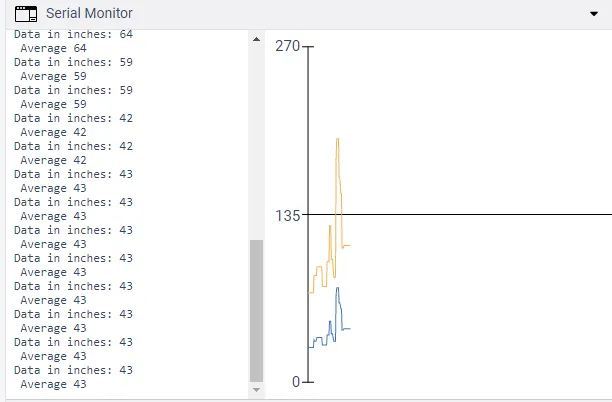
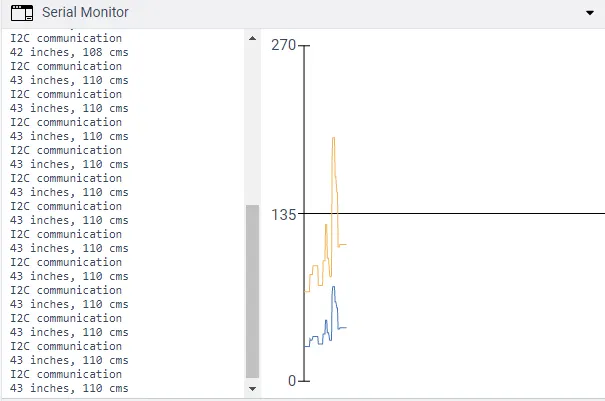
MASTER SERIAL MONITOR:
SLAVE SERIAL MONITOR: