Project 1 - Interfacing a 16*2 LCD with Arduino using I2C protocol
QUESTION:
---> Interfacing a 16*2 LCD with Arduino using I2C protocol
SOLUTION:
--> Overview of the Project:
In this project implementing the Code for “Interfacing a 16*2 LCD with two Arduino’s (one for Master and one for Slave) using Inter-Integrated Circuit (I2C) communication protocol” by sending the message to LCD using I2C communication protocol and display the message on LCD screen.
--> Goals:
- Communication between Arduino and 16*2 LCD using I2C protocol.
- Displaying the message sent by Master and received by slave i.e. LCD display.
--> Key Highlights of the Project:
- Using the inter-integrated circuit communication protocol, transferring the data i.e. the message we want to display is sent to the LCD.
- Two Arduino’s connected to the LCD display and the communication is executed using I2C protocol between Arduino and the LDC display.
--> Deliverables of this project:
- Communication between the Arduino’s and LCD using I2C.
- The message passed from master to slave and displayed on the 16*2 LCD.
--> Expected Outcomes:
- Students will get the Knowledge of I2C communication Protocol and the Arduino.
- The Hardware connection of all components used in this project.
- Displaying the message sent by master (Arduino) and received by the slave (16*2 LCD display).
--> TINKERCAD LINK:
--> CIRCUIT:
--> CODE:
MASTER CODE:
//MASTER CODE


#include <Wire.h> // library for I2C communication

void setup()
{
  Wire.begin();  //initializing the I2C communication
  Serial.begin(9600);
}

void loop()
{
  int potvalue = analogRead(A0);  //storing the analog value
  byte MasterSend = map(potvalue, 0, 1023, 0, 127); //mapping the potentiometer value from (0-1023) to (0-127)
  Wire.beginTransmission(8); //start th transmission
  Wire.write(MasterSend);    //sending the value to slave
  Wire.endTransmission();     //ending the transmission
  Serial.println("I2C communication");  //printing on serial monitor
  Serial.println("Data is sent to slave");
  delay(500);

}
SLAVE CODE:
//SLAVE CODE


#include <Wire.h>  //library for I2C communication
#include <LiquidCrystal.h>  //library for LCD

LiquidCrystal lcd(12,11,5,4,3,2); //initializing the LCD pins

int slaveReceived = 0;   //global variable to store master data


void setup()
{
  Serial.begin(9600); //to begin serial communitcation at baud rate 9600
  lcd.begin(16,2);   //settinG up the number of columns and rows of the LCD
  Wire.begin(8);     //Initializing the I2C communication
  Wire.onReceive(receiveEvent);   //function call on receiving the data from master
}

void loop()
{
  Serial.println("I2C Communication"); //printing on serial monitor
  Serial.print("MASTER DATA: ");
  Serial.println(slaveReceived);
  lcd.setCursor(0,0);    //setting the cursor of LCD to the sarting
  lcd.print("SLAVE LCD");  //printing on the LCD
  lcd.setCursor(0,1);
  lcd.print("MASTER DATA: ");
  lcd.print(slaveReceived);
  delay(500);  //giving delay
  lcd.clear();  //clearing the LCD
}


void receiveEvent(int howMany) //called function definition
{
  slaveReceived = Wire.read();  //storing the data from master
}
--> EXPLANATION:
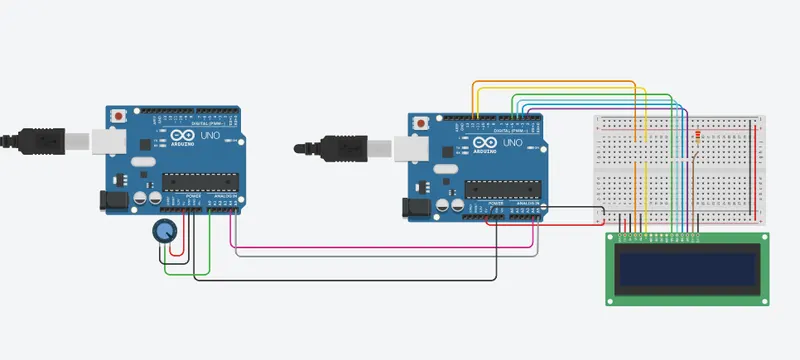
In the given question we are to interface a 16*2 LCD with 2 Arduino's which communicate with each other using I2C serial communication protocol.
Among 2 Arduino's one is the master and the other is the slave.
here we have connected a potentiometer to the master Arduino, and the value is read and mapped in the master code,
the mapped potentiometer value is sent to the slave Arduino using I2C protocol and then the message of slave and the master data is printed on the LCD connected the slave Arduino.
--> RESULT:
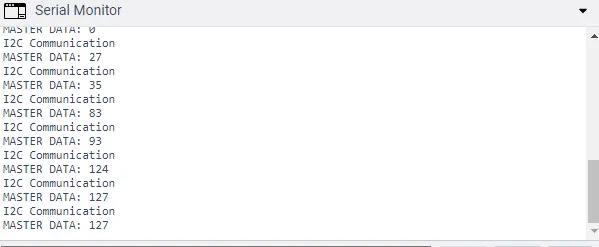
MASTER'S SERIAL MONITOR:
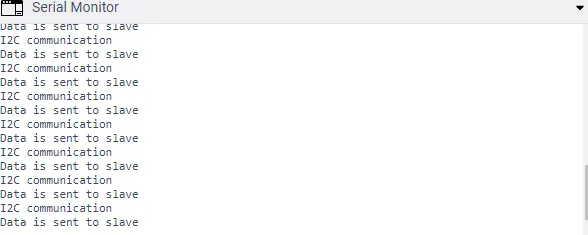
SLAVE'S SERIAL MONITOR: