Project 2 - Measuring the distance of an object using ultrasonic sensor and also smoothen the sensor data using moving average filter
implementation of code for “Measuring distance of an object using ultrasonic distance sensor (28015 Ping) and also smoothen the sensor data using moving average filter”:-
HC-SR04 ultrasonic sensor:
This popular ultrasonic distance sensor provides stable and accurate distance measurements from 2cm to 450cm. It has a focus of less than 15 degrees and an accuracy of about 2mm.
This sensor uses ultrasonic sound to measure distance just like bats and dolphins do. Ultrasonic sound has such a high pitch that humans cannot hear it. This particular sensor sends out an ultrasonic sound that has a frequency of about 40 kHz. The sensor has two main parts: a transducer that creates an ultrasonic sound and another that listens for its echo. To use this sensor to measure distance, the robot's brain must measure the amount of time it takes for the ultrasonic sound to travel.
Sound travels at approximately 340 meters per second. This corresponds to about 29.412µs (microseconds) per centimeter. To measure the distance the sound has travelled we use the formula: Distance = (Time x SpeedOfSound) / 2. The "2" is in the formula because the sound has to travel back and forth. First the sound travels away from the sensor, and then it bounces off of a surface and returns back. The easy way to read the distance as centimeters is to use the formula: Centimeters = ((Microseconds / 2) / 29). For example, if it takes 100µs (microseconds) for the ultrasonic sound to bounce back, then the distance is ((100 / 2) / 29) centimeters or about 1.7 centimeters.
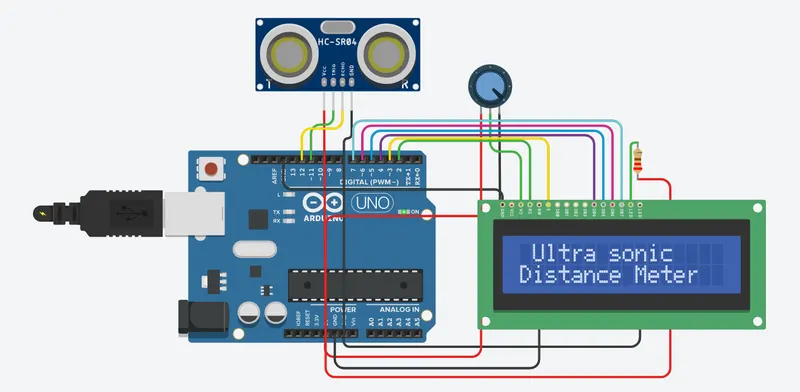
Connect the VCC and GND pins to a 5V power supply, the trigger input (Trig) pin to a digital output and the echo (Echo) pin to a digital input on your robot's microcontroller. Pulse the trigger (Trig) pin high for at least 10us (microseconds) and then wait for a high level on the echo (Echo) pin. The amount of time the Echo pin stays high corresponds to the distance that the ultrasonic sound has travelled.
What is a Moving Average Filter?
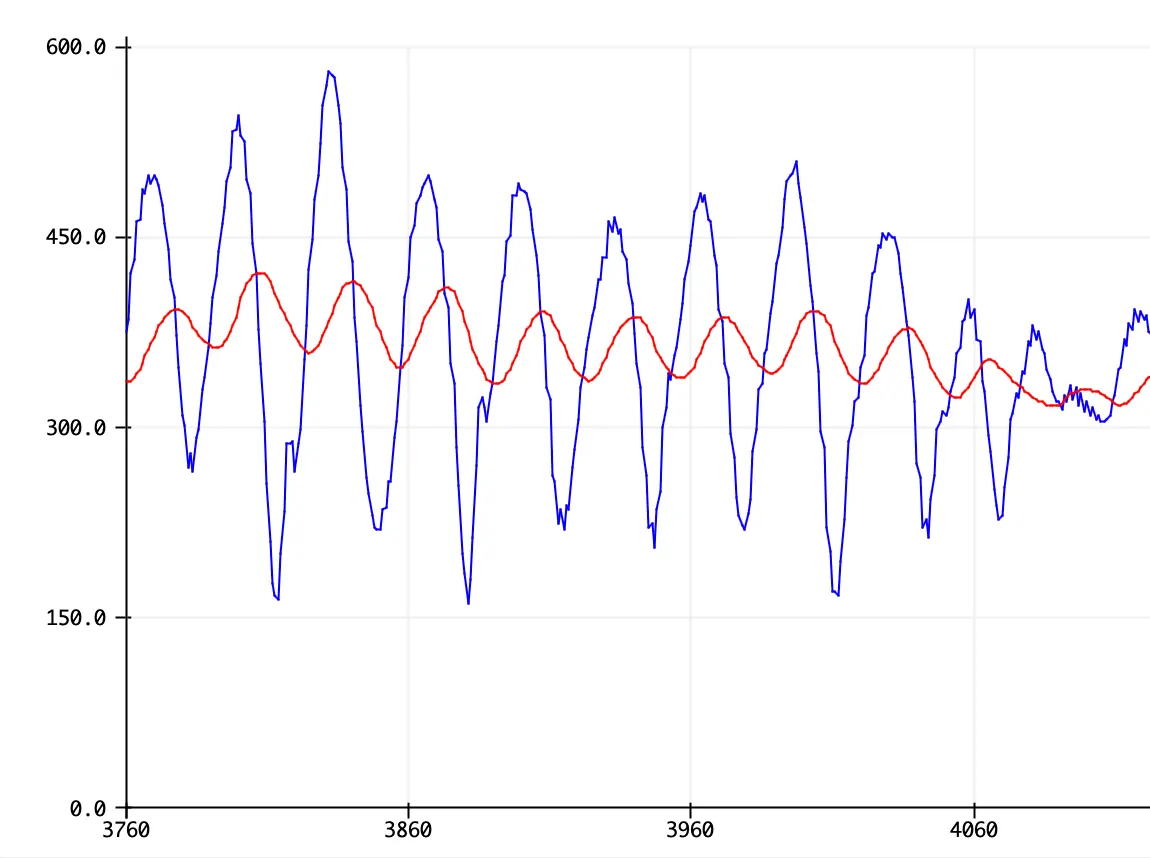
A moving average filter is a basic technique that can be used to remove noise (random interference) from a signal. It is a simplified form of a low-pass filter.
Running a signal through this filter will remove higher frequency information from the output. While a traditional low pass filter can be efficiently used to focus on a desired signal frequency, the moving average filter is a more direct approach to simply smoothing out a signal.
The idea is simple: the moving average filter takes the average of the last amount of entries in the signal and averages them to produce the output.
The only real parameter that can be controlled in the moving average filter is the window size, which is the amount of previous signal entries that can be averaged together. If the window is too small, the signal may still end up being very noisy. However, if the window is too large, critical information in the signal may be lost. Choosing the right window size is a matter of trial and error.
CODE:-
#include <LiquidCrystal.h>
#define trigger 11
#define echo 12
LiquidCrystal lcd(2,3,4,5,6,7);
float time=0,duration=0;
long sum=0;
long avg,inches=0;
void setup()
{
Serial.begin (9600);
lcd.begin(16,2);
pinMode(trigger,OUTPUT);
pinMode(echo,INPUT);
lcd.print(" Ultra sonic");
lcd.setCursor(0,1);
lcd.print("Distance Meter");
delay(2000);
lcd.clear();
}
void loop()
{
digitalWrite(trigger,LOW);
delayMicroseconds(2);
digitalWrite(trigger,HIGH);
delayMicroseconds(10);
digitalWrite(trigger,LOW);
delayMicroseconds(2);
time=pulseIn(echo,HIGH);
duration=(time/2)/29;
inches = (duration/2) / 74; // Divide by 74 or multiply by 0.0135
for (int i=0; i<5; i++)
{
sum=sum+inches;
avg = sum/5;
}
lcd.clear();
lcd.print("Distance:");
lcd.print(duration);
lcd.print("cm");
lcd.setCursor(0,1);
lcd.print("Average:");
lcd.print(avg);
//Serial.print(avg);
//Serial.print("Avg, ");
//Serial.print(duration);
//Serial.print("cm");
//Serial.println();
//Serial.print(inches);
//Serial.print("in");
//Serial.println();
delay(250);
}