Project 1 - Interfacing a 16*2 LCD with Arduino using I2C protocol
Project 1 - Interfacing a 16*2 LCD with Arduino using I2C protocol:-
Before starting we must know about I2C communication
I2C Communication
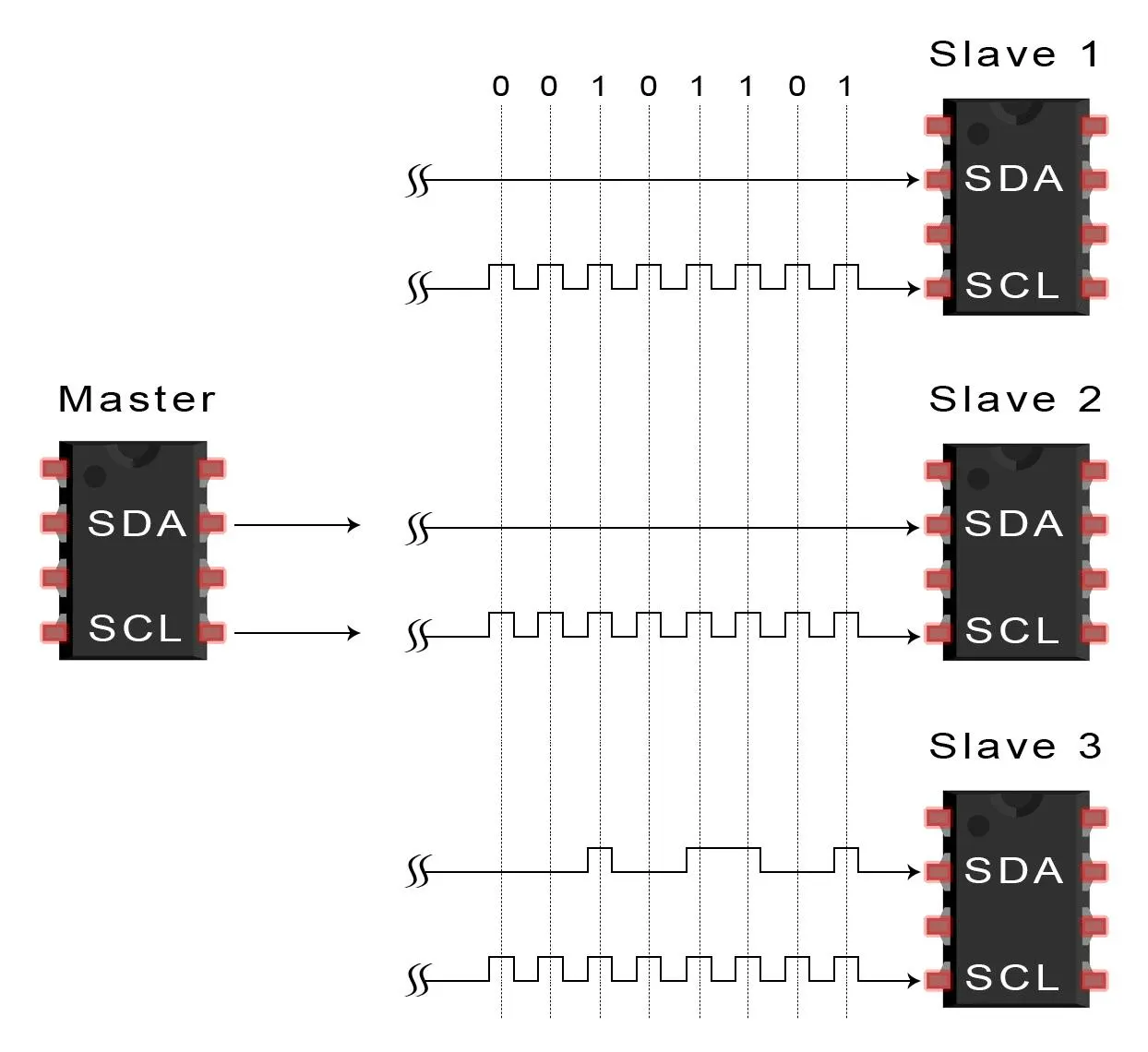
- I2C is short for Inter-IC.
- And it is a type of BUS.
- This is designed by Philips semiconductors.
- I2C is a synchronous, multi slave, multi master packet switched, single-ended serial bus. ie. multiple chips can be connect to the same bus.
- I2C uses only two bidirectional open collector or open drain lines, Serial Data Line (SDA) and Serial Clock Line (SCL), pulled up with resistors.
- Typical voltages used are +5 V or +3.3 V, although systems with other voltages are permitted.
Where to use I2C communication?
- I2C communication is used only for short distance communication.
- It is certainly reliable to an extent since it has a synchronised clock pulse to make it smart.
- This protocol is mainly used to communicate with sensor or other devices which has to send information to a master.
- It is very handy when a microcontroller has to communicate with many other slave modules using a minimum of only wires.
Circuit Diagram For Interfacing a 16*2 LCD with two Arduino’s (one for Master and one for Slave) using Inter-Integrated Circuit (I2C) communication protocol
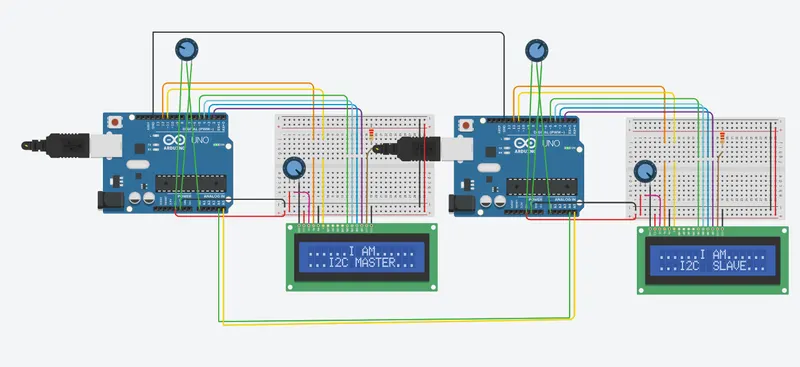
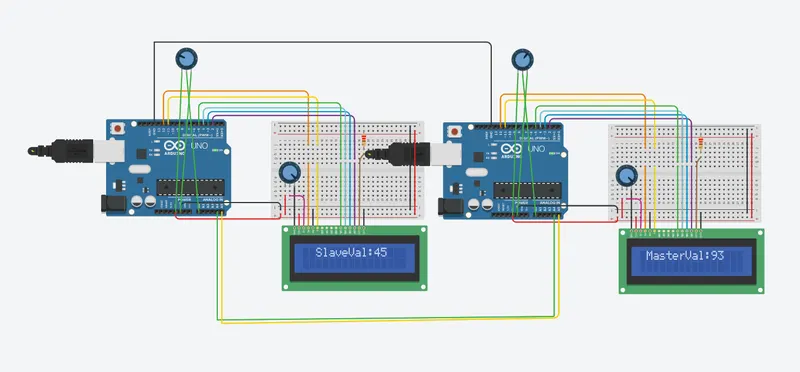
Working Explanation
- Here for demonstrating I2C communication in Arduino, we use Two Arduino UNO with Two 16x2 LCD DISPLAY attached to each other and use two potentiometers at both arduino to determine the sending values (0 to 127) from master to slave and slave to master by varying the potentiometer.
- We take input analog value at arduino pin A0 from (0 to 5V) by using potentiometer and convert them into Analog to Digital Values (0 to 1023). Then these ADC values are further converted into (0 to 127) as we can send only 7-bit data through I2C communication. The I2C communication takes place through two wires at pin A4 & A5 of both arduino.
CODE:-
MASTER:-
#include<Wire.h> //Library for I2C Communication functions
#include<LiquidCrystal.h> //Library for LCD display function
LiquidCrystal lcd(12, 11, 5, 4, 3, 2); //Define LCD Module Pins (RS,EN,D4,D5,D6,D7)
void setup()
{
lcd.begin(16,2); //Initilize LCD display
lcd.setCursor(0,0); //Sets Cursor at first line of Display
lcd.print("......I AM......"); //Prints CIRCUIT DIGEST in LCD
lcd.setCursor(0,1); //Sets Cursor at second line of Display
lcd.print("...I2C MASTER..."); //Prints I2C ARDUINO in LCD
delay(5000); //Delay for 5 seconds
lcd.clear(); //Clears LCD display
Wire.begin(); //Begins I2C communication at pin (A4,A5)
}
void loop()
{
Wire.requestFrom(8,1); // request 1 byte from slave arduino (8)
byte MasterReceive = Wire.read(); // receive a byte from the slave arduino and store in MasterReceive
int potentiometer = analogRead(A0); // Reads analog value from POT (0-5V)
byte MasterSend = map(potentiometer,0,1023,0,127); //Convert digital value (0 to 1023) to (0 to 127)
Wire.beginTransmission(8); // start transmit to slave arduino (8)
Wire.write(MasterSend); // sends one byte converted POT value to slave
Wire.endTransmission(); // stop transmitting
lcd.setCursor(0,0); //Sets Currsor at line one of LCD
lcd.print(" SlaveVal:"); //Prints SlaveVal: in LCD
lcd.print(MasterReceive); //Prints MasterReceive in LCD received from Slave
delay(500);
lcd.clear();
}
SLAVE:-
#include<Wire.h> //Library for I2C Communication functions
#include<LiquidCrystal.h> //Library for LCD display function
LiquidCrystal lcd(12, 11, 5, 4, 3, 2); //Define LCD Module Pins (RS,EN,D4,D5,D6,D7)
byte SlaveReceived = 0;
void setup()
{
lcd.begin(16,2); //Initilize LCD display
lcd.setCursor(0,0); //Sets Cursor at first line of Display
lcd.print("......I AM......"); //Prints CIRCUIT DIGEST in LCD
lcd.setCursor(0,1); //Sets Cursor at second line of Display
lcd.print("...I2C SLAVE..."); //Prints I2C ARDUINO in LCD
delay(5000); //Delay for 5 seconds
lcd.clear(); //Clears LCD display
Wire.begin(8); //Begins I2C communication with Slave Address as 8 at pin (A4,A5)
Wire.onReceive(receiveEvent); //Function call when Slave receives value from master
Wire.onRequest(requestEvent); //Function call when Master request value from Slave
}
void loop(void)
{
lcd.setCursor(0,0); //Sets Currsor at line one of LCD
lcd.print(" MasterVal:"); //Prints MasterVal: in LCD
lcd.print(SlaveReceived); //Prints SlaveReceived value in LCD received from Master
delay(500);
lcd.clear();
}
void receiveEvent (int howMany) //This Function is called when Slave receives value from master
{
SlaveReceived = Wire.read(); //Used to read value received from master and store in variable SlaveReceived
}
void requestEvent() //This Function is called when Master wants value from slave
{
int potentiometer = analogRead(A0); // Reads analog value from POT (0-5V)
byte SlaveSend = map(potentiometer,0,1023,0,127); // Convert potvalue digital value (0 to 1023) to (0 to 127)
Wire.write(SlaveSend); // sends one byte converted POT value to master
}