Project 2 - Measuring distance of an object using ultrasonic sensor (HC-SR04)
AIM: The implementation of code for “Measuring distance of an object using ultrasonic distance sensor (HC-SR04).
Goals:
- Measuring the distance of an object using Ultrasonic Distance Sensor (HC-SR04)
- Usage of Input Capture Mode
Key Highlights of the Project:
- Measuring the distance traveled by the wave to the object and gets bounced back from the object to the sensor.
- Measuring Pulse width using Input Capture Mode
Deliverables of this project:
- The distance traveled by a wave to the object for which we want to measure the distance using Ultrasonic Distance Sensor (HC-SR04).
- Measuring Pulse width using the Input Capture Mode of Timer 1.
HC-SR04 Ultrasonic Sensor.
An HC-SR04 ultrasonic distance sensor actually consists of two ultrasonic transducers. One acts as a transmitter that converts the electrical signal into 40 KHz ultrasonic sound pulses. The other acts as a receiver and listens for the transmitted pulses. When the receiver receives these pulses, it produces an output pulse whose width is proportional to the distance of the object in front.This sensor provides excellent non-contact range detection between 2 cm to 400 cm (~13 feet) with an accuracy of 3 mm.
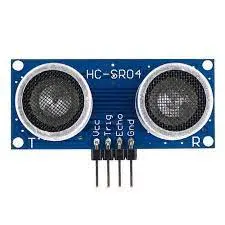
Working:
It all starts when the trigger pin is set HIGH for 10µs. In response, the sensor transmits an ultrasonic burst of eight pulses at 40 kHz. This 8-pulse pattern is specially designed so that the receiver can distinguish the transmitted pulses from ambient ultrasonic noise. These eight ultrasonic pulses travel through the air away from the transmitter. Meanwhile, the echo pin goes HIGH to initiate the echo-back signal.f those pulses are not reflected back, the echo signal times out and goes low after 38ms (38 milliseconds). Thus a pulse of 38ms indicates no obstruction within the range of the sensor. If those pulses are reflected back, the echo pin goes low as soon as the signal is received. This generates a pulse on the echo pin whose width varies from 150 µs to 25 ms depending on the time taken to receive the signal.
Distance Calculation :
It is given speed time and distance relation.
Distance = Speed X Time
value of time is given by the counter and we know the speed. speed of sound is 340 m/s. To calculate the distance we need to convert the speed of sound into cm/µs. It is 0.034 cm/μs.
Code:
/*
* ultra_sonic.c
*
* Created: 29-08-2023 11:55:14
* Author : KISHAN
*/
#include
#define F_CPU 16000000L
#include
#include
#define rs_high PORTB |= (1<<7>
#define rs_low PORTB &= ~(1<<7>
#define en_high PORTB |= (1<<6>
#define en_low PORTB &= ~(1<<6>
#define lcd_screen PORTB
#define echo_pin PD3
#define trigger_pin PD4
#define US_PIN PINC
//error handling mechanism
#define us_error -1
#define us_no_obstacle -2
int distance,previous_distance;
uint16_t pulsewidth();
void lcd_cmd(unsigned char cmd) //command mode
{
lcd_screen = cmd;
rs_low;
en_low;
_delay_ms(1);
en_high;
}
void lcd_data(unsigned char data) //data mode
{
lcd_screen = data;
rs_high;
en_low;
_delay_ms(1);
en_high;
}
void lcd_init()
{
//lcd_data_dir = 0xFF; // this will set the LCD pins connected on the microcontroller as output
//_delay_ms(15); // to show data on the LCD we need to send commands first then the data
lcd_cmd(0x02); // this command returns the cursor to the first row and first column position
lcd_cmd(0x28); // please refer to this link to understand meaning of all the commands
lcd_cmd(0x0c);
lcd_cmd(0x06);
lcd_cmd(0x01);
_delay_ms(2);
}
void lcd_set_cursor(char r, char c)
{
if((r<1>2) || (c>16||c<1>
{
r =1;
c =1;
}
if(r==1)
{
lcd_cmd(0x7F+c);
}
else
{
lcd_cmd(0xBF+c);
}
}
void lcd_print(char x, char y, char *str)
{
lcd_set_cursor(x,y);
while (*str)
{
lcd_data(*str);
str++;
}
}
int main(void)
{
PORTB = 0XFF;
TCCR1B = 0X41;
uint16_t r;
char numstring[4]; //For storing integer value as string
while (1)
{
PORTC |= (1<
_delay_us(10) ;
PORTC &= ~(1<
_delay_us(10);
r = pulsewidth();
if(r == us_error)
{
lcd_set_cursor(1,1);
lcd_print(1,1,"Error!");
}
else
{
distance = (r *0.034/2.0);
lcd_set_cursor(1,1);
lcd_print(1,1,"Distance = ");
lcd_set_cursor(12,1);
itoa(distance,numstring,10);
lcd_print(12,1,numstring);
lcd_set_cursor(14,1);
lcd_print(14,1,"cm");
previous_distance = distance;
_delay_ms(30);
}
}
}
uint16_t pulsewidth()
{
uint32_t i , result;
for(i=0; i<600000>
{
if(!(US_PIN & (1<
continue;
else
break;
}
if(i==600000)
return us_error;
TCCR1A=0X00;
TCCR1B=(1<
TCNT1=0x00; // This line start theilliseconds counter to start counting time
// checks weather the there is any object or not
for(i=0;i<600000>
{
if(US_PIN & (1<
{
if(TCNT1 > 60000) break; else continue; // if the TCNT1 value gets higher than 60000 it means there is not object in the range of the sensor
}
else
break;
}
if(i==600000)
return us_no_obstacle; //Indicates time out
//Falling edge found
result=TCNT1; // micro controller stores the the value of the counted pulse time in the TCNT1 register. So, we're returning this value to the
// main function for utilizing it later
//Stop Timer
TCCR1B=0x00;
if(result > 60000)
{
return us_no_obstacle; //No obstacle
}
else
{
return (result>>1);
}
}
Circuit Diagram: