Project 2 - Measuring distance of an object using ultrasonic sensor (HC-SR04)
Project 2 - Measuring distance of an object using ultrasonic sensor (HC-SR04)
Overview of the Project:
In this project, the implementation of code for “Measuring distance of an object using ultrasonic distance sensor (HC-SR04).
Goals:
Measuring the distance of an object using Ultrasonic Distance Sensor (HC-SR04).
Usage of Input Capture Mode.
Deliverables of this project:
The distance travelled by a wave to the object for which we want to measure the distance using Ultrasonic Distance Sensor (HC-SR04).
Measuring Pulse width using Input Capture Mode of Timer 1.
Expected Outcomes:
The students will get the Knowledge on Ultrasonic sensor (HC-SR04) to measure the distance travelled by wave to the object, the hardware connection of Atmega328p and HC-SR04 and how to use input capture mode of Timer1.
AVR CODE:
#include <avr/io.h> //header file for avr
#define F_CPU 16000000L //defining the CPU clock cycle as 16MHZ
#include <util/delay.h> //header file for DEALY/UTILITY functions
#define rs_high PORTD |=(1<<0); //defines the macro rs_high which sets the RS (register select) pin high.
#define rs_low PORTD &=~(1<<0); //defines the macro rs_low which sets the RS (register select) pin low.
#define en_high PORTD |= (1<<2); // defines the macro en_high, which sets the EN (enable) pin high.
#define en_low PORTD &=~(1<<2); // defines the macro en_low, which sets the EN (enable) pin low.
#define rw_high PORTD |= (1<<1); //defines the macro rw_high, which sets the RW (read/write) pin high.
#define rw_low PORTD &= ~(1<<1); //defines the macro rw_low, which sets the RW (read/write) pin low.
#define US_ERROR -1 // defines the constant US_ERROR as -1 .this value will be returned by the GetPulseWidth() function if an error occurs.
#define US_NO_OBSTACLE -2 //defines the constant US_NO_OBSTACLE as -2 . This value will be returned by the GetPulseWidth() function if no obstacle is detected.
#define US_PORT PORTC // defines the macro US_PORT as the PORTC register. This register is used to read and write to the pins of port C.
#define US_PIN PINC //defines the macroUS_PIN as the PINC register. This register is used to read the state of the pins of port C.
#define US_DDR DDRC // defines the macroUS_DDR as the DDRC register. This register is used to set the direction of the pins of port C.
#define US_TRIG_POS PC0 //defines the macro US_TRIG_POS as the position of the Trig pin on port C.
#define US_ECHO_POS PC1 //defines the macroUS_ECHO_POS as the position of the Echo pin on port C.
void lcd_cmd(unsigned char cmd) // function sends a command to the LCD display
{
PORTB = cmd; //parameter specifies the command to be sent
rs_low;
rw_high;
en_high;
_delay_ms(1);
en_low;
}
void lcd_data(unsigned char data) //function sends data to the LCD display.
{
PORTB = data; // parameter specifies the data to be sent.
rw_low;
rs_high;
en_high;
_delay_ms(1);
en_low;
}
void lcd_init() //function initializes the LCD display
{
rw_high; //setting the R/W, RS, and EN pins high,
rs_high;
en_high;
PORTB = 0xff; //setting the PORTB register to all 1s, sends the 0x38 command to initialize the LCD
lcd_cmd(0x38);
_delay_ms(5);
lcd_cmd(0x02); //sends the 0x02 command to clear the display,
_delay_ms(5);
lcd_cmd(0x01); // 0x01 command to return the cursor to the home position,
_delay_ms(5);
lcd_cmd(0x0c); //sends the 0x0c command to turn on the display
_delay_ms(5);
lcd_cmd(0x06); // sends the 0x06 command to set the cursor to move left to right
_delay_ms(5);
lcd_cmd(0x80); //sends the 0x80 command to set the cursor to the first column of the first row.
_delay_ms(5);
}
void cursorpos(char x, char y) //function sets the cursor position on the LCD display.
{
if ((x < 1 || x > 2) || (y < 1 || y > 16)) // checks if the x and y coordinates are valid
{
x = 1;
y = 1;
}
if (x == 1) // sends the 0x7F + y command to set the cursor to the yth column of the first row.
{
lcd_cmd(0x7F + y);
}
else // If x is 2, it sends the 0xBF + y command to set the cursor to the yth column of the second row.
{
lcd_cmd(0xBF + y);
}
}
void lcd_out(char a, char b, char *str) // function prints a string to the LCD display. It sets the cursor position using the cursorpos()
{
cursorpos(a, b);
while (*str)
{
lcd_data(*str);
str++;
}
}
void lcd_clear() //function used to clear the lcd screen
{
lcd_cmd(0x01);
_delay_ms(2);
lcd_cmd(0x80);
}
void HCSR04Init() // function initializes the Ultrasonic Sensor (US) by setting the US_DDR register to output.
{
US_DDR |= (1 << US_TRIG_POS); //setting the US_DDR register to output
}
void HCSR04Trigger() //unction triggers the US by setting the US_PORT register to high waiting 15 microseconds.
{
US_PORT |= (1 << US_TRIG_POS);
_delay_us(15); //waiting for 15 microseconds
US_PORT &= ~(1 << US_TRIG_POS); //set US_PORT to low
}
uint16_t GetPulseWidth() //s function gets the pulse width of the UltraSonic by first setting the TCCR1A and TCCR1B registers
{
uint32_t i, result; //declaring the variables
for (i = 0; i < 600000; i++)
{
if (!(US_PIN & (1 << US_ECHO_POS)))
continue;
else
break;
}
if (i == 600000)
return US_ERROR;
TCCR1A = 0X00; //setting TCCR1A REGISTER TO ZERO
TCCR1B = (1 << CS11);
TCNT1 = 0x00; //setting TCNT1 REGISTER TO ZERO
for (i = 0; i < 600000; i++)
{
if (US_PIN & (1 << US_ECHO_POS)) //loop until echo pin is high
{
if (TCNT1 > 60000)
break;
else
continue;
}
else
break;
}
if (i == 600000)
return US_NO_OBSTACLE;
result = TCNT1; //Get pulsewidth
TCCR1B = 0x00;
if (result > 60000)
return US_NO_OBSTACLE;
else
return (result >> 1); //retrun the pulsewidth
}
int main(void)
{
lcd_init(); //intialising lcd display
char numberString[4]; //declaring variables
int distance; // Declaring the 'distance' variable
int previous_distance; // Declaring the 'previous_distance' variable
while (1)
{
uint16_t r;
_delay_ms(100);
HCSR04Init(); //intialising the ultrasonic
while (1)
{
HCSR04Trigger(); //trigerring the ultrasonic
r = GetPulseWidth(); //getting the pulsewidth
if (r == US_ERROR) //if r is error print error message
{
cursorpos(1, 1);
char j[10] = "Error!";
lcd_out(1, 1, &j);
}
else //otherwise calculate the diatance and print it
{
distance = (r * 0.034 / 2.0);
char f[15] = "Distance = ";
lcd_out(1, 0, &f);
itoa(distance, numberString, 10);
lcd_out(2, 4, numberString);
char h[6] = " cm";
lcd_out(2, 10, &h);
previous_distance = distance;
_delay_ms(30);
}
}
}
}
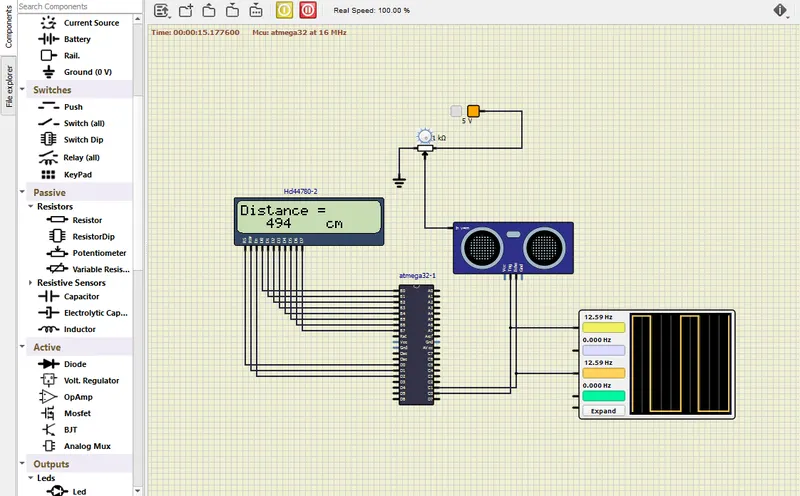
CONNECTION DIAGRAM:
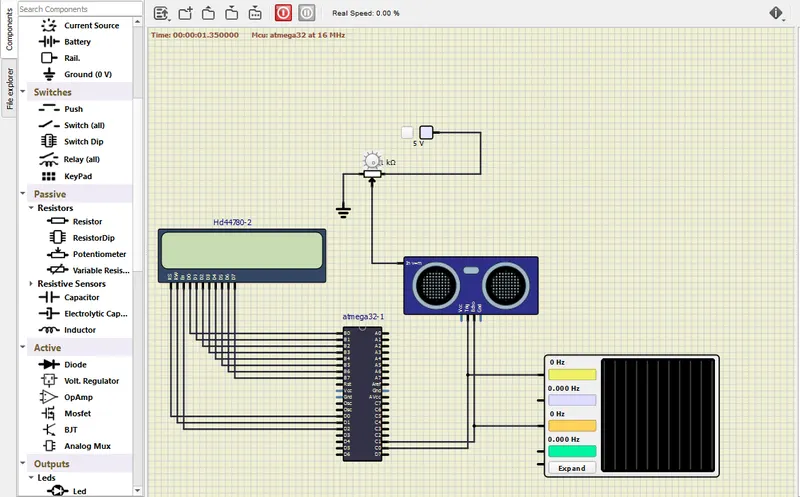
WORKING DIAGRAM:
INTIAL WORKING DIAGRAM:
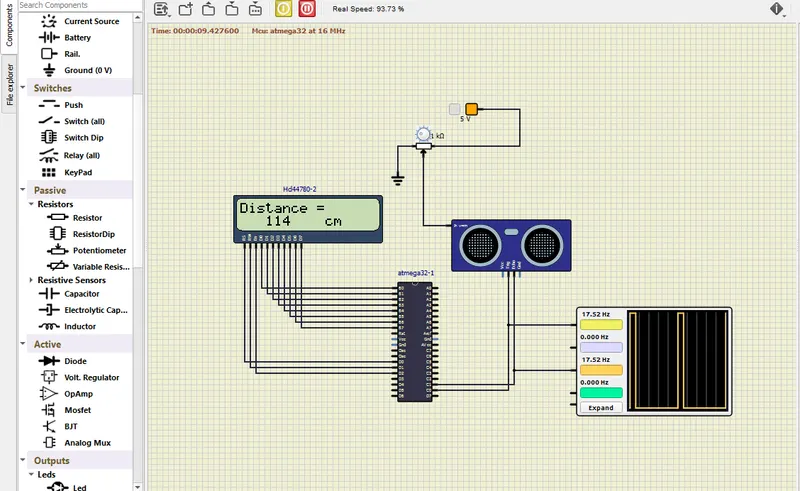
AFTER ADJUSTING RESISTOR VALUE: