Project - 2 - Generating the report for hypermesh file
AIM:
To Generate the report for hypermesh file using TCL/TK commands.
OBJECTIVE:
To create a macro that generates a report that contains the following information about the model:
- User name, date, time
- Profile/deck; count of component, prop, material, elements
- Count of empty comp/prop/mats
- Elements failed in all qualities or duplicates
PROCEDURE:
Date and Time:
To extract date and time, clock command has been used. It updates and manipulates date and time. Then clock format command is used to format time and date as the user requested format.
Here format %D will provide the date on DD/MM/YYYY format and %T HH:MM:SS format.
Component data:
To get component name and count, hm_getmark command is used and store those values in a variable. These values then used to display details. This procedure then used for properties and materials.
Assigned data:
For a component, assigned property and material details are get by hm_getvalue. This command will return ids of property and materials. Then is ID values are evaluated to finds their respective names.
Then these values are appended to variables.
Unused/Empty data:
Unused and empty entities are got by command *EntityPreviewEmpty, *EntityPreviewUnused.
The entity's id will be stores in a variable and their name are stored in a variable.
Element quality:
Element quality is a has-been checked for each element for its element criteria value. To these initial values criteria values are save using the set. A window (gadget) has been popped up to enter criteria value from user. This tab is used to get values for element criteria from the user.
Element check then starts with a mark of all elements. And go with each criterion check. Failed elements are stored on a respective variable name.
TCL COMMAND USED:
*createmark - Create mark of selected entities.
clock second - Clock function import.
clock format - Time and Date values format.
hm_getmark - Get marked entities.
llength $vairable - No. of values on a list
*EntityPreviewEmpty - Return empty components.
*EntityPreviewUnused - Return unused property and materials.
hm_getvalue - Return various values like name, assigned entities, etc for entities.
CODE:
*clearmarkall 1
*clearmarkall 2
set f [open Report.txt w]
set a1 "$env(COMPUTERNAME)"
puts $f "USERNAME-$a1"
puts $f [clock format [clock seconds]]
set n [ hm_info templatetype]
puts $f "\n Profile-$n"
#no of components
*createmark comp 1 "all"
set cmp [hm_getmark comp 1]
set n_cmp [llength $cmp]
puts $f " \n No of Components \t $n_cmp "
#no of prop
*createmark prop 1 "all"
set prop [hm_getmark prop 1]
set n_prop [llength $prop]
puts $f "No of Property cards \t $n_prop "
#no of materials
*createmark mat 1 "all"
set mat [hm_getmark mat 1]
set n_mat [llength $mat]
puts $f "No of Material cards \t $n_mat "
#no of elems
*createmark elems 1 "all"
set elems [hm_getmark elems 1]
set n_elems [llength $elems]
*createmark elems 1 "by config" quad4
set n_quad [hm_marklength elems 1]
*createmark elems 1 "by config" tria3
set n_tria [hm_marklength elems 1]
puts $f "No of QUAD Elements \t $n_quad "
puts $f "No of TRIA Elements \t $n_tria "
puts $f "TOtal No of Elements \t $n_elems "
#component details
puts $f "\n COMPONENT NAME \t THICKNESS \t MATERIAL \t PROPERTY "
foreach i $cmp {
set m_name {}
set c_name [hm_entityinfo name comp $i]
set t [hm_getthickness comp $i]
set p_name [hm_getentityvalue comps $i property.name 1]
*createmark prop 1 $p_name
set g [hm_marklength prop 1]
if {$g!= 0} {
*createmark prop 1 $p_name
set p_id [hm_getmark prop 1]
puts $p_id
set m_name [hm_getentityvalue prop $p_id material.name 1]
puts $m_name
}
puts $f "$c_name \t $t mm \t $m_name \t $p_name "
}
# no of empty components
*EntityPreviewEmpty comps 1
set l_ec [hm_marklength comps 1]
set a1 [hm_getmark comps 1]
puts $f " \n No of EMPTY COMPONENT - $l_ec "
puts $f " COMPONENT NAME "
foreach i $a1 {
set n [hm_entityinfo name comp $i]
puts $f "$n "
}
# no of Unused properties
*EntityPreviewUnused prop 1
set l_up [hm_marklength prop 1]
set b1 [hm_getmark prop 1]
puts $f " \n No of UNUSED PROPERTY CARDS - $l_up "
puts $f " PROPERTY CARD NAME "
foreach i $b1 {
set n [hm_entityinfo name prop $i]
puts $f "$n"
}
# no of Unused Material
*EntityPreviewUnused mat 1
set l_um [hm_marklength mat 1]
set c1 [hm_getmark mat 1]
puts $f " \n No of UNUSED MATERIAL CARDS - $l_um "
puts $f " MATERIAL CARD NAME "
foreach i $c1 {
set n [hm_entityinfo name mat $i]
puts $f "$n"
}
#qc minimum
set min_l [hm_getstring "2D length <" ]
*createmark elems 1 "all"
*elementtestlength elems 1 $min_l 2 1 2 0 "2D length <"
set min_f [hm_marklength elems 2]
set max_l [hm_getstring "2D length >" ]
*createmark elems 1 "all"
*elementtestlength elems 1 $max_l 2 0 2 0 "2D length >"
set max_f [hm_marklength elems 2]
puts $f " \n QUALITY FAILURE "
puts $f " \n Minimum length ($min_l mm) $min_f of $n_elems"
puts $f "Maximum length ($max_l mm) $max_f of $n_elems"
close $f
OUTPUT
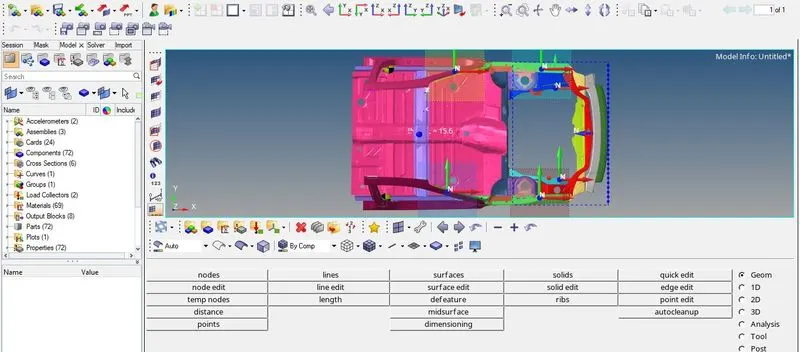
Figure1: File generated for the above model
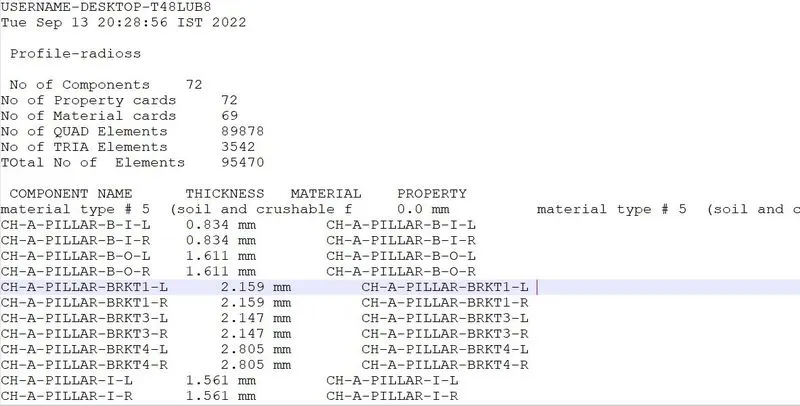
Figure2: Output of .xlsx file with minimum length 2 and maximum length 3
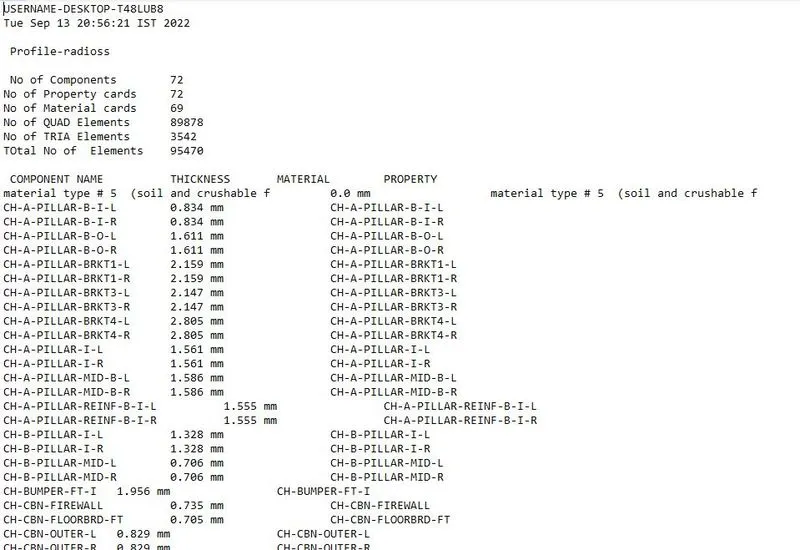
Figure3: Output of .txt file with minimum length 2 and maximum length 50
RESULT:
- .csv, .xlxs, ,xlsm and .txt files have been written for different minimum and maximum length and all the files are uploaded.