Project - 2 - Generating the report for hypermesh file
Aim:
To generate the report for hypermesh file
Objective:
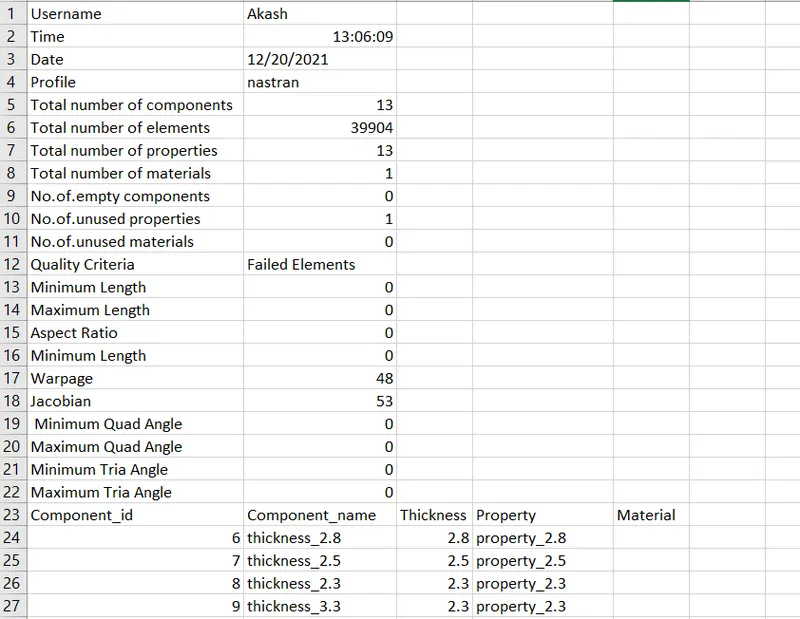
To create an ergonomic and visually appealing excel (.xlsm) report that contains following information about your model:
- User name, date, time
- Profile/deck; count of component, prop, material, elements
- Count of empty comp/prop/mats
- Elements failed in all qualities or duplicates as discussed before
Code:
set filechannelid [open output.csv w]
puts $filechannelid "Username,$env(USERNAME)"
set systemTime [clock seconds]
puts $filechannelid "Time,[clock format $systemTime -format %H:%M:%S]"
puts $filechannelid "Date,[clock format $systemTime -format %D]"

# Profile/deck
set profile [hm_info templatetype]
puts $filechannelid "Profile,$profile"


# Components
*createmark components 1 "all"
set comp [hm_getmark components 1]
set no_of_comp [llength $comp]
puts $filechannelid "Total number of components,$no_of_comp"

*createmark elements 1 "all"
set elem [hm_getmark elements 1]
set no_of_elems [llength $elem]
puts $filechannelid "Total number of elements,$no_of_elems"

*createmark properties 1 "all"
set prop [hm_getmark properties 1]
set no_of_prop [llength $prop]
puts $filechannelid "Total number of properties,$no_of_prop"

*createmark materials 1 "all"
set mat [hm_getmark materials 1]
set no_of_mat [llength $mat]
puts $filechannelid "Total number of materials,$no_of_mat"

*createmark elements 1

# Unused and Empty
*EntityPreviewEmpty comps 1
set empty_comp [hm_marklength comps 1]
puts $filechannelid "No.of.empty components,$empty_comp"

*EntityPreviewUnused properties 1
set unused_prop [hm_marklength properties 1]
puts $filechannelid "No.of.unused properties,$unused_prop"

*EntityPreviewUnused materials 1
set unused_mat [hm_marklength materials 1]
puts $filechannelid "No.of.unused materials,$unused_mat"
#_________________________________________________________________#

puts $filechannelid "Quality Criteria,Failed Elements"

*clearmarkall 1
*createmark elements 1 "all"
*elementtestlength elements 1 2 2 1 2 0 " 2D Min Length "
*maskentitymark elements 2 0
*maskreverse elements
*createmark elements 1 "displayed"
set n_minl [hm_marklength elements 1]
*unmaskall2
puts $filechannelid "Minimum Length,$n_minl"

*clearmarkall 1
*createmark elements 1 "all"
*elementtestlength elements 1 8 2 0 2 0 " 2D Min Length "
*maskentitymark elements 2 0
*maskreverse elements
*createmark elements 1 "displayed"
set n_maxl [hm_marklength elements 1]
*unmaskall2
puts $filechannelid "Maximum Length,$n_maxl"


*clearmarkall 1
*createmark elements 1 "all"
*elementtestaspect elements 1 5 2 2 0 " 2D Aspect Ratio "
*maskentitymark elements 2 0
*maskreverse elements
*createmark elements 1 "displayed"
set n_asp [hm_marklength elements 1]
*unmaskall2
puts $filechannelid "Aspect Ratio,$n_asp"


*clearmarkall 1
*createmark elements 1 "all"
*elementtestskew elements 1 45 2 2 0 " 2D Skew "
*maskentitymark elements 2 0
*maskreverse elements
*createmark elements 1 "displayed"
set n_skew [hm_marklength elements 1]
*unmaskall2
puts $filechannelid "Minimum Length,$n_skew"


*clearmarkall 1
*createmark elements 1 "all"
*elementtestwarpage elements 1 10 2 2 0 " 2D Warpage "
*maskentitymark elements 2 0
*maskreverse elements
*createmark elements 1 "displayed"
set n_war [hm_marklength elements 1]
*unmaskall2
puts $filechannelid "Warpage,$n_war"


*clearmarkall 1
*createmark elements 1 "all"
*elementtestjacobian elements 1 0.7 2 2 0 " 2D Jacobian "
*maskentitymark elements 2 0
*maskreverse elements
*createmark elements 1 "displayed"
set n_jac [hm_marklength elements 1]
*unmaskall2
puts $filechannelid "Jacobian,$n_jac"


*clearmarkall 1
*createmark elements 1 "all"
*elementtestinterangle elements 1 45 0 2 1 2 0 " 2D Quad Min Angle "
*maskentitymark elements 2 0
*maskreverse elements
*createmark elements 1 "displayed"
set n_min_qa [hm_marklength elements 1]
*unmaskall2
puts $filechannelid " Minimum Quad Angle,$n_min_qa"


*clearmarkall 1
*createmark elements 1 "all"
*elementtestinterangle elements 1 135 0 2 0 2 0 " 2D Quad Max Angle "
*maskentitymark elements 2 0
*maskreverse elements
*createmark elements 1 "displayed"
set n_max_qa [hm_marklength elements 1]
*unmaskall2
puts $filechannelid "Maximum Quad Angle,$n_max_qa"


*clearmarkall 1
*createmark elements 1 "all"
*elementtestinterangle elements 1 20 1 2 1 2 0 " 2D Tria Min Angle "
*maskentitymark elements 2 0
*maskreverse elements
*createmark elements 1 "displayed"
set n_min_ta [hm_marklength elements 1]
*unmaskall2
puts $filechannelid "Minimum Tria Angle,$n_min_ta"


*clearmarkall 1
*createmark elements 1 "all"
*elementtestinterangle elements 1 120 1 2 0 2 0 " 2D Tria Max Angle "
*maskentitymark elements 2 0
*maskreverse elements
*createmark elements 1 "displayed"
set n_max_ta [hm_marklength elements 1]
*unmaskall2
puts $filechannelid "Maximum Tria Angle,$n_max_ta"

puts $filechannelid "Component_id,Component_name,Thickness,Property,Material"
*clearmarkall 1
*createmark components 1 "all"
set compid [hm_getmark components 1]
foreach info $compid {
*createmark elements 1 1 "by collector id" $info
set comp_name [hm_entityinfo name components $info]
set thickness [hm_getthickness components $info]
set prop_name [hm_getvalue component id=$info dataname=property.name]
set mat_name [hm_getvalue component id=$info dataname=material.name]
puts $filechannelid "$info,$comp_name,$thickness,$prop_name,$mat_name"
}

close $filechannelid
Procedure and code explanation:
[open output.csv w] is used to open new .csv or .xlsm files. 'w' represents write mode since we generating the report.
$env(USERNAME) is used get the username of the system. puts $filechannelid is the command that actually prints all the given information in the file.
[clock seconds] command has been used to get the time and date. It updtaes date and time every time you run the code.
clock format $systemTime -format %H:%M:%S is the command used to get times in HH:MM:SS format, i.e. hours, minutes and seconds. clock format $systemTime -format %D is the command used to get date in DD:MM:YY format.
hm_info templatetype is used to get the profile/deck.
To get the component count, hm_getmark command is used and store those values in a variables. llength command is used tp get the total number of components. Then use this procedure to get the total number of properties, materials and elements.
*EntityPreviewEmpty command is used to get the empty component and *EntityPreviewUnused command is used to get unused properties and materials and hm_marklength command is used to get the number of empty components and unsed properties, materials.
*createmark elements 1 "all"
*elementtest(quality) entity_type mark_id value output_mark_id dimension contour " title" (change as per quality type)
*maskentitymark elements 2 0
*maskentitymark elements 2 0 elements
*createmark elements 1 "displayed"
set variable_name [hm_marklength elements 1]
*unmaskall2
*maskentitymark command is used to mask entities and *maskentitymark command is unsed reversing the masked entities and *unmaskall2 command is unmask all the entities.
*createmark elements 1 1 "by collector id" command is used to get all the components by its id.
hm_entityinfo name components $info command is used get the component names. $info is the variable name where all the components are stored.
hm_getthickness components $info command is used to the component thickness.
hm_getvalue component id=$info dataname=property.name command is used to get the property names.
hm_getvalue component id=$info dataname=material.name command is used to get the material names.
close $filechannelid is used to close the file.
Output:
Conclusion:
Sucessfully generated the report for hypermesh file that contains username, date, time, no.of.components, properties, materials and properties, no.of,empty components. no.of.unused properties and materials, no.of.failed elements.