Project 1 - V&V SW Analysis - I
LIVE BATCH - 12 & 14 (Preeti ma'am)
Write a Test plan to test features of a new mobile phone (Blackbox test) that needs to be implemented based on the following requirements. (The product is still under development stage and is yet to be UA (User Acceptance ) tested .Every other thing to be included in the test plan can be hypothetical.
US-1:As a Product owner,when long pressed the power button of the phone shall switch on with a company logo at the center of the screen.
US- 2: As a Customer,when the power button is pressed my phone is switched ON and all my icons of the APPS shall be present in the grid
US- 3: As a Product owner,when the phone is powered ON ,I shall see the "call the phone" icon as the first icon at the bottom bar of my screen.
US- 4: As a Product owner,when the phone is powered ON, I shall see the "Dictionary" icon as the second icon at the bottom bar of my screen.
US- 5: As a Product owner,when I Clicked my "call the phone" icon ,all the contacts shall be visible based on chronological order.
US- 6: As a Product owner,when I Clicked my "Dictionary icon ,a search bar shall appear at the middle of the screen to let me search the meanings of the words I desire.
US- 7: As a Product owner,when I long pressed my "power on" button ,my phone shall be switched off saying "Good-Bye” Message.
US-8: As a product owner ,my font in the mobile shall always be ''calibri (Body)" and shall be of size 12.
US-9:As a Customer,I need my UI to be touch responsive.
US-10: As a customer ,my mobile phone should have no hard buttons.
Ans :
Project 1
Test plan to test features of a new mobile phone
If (Product Owner ,Long Press the power button)
{
Switch On, company logo at the center of screen
}
Elseif (Customer press the power button)
{
Display on, apps are in grid
}
Elseif (Product owner, phone is powered On)
{
Displaying first icon “call the phone” at bottom bar
}
Elseif (Product owner, phone is powered On)
{
Displaying second icon “Dictionary” at bottom bar
}
Else if( Product owner clicks on “call the phone ” icon)
{
Contacts visible in chronological order
}
Elseif ( Product owner clicks on “Dictionary” icon
{
Search bar appears in middle of screen as “search here”
}
Elseif (Product owner long pressed Power button)
{
Switch Off phone with message “Good Bye”
}
Elseif (icon displaying defaults)
{
Font are in “calibri(Body)” and size is 12
}
Elseif (Customer touches any part of the screen)
{
Display on ask for password
}
Else
{
No hard button
}
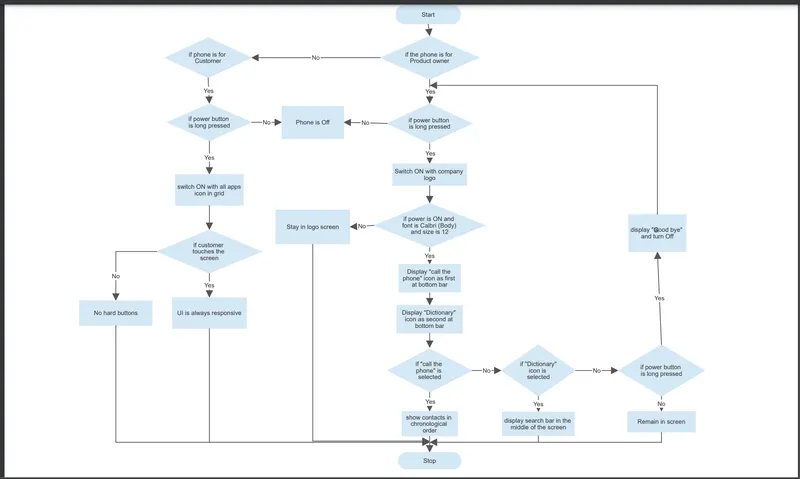
The flow chart for the above test plan is as follows: