Project 1- Traffic Jam Assistant Feature
Title:- Implementation Algorithm of Traffic Jam Assistant Feature In MATLAB/Simulink
Objectives:-
- The model must be developed in MATLAB Simulink as per MBD guidelines.
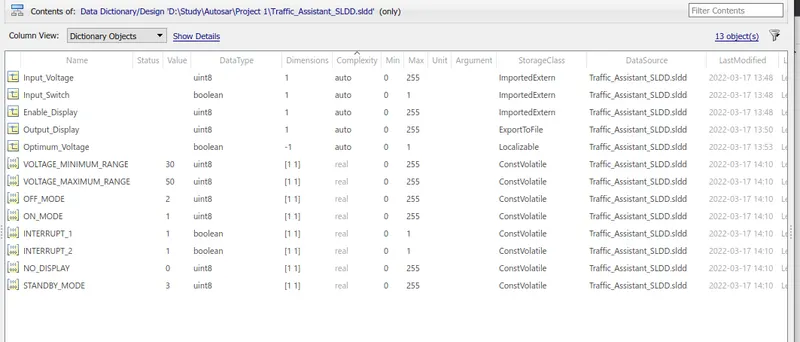
- Simulink Data Dictionary must be created for the model & must be linked to the model.
- Model Advisor Report is mandatory & this will be followed by Code Generation.
Traffic Jam Assistant Feature
Introduction to the Feature:
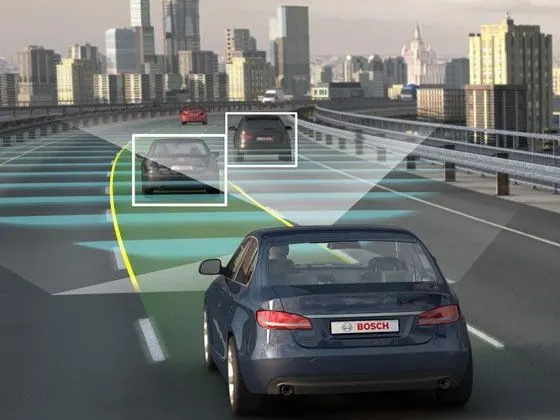
Traffic Jam Assistant is one of the most common feature in Advanced Driver Assistance System. Traffic Jam Assistant helps the driver arrive more relaxed at their destination, even in dense traffic or in traffic jams. As a partially automated comfort function, the system takes over the longitudinal & lateral guidance of the vehicle. This means that the car can drive off, accelerate & brake automatically, as well as steer the vehicle within certain constraints. The driver has to permanently supervise the system & be ready to take over the complete control of the vehicle at any time.
Traffic Jam Assistant system helps to avoid rear end collisions in dense traffic conditions & traffic jams. In Traffic jams, the vehicle takes over driving off, acceleration, braking and steering within same lane.
Basic Working Principle:
Traffic Jam Assistant is based on the sensors and the functionality of the Adaptive Cruise Control (ACC) with stop & go and Lane Keeping Support (LKS). When ACC ‘Stop & Go’ is turned ON, the Traffic Jam Assistant continuously analyses the speed of the surrounding vehicles and compares it with the own driving speed. If the system detects dense traffic or a traffic jam at speeds less than 60 kmph, the driver can activate the functionality by press of a button. The vehicle will now automatically follow the vehicle in front, takes over driving off, acceleration, braking and steering within same lane.
Information regarding the Traffic Jam Assistant will be available to be displayed to the driver in the Instrument Panel Cluster (IPC). The Algorithm which the students need to implement here in this project is predominantly based on IPC units.
Development of The model:-
As per the requirement as shown below the target model has been developed:
Requirement No 1:
- Input Signal “Input_Voltage” is compared against voltage values “VOLTAGE_MINIMUM_RANGE” & “VOLTAGE_MAXIMUM_RANGE”.
- Incoming input signal “Input_Voltage” must be greater than – equal to “VOLTAGE_MINIMUM_RANGE” and less than – equal to “VOLTAGE_MAXIMUM_RANGE”.
- Output signal from here is “Optimum_Voltage” which will be one of the inputs to the subsystem “DisplayUnit”.
Requirement No 2 (DisplayUnit Subsystem):
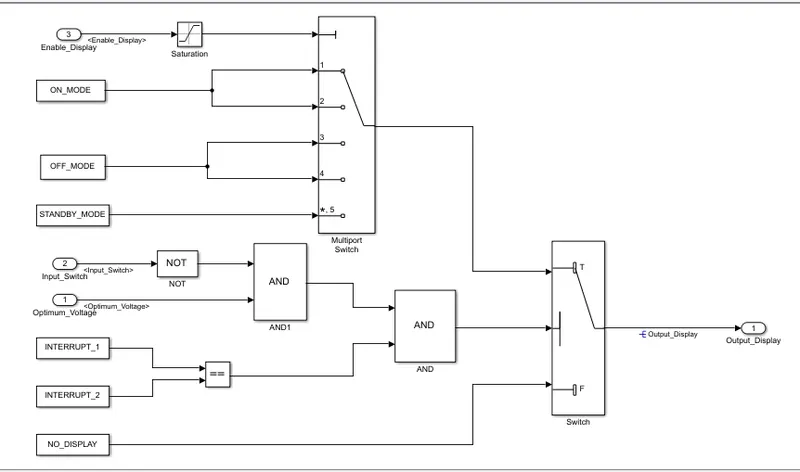
- Input Signals are “Optimum_Voltage”, “Input_Switch”,“Enable_Display”. Signal “Enable_Display” must be saturated between the range 0 – 7. Output signal from the subsystem is “Output_Display”.
- Input Signal “Enable_Display” is compared against pre – defined set of values in a multiport switch. Total data ports in the multiport switch is 5.
- Multiport switch inputs 1 & 2 is connected to calibration signal “ON_MODE”, Multiport switch inputs 3 & 4 is connected to calibration signal “OFF_MODE” while Multiport switch input 5 is connected to calibration signal “STANDBY_MODE”.
- The output from Multiport switch is connected to the first input port of the Switch block. The third input port of the Switch block is connected to the calibration signal “NO_DISPLAY”.
- Meanwhile NOT value of input signal “Input_Switch” is compared in an AND gate against input signal “Optimum_Voltage” and the output from comparing if calibration signals “INTERRUPT_1” & “INTERRUPT_2” are equal. The output of the AND gate is the second input of the switch block.
- The output from the switch block is “Output_Display”.
Simulink Model:-
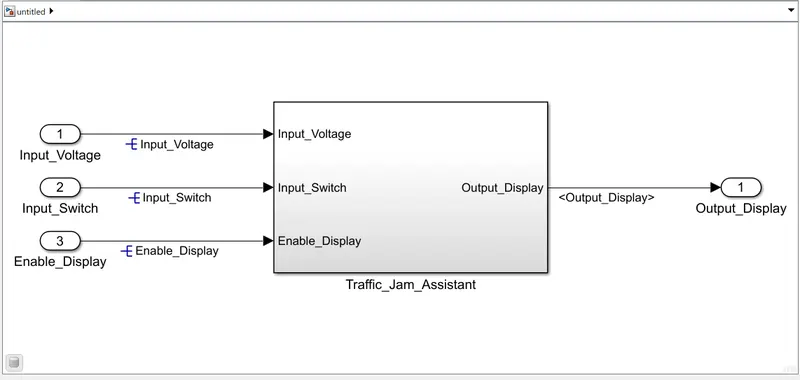
Subsystem of Traffic_Jam_Assistant:-
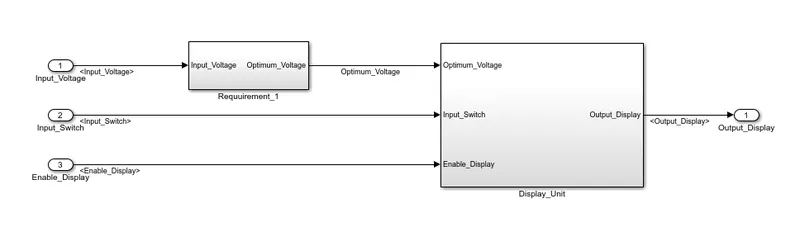
Subsystem of Requirement 1:-
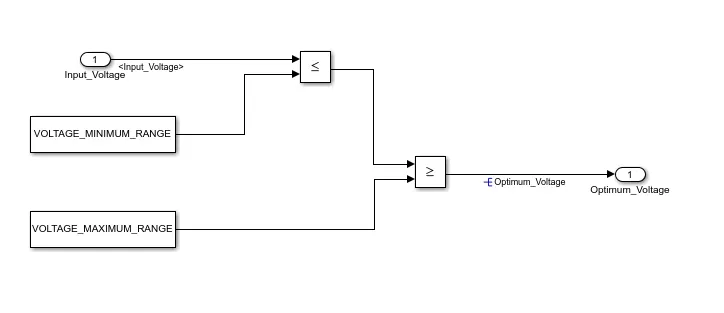
Subsystem of Display Unit:-
SImulink Data Dictionary Creation:-
Propagating signals:-
Solver Setting:-
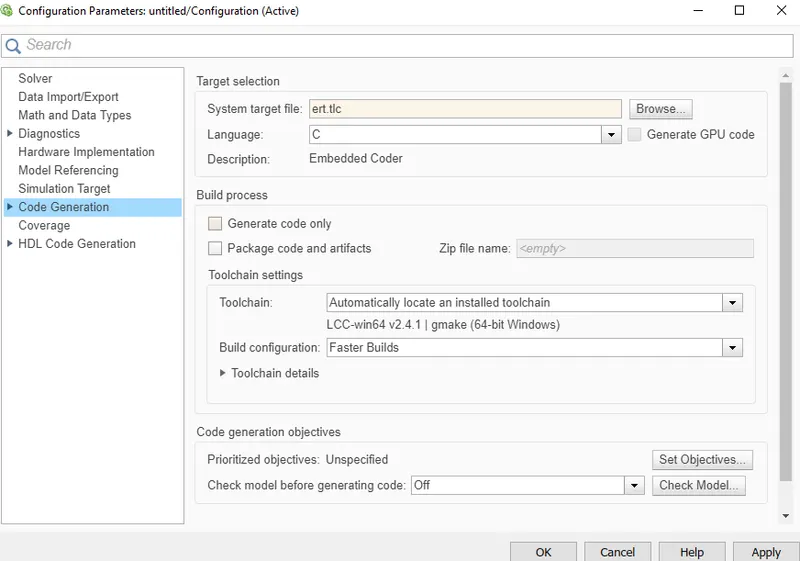
Model Advisor Report:-
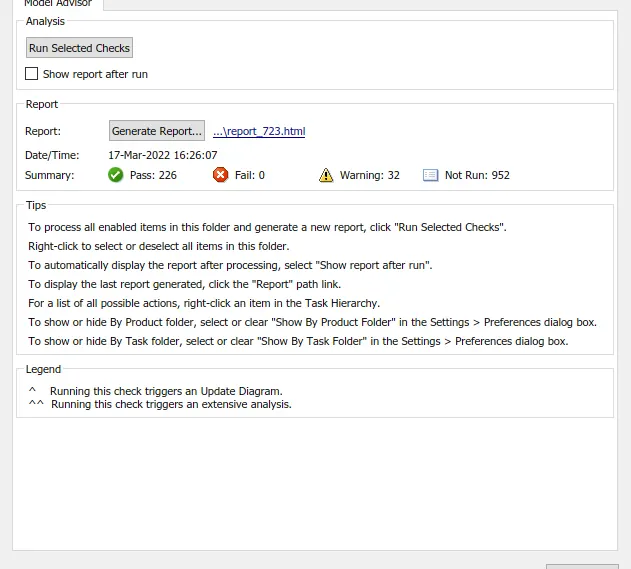
Code Generation:-
The following model is successfully simulated and the corresonding source file and the header file is generated as follows:
C Source File:-
/*
 * File: Traffic_jam_assistant.c
 *
 * Code generated for Simulink model 'Traffic_jam_assistant'.
 *
 * Model version                  : 1.1
 * Simulink Coder version         : 9.5 (R2021a) 14-Nov-2020
 * C/C++ source code generated on : Thu Mar 17 16:43:20 2022
 *
 * Target selection: ert.tlc
 * Embedded hardware selection: Intel->x86-64 (Windows64)
 * Code generation objectives: Unspecified
 * Validation result: Not run
 */

#include "Traffic_jam_assistant.h"
#include "Traffic_jam_assistant_private.h"

/* Exported data definition */

/* ConstVolatile memory section */
/* Definition for custom storage class: ConstVolatile */
const volatile boolean_T INTERRUPT_1 = 1;/* Referenced by: '<S3>/Constant4' */
const volatile boolean_T INTERRUPT_2 = 1;/* Referenced by: '<S3>/Constant5' */
const volatile uint8_T NO_DISPLAY = 0U;/* Referenced by: '<S3>/Constant3' */
const volatile uint8_T OFF_MODE = 2U;  /* Referenced by: '<S3>/Constant1' */
const volatile uint8_T ON_MODE = 1U;   /* Referenced by: '<S3>/Constant' */
const volatile uint8_T STANDBY_MODE = 3U;/* Referenced by: '<S3>/Constant2' */
const volatile uint8_T VOLTAGE_MAXIMUM_RANGE = 50U;/* Referenced by: '<S2>/Constant1' */
const volatile uint8_T VOLTAGE_MINIMUM_RANGE = 30U;/* Referenced by: '<S2>/Constant' */

/* Model step function */
void Traffic_jam_assistant_step(void)
{
  /* local block i/o variables */
  boolean_T Optimum_Voltage;
  uint8_T tmp;

  /* RelationalOperator: '<S2>/Relational_Operator1' incorporates:
   *  Constant: '<S2>/Constant'
   *  Constant: '<S2>/Constant1'
   *  Inport: '<Root>/Input_Voltage'
   *  RelationalOperator: '<S2>/Relational_Operator'
   */
  Optimum_Voltage = (((uint32_T)((Input_Voltage <= VOLTAGE_MINIMUM_RANGE) ?
    ((int32_T)1) : ((int32_T)0))) >= ((uint32_T)VOLTAGE_MAXIMUM_RANGE));

  /* Switch: '<S3>/Switch' incorporates:
   *  Constant: '<S3>/Constant4'
   *  Constant: '<S3>/Constant5'
   *  Inport: '<Root>/Input_Switch'
   *  Logic: '<S3>/AND'
   *  Logic: '<S3>/AND1'
   *  Logic: '<S3>/NOT'
   *  RelationalOperator: '<S3>/Relational_Operator'
   */
  if (((!Input_Switch) && (Optimum_Voltage)) && (INTERRUPT_1 == INTERRUPT_2)) {
    /* Saturate: '<S3>/Saturation' incorporates:
     *  Inport: '<Root>/Enable_Display'
     */
    if (Enable_Display < ((uint8_T)7U)) {
      tmp = Enable_Display;
    } else {
      tmp = ((uint8_T)7U);
    }

    /* End of Saturate: '<S3>/Saturation' */

    /* MultiPortSwitch: '<S3>/Multiport_Switch' */
    switch (tmp) {
     case 1:
      /* Switch: '<S3>/Switch' incorporates:
       *  Constant: '<S3>/Constant'
       */
      Output_Display = ON_MODE;
      break;

     case 2:
      /* Switch: '<S3>/Switch' incorporates:
       *  Constant: '<S3>/Constant'
       */
      Output_Display = ON_MODE;
      break;

     case 3:
      /* Switch: '<S3>/Switch' incorporates:
       *  Constant: '<S3>/Constant1'
       */
      Output_Display = OFF_MODE;
      break;

     case 4:
      /* Switch: '<S3>/Switch' incorporates:
       *  Constant: '<S3>/Constant1'
       */
      Output_Display = OFF_MODE;
      break;

     default:
      /* Switch: '<S3>/Switch' incorporates:
       *  Constant: '<S3>/Constant2'
       */
      Output_Display = STANDBY_MODE;
      break;
    }

    /* End of MultiPortSwitch: '<S3>/Multiport_Switch' */
  } else {
    /* Switch: '<S3>/Switch' incorporates:
     *  Constant: '<S3>/Constant3'
     */
    Output_Display = NO_DISPLAY;
  }

  /* End of Switch: '<S3>/Switch' */
}

/* Model initialize function */
void Traffic_jam_assistant_initialize
(void)
{
  /* (no initialization code required) */
}

/*
 * File trailer for generated code.
 *
 * [EOF]
 */
H Source File:-
/*
 * File: Traffic_jam_assistant.h
 *
 * Code generated for Simulink model 'Traffic_jam_assistant'.
 *
 * Model version                  : 1.1
 * Simulink Coder version         : 9.5 (R2021a) 14-Nov-2020
 * C/C++ source code generated on : Thu Mar 17 16:43:20 2022
 *
 * Target selection: ert.tlc
 * Embedded hardware selection: Intel->x86-64 (Windows64)
 * Code generation objectives: Unspecified
 * Validation result: Not run
 */

#ifndef RTW_HEADER_Traffic_jam_assistant_h_
#define RTW_HEADER_Traffic_jam_assistant_h_
#ifndef Traffic_jam_assistant_COMMON_INCLUDES_
#define Traffic_jam_assistant_COMMON_INCLUDES_
#include "rtwtypes.h"
#endif                              /* Traffic_jam_assistant_COMMON_INCLUDES_ */

#include "Traffic_jam_assistant_types.h"

/* Includes for objects with custom storage classes. */
#include "taffic_jam_assistant.h"

/* Macros for accessing real-time model data structure */

/* Model entry point functions */
extern void Traffic_jam_assistant_initialize(void);
extern void Traffic_jam_assistant_step(void);

/* Exported data declaration */

/* ConstVolatile memory section */
/* Declaration for custom storage class: ConstVolatile */
extern const volatile boolean_T INTERRUPT_1;/* Referenced by: '<S3>/Constant4' */
extern const volatile boolean_T INTERRUPT_2;/* Referenced by: '<S3>/Constant5' */
extern const volatile uint8_T NO_DISPLAY;/* Referenced by: '<S3>/Constant3' */
extern const volatile uint8_T OFF_MODE;/* Referenced by: '<S3>/Constant1' */
extern const volatile uint8_T ON_MODE; /* Referenced by: '<S3>/Constant' */
extern const volatile uint8_T STANDBY_MODE;/* Referenced by: '<S3>/Constant2' */
extern const volatile uint8_T VOLTAGE_MAXIMUM_RANGE;/* Referenced by: '<S2>/Constant1' */
extern const volatile uint8_T VOLTAGE_MINIMUM_RANGE;/* Referenced by: '<S2>/Constant' */

/*-
 * The generated code includes comments that allow you to trace directly
 * back to the appropriate location in the model.  The basic format
 * is <system>/block_name, where system is the system number (uniquely
 * assigned by Simulink) and block_name is the name of the block.
 *
 * Use the MATLAB hilite_system command to trace the generated code back
 * to the model.  For example,
 *
 * hilite_system('<S3>')    - opens system 3
 * hilite_system('<S3>/Kp') - opens and selects block Kp which resides in S3
 *
 * Here is the system hierarchy for this model
 *
 * '<Root>' : 'Traffic_jam_assistant'
 * '<S1>'   : 'Traffic_jam_assistant/Traffic_Jam_Assistant'
 * '<S2>'   : 'Traffic_jam_assistant/Traffic_Jam_Assistant/Requuirement_1'
 * '<S3>'   : 'Traffic_jam_assistant/Traffic_Jam_Assistant/Subsystem'
 */

/*-
 * Requirements for '<Root>': Traffic_jam_assistant
 */
#endif                                 /* RTW_HEADER_Traffic_jam_assistant_h_ */

/*
 * File trailer for generated code.
 *
 * [EOF]
 */
Conclusion:-
The model corresponding to Traffic Jam Assistant feature is successfully implemented. All the compliant changes pertaining to MBD, linking of the model to the SLDD, Code generation and ultimately generation of the Model Advisor Report is presented with detailed analysis.