Project 1 - Parsing NASA thermodynamic data
AIM : To parse the thermodynamics data from NASA using MATLAB.
OBJECTIVES :
- To write a function that extracts the 14 coefficients and calculates the enthalpy, entropy, and specific heats for all the species in the data file.
- To calculate the molecular weight of each species and display it in the command window.
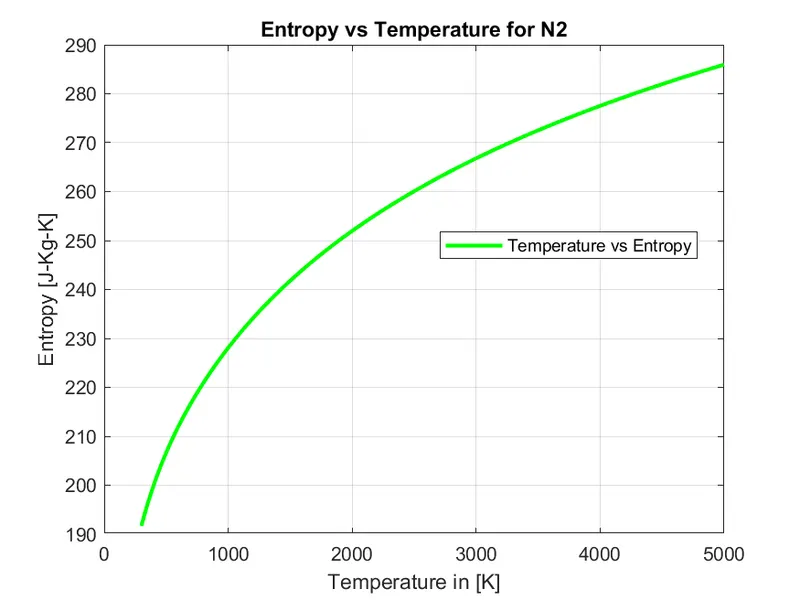
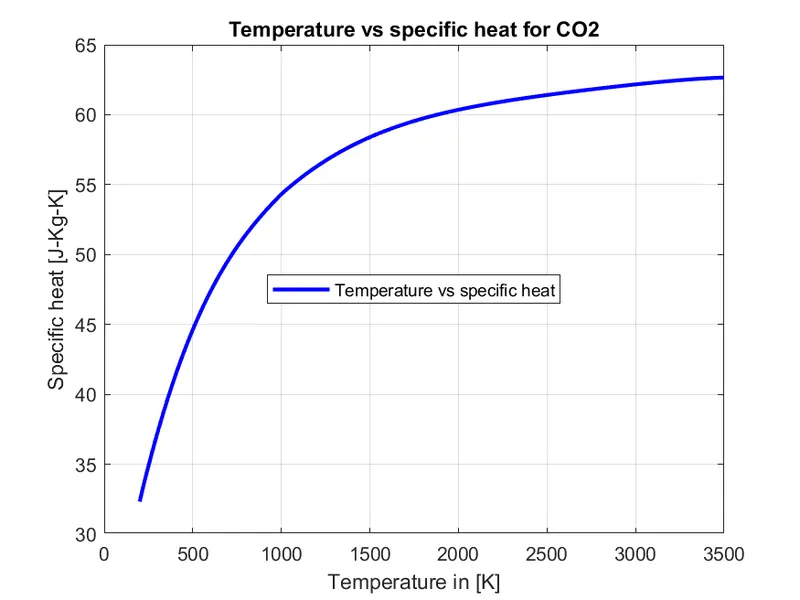
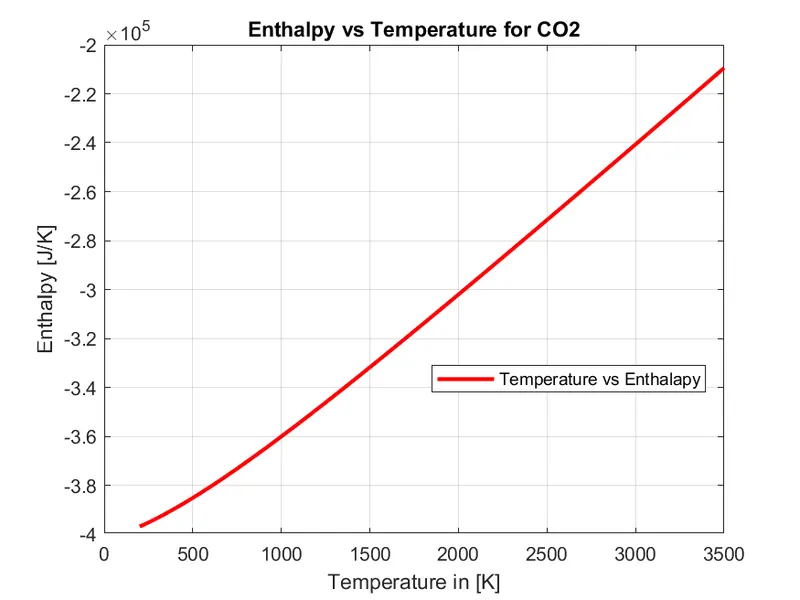
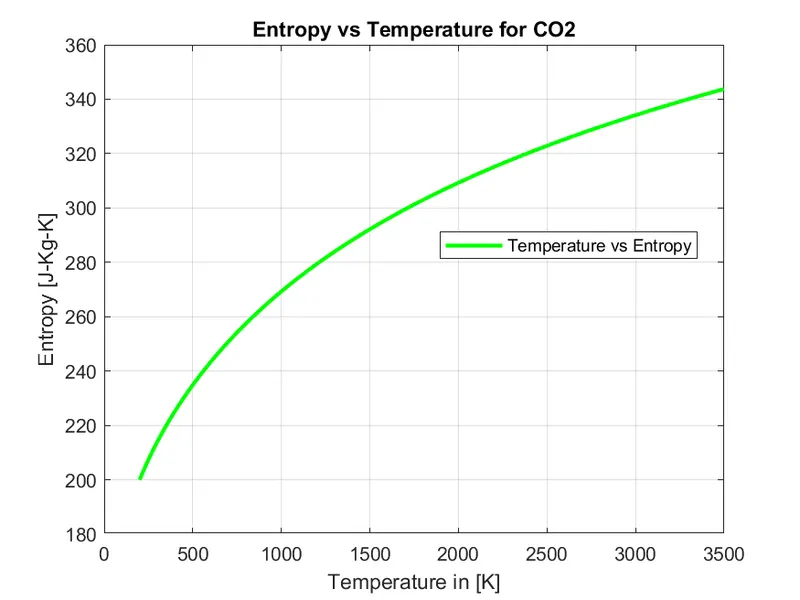
- To plot the Specific heat, enthalpy, and Entropy for the local temperature range (low temperature: high temperature) specific for each species.
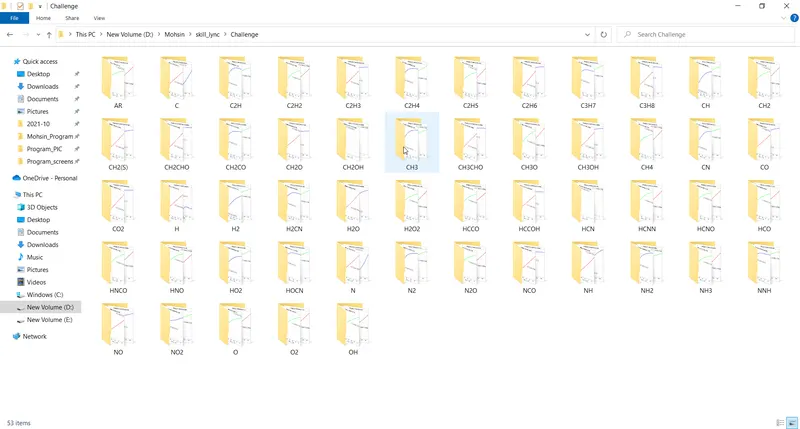
- To save the plots as images with appropriate names and dump them in separate folders for each species with a suitable name.
THEORY :
File Parsing :
Parsing in computer languages refers to syntactic analysis of the input code into its components parts in order to facilitate the writing of compilers and interpreters. It can be used to describe split or separation. Parsing a file means reading in a data stream of some sort and building an in memory model of the semantic content of that data. This aims at facilitating perfoming some kind of transformation on the data.
File parsing basically deal with two types, File Writing and File Reading.
File Writing :
File writing refers to the process of writing data to a particular file.
The command fopen keyword is basically a command to open a file. Syntax of fopen is FileId = fopen('filename', 'permission').
Where file name can be any type of the file and permission is nothing but write the data. Which represents 'w' for permission keyword.
For Example :
thermo_file = fopen('Thermo.dat', 'w')
Where ,
thermo_file is file handle, Themo.dat is file name, and w is to write the data to the file.
File Reading :
File reading is a kind of reverse process of file writing. File reading refers to the process of reading the data to a particular file.
The command fopen keyword is basically a command to open a file. Syntax of fopen is FileId = fopen('filename', 'permission').
Where file name can be any type of the file and permission is nothing but read the data. Which represents 'r' for permission keyword.
For Example :
thermo_file = fopen('Thermo.dat', 'r')
Where ,
thermo_file is file handle, Themo.dat is file name, and r is to read the data of the file.
Thermodynamics Constants :
- Specific Heat : Specific heat, the quantity of heat required to raise the temperature of one gram of a substance by one celsius degree. The units of specific heat are usually jousles per gram per Celsius degree.
- Entropy : Entropy, the measure of a system's thermal energy per unit temperature that is unavailable for doing useful work. Because work is obtained from ordered molecular motion, the amount of entropy is also a measure of the molecular disorder, or randomness, of a system.
- Enthalpy : Enthalpy, the sum of the internal enrgy and the product of the pressure and volume of a thermodynamic system. Enthalpy is an energy-like property or state function—it has the dimensions of energy (and is thus measured in units of joules), and its value is determined entirely by the temperature, pressure, and composition of the system and not by its history. In symbols, the enthalpy, H, equals the sum of the internal energy, E, and the product of the pressure, P, and volume, V, of the system: H = E + PV.
According to the law of energy conservation, the change in internal energy is equal to the heat transferred to, less the work done by, the system. If the only work done is a change of volume at constant pressure, the enthalpy change is exactly equal to the heat transferred to the system. When energy needs to be added to a material to change its phase from a liquid to a gas, that amount of energy is called the enthalpy (or latent heat) of vaporization and is expressed in units of joules per mole. Other phase transitions have similar associated enthalpy changes, such as the enthalpy (or latent heat) of fusion for changes from a solid to a liquid. As with other energy functions, it is neither convenient nor necessary to determine absolute values of enthalpy. For each substance, the zero-enthalpy state can be some convenient reference state.
Molecular Weight :
Molecular weight, also called molecular mass, mass of a molecule of a substance, based on 12 as the atomic weight of carbon-12. It is calculated in practice by summing the atomic weight of the atoms making up the substance’s molecular formula. The molecular weight of a hydrogen molecule (chemical formula H2) is 2 (after rounding off); for many complex organic molecules (e.g., protiens, polymers) it may be in the millions.
GOVERNING EQUATION :
To calculates the enthalpy, entropy and specific heats for all the species the equation is given below :
`C_p/(R) = a1 + a2.T + a3.T^2 + a4.T^3 + a5.T^4`
`H/(R) = a1.T + a2.T^2/2 + a3.T^3/3 + a4.T^4/4 + a5.T^5/5 +a6`
`S/(R) = a1.log.T + a2.T + a3.T^2/2 + a4.T^3/3 + a5.T^4/4 +a7`
Where,
`C_p` = Specific Heat in (J/K kg),
H = Enthalpy in (J),
S = Entropy in (J/K),
R = Universal gas constant = 8.314 (J/mole K)
T = Temperature in (K)
The First 7 coefficients are high-temperature coefficients and the second 7 coefficients are low-temperature coefficients.
MATLAB CODE :
Program 1 : A MATLAB program to read and extract the information from file 'THERMO.dat'.
% A program for parsing the given data and calculate the various thermodynamics parameters

clear all
close all
clc

% Reading the given File

thermo_file = fopen('THERMO.dat','r');
header_1 = fgetl(thermo_file);

% Reading and defining the global temperatures

global_temp = fgetl(thermo_file);
temp_range = strsplit(global_temp,' ');
global_low_temp = str2double(temp_range(2));
global_mid_temp = str2double(temp_range(3));
global_high_temp = str2double(temp_range(4));

% Reading the comment line

comment_line1 = fgetl(thermo_file);
comment_line2 = fgetl(thermo_file);
comment_line3 = fgetl(thermo_file);

% Reading all the line fo species

for i = 1:53
    species_line = fgetl(thermo_file);
    split_species = strsplit(species_line,' ');
    species = split_species{1};
    A = strfind(species_line,'G');
    low_temp = species_line(A+3:55);
    high_temp = species_line(A+12:65);
    mid_temp = species_line(A+23:75);

% Converting the local temperature of each species data from string to ineteger/double

    local_low_temp = str2double(low_temp);
    local_high_temp = str2double(high_temp);
    local_mid_temp = str2double(mid_temp);

    line1 = fgetl(thermo_file);
    line2 = fgetl(thermo_file);
    line3 = fgetl(thermo_file);

% finding the character E in each line in string and storing in various variable

    c1 = strfind(line1,'E');
    c2 = strfind(line2,'E');
    c3 = strfind(line3,'E');

% converting the string data into numerical at given place of the given data

     a1 = str2double(line1(1:c1(1)+3));
     a2 = str2double(line1(c1(1)+4:c1(2)+3));
     a3 = str2double(line1(c1(2)+4:c1(3)+3));
     a4 = str2double(line1(c1(3)+4:c1(4)+3));
     a5 = str2double(line1(c1(4)+4:c1(5)+3));

     a6 = str2double(line2(1:c2(1)+3));
     a7 = str2double(line2(c2(1)+4:c2(2)+3));
     a8 = str2double(line2(c2(2)+4:c2(3)+3));
     a9 = str2double(line2(c2(3)+4:c2(4)+3));
     a10 = str2double(line2(c2(4)+4:c2(5)+3));

     a11 = str2double(line3(1:c3(1)+3));
     a12 = str2double(line3(c3(1)+4:c3(2)+3));
     a13 = str2double(line3(c3(2)+4:c3(3)+3));
     a14 = str2double(line3(c3(3)+4:c3(4)+3));

% creating a temperature array of 1000 equally spaced points between local low temperature and local high temperature

     T = linspace(local_low_temp,local_high_temp,1000);
     R = 8.314;

% Calling specfic heat(Cp) to the program

     Cp = specific_heat(a1,a2,a3,a4,a5,a6,a7,a8,a9,a10,a11,a12,a13,a14,T,R,local_mid_temp);

% calling enthalpy(H) to the program

     H = enthalpy(a1,a2,a3,a4,a5,a6,a7,a8,a9,a10,a11,a12,a13,a14,T,R,local_mid_temp);

% calling entropy(S) to the program

     S = entropy(a1,a2,a3,a4,a5,a6,a7,a8,a9,a10,a11,a12,a13,a14,T,R,local_mid_temp);

% Identify the current folder and change to local folder and store the path

    mkdir(['D:\Mohsin\skill_lync\Challenge\',species]);

% Plotting specific heat vs temperature

    figure(1)
    plot(T,Cp,'color','b','linewidth',2)
    xlabel('Temperature in [K]')
    ylabel('Specific heat [J-Kg-K]')
    title(sprintf('Temperature vs specific heat for %s',species))
    legend('Temperature vs specific heat','Location','best')
    grid on

% Plotting Enthalpy vs temperature

    figure(2)
    plot(T,H,'color','r','linewidth',2)
    xlabel('Temperature in [K]')
    ylabel('Enthalpy [J/K]')
    title(sprintf('Enthalpy vs Temperature for %s',species))
    legend('Temperature vs Enthalapy','Location','best')
    grid on

 % Plotting Entropy vs temperature

    figure(3)
    plot(T,S,'color','g','linewidth',2)
    xlabel('Temperature in [K]')
    ylabel('Entropy [J-Kg-K]')
    title(sprintf('Entropy vs Temperature for %s',species))
    legend('Temperature vs Entropy','Location','best')
    grid on

    dir_name = (['D:\Mohsin\skill_lync\Challenge\',species]);
    cd(dir_name)

% Saving the images of graph of each species in individual folder

    saveas(1,'cp.png')
    saveas(2,'enthalpy.png')
    saveas(3,'entropy.png')

    cd('D:\Mohsin\skill_lync\')
    cd ..


% Molecular weight calculation

    [MW] = Molecular_weight(species);

end

fclose(thermo_file)
Program 2 : A MATLAB Function program to calculate the Thermodynamics properties(Specific heat, Enthalpy and Entropy).
Function Program 1 : A function code to calculate the Specific heat.
% Specific heat function

function [Cp] = specific_heat(a1,a2,a3,a4,a5,a6,a7,a8,a9,a10,a11,a12,a13,a14,T,R,local_mid_temp);
for i = 1:length(T)
    if (T(i)>local_mid_temp)
        Cp(i) = (a1+(a2*(T(i)))+(a3*(T(i)^2))+(a4*(T(i)^3))+(a5*(T(i)^4)))*R;
    else
        Cp(i) = (a8+(a9*(T(i)))+(a10*(T(i)^2))+(a11*(T(i)^3))+(a12*(T(i)^4)))*R;
    end
end
Function Program 2 : A function code to calculate the Enthalpy.
% Enthalpy function

function [H] = enthalpy(a1,a2,a3,a4,a5,a6,a7,a8,a9,a10,a11,a12,a13,a14,T,R,local_mid_temp);
for i = 1:length(T)
    if (T(i)>local_mid_temp)
        H(i) = ((a1*(T(i)))+(a2*(T(i)^2)/2)+(a3*(T(i)^3)/3)+(a4*(T(i)^4)/4)+(a5*(T(i)^5)/5)+a6)*R;
    else
        H(i) = ((a8*(T(i)))+(a9*(T(i)^2)/2)+(a10*(T(i)^3)/3)+(a11*(T(i)^4)/4)+(a12*(T(i)^5)/5)+a13)*R;
    end
end
Function Program 3 : A function code to calculate the Entropy.
% Entropy Function

function [S] = entropy(a1,a2,a3,a4,a5,a6,a7,a8,a9,a10,a11,a12,a13,a14,T,R,local_mid_Temp);
for i = 1:length(T)
    if (T(i)>local_mid_Temp)
        S(i) = ((a1*log(T(i)))+(a2*(T(i)))+(a3*(T(i)^2)/2)+(a4*(T(i)^3)/3)+(a5*(T(i)^4)/4)+a7)*R;
    else
        S(i) = ((a8*log(T(i)))+(a9*(T(i)))+(a10*(T(i)^2)/2)+(a11*(T(i)^3)/3)+(a12*(T(i)^4)/4)+a14)*R;
    end
end
Function Program 4 : A function code to calculate the molecular weight of species mentioned in the given file.
% Function to calculate Moleculuar weight

function [MW] = Molecular_weight(species)
MW = 0;
c = 0;

% Finding molecular weight

elements = ['O','H','C','S','N','AR'];
atomic_mass = [15.999,1.008,12.011,32.065,14.007,39.948];


for i = 1:length(species)
    for j = 1:length(atomic_mass)
        if strcmp(species(i),elements(j))
            MW =MW + atomic_mass(j);
            c=j;
        end
    end
    num = str2double(species(i));
    if(num>1)
        MW =MW + (atomic_mass(c)*(num-1));
    end

end
        fprintf('Molecular weight of %s : ',species)
        fprintf('%d',MW)
        fprintf(' amu ')
        fprintf('\n')
end
Step wise explanation of the code :
For Program 1 :
1. The code starts with the command clear all, close all and clc. Where,
- clear all : it is used to clear the data stored in workspace.
- close all : it is used to close all the plots abd figure.
- clc : it is used to clear the command window.
2. The code is started with opening the file using command 'fopen(THERMO.dat,'r')', the 'r' is used to read the file.
3. Using fgetl command read and saved the Header line and global temperature values. Then splited the global temperature values using strsplit and in the data file using str2double command to split the data from the string.
4. Then the next 3 line are not neccesary they defined only the comment/text for their understanding so using fgetl command read the 3 lines.
5. For loop is used to read the co-efficient of all 53 species
6. Then the fgetl command reads, splited and saved into the variable species
7. Using the strfind the 'G' character is found in the line and with respect to this G taken the values of Local low,mid and high temperature values.
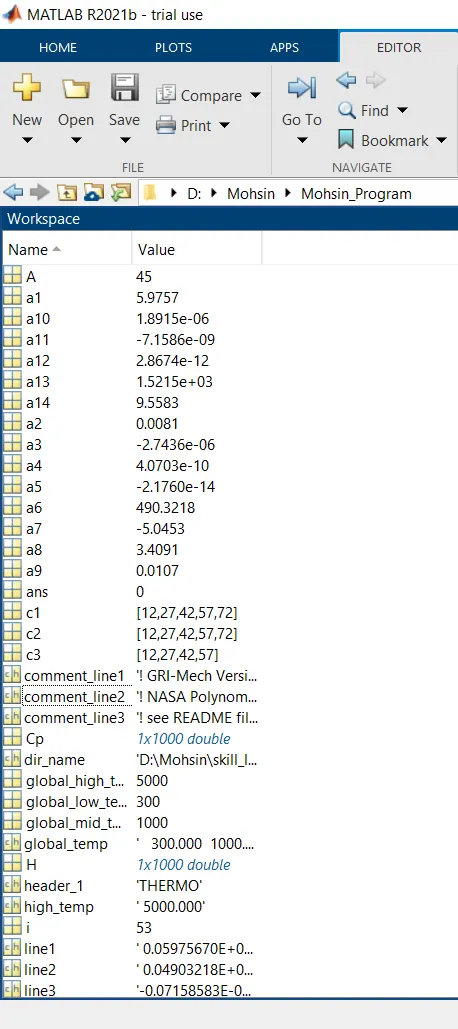
8. Using the similar approach as above found out the 14 co-efficient for different species. Strings are converted into numericals by using str2double command. Used strfind command to locate the character of 'E' in each line co-efficient are assigned to the variables a1, a2 ,a3.........a14 which are also has been provided in the above function programs.
9. Creating a temperature array of 1000 equally spaced points between local low temperature and local high temperature using linspace command.
10. Assigning the value of Universal gas constant = 8.314 (J/mole K) in the variable R.
11. For different temperature range function calls and values of Cp,H and S are calculated for temperatures.
12. Calling specfic heat(Cp), Enthalpy(H) and Entropy(S) to the program.
13. Using mkdir function we have created new folder with name for all the output files, Cd command changes the directory again
14. By using plot and figures commands plots have been created for all the different species. saveas command is used to save all the plots into their respective folders
15. Then called the molecular weight function program and prints the values of all the species in the command window.
16. Using command 'fclose(thermo_file)' the file is closed.
For Program 2 :
1. As per the challange the first seven co-efficient are used to calculated Cp values with temperature greater than Local mid temperature (Higher value) and the rest co-efficient are used to calculate the Cp with Local low temperature (Lower values ) and similar concept is used for the Entropy and Enthalpy.
2. To calculate the molecular weight for each species, each species is a compound molecule of carbon C, hydrogen H, nitrogen N, oxygen O, argon A, sulphur S, are atoms. so, the atomic weight of atoms are taken as C = 12.011, H = 1.008, O = 15.999, N = 14.006, A = 39.948, S = 32.065. To calculate the molecular weight for example: The chemical formula for water is H2O, which means this molecule has 3 atoms: 2 of hydrogen (H) and 1 oxygen (O) atom. Using the periodic table of the elements to find atomic weights, we find that hydrogen has an atomic weight of 1, and oxygen is 16. To calculate the molecular weight of one water molecule, we add the contributions from each atom; that is, 2(1)+1(16) = 18 grams/mole. here 1 is H and 16 is O.
3. The Molecular weight is calculated by a for loop in which a element, atomic mass array is formed and in the for loop ran for length of length species.
4. Then with respect to that these species it is also ran to the length of atomic mass and comparing the string using strcmpi.
5. The character is runned using the above but the number part is taken out from string to number using str2double and multipled with the previous character and by the way Molecular weight is calculated and called the function into the main program as mentioned above.
Errors faced while programming :
- Not enough input arguments is provided in function specific heat.
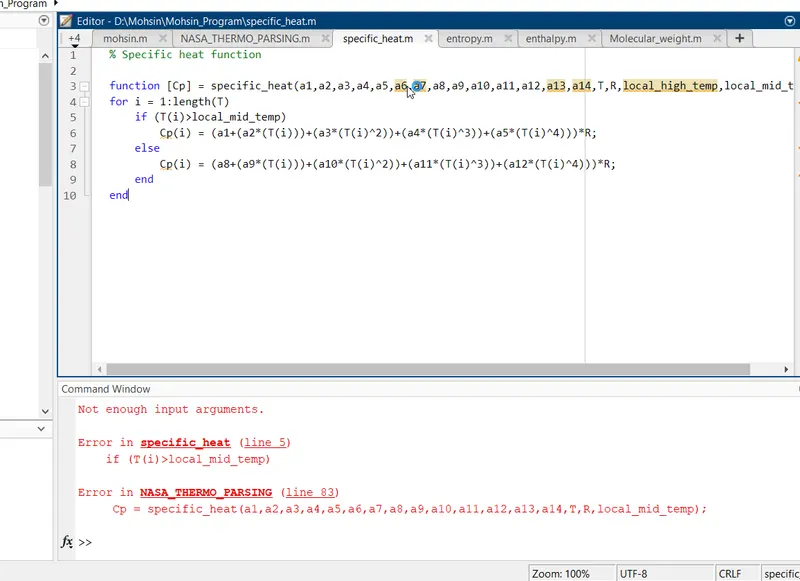
Solution : Removed the local_high_temperature from the function Cp .
RESULTS :
- Molecular weight of all species is given below,
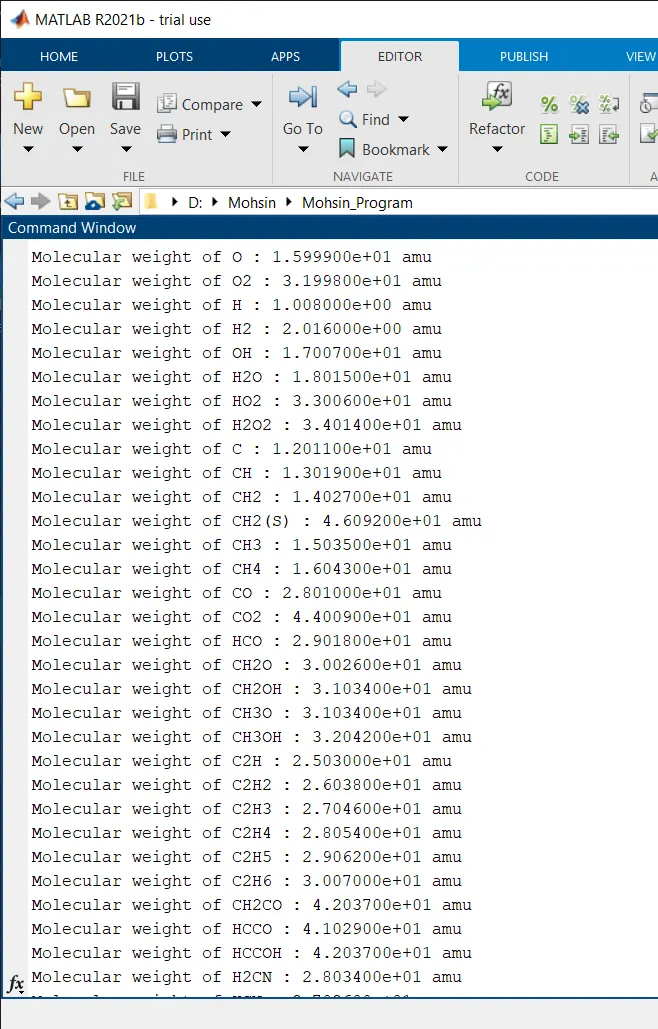
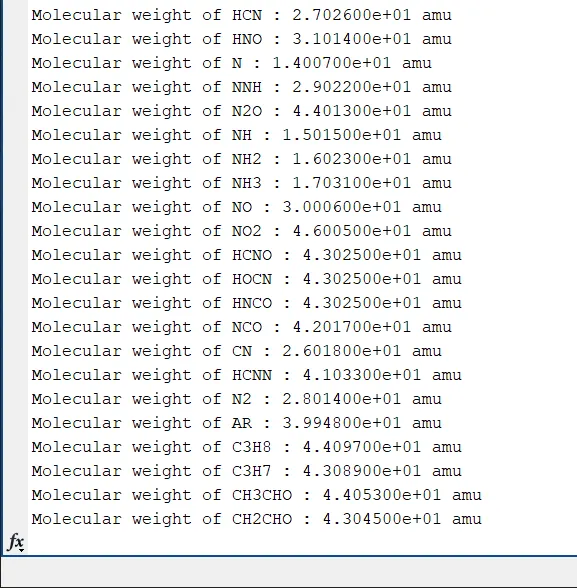
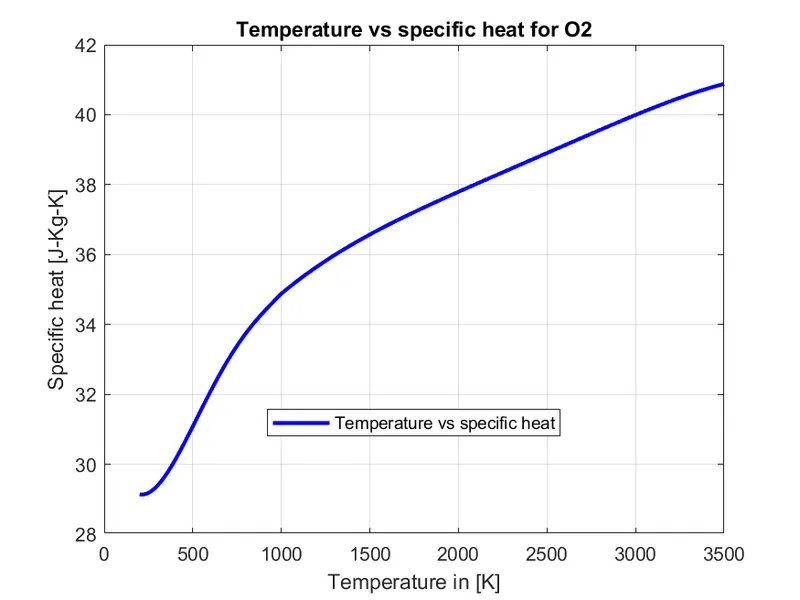
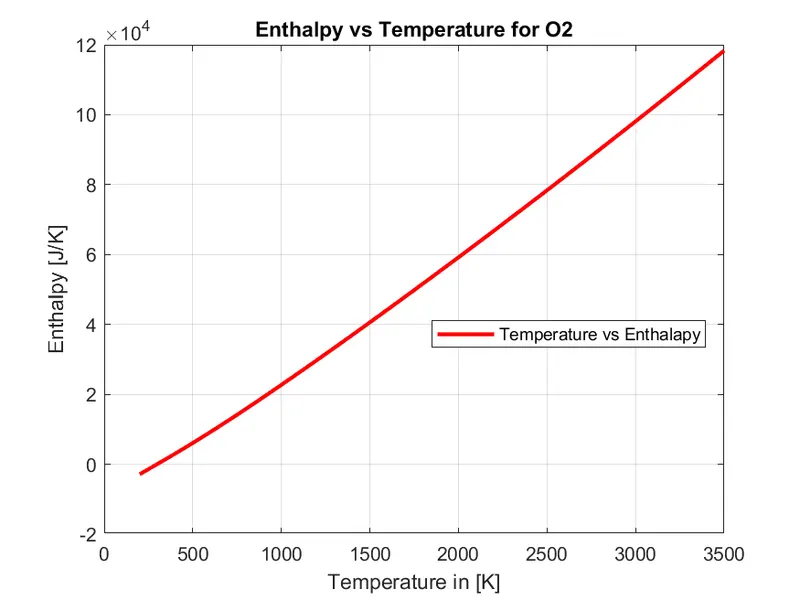
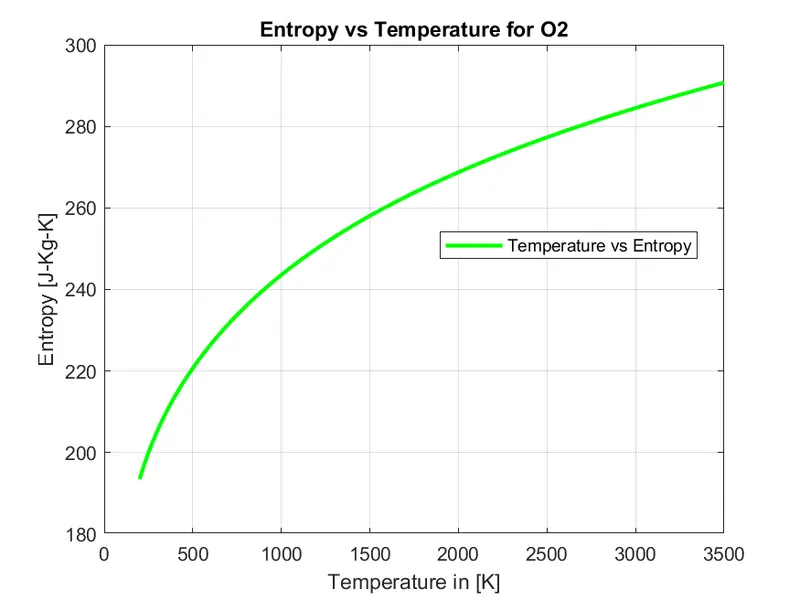
- Plot the Specific heat, Enthalpy and Entropy for the local temperature range of O2, N2 and Co2 species.
Plot For O2 :
Plot for N2 :
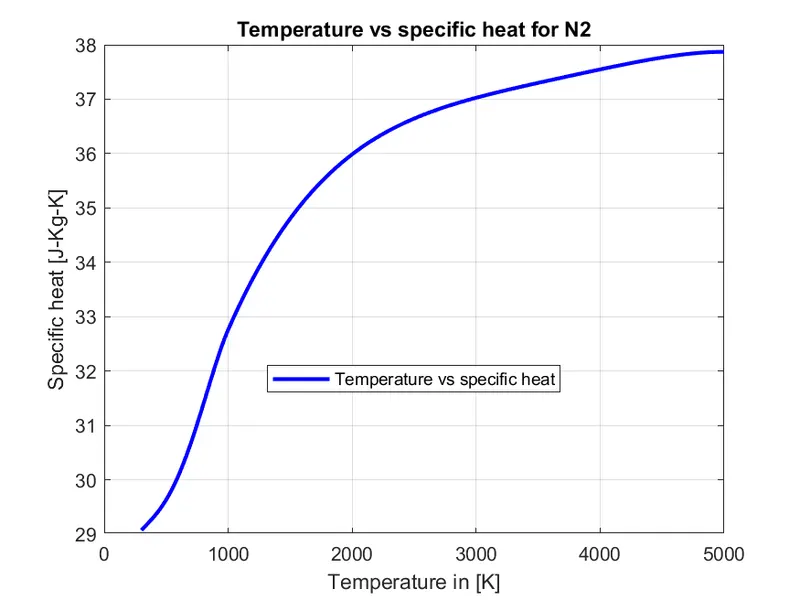
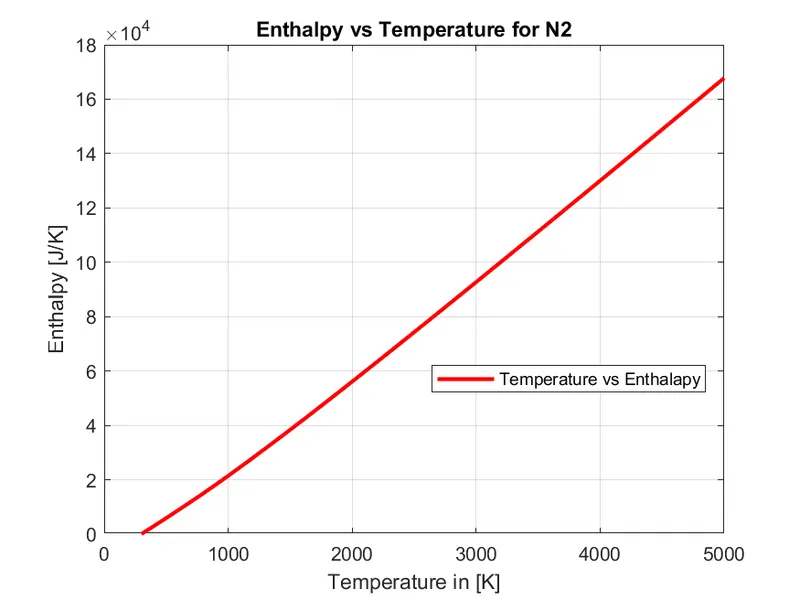
Plot for CO2 :
- Location of species :
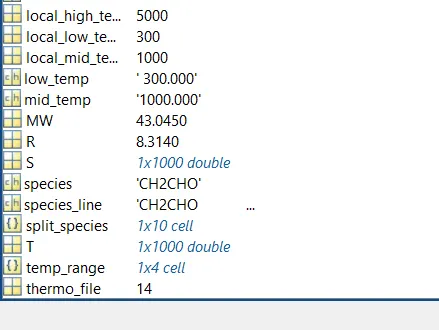
- Workspace :
CONCLUSION :
- Thus using the File parsing method, we have successfully collected Nasa's thermodynamic data from their data file and hence also performed certain functions to plot the characteristics of the properties with respect to the temperature range with the help of the values from the data file.
- Moreover a function, is used to calculate the molecular weight of the species of the given data file.
REFERENCES :