Project 1 - Parsing NASA thermodynamic data
Objective: The aim is to write a program by parse the NASA thermodynamic data file in a code and find the following stuffs.
- Write a function that extracts the 14 coefficients and calculates the enthalpy, entropy and specific heats for all the species in the data file.
- Calculate the molecular weight of each species and display it in the command window.
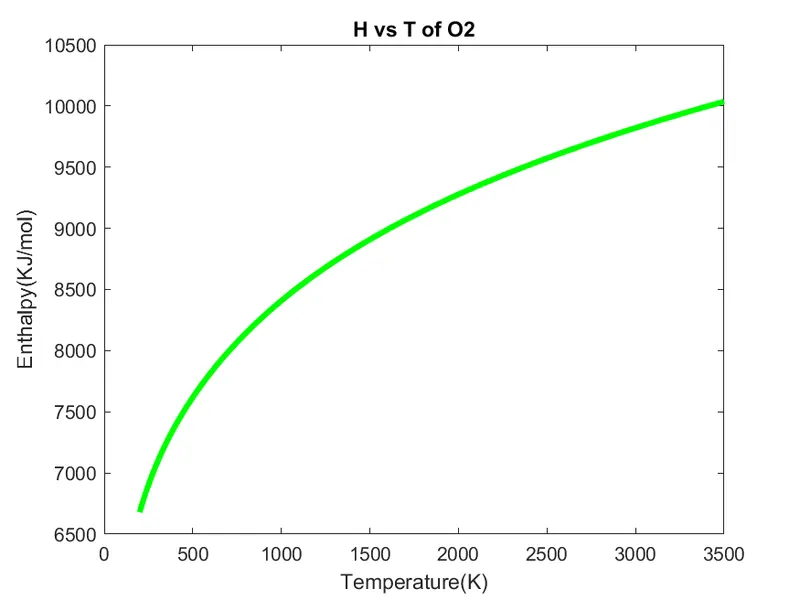
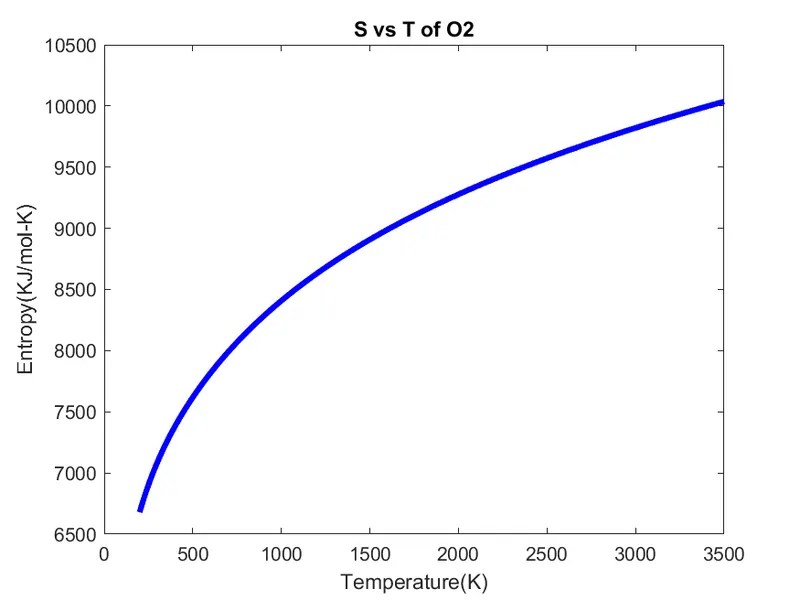
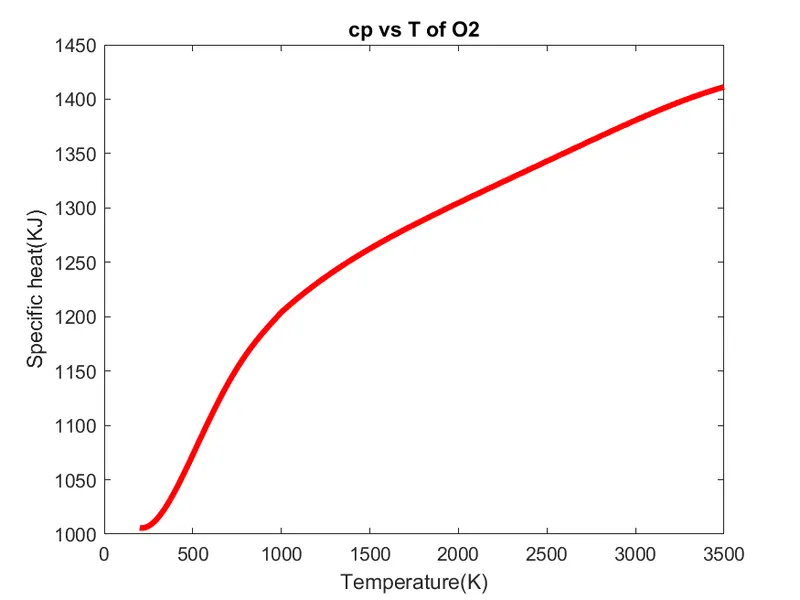
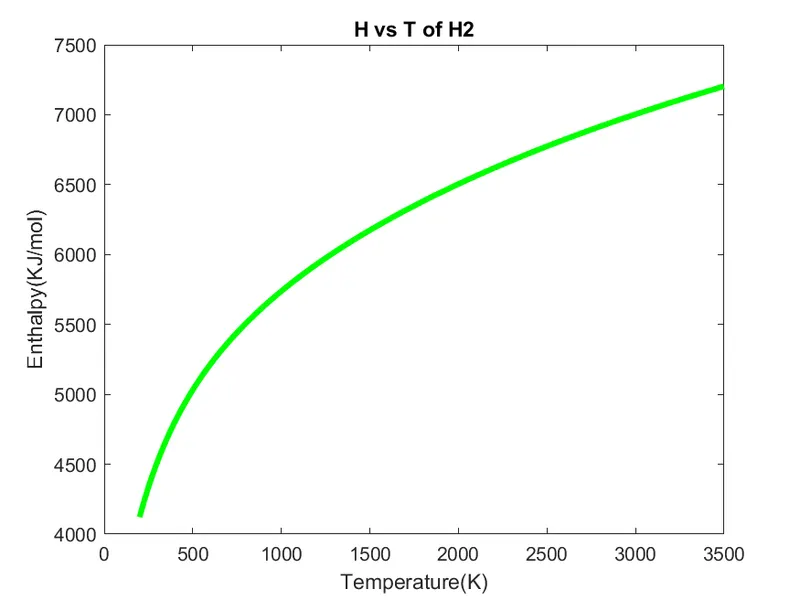
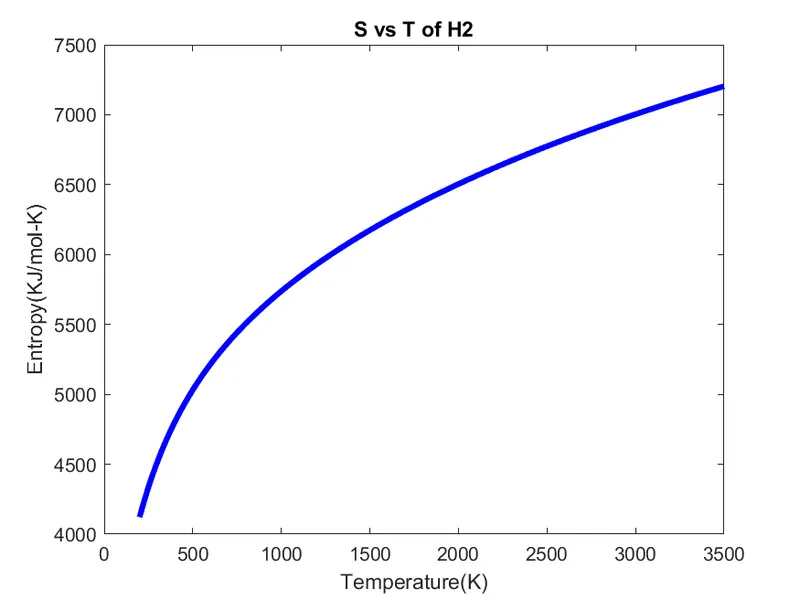
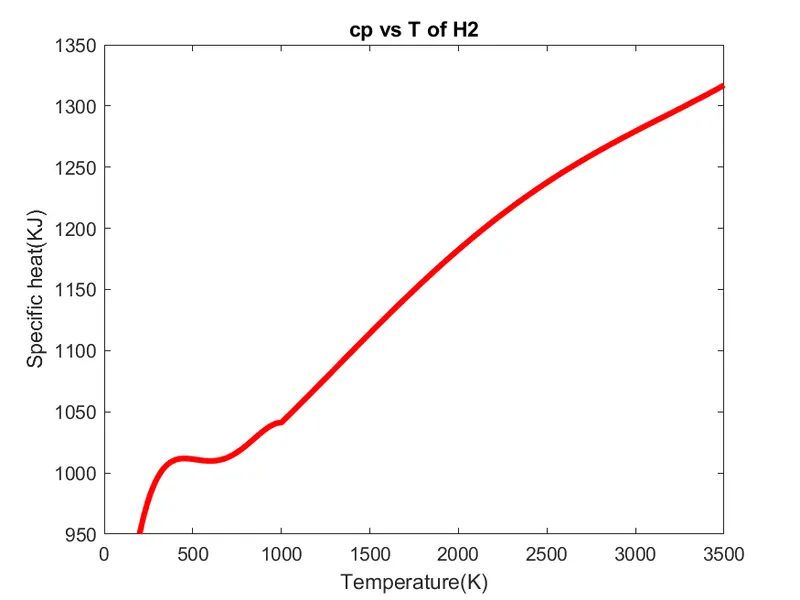
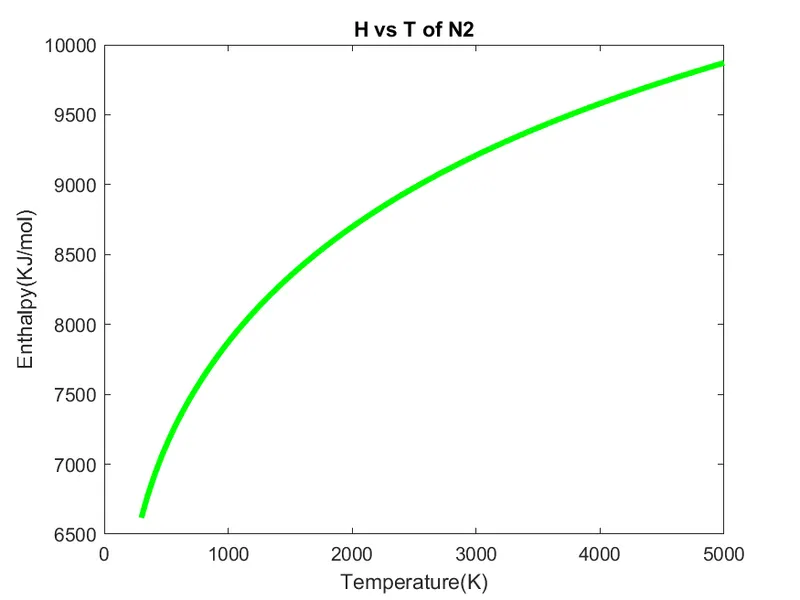
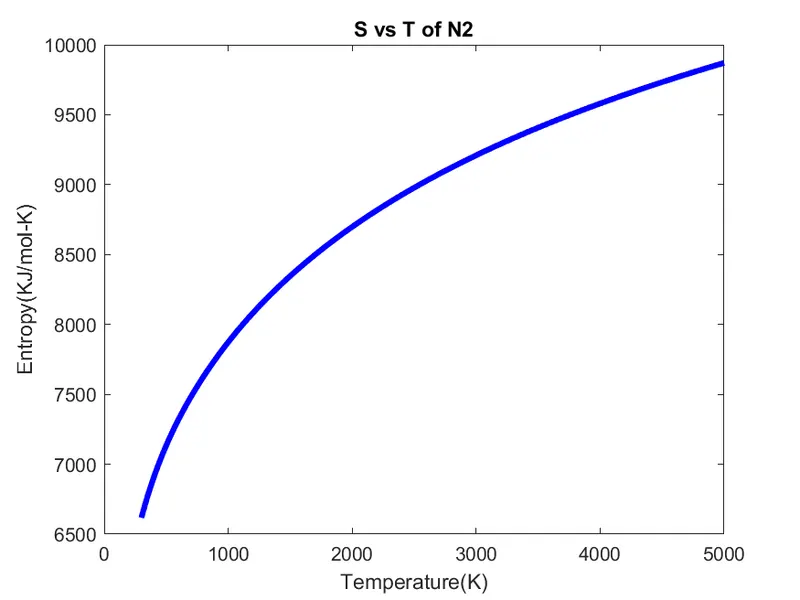
- Plot the Cp, Enthalpy and Entropy for the local temperature range specific for each species.
- Save the plots as images with appropriate names and dump them in separate folders for each species with suitable name. All these should be generated automatically.
- The main program that you will submit will just take the "THERMO.dat" file as an input and generate Cp, H and S plots.
- Please write a detailed report to describe your logic.
- Screenshot of the window where all the folders are saved.
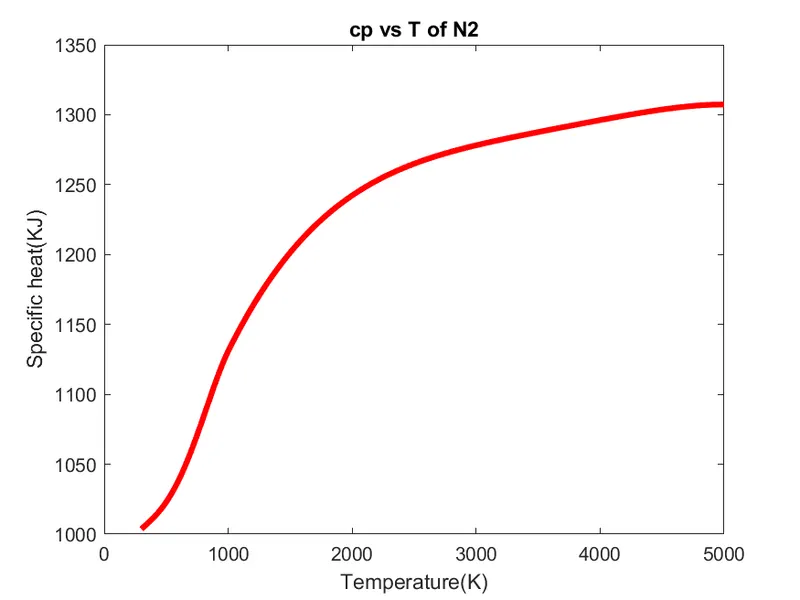
- Plots for o2, N2 and Co2 species.
File parsing: The File Parser process enables you to convert data from an external file into PeopleSoft data and place it into tables in your Campus Solutions database. The external file can be a delimited file or a flat file. It can be a simple file with one row type or a complex file with several row types.
Code:
clear all
close all
clc

% Parsing NASA thermodynamic data

% Inputs
% Gas constant [J/kg K]
R = 287

f1 = fopen('THERMO.dat','r')             % opening the file & reading it
g = fgetl(f1);                           % reading comment lines
temp = fgetl(f1);                        % reading the temperature from the file
split = strsplit(temp);                  % spliting temperature string into cell array
temp_low = str2double(split{2});         % converting cell array string into precision numbers
temp_mid = str2double(split{3});
temp_high = str2double(split{4});
T = linspace(temp_low,temp_high,1000);   % defining the length of the temperature

% for neglecting comment lines
for i = 1:3
    g = fgetl(f1);
end

% for finding the cp,H,S & molecular weight of species
v = 1;
for j = 1:inf
    v = v+1;
    tline = fgetl(f1);                    % reading specific line string characters
    B = strsplit(tline,' ');              % spliting string into cell array
    species_name = (B{1});                % for species name
    if species_name == "END"              % when species_name "END" is r-eading, condition become true
        break                             % and loop gets break
    end
    templow = str2double(B{end-3});       % converting cell array string to precision number
    tempmid = str2double(B{end-1});
    temphigh = str2double(B{end-2});
    T = linspace(templow,temphigh,1000);

    % for finding coefficients
    tline2 = fgetl(f1);
    a = strfind(tline2,'E');

    % for finding higher coefficients
    a1 = tline2(1:a(1)+3);
    a1 = str2double(a1);
    a2 = tline2(a(1)+4:a(2)+3);
    a2 = str2double(a2);
    a3 = tline2(a(2)+4:a(3)+3);
    a3 = str2double(a3);
    a4 = tline2(a(3)+4:a(4)+3);
    a4 = str2double(a4);
    a5 = tline2(a(4)+4:a(5)+3);
    a5 = str2double(a5);

    tline3 = fgetl(f1);
    b = strfind(tline3,'E');
    a6 = tline3(1:b(1)+3);
    a6 = str2double(a6);
    a7 = tline3(b(1)+4:b(2)+3);
    a7 = str2double(a7);

    % for finding lower coefficients
    a8 = tline3(b(2)+4:b(3)+3);
    a8 = str2double(a8);
    a9 = tline3(b(3)+4:b(4)+3);
    a9 = str2double(a9);
    a10 = tline3(b(4)+4:b(5)+3);
    a10 = str2double(a10);

    tline4 = fgetl(f1);
    c = strfind(tline4,'E');
    a11 = tline4(1:c(1)+3);
    a11 = str2double(a11);
    a12 = tline4(c(1)+4:c(2)+3);
    a12 = str2double(a12);
    a13 = tline4(c(2)+4:c(3)+3);
    a13 = str2double(a13);
    a14 = tline4(c(3)+4:c(4)+3);
    a14 = str2double(a14);

    % to calculate cp,S & H for the length of the temperature

    for k = 1:length(T)
        cp(k) = specific_heat(a1,a2,a3,a4,a5,a6,a7,a8,a9,a10,a11,a12,a13,a14,T(k),R,tempmid);

        S(k) = entropy(a1,a2,a3,a4,a5,a6,a7,a8,a9,a10,a11,a12,a13,a14,T(k),R,tempmid);

        H(k) = enthalpy(a1,a2,a3,a4,a5,a6,a7,a8,a9,a10,a11,a12,a13,a14,T(k),R,tempmid);

    end

    y = molecular_weight(species_name);     % calculating molecular weight

% plotting
% cp vs T
figure(1)
plot(T,cp,'linewidth',3,'color','r')
xlabel('Temperature(K)')
ylabel('Specific heat(KJ)')
title(sprintf('cp vs T of %s',species_name))
saveas(figure(1),'Specific heat.png')

% S vs T
figure(2)
plot(T,S,'linewidth',3,'color','b')
xlabel('Temperature(K)')
ylabel('Entropy(KJ/mol-K)')
title(sprintf('S vs T of %s',species_name))
saveas(figure(2),'Entropy.png')

% H vs T
figure(3)
plot(T,S,'linewidth',3,'color','g')
xlabel('Temperature(K)')
ylabel('Enthalpy(KJ/mol)')
title(sprintf('H vs T of %s',species_name))
saveas(figure(3),'Enthalpy.png')

% writing text file
mw = fopen('molecular weight.txt','w');
fprintf(mw,'%s- %d',species_name,y);
fclose(mw);

% saving file at a particular path
mkdir('C:\Users\Bala Vijay\Documents\MATLAB\parsing species',species_name)  % creating new folder
cd('C:\Users\Bala Vijay\Documents\MATLAB\parsing species');                 % changing current path to new path
mkdir(species_name);                                                        % creating child folders in specified parent folder
cd(species_name);                                                           % to save files in new original folder
end

function cp = specific_heat(a1,a2,a3,a4,a5,a6,a7,a8,a9,a10,a11,a12,a13,a14,T,R,tempmid)
if T >= tempmid
    cp = R*(a1 + (a2*T) + (a3*(T.^2)) + (a4*(T.^3)) + (a5*(T.^4)));
else
    cp = R*(a8 + (a9*T) + (a10*(T.^2)) + (a11*(T.^3)) + (a12*(T.^4)));
end
end

function H = enthalpy(a1,a2,a3,a4,a5,a6,a7,a8,a9,a10,a11,a12,a13,a14,T,R,tempmid)

if  T >= tempmid
    H = (R*T)*(a1 + ((a2*T)/2) + ((a3*(T.^2))/3) + ((a4*(T.^3))/4) + ((a5*(T.^4))/5) + (a6/T));
else
    H = (R*T)*(a8 + ((a9*T)/2) + ((a10*(T.^2))/3) + ((a11*(T.^3))/4) + ((a12*(T.^4))/5) + (a13/T));
end
end

function S = entropy(a1,a2,a3,a4,a5,a6,a7,a8,a9,a10,a11,a12,a13,a14,T,R,tempmid)

if T >= tempmid
    S = R*((a1.*log(T)) + (a2*T) + ((a3*(T.^2))/2) + ((a4*(T.^3))/3) + ((a5*(T.^4))/4) + a7);
else
    S = R*((a8.*log(T)) + (a9*T) + ((a10*(T.^2))/2) + ((a11*(T.^3))/3) + ((a12*(T.^4))/4) + a14);
end
end


function w = molecular_weight(species_name)

atomic_name = ['H' 'C' 'N' 'O' 'A'];
atomic_weight = [1 12 14 16 40];
w = 0;

for l = 1:length(species_name)
    for m = 1:length(atomic_name)
        if strcmp(species_name(l),atomic_name(m)) == 1    % If both string is equal, the condition is true(1) and if not (0) no return happens
        w = w + atomic_weight(m)
        x = m
        end
    end
        n = str2double(species_name(l))
    if n>1
        w = w + (atomic_weight(x)*(n-1))
    end
end
sprintf('%s',species_name)   % for printing species name in command window
sprintf('%f',w)              % for printing molecular weight in command window
end
Explanation:
- Initially, we defined gas constant(R) as an input.
- Now, we are opening the file “THERMO.dat” with the help of command “fopen” and reading the file.
- First, we read the comment lines and then read the temperature from the file with the help of command “fgetl”.
- Then, we splitting temperature string into cell array with the help of “strsplit” comma
- For converting cell array into precision value, here we used “str2double” comma It’s a row vector. So, we need to change the column in the input state. Here, we need to use the following format (syntax (function{input}) to convert it into number.
- Then, defining the length of the temperature from low to high with the help of the “linspace” comma
- Now, defining the loop to neglect the comment lines.
- To find the required parameters, created another loop for the infinity times. Then, reading the data for the species line and splitting into cell array by defining space inside synta Then, need to find the species name and temperature of each species by converting it from cell array into string & number.
- Then, created “if” condition with the true statement for when the condition gets the species name as “END”, it comes to the end of the file and loop will get stop. For stopping loop, we used the “break” condition. Until the process continues with the help of the variable “v” if condition not gets sa
- For finding coefficients, we need to read the coefficient lines from the file. Then, need to find "E" with the help of the command “strfind” which leads to give the result up to the character “E”. Then, we can simply find the prefix by giving it from a starting & suffix by just a To convert strings into a numbers, simply use “str2double” command. The same thing to be repeat to find all the coefficients.
- Plotting also have done within the loop for getting the each species result individua If we have done it after the loop, it will give the result only for the final species.
- To write the molecular weight text file, using “fopen”. Then, using “sprintf” to I write the result for each species as I required. Finally, using “fclose” to close the file.
- To create the new folder, I used “mkdir(‘path’,folder name)”. To change the path I created to save the files automatically, I used “cd(‘same path’)”. To create the new child folder within the specified parent folder for every species, again I used “mkdir(foldername)”. To save the files in the newly created folder, again I used “cd(‘foldername’)”.
- To calculate the cp,S & H for the length of the temperature, creating a At the end of the program, we need to define the function to get the result. In function, we assign all the necessary input into it and stored in a variable. Here, 14 coefficients are available. First 7 is higher temperature coefficients & final 7 is the lower temperature coefficients. So, we need to arise the condion by using “if”,”else” for the given formula of cp,S & H. Here, the condition is that when the T >= tempmid it takes the “if” condition. If not, then else condition.
- To calculate molecular weight, create function & give input as species na Then, define atomic name, atomic weight of the common species & molecular weight is zero. Inside function, created two loops. One for the length of species name & another one is for the length of the atomic name. Now, using “if” condition by comparing both of it. If both string is equal, the condition is true (1) which leads to store the molecular weight and if not (0), no return happens.
- Now, define “n” by converting string to number. Then, use “if” condition of “n>1” when more specific species names comes together and calculate molecular weight by multiply with (n-1).
Result: