Project 1 - Parsing NASA thermodynamic data
File Parsing in MATLAB refers to file reading and data file and storing it internally as a code in its memory. When the code is executed the stored or parsed file get read or executed. It is also checked whether the data is broken down into meaningful bits or not.
Code Explanation for calculating function of Cp,H and S.
The function of the code is calculated on the basis of the formulae given in the question and is iterated in a for loop till the extent of the temperature. The if else statement is used to calcuate both the temperatures. Here temperature of each species vary. The initial 7 data will be local high temperatures and the last 7 data will be local low temperatures.
%function for calculating Cp, H & S
function [Cp,H,S] = inputs(T,R,Tm1,a1,a2,a3,a4,a5,a6,a7,a8,a9,a10,a11,a12,a13,a14)

for i = 1:length(T)
    if T(i)>Tm1
        Cp = (a1+a2.*T + a3.*T.^2 + a4.*T.^3 + a5.*T.^4).*R;
        H = (a1+(a2.*T)./2+(a3.*T.^2)./3+ (a4.*T.^3)./4 + (a5.*T.^4)./5 + a6./T).*T.*R;
        S = (a1.*log(T)+ a2.*T + (a3.*T.^2)./2 + (a4.*T.^3)./3 + (a5.*T.^4)./4 + a7)*R;
    else
        Cp = (a8 + a9.*T + a10.*T.^2 + a11.*T.^3 + a12.*T.^4)*R;
        H = (a8 + (a9.*T)./2 + (a10.*T.^2)./3 + (a11.*T.^3)./4 + (a12.*T.^4)./5 + a13./T)*R;
        S = (a8.*log(T) + (a9*T)+ (a10.*T.^2)./2 + (a11.*T.^3)./3 + (a12.*T.^4)./4 + a14)*R;
    end
end
end
Code Explanation for calculating function of of Molecular Weight.
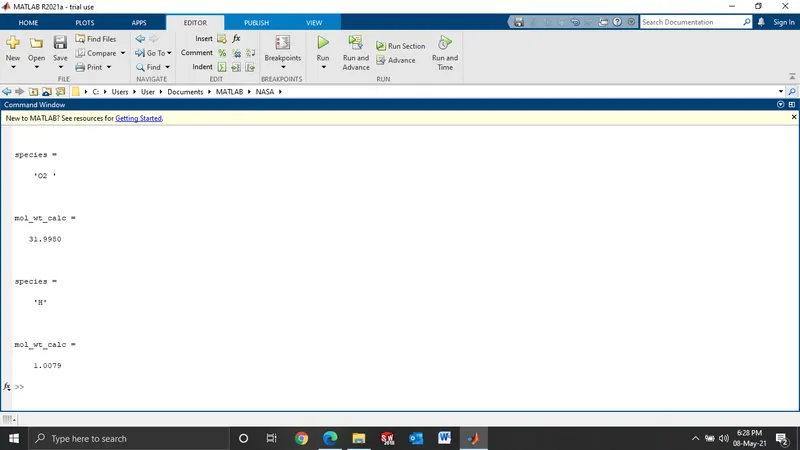
In this code molecular weight is calculated by giving atomic symbols and atomic weight as input for the goven species. To calculate the molecular weights indicidually a for loop is used and the strcmp is used to compare the string of the species with elements and calculate their respective molecular weights. To convert the string in to number str2double is used.
%function to calculate molecular weight
function mol_wt_calc = mol_wt(sp_name)
species = (sp_name)
elements = ['H','C','O','N','A','S'];
atomic_wt = [1.00794 12.0107 15.999 14.0067 39.948 32];
mol_wt_calc = 0;
for i = 1:length(species)
    for j = 1:length(elements)
        if strcmp(species(i),elements(j))
            mol_wt_calc = mol_wt_calc + atomic_wt(j)
            c = j;
        end
    end
    n = str2double(species(i));
    if n>1;
       mol_wt_calc = mol_wt_calc + (atomic_wt(c)*(n-1))
    end
end
end
Main program Explanation
-In the program firstly the data is read from the file and the information is acquired.
-Then we acquire the global temperatures as we need.
-The loop is used to get all the temperature an coefficient data.
-Now, the data we got is converted from string to numbers.
-The function is then called for calculation.
-Then a specific directory is created.
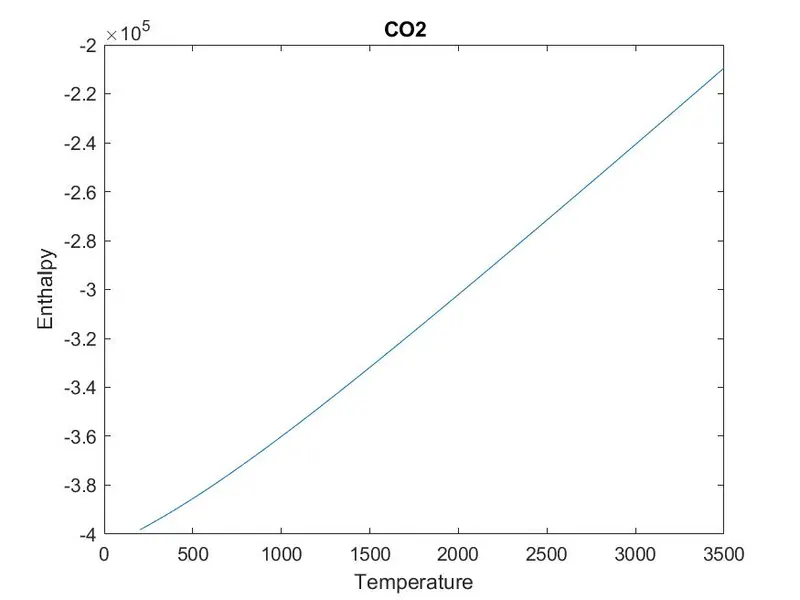
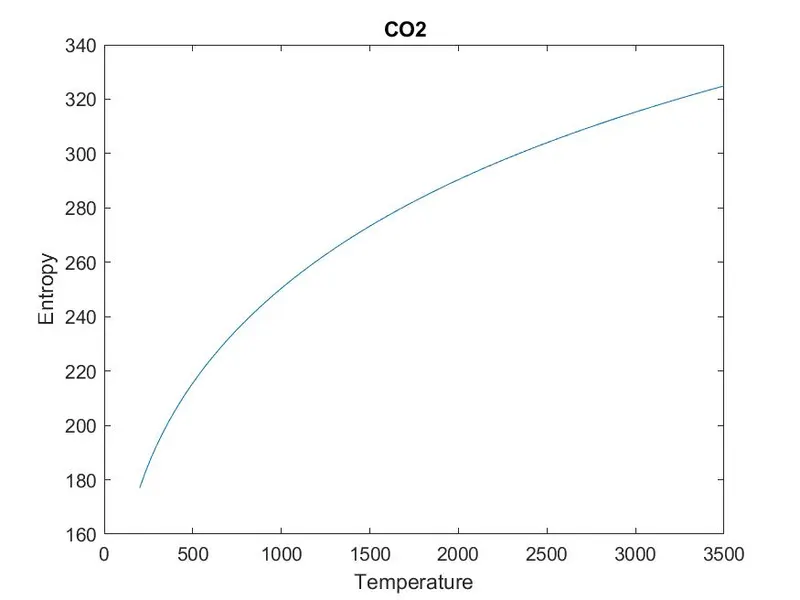
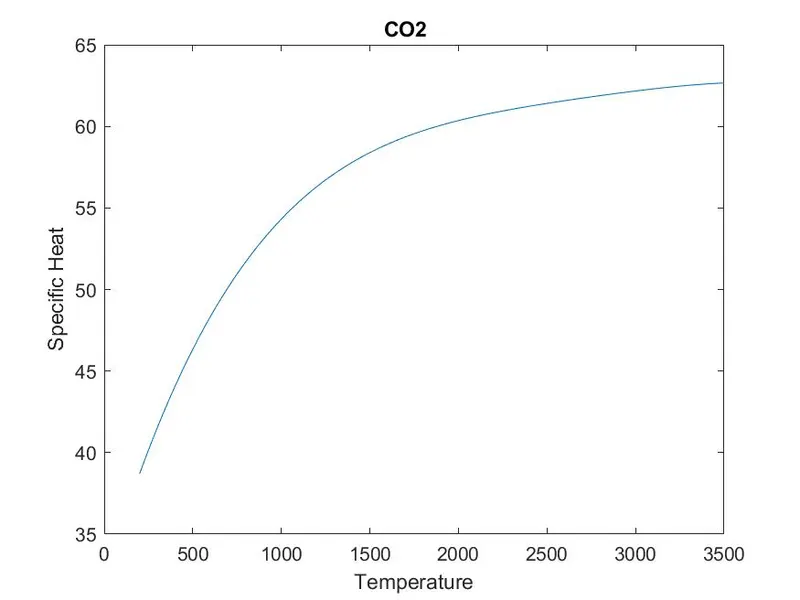
- the respective plots are then made.
- The change directory is used to save the enthalpy, entropy and temperature data.
- Then the molecular weight is calculated by calling the function
%main program
clear all
close all
clc

f1 = fopen('THERMO.dat','r');
fgetl(f1)
tline = fgetl(f1);
A = strsplit(tline,' ');
Global_low_temp = str2double(A{2});
Global_mid_temp = str2double(A{3});
Global_high_temp = str2double(A{4});

%for lines
for i = 3:5
    g = fgetl(f1);
end
%for temp
   for j = 1:53
  species = fgetl(f1);
  t = strfind(species,'.');
  %local_temp
  species(52-3:52+3);
  Tl = species(52-3:t(1)+3);
  Tl1 = str2double(Tl);

    species(t(1)+6:62+3);
  Th = species(t(1)+6:t(2)+3);
  Th1 = str2double(Th);

    species(t(2)+6:72+3);
  Tm = species(t(2)+6:t(3)+3);
  Tm1 = str2double(Tm);

  sp_name = species(1:6);

  %coefficients_1
  coeff_line_1 = fgetl(f1);
  A11 = strfind(coeff_line_1, 'E');
  coeff_line_1(1:12+3);

  c1 = coeff_line_1(1:A11(1)+3);
  a1 = str2double(c1);
  c2 = coeff_line_1(A11(1)+4:A11(2)+3);
  a2 = str2double(c2);
  c3 = coeff_line_1(A11(2)+4:A11(3)+3);
  a3 = str2double(c3);
  c4 = coeff_line_1(A11(3)+4:A11(4)+3);
  a4 = str2double(c4);
  c5 = coeff_line_1(A11(4)+4:A11(5)+3);
  a5 = str2double(c5);

  %coefficients_2
  coeff_line_2 = fgetl(f1);
  A12 = strfind(coeff_line_2, 'E');
  coeff_line_2(1:12+3);
  c6 = coeff_line_2(1:A12(1)+3);
  a6 = str2double(c6);
  c7 = coeff_line_1(A12(1)+4:A11(2)+3);
  a7 = str2double(c7);
  c8 = coeff_line_1(A12(2)+4:A11(3)+3);
  a8 = str2double(c8);
  c9 = coeff_line_1(A12(3)+4:A11(4)+3);
  a9 = str2double(c9);
  c10 = coeff_line_1(A12(4)+4:A11(5)+3);
  a10 = str2double(c10);

  %coefficients_3
  coeff_line_3 = fgetl(f1);
  A13 = strfind(coeff_line_3, 'E');
  coeff_line_3(1:12+3);
  c11 = coeff_line_2(1:A13(1)+3);
  a11 = str2double(c11);
  c12 = coeff_line_1(A13(2)+4:A11(2)+3);
  a12 = str2double(c12);
  c13 = coeff_line_1(A13(3)+4:A11(4)+3);
  a13 = str2double(c13);
  c14 = coeff_line_1(A13(4)+4:A11(5)+3);
  a14 = str2double(c14);
T= linspace(Tl1,Th1,100);
R = 8.314; %gas constant
[Cp,H,S] = inputs(T,R,Tm1,a1,a2,a3,a4,a5,a6,a7,a8,a9,a10,a11,a12,a13,a14)
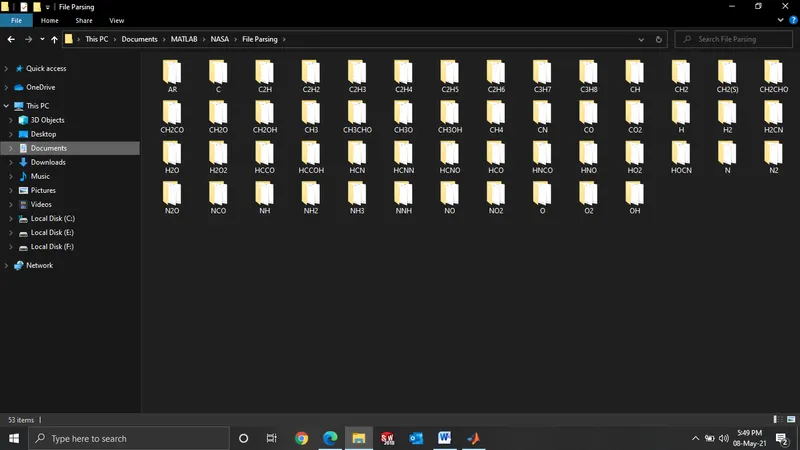
mkdir('C:\Users\User\Documents\MATLAB\NASA\File Parsing', sp_name)

%plot1
figure(1)
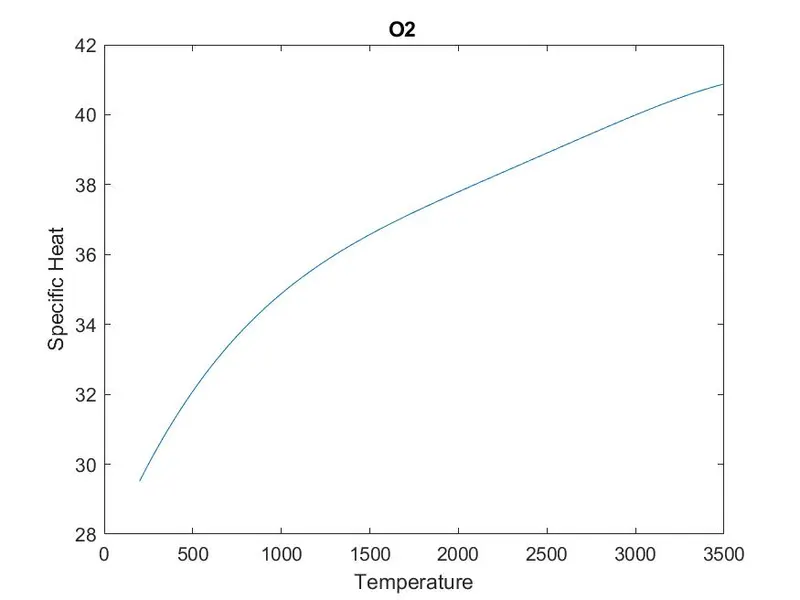
plot(T,Cp);
xlabel('Temperature');
ylabel('Specific Heat');
title(sp_name);

figure(2)
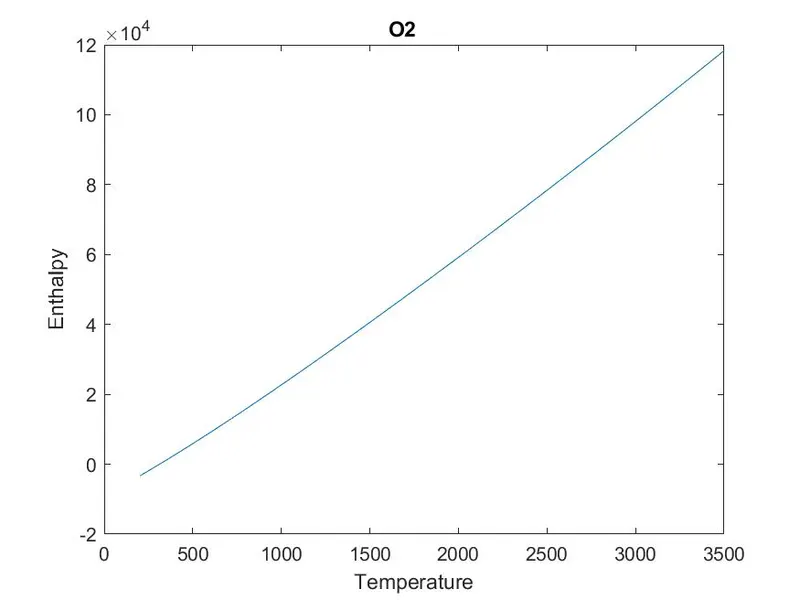
plot(T,H);
xlabel('Temperature');
ylabel('Enthalpy');
title(sp_name);

figure(3)
plot(T,S);
xlabel('Temperature');
ylabel('Entropy');
title(sp_name);

program = (['C:\Users\User\Documents\MATLAB\NASA\File Parsing\', sp_name]);
cd(program)

saveas(1,'specific heat.jpg');
saveas(2,'Enthalpy.jpg');
saveas(3,'Entropy.jpg');
cd('C:\Users\User\Documents\MATLAB\NASA')

mol_wt_calc = mol_wt(sp_name)

   end
   fclose(f1)
Folder Screenshot
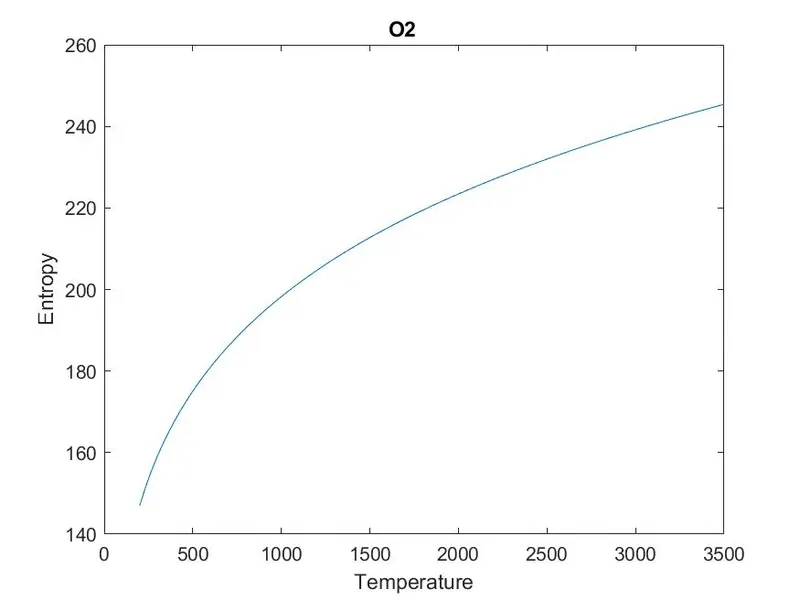
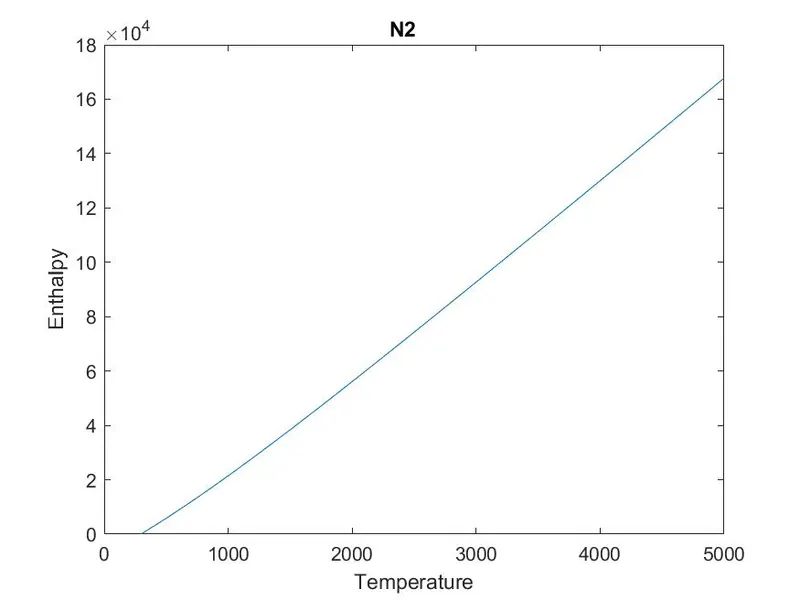
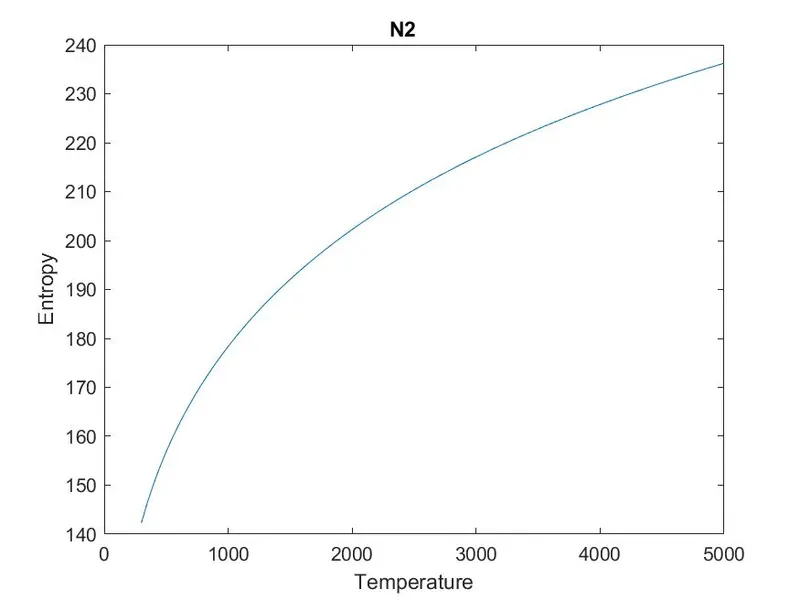
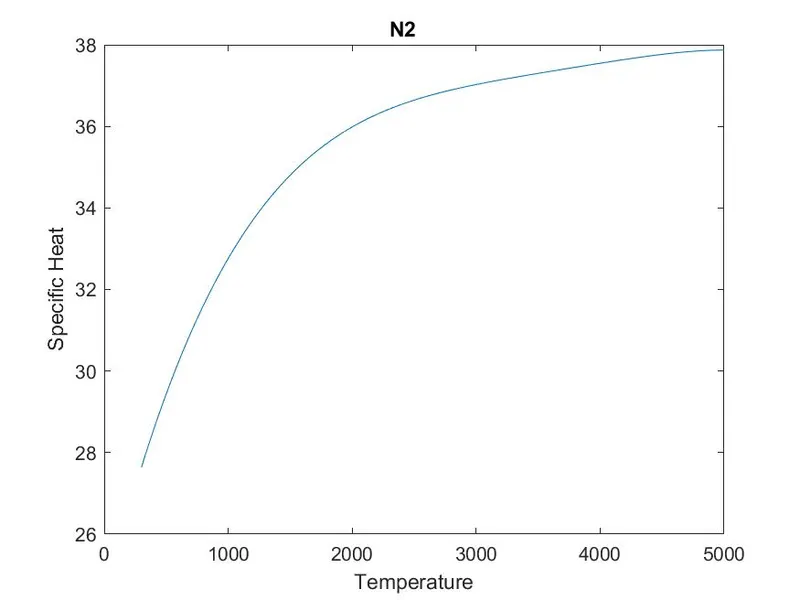
PLOTS
O2
N2
CO2
Command Window ScreenShot