Parsing NASA thermodynamic data
AIM:
To write a MATLAB Code to parse the NASA thermodynamic data file and then calculate thermodynamic properties of various gas species.
OBJECTIVES:
- Write a function that extracts the 14 co-efficients and calculates the enthalpy, entropy and specific heats for all the species in the data file.
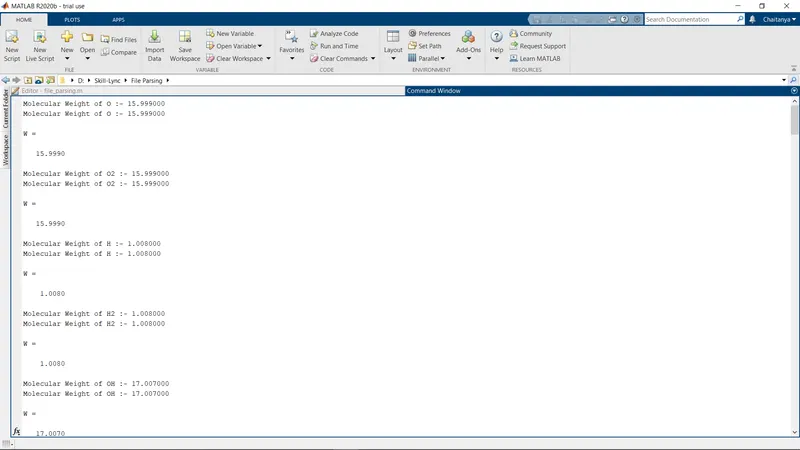
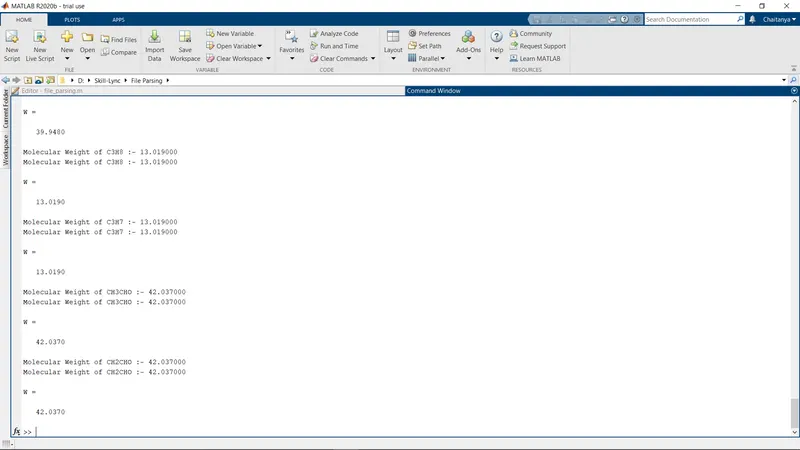
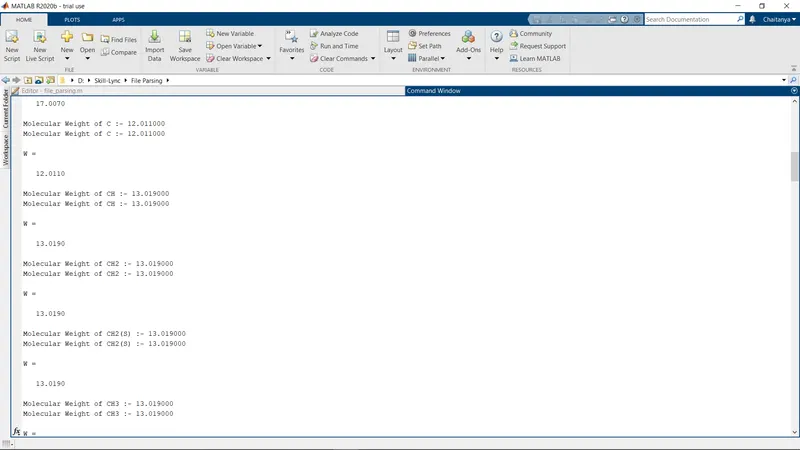
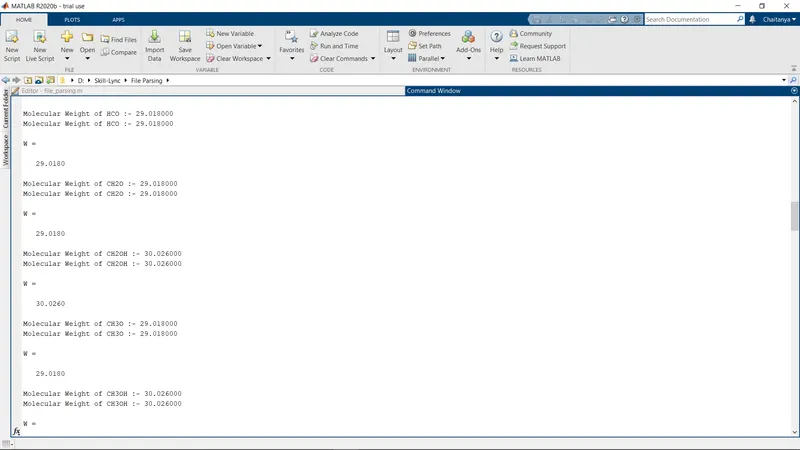
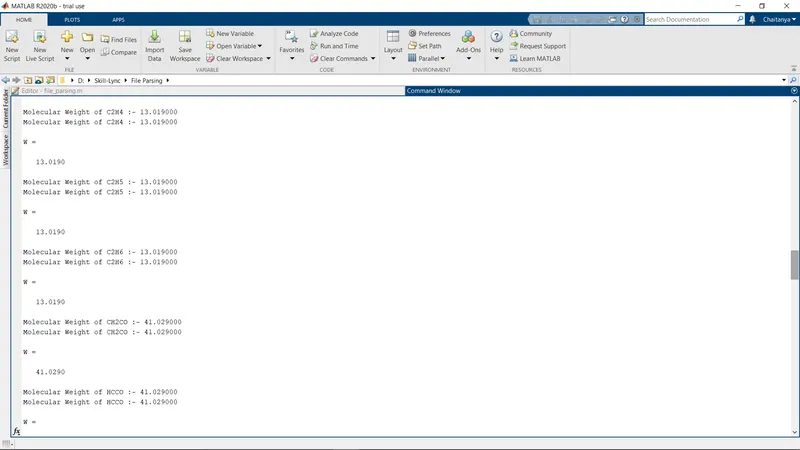
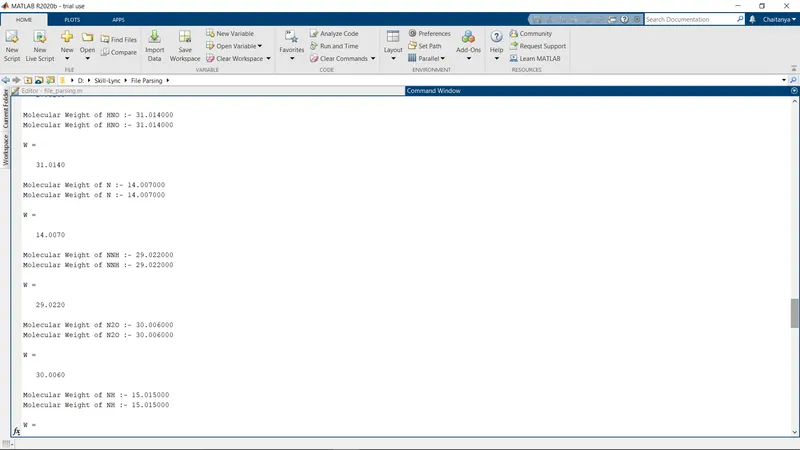
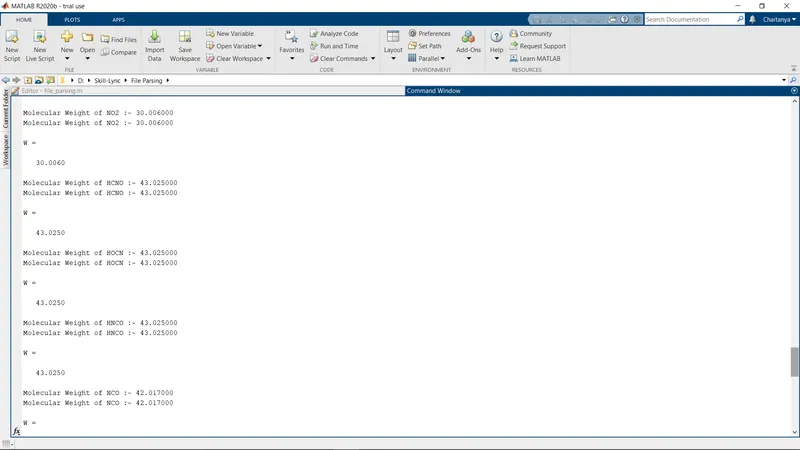
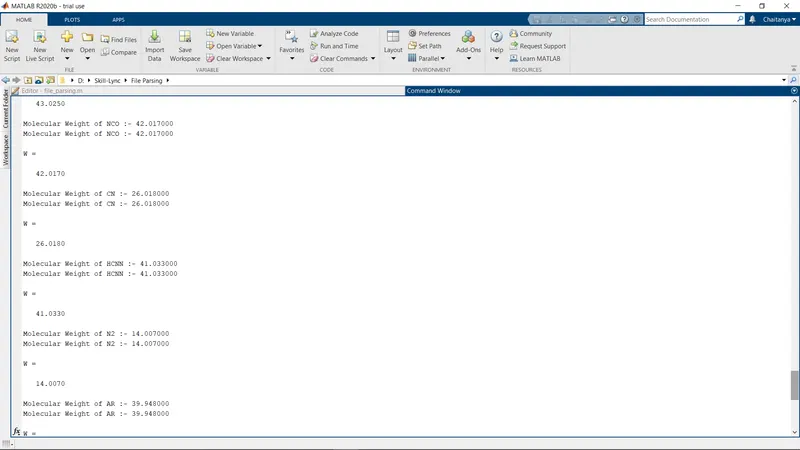
- Calculate the molecular weight of each species and display it in the command window.
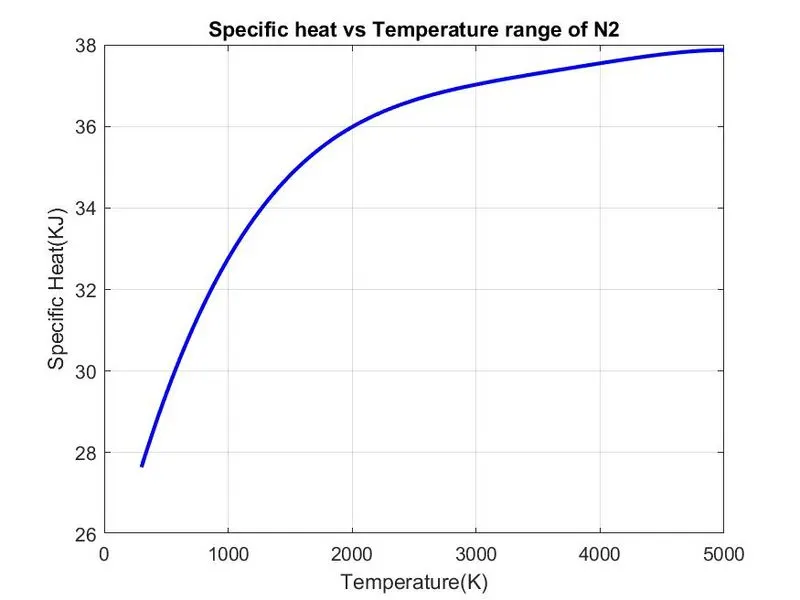
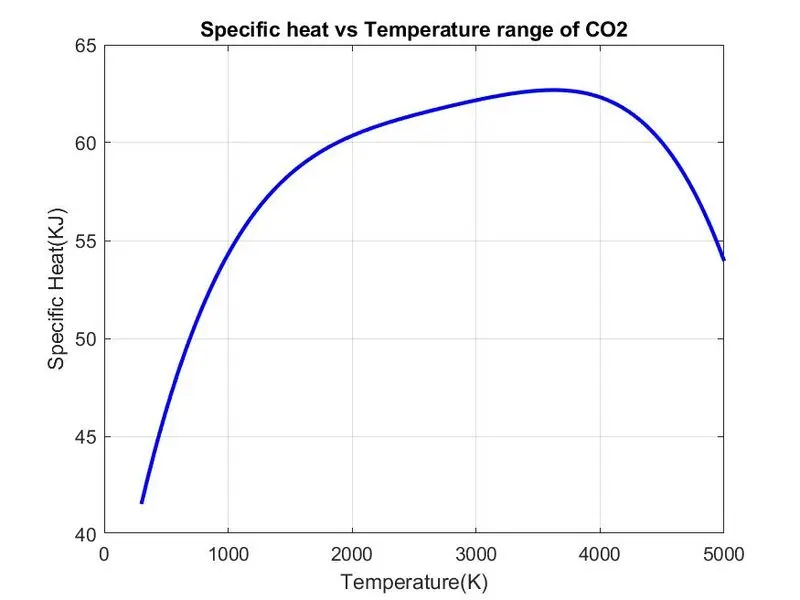
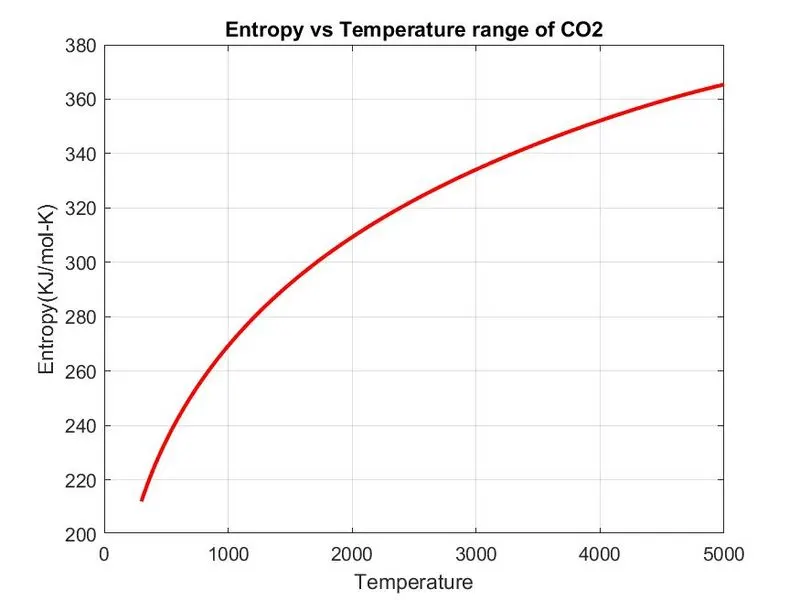
- Plot the Cp, Enthalpy and Entropy for the local temperature range (low temperature : high temperature) specific for each species.
- Save the plots as images with appropriate names and dump them in seperate folders for each species with suitable name. All these should be generated automatically.
- The main program that would be submitted will just take the "THERMO.dat" file as input and generate Cp, H and S plots.
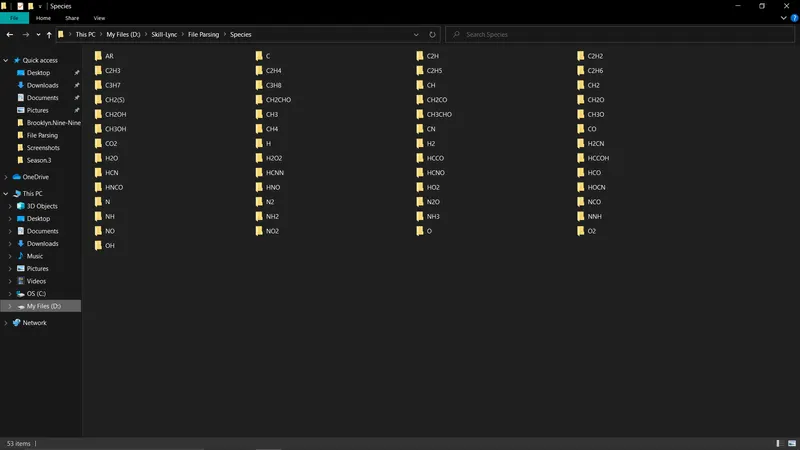
- Screenshot of the window where all the folders are saved.
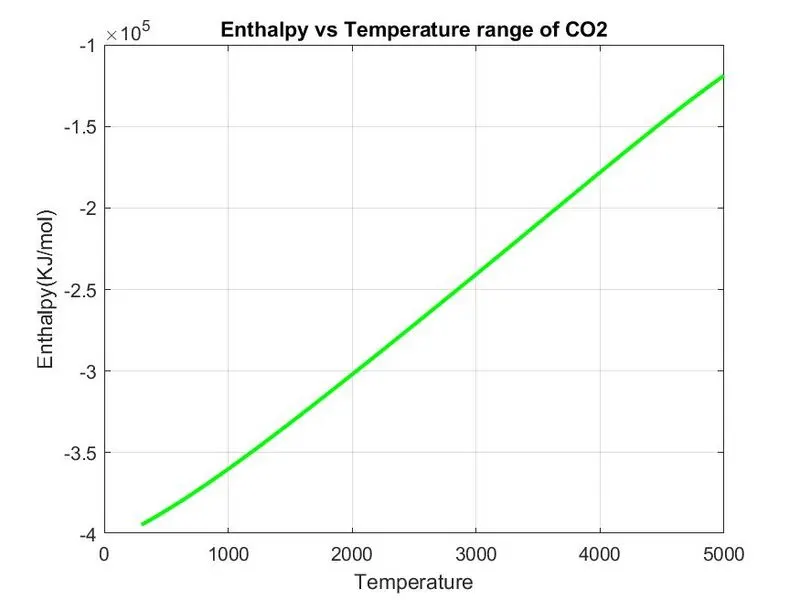
- Plots for O2, N2 and CO2 species (the program should be case insensitive, if it is going to take the species name as an input).
THEORY:
File Parsing:
Parsing, syntax analysis, or syntactic analysis is the process of analyzing a string of symbols, either in natural language, computer languages or data structures, conforming to the rules of a formal grammar. The term parsing comes from Latin pars (orationis), meaning part (of speech).
The term has slightly different meanings in different branches of linguistics and computer science. Traditional sentence parsing is often performed as a method of understanding the exact meaning of a sentence or word, sometimes with the aid of devices such as sentence diagrams. It usually emphasizes the importance of grammatical divisions such as subject and predicate.
Within computational linguistics the term is used to refer to the formal analysis by a computer of a sentence or other string of words into its constituents, resulting in a parse tree showing their syntactic relation to each other, which may also contain semantic and other information (p-values). Some parsing algorithms may generate a parse forest or list of parse trees for a syntactically ambiguous input.
Use 'fopen' command to open the data file.
syntax:
- "fileid = fopen(filename,'r')"
'r' is used for file reading
- "fileid = fopen(filename,'w')"
'w' is used for file writing
Specific Heat (Cp):
The specific heat is the amount of heat per unit mass required to raise the temperature by one degree celsius. In si systems, this is joules per kelvin per kg.
Q = mcdt
where, Q = heat added
M = 1 kg of mass
dt = change in temperature
c = specific heat
Entropy:
Entropy is a thermodynaamic quantity reresenting the unavailability of a system's thermal energy for conversion into mechanical work, often interpreted as the degree of disorder or randomness in the system.
Enthalpy:
Enthaply is a property of a thermodynamic systemis equal to the system's internal energy plus the product of its pressure and volume. it depends only on the prevailing equilibrium state identified by the system's internal energy, pressure and volume.
The unit of measurement for enthaply in the Sl is the joule.
Molecular Weight:
The average mass of a molecule of a compound compared to ¹/₁₂ the mass of carbon 12 and calculated as the sum of the atomic weights of the constituent atoms.
FORMULAE:
Formulae to calculate Specific Heat(Cp), Entropy(S), Enthalpy(H) are
CP/R= a1 +a2 t + a3 t^2 + a4 t^3 + a5t^4
S/R = a1 1nT + a2 T + a3 T^2/2 + a4 T^3/3 + a5 T^4/4 + a7
H/RT= a1+ a2 t /2 + a3 t^2/3 + a4 T^3 /4 + a5 T^4 /5 + a6/T
CODE:
Main code:
clear all
close all
clc

%Input
R=8.314; % Gas Constant

% Reading data file
% open file and reading THERMO.dat file
f1 = fopen('THERMO.dat','r');
get = fgetl(f1);

% Now Reading Temperature from this file
temp = fgetl(f1);

%spliting
s = strsplit(temp);

% converting strings cells into numbers
templow = str2num(s{2});
tempmid = str2num(s{3});
temphigh = str2num(s{4});

% Temperature Range
T = linspace(templow,temphigh,1000);

%Skipping comment lines
for i=1:3
    get=fgetl(f1);
end

% Reading the Species
for j=1:53
    tline=fgetl(f1);

   A=strsplit(tline,' ');  % spliting into cell array
    species =  (A{1});         % To read the name of the species

     % Converting string to number
    lowtemp = str2num(A{end-3});
    midtemp = str2num(A{end-2});
    hightemp = str2num(A{end-1});


    tline1 = fgetl(f1);   % getting next line
    a = strfind(tline1,'E');  % Finding the string E

    % Finding First 7 higher and second 7 lower coefficients
    %Finding Higher coefficients
    a1 = tline1(1:a(1)+3);
    a1 = str2num(a1);
    a2 = tline1(a(1)+4:a(2)+3);
    a2 = str2num(a2);
    a3 = tline1(a(2)+4:a(3)+3);
    a3 = str2num(a3);
    a4 = tline1(a(3)+4:a(4)+3);
    a4 = str2num(a4);
    a5 = tline1(a(4)+4:a(5)+3);
    a5 = str2num(a5);

    tline2 = fgetl(f1);
    b = strfind(tline2,'E');
    a6 = tline2(1:b(1)+3);
    a6 = str2num(a6);
    a7 = tline2(b(1)+4:b(2)+3);
    a7 = str2num(a7);

    % Finding Lower coefficients
    a8 = tline2(b(2)+4:b(3)+3);
    a8 = str2num(a8);
    a9 = tline2(b(3)+4:b(4)+3);
    a9 = str2num(a9);
    a10 = tline2(b(4)+4:b(5)+3);
    a10 = str2num(a10);

    tline3 = fgetl(f1);
    c = strfind(tline3,'E');
    a11 = tline3(1:c(1)+3);
    a11 = str2num(a11);
    a12 = tline3(c(1)+4:c(2)+3);
    a12 = str2num(a12);
    a13 = tline3(c(2)+4:c(3)+3);
    a13 = str2num(a13);
    a14 = tline3(c(3)+4:c(4)+3);
    a14 = str2num(a14);

    % calculate specific heat
    Cp = Specific_heat(a1,a2,a3,a4,a5,a8,a9,a10,a11,a12,T,R,tempmid);

    % calculate Entropy
    S = Entropy(a1,a2,a3,a4,a5,a7,a8,a9,a10,a11,a12,a14,T,R,tempmid);

    % claculate Enthalpy
    H = Enthalpy(a1,a2,a3,a4,a5,a6,a8,a9,a10,a11,a12,a13,T,R,tempmid);

    % Calculate Molecular weight of the Species
    W = Molecular_weight(species);

    % writing molecular weight file
    MW_file = fopen('Molecular Weight.txt','w');
    fprintf(MW_file,'Molecular weight of %s is %d ',species,W);
    fclose(MW_file);   % Closing the file

    %Plotting Cp, H and S with Temperature
    % Saving in a folder
    cd('D:Skill-LyncFile ParsingSpecies')  % changing directory
    mkdir(species);  %creating directory
    cd(species);


    % Plot 1 Cp vs T
    figure(1)
    plot(T,Cp,'linewidth',2,'color','b');
    xlabel('Temperature(K)');
    ylabel('Specific Heat(KJ)');
    title(sprintf('Specific heat vs Temperature range of %s',species));
    grid on
    saveas(figure(1),'Specific Heat.jpg');

    % Plot 2 S vs T
    figure(2)
    plot(T,S,'linewidth',2,'color','r');
    xlabel('Temperature');
    ylabel('Entropy(KJ/mol-K)');
    title(sprintf('Entropy vs Temperature range of %s',species));
    grid on
    saveas(figure(2),'Entropy.jpg');

    % Plot 3 H vs T
    figure(3)
    plot(T,H,'linewidth',2,'color','g');
    xlabel('Temperature');
    ylabel('Enthalpy(KJ/mol)');
    title(sprintf('Enthalpy vs Temperature range of %s',species));
    grid on
    saveas(figure(3),'Enthalpy.jpg');

    cd('D:Skill-LyncFile Parsing')  %Changing directory to Original matlab path

    % Molecular weight
    W =  Molecular_weight(species)

end
STEPS:
- Firstly, we will Input the parameter R and we will open a file THERMO.dat file and reading this file using fopen command.
- Then, we will read first THERMO using fgetl command and then we read temperature file and we will split the temperatures using strsplit command to convert it into cell array and then we will convert this string to number using str2num command to find low, high and mid temperatures.
- Then we will assign temperature range using linspace command. Then we run loop to skip command lines the data file using fgetl command inside the loop.
- Now, we will run the loop to find 53 element in the data file by assigning fgetl command and then spliting into the cell array to find the species line and then find the species name and then find the number of the temperatures in the species line.
- Then we read the new line. In order to read the coefficient in the data file we will first find the 'E' string using strfind command to find before and after numbers of the coefficients then we will find remaining 14 coefficients and convert them to numbers from strings.
- Out of which we will find first 7 Coefficients which are for Higher temperature and then Second 7 Coefficients which are for Lower temperature.
- Now we will specify. Specific Heat Cp, Entropy S, Enthalpy H functions to find these parameters using these 14 coefficients for Lower and Higher Temperatures. Then, we will specify molecular weight W function to find the Molecular Weight of different species.
- Now we will write the 'Molecular weight.txt' file and fprintf all the molecular weights of the species and then close the txt file using fclose command.
- Now we change the directory using cd command and then creating directory folder where we have to save our files using mkdir command and then we will change the directory to this created folder.
- Now, we will plot Specific Heat, Entropy and Enthalpy with the temperature for different species. We will use scanf command to scan the species and the title command to create different species title.
- Then we will use saveas command to save the plots of different species in the directory folder. Now we will change the directory to which our main code file runs in the MATLAB.
Function to find Specific Heat:
function Cp = Specific_heat(a1,a2,a3,a4,a5,a8,a9,a10,a11,a12,T,R,tempmid)

    % calculating specific heat
    % calculating specific heat for higher and lower temperature repectively.

    if (T <= tempmid)
        Cp = R*(a8 + (a9*T) + (a10*(T).^2) + (a11*(T).^3) + (a12*(T).^4));
    else
        Cp = R*(a1 + (a2*T) + (a3*(T).^2) + (a4*(T).^3) + (a5*(T).^4));
    end
end
Steps:
- Now we will find the Specific heat by creating Specific Heat Function and assigning its related formula coefficient from 14 coefficients, Gas constant, Temperature and mid temperature.
- Now we will create a condition using 'if loop' and make the temperature less than and equal to mid temperature to specify lower temperature coefficient in the formula.
- Then we will use else condition to specify coefficient of Higher temperature coefficient in the formula.
- Then end the loop and function to calculate Specific Heat.
Function to find Entropy:
function S = Entropy(a1,a2,a3,a4,a5,a7,a8,a9,a10,a11,a12,a14,T,R,tempmid)

    % calculating entropy
    % calculating entropy for higher and lower temperature repectively.

    if (T <= tempmid)
        S = R*(a8.*log(T) + (a9*T) + ((a10*(T).^2)/2) + ((a11*(T).^3)/3) + ((a12*(T).^4)/4) + a14);
    else
        S = R*(a1.*log(T) + (a2*T) + ((a3*(T).^2)/2) + ((a4*(T).^3)/3) + ((a5*(T).^4)/4) + a7);

    end
end
Steps:
- Now we will find the Entropy by creating Entropy Function and assigning its related formula coefficient from 14 coefficients, Gas constant, Temperature and mid temperature.
- Now we will create a condition using 'if loop' and make the temperature less than and equal to mid temperature to specify lower temperature coefficient in the formula.
- Then we will use else condition to specify coefficient of Higher temperature coefficient in the formula.
- Then end the loop and function to calculate Entropy.
Function to find Enthalpy:
function H = Enthalpy(a1,a2,a3,a4,a5,a6,a8,a9,a10,a11,a12,a13,T,R,tempmid)

    % calculating enthalpy
    % calculating enthalpy for higher and lower temperature repectively.

    if (T <= tempmid)
        H = R*T.*(a8 + ((a9*T)/2) + ((a10*(T).^2)/3) + ((a11*(T).^3)/4) + ((a12*(T).^4)/5) + ((a13./T)));
    else
        H = R*T.*(a1 + ((a2*T)/2) + ((a3*(T).^2)/3) + ((a4*(T).^3)/4) + ((a5*(T).^4)/5) + ((a6./T)));
    end
end
Steps:
- Now we will find the Enthalpy by creating Enthalpy Function and assigning its related formula coefficient from 14 coefficients, Gas constant, Temperature and mid temperature.
- Now we will create a condition using 'if loop' and make the temperature less than and equal to mid temperature to specify lower temperature coefficient in the formula.
- Then we will use else condition to specify coefficient of Higher temperature coefficient in the formula.
- Then end the loop and function to calculate Enthalpy.
Function to find Molecular Weight:
function W = Molecular_weight(species)

    % Defining Atomic name of the species
    atomic_name = ['H','C','O','N','Ar'];

    % Defining Atomic masses of main species
    atomic_weight = [1.008 12.011 15.999 14.007 39.948];

    W=0;  % Molecular weight starting range

    for i=1:length(species)   % Loop runs to the length of the species
        for j=1:length(atomic_name)  % Loop runs to the length of the atomic names
            if strcmp(species(i), atomic_name(j))  %function to compare 2 strings
                W = W + atomic_weight(j);
                position = j;
            end
        end
        n = str2num(species);   % Now we will find if there is more element in the species then incrementing atomic weight of the species

        if n>1
            W = W + atomic_weight(position)*(n-1);
        end
    end

    fprintf('Molecular Weight of %s :- ',species);
    fprintf('%f',W);
    disp(' ')
end
Steps:
- Firstly, we create a Molecular_weight function W and assigning species input to that.
- then define the main element of all 53 species in an array atomic_name they are:- 'H', 'C', 'O', 'N', 'Ar'.
- Then by taking above main elements we will create their atomic_weight array from any source like internet and their values are :- 1.008 12.011 15.999 14.007 39.948.
- Then we will assign molecular weight starting range W to zero and then create a 'For Loop' condition which runs to the length of the species and an another nested 'For Loop' is created which run to the length of the string 'atomic_name'.
- Then we will create a condition using 'if condition' and use 'strcmp' command to compare the species and atomic_name strings to calculate molecular masses if by comparision both string found same then we will assign its molecular weight.
- Now, we will convert string to the number using 'str2num' command assigned to n. Then we run a condition of 'if loop' to find whether the species contains more than one element if there are more than 1 element that is n-1 to the atomic_weight array.
- then we will print the Molecular weight using fprintf command and display it using disp command.
ERRORS:
Basic syntax errors were encountered which were resolved immediately.
An error was occured using 'str2double' command but, once replaced it with 'str2num', the error was resolved.
FINAL RESULTS:
PLOTS:
Plots of Species O2:
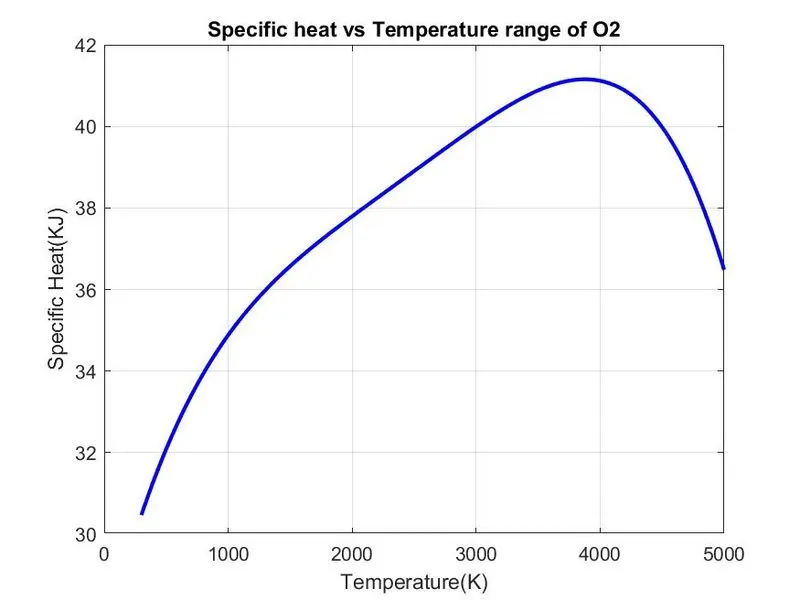
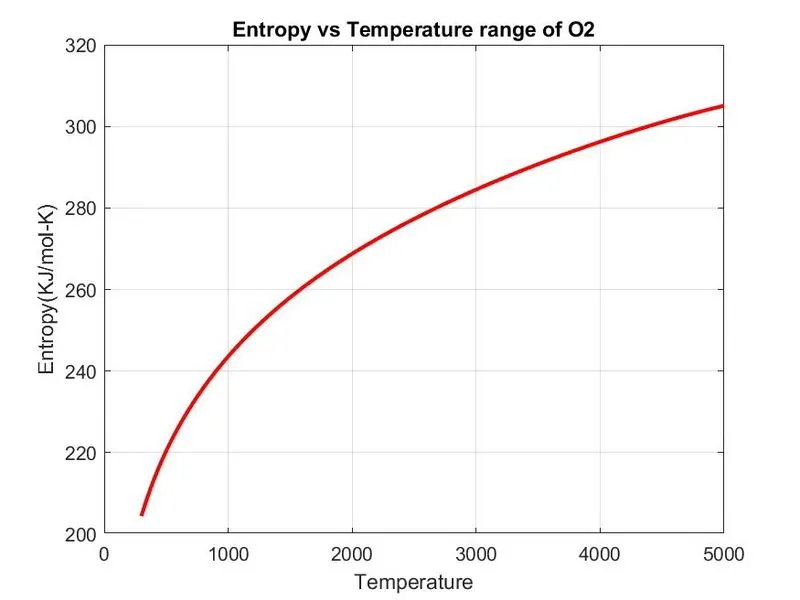
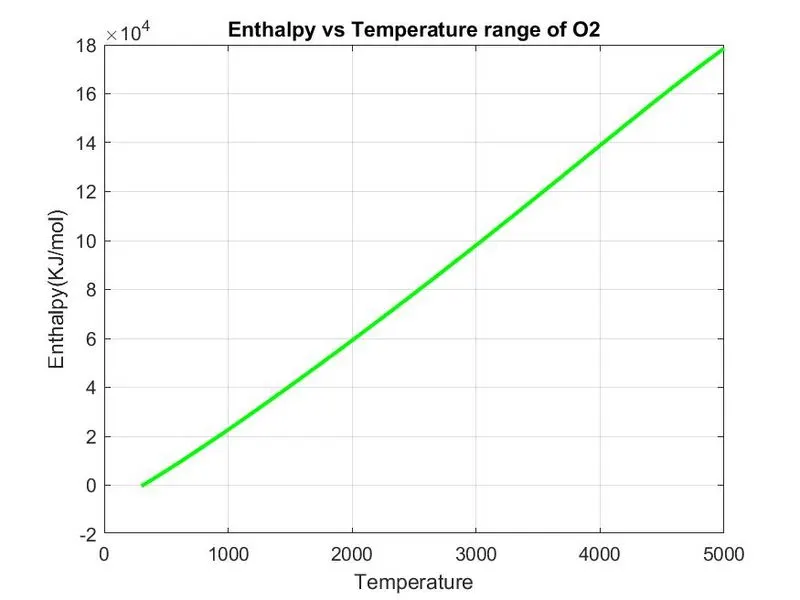
Plots of Species N2:
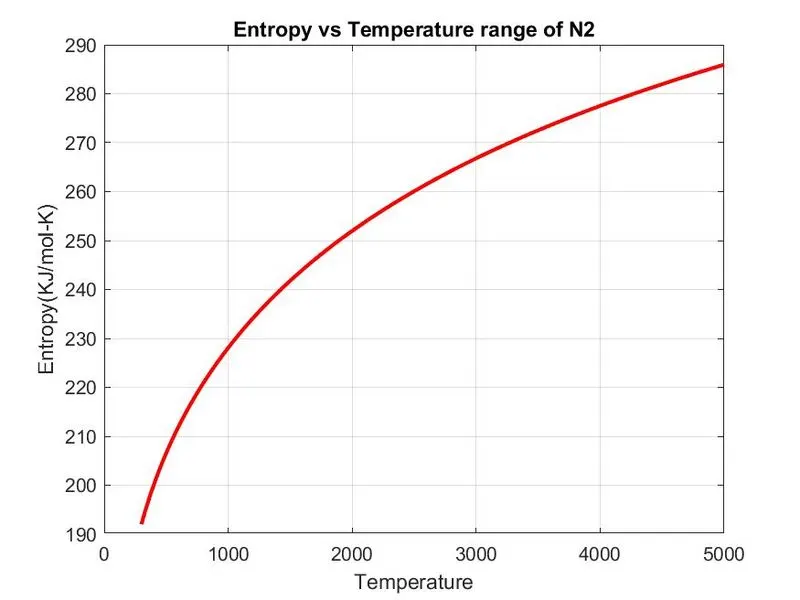
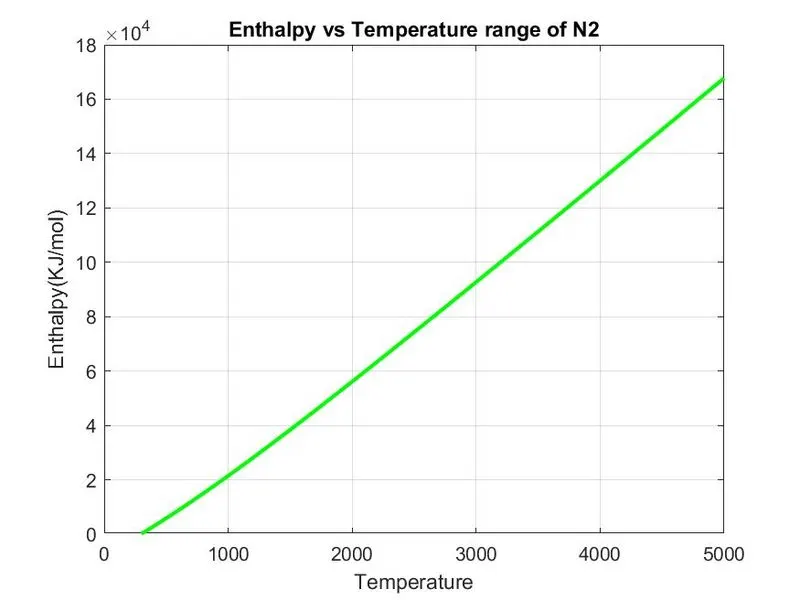
Plots of Species CO2:
Screenshot of the Window of the Local Folder where plots of different species are being stored:
Output of the Molecular Weights of Different Species:
Drive Link for Output Plots of Different Species:
https://drive.google.com/drive/folders/1BNyYaI0KkS_mROouL4hHE3LFE-S6o8Vr?usp=sharing
REFERENCES: