Project 1 - Parsing NASA thermodynamic data
AIM- To write a MATLAB program to extract the 14 coefficients of the NASA Thermodynamic file and also to calculate the enthalpy,entropy and specific heats for all the species in the data.Also find the molecular weight of each species.
THEORY -
Parsing a file means reading in a data stream of some sort and building an in memory model of the semantic content of that data. This aims at facilitating perfoming some kind of transformation on the data.The data is extracted from the file and transformed into suitable plot.
FORMULA-
To calculate the enthalpy,entropy and specific heat the formulas used are as follows
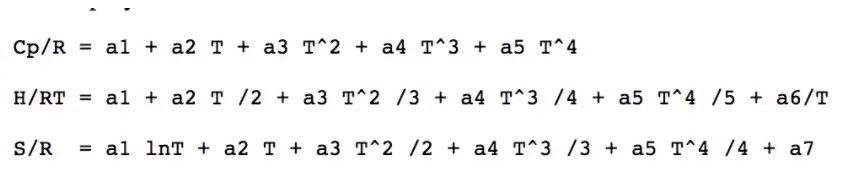
where,
Cp = Specific Heat
H = Enthalpy
S = Entropy
T = Temperature
a1-a7 = low temperature coefficient
a8-a14 = high temperature coefficient
STEPS -
1.First step is to close all the variables in workspace and the plots generated.
2.Then the ''THERMO.dat' file is opened using the fopen command.
3.For reading the 1st line the fgetl command is used and the next line is scanned and the data is stored in the 'temp'.
4.Now the for loop command is used to get all the 53 species data in the file.
5.For splitting the string at whitespace to extract the species names the strsplit command is used.
6.Now the data obtained from the file is in the string which is converted into no. using the str2num command and we get the temperature and coeffiicent of all the species.
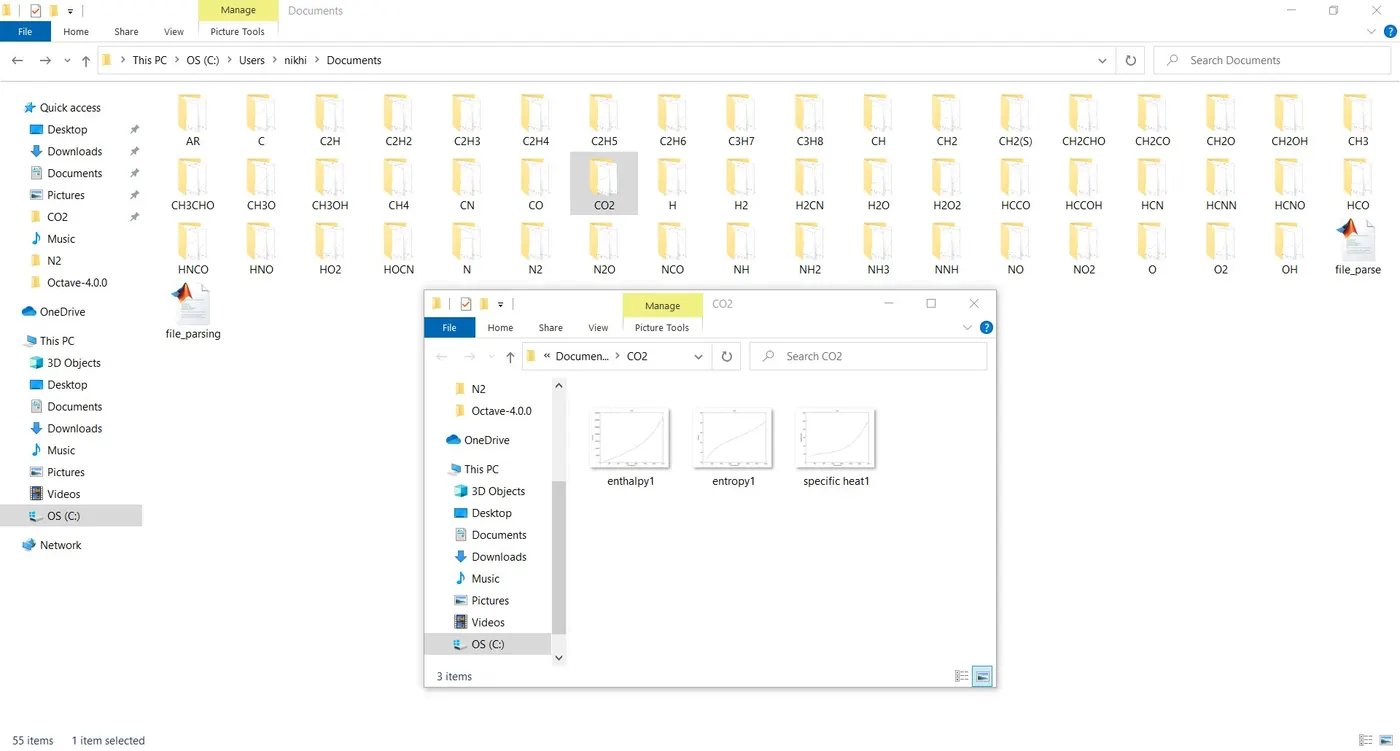
7.mkdir command is then used to create a folder where all the plots generated will be stored.
8.Enthalpy,Entropy, and specific heat is calculated foa the low and the high temperature coefficients.
9.The plots generated are then saved in the created folder using the cd commands.
MATLAB CODE -
clear all
close all
clc


f1=fopen('THERMO.dat','r');          %To read the thermo file
file_header=fgetl(f1);               %to read the header line

temp=fscanf(f1,'%f',[1,3]);          %for scanning the next line

% for assignning the variable for scanned value
global_low_temp=temp(1);
global_mid_temp=temp(2);
global_high_temp=temp(3);

%Reading the next 4 lines

fgetl(f1);
fgetl(f1);
fgetl(f1);
fgetl(f1);

for i=1:53

    species_row=fgetl(f1) ;               %to assign variable to row having species name
    u=strsplit(species_row,' ');          %split string at whitespace into u
    species=(u{1});

    %to find local temperature
    u1=strfind(species_row,'G');
    temp_values=species_row(u1+4:length(species_row));
    A=strsplit(temp_values,' ');

    local_low_temp=str2double(A{1});
    local_high_temp=str2double(A{2});
    local_mid_temp=str2double(A{3});

    %to calculate the temperature coefficient of 1st line(a1-a5)
    co1=fgetl(f1);

    z1=strfind(co1,'E')  ;                 % to find string'E' in co1 line

    % Temperature co-efficient
    a1=str2double(co1(1:z1(1)+3));
    a2=str2double(co1(z1(1)+4:z1(2)+3));
    a3=str2double(co1(z1(1)+4:z1(2)+3));
    a4=str2double(co1(z1(1)+4:z1(2)+3));
    a5=str2double(co1(z1(1)+4:z1(2)+3));


    %to calculate temperature coefficient of 2nd line(a6-a10)
    co2=fgetl(f1);

    z2=strfind(co2,'E');                   %to find string'E' in co2 line

    %Temperature co-efficient
    a6=str2double(co2(1:z2(1)+3));
    a7=str2double(co2(z2(1)+4:z2(2)+3));
    a8=str2double(co2(z2(2)+4:z2(3)+3));
    a9=str2double(co2(z2(3)+4:z2(4)+3));
    a10=str2double(co2(z2(4)+4:z2(5)+3));

     %to calculate of temperature coefficient of 3rd line(a11-a14)
    co3=fgetl(f1);

    z3=strfind(co3,'E');                  %to find string'E' in co3 line

    %Temperature co-efficient
    a11=str2double(co3(1:z3(1)+3));
    a12=str2double(co3(z3(1)+4:z3(2)+3));
    a13=str2double(co2(z3(2)+4:z3(3)+3));
    a14=str2double(co2(z3(3)+4:z3(4)+3));

    %Creating folder
    mkdir(['c:\users\nikhi\Documents\']);


    % local temperature range
    T=linspace(local_low_temp,local_high_temp,100);
    R=8.314;


    for n=1:length(T)
    %a1-a7=high temperature co-efficient
    %a8-a14=low temperature co-efficient

    %calculating specific heat,enthalpyand entropy
     if T(n)>local_high_temp

         %high temperature co-efficient
         c_p=(a1+a2.*T+a3.*T.^2+a4.*T.^3+a5.*T.^4)*R;
         H=(a1+(a2.*T)./2+(a3.*T.^2)./3+(a4.*T.^3./4)+(a5.*T.^4)./5+a6./T)*R.*T;
         S=((a1.*log(T))+(a2.*T)+((a3.*T.^2)/2)+(a4.*T.^3)./3+(a5.*T.^4)./4 +a7).*R;
     else

         %low temperature co-efficient
         c_p=(a8+a9.*T+a10.*T.^2+a11.*T.^3+a12.*T.^4).*R;
         H=(a8+(a9.*T)./2+(a10.*T.^2)./3+(a11.*T.^3)./4+(a12.*T.^4)./5+a13./T)*R.*T;
         S=(a8.*log(T)+a9.*T+(a10.*T.^2)./2+(a11.*T.^3)./3+(a12.*T.^4)./4 +a14)*R;
     end

    end

%plotting the graph

figure(1);
plot(T,c_p);
title(species)
xlabel('Temperature')
ylabel('Specific heat')

figure(2);
plot(T,H);
title(species)
xlabel('Temperature')
ylabel('Enthalpy')

figure(3);
plot(T,S);
title(species)
xlabel('Temperature')
ylabel('Entropy')

%to change the directory and also save the file
s=(['c:\users\\nikhi\Documents\']);
cd(s);
saveas(1,'specific heat1.jpg');
saveas(2,'enthalpy1.jpg');
saveas(3,'entropy1.jpg');


%molecular_weight_calculations

elements=['H','C','O','N','A'];
atomic_weight=[1.0079 12.01107 15.999 14.0067 39.948];
mol_weight=0;
for y=1:length(species)
    for p=1:length(elements)
        if strcmp(species(y),elements(p))
            mol_weight=mol_weight+atomic_weight(p);
            c=p;
        end
    end
g=str2double(species(y));
if g>1
    mol_weight=mol_weight+atomic_weight(c)*(g-1);

end

end

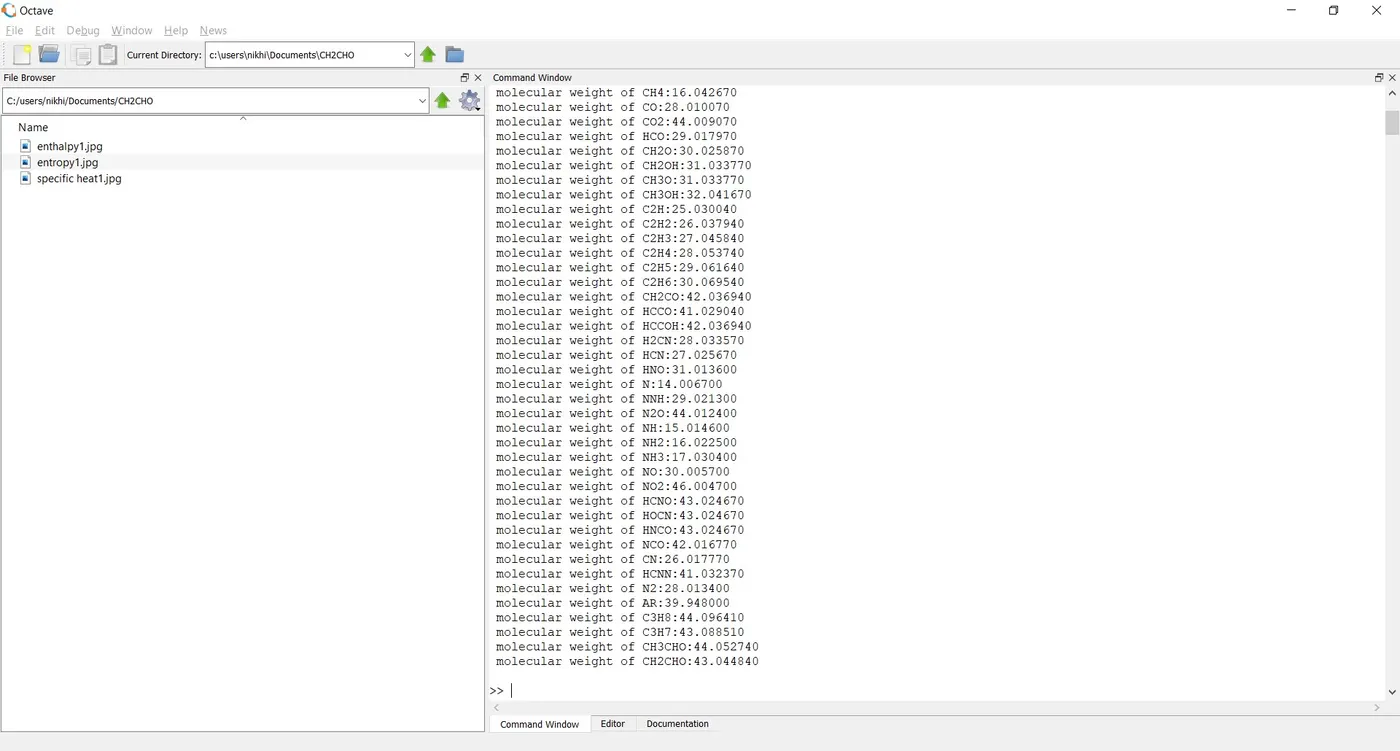
fprintf('molecular weight of %s:%f \n ',species,mol_weight );

end
RESULTS-
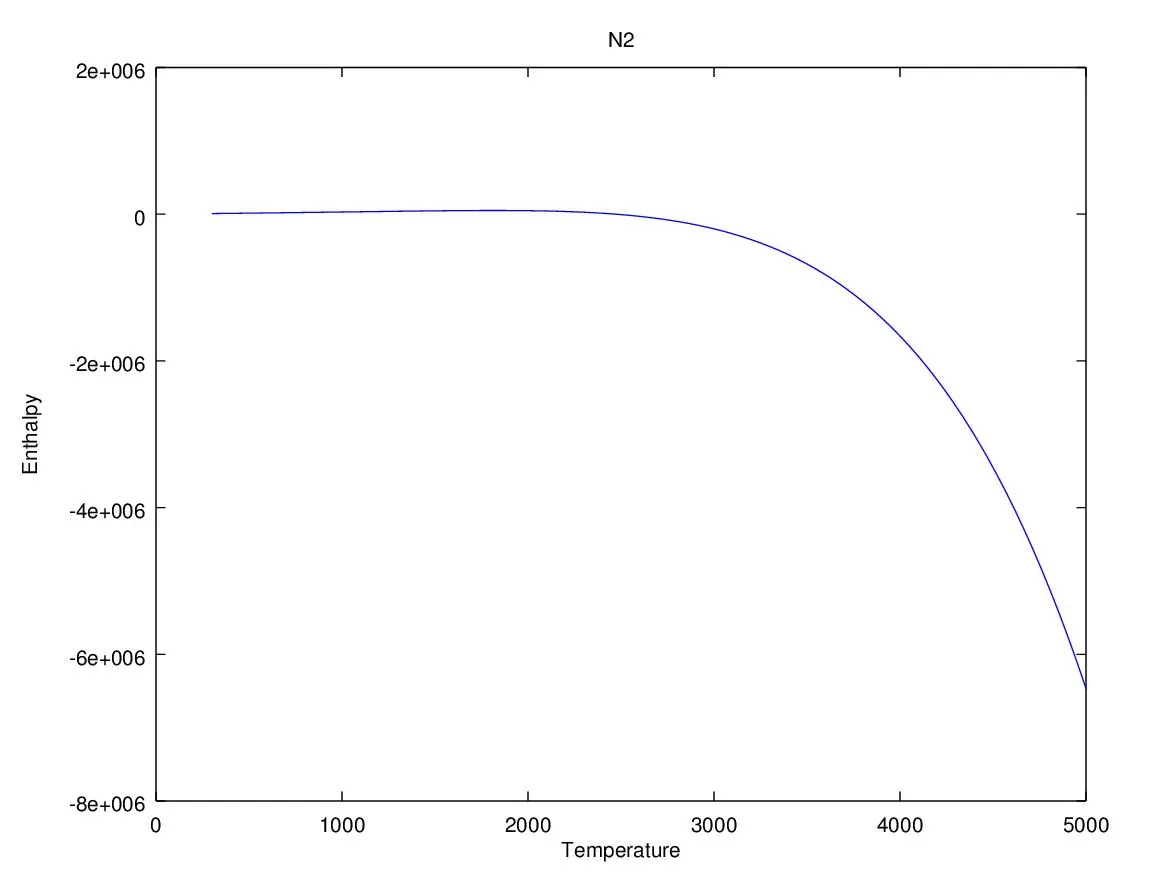
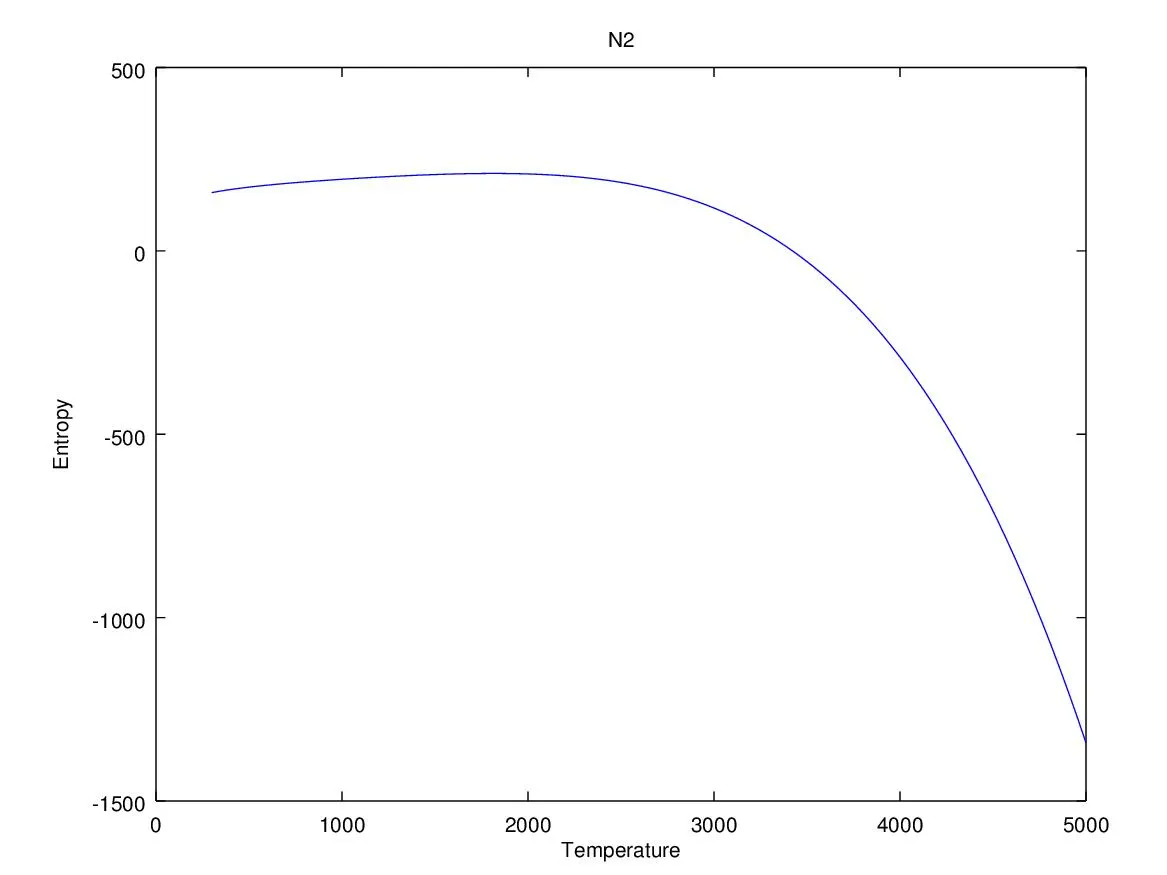
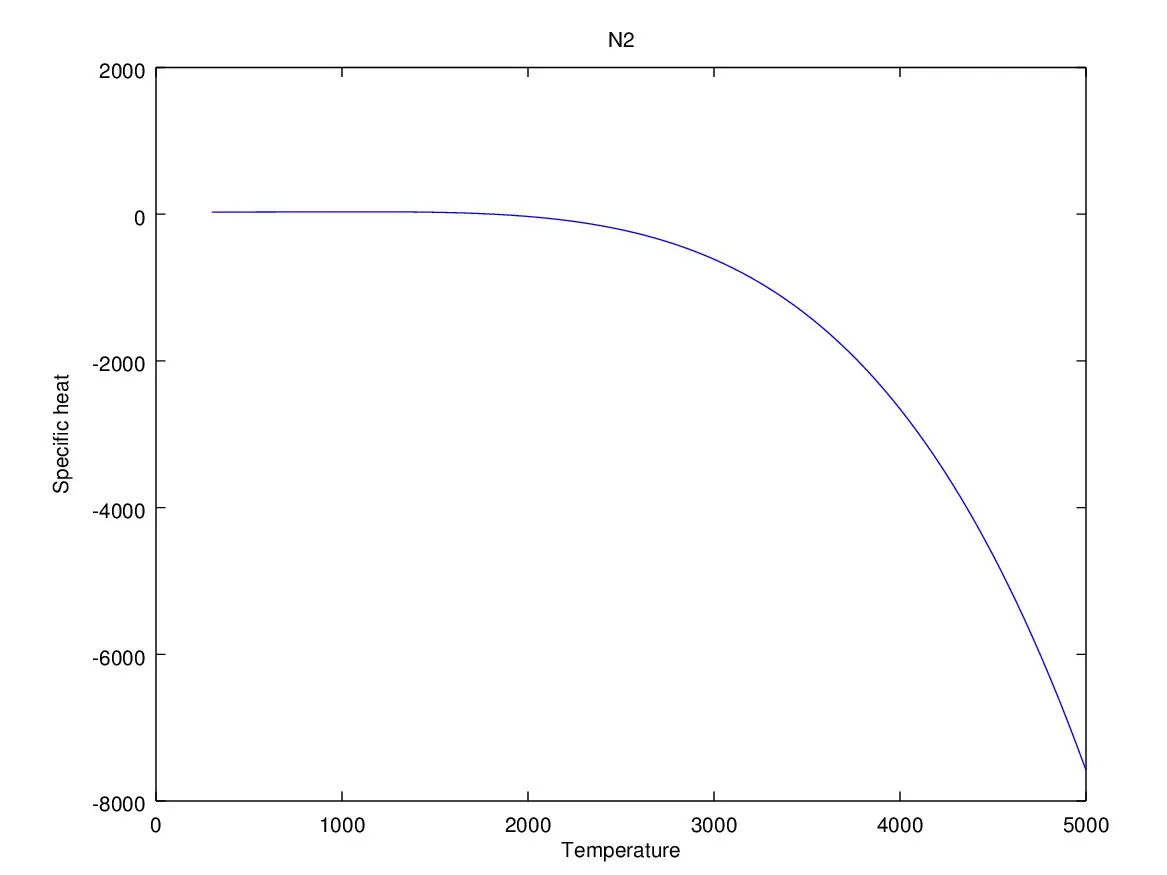
PLOTS OF N2-
PLOTS OF CO2
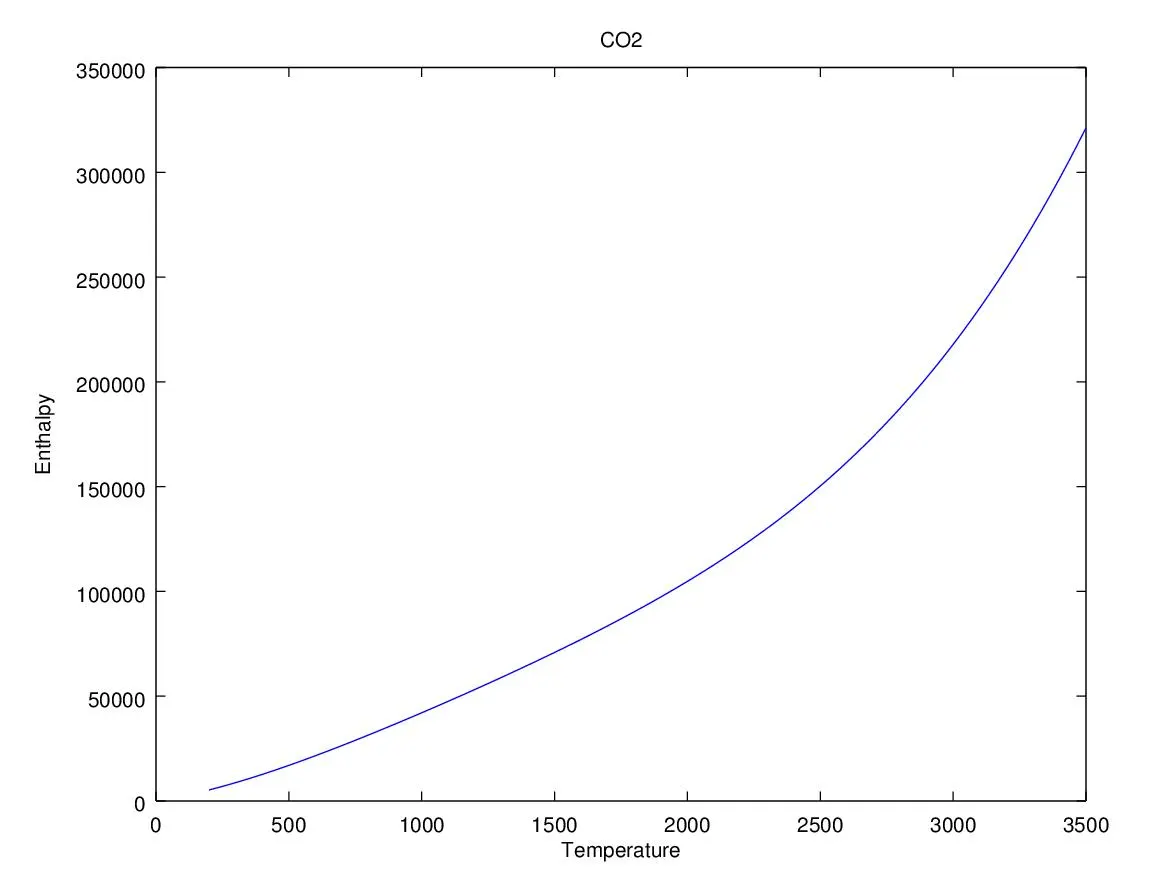
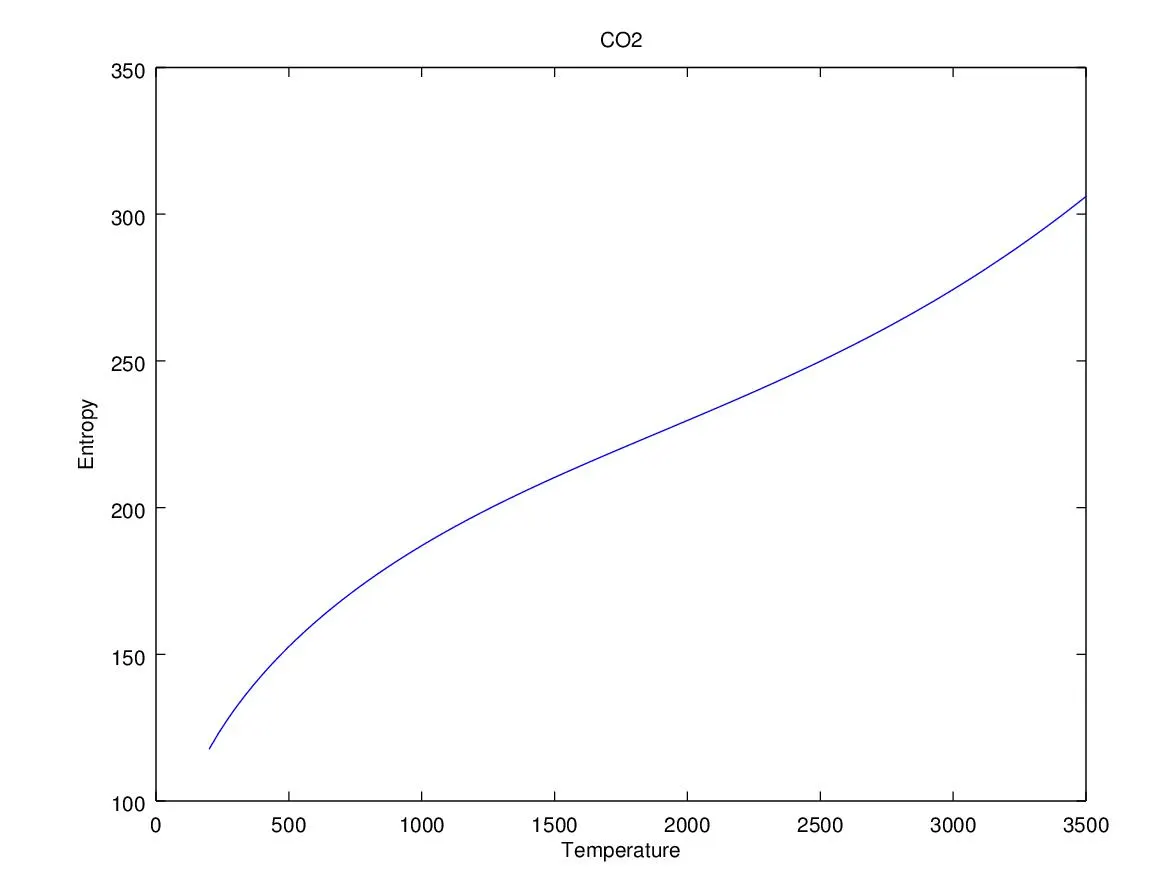
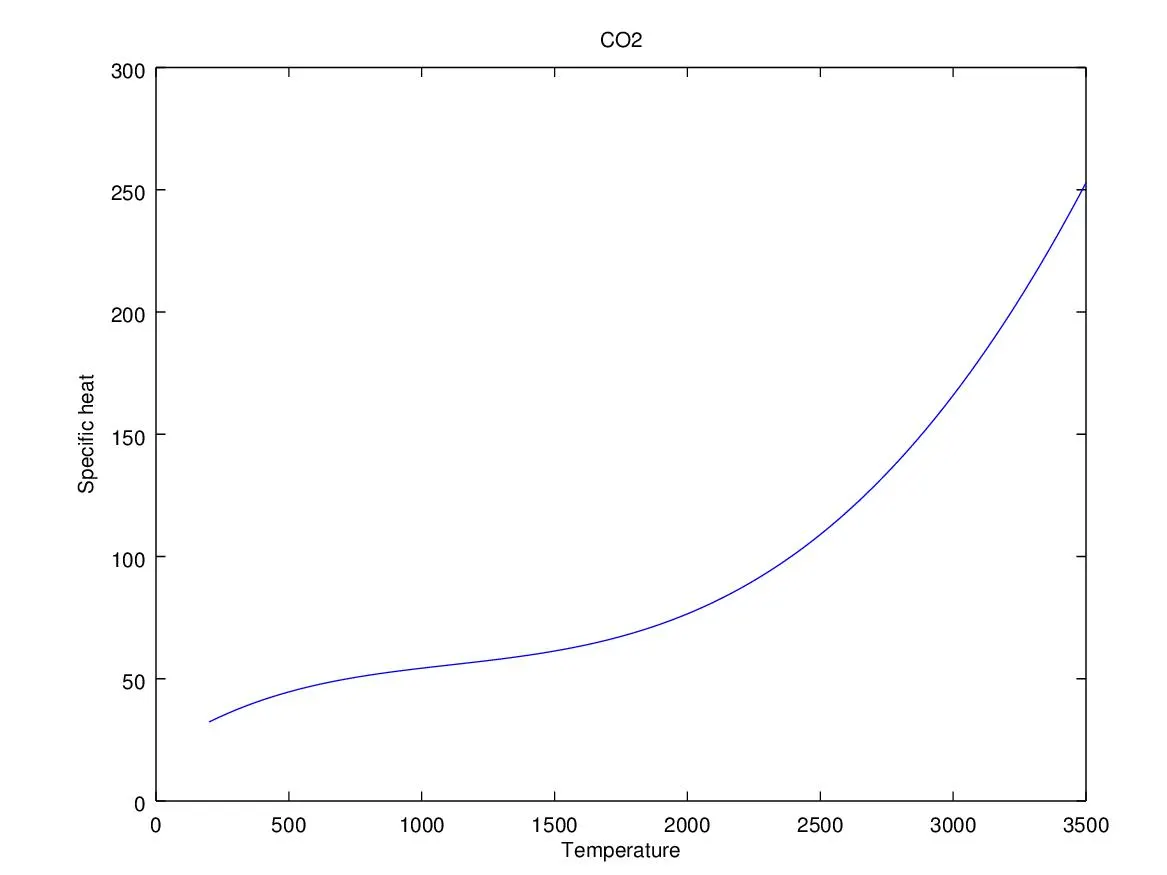
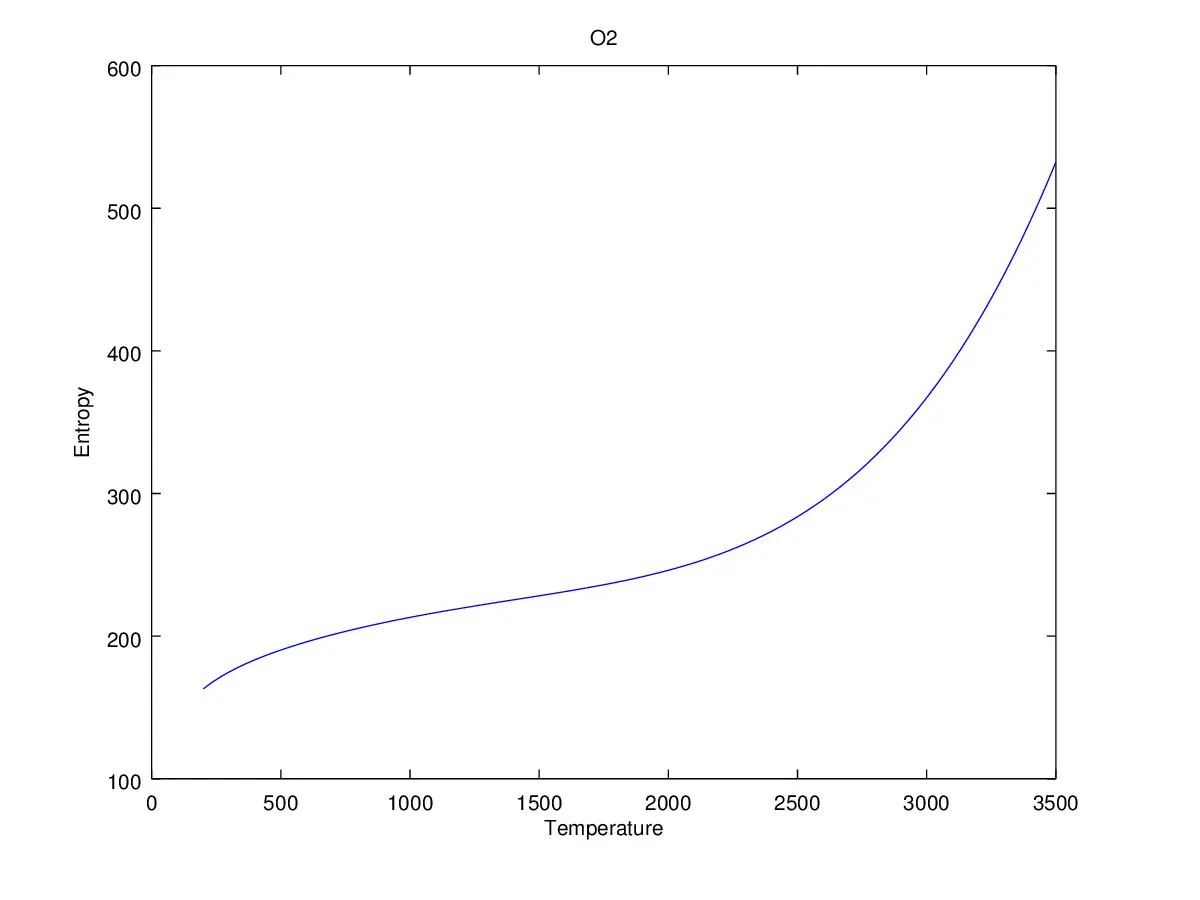
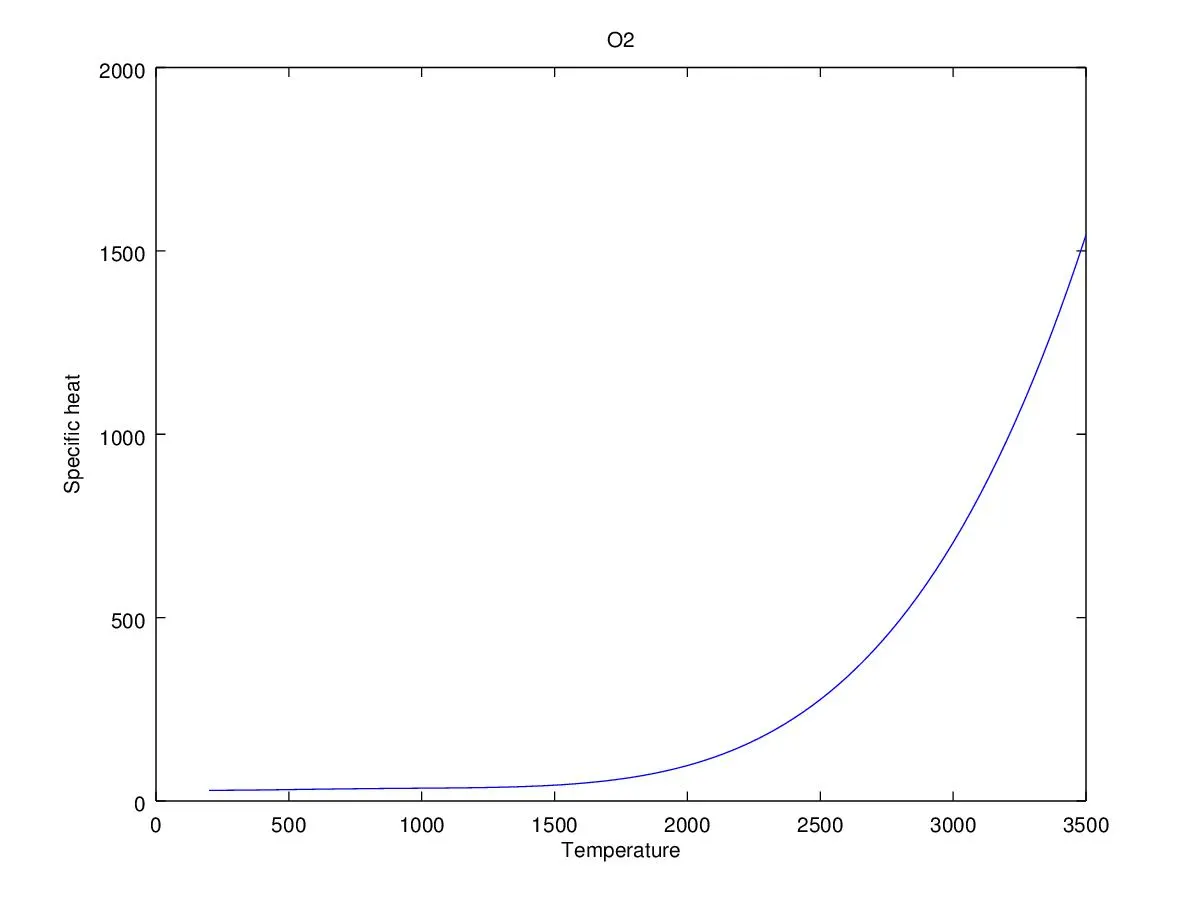
PLOTS OF O2
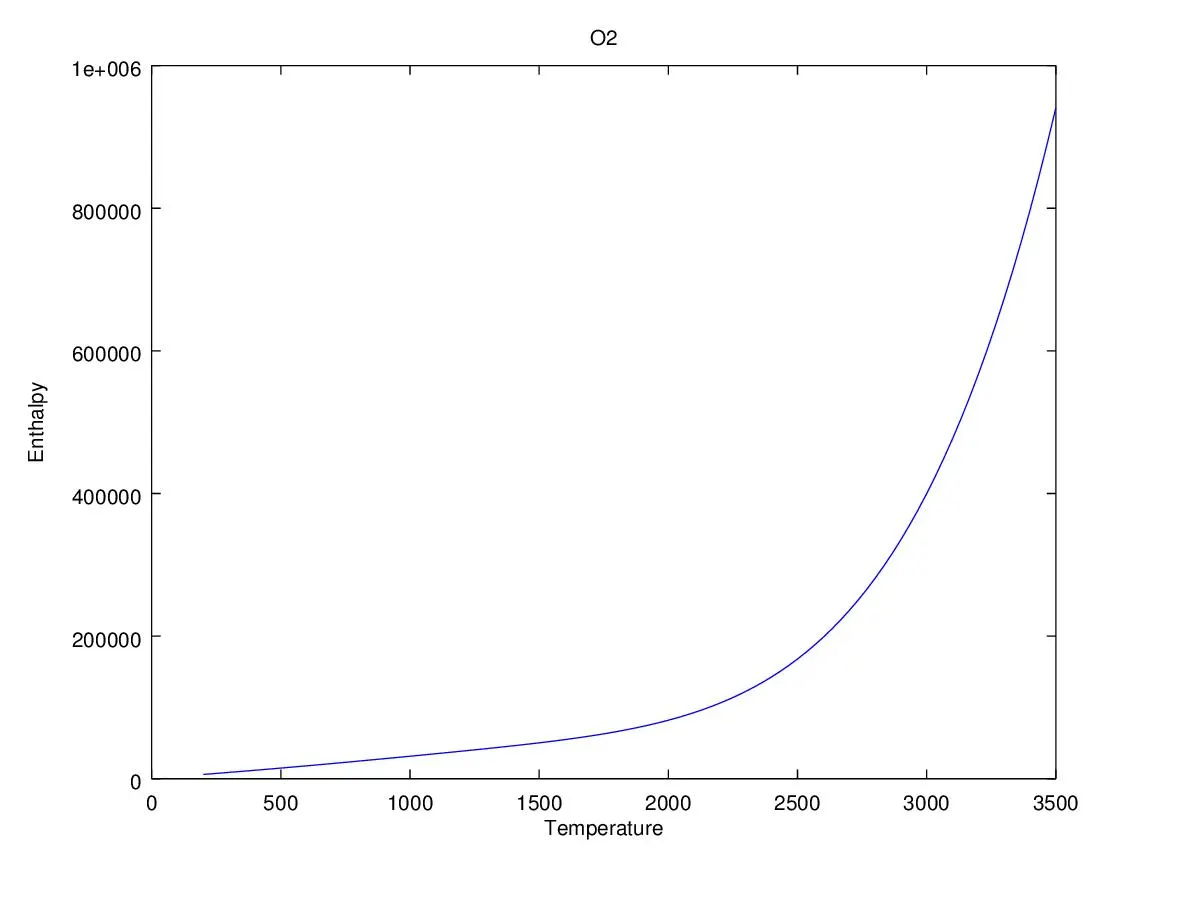
SCREENSHOT OF SPECIES FOLDER -
MOLECULAR WEIGHT VALUES -
CONCLUSION-
With the help of the MATLAB program the NASA Thermodynamic file is transformed into a easy and readable content i.e the enthalpy,entroopy and the specific heat is calculated and plotted and also the molecular weight of the species is also calculated.