Project 1 - Parsing NASA thermodynamic data
PROBLEM STATEMENT;
NASA came up with polynomials that can be used to evaluate thermodynamic properties such as Cp, H and S. They have also documented the co-efficients that are required to evaluate these polynomials for 1000+ species.
To guide you we have broken down the problem into meaningful bits that you can work on individually.
1. Write a function that extracts the 14 co-efficients and calculates the enthalpy, entropy and specific heats for all the species in the data file. You will be reading this file NASA thermodynamic data(Tip: use fopen and fgetl). The formulae are shown below.
Here R is the universal gas constant, T is the temeprature
The FIRST 7 coefficients are HIGH-temperature coefficients and the SECOND 7 coefficients are LOW-temperature coefficients.
Also use the LOCAL TEMPERATURE RANGES which is unique for each individual species, not the GLOBAL TEMPERATURE RANGE.
2. Calculate the molecular weight of each species and display it in the command window.
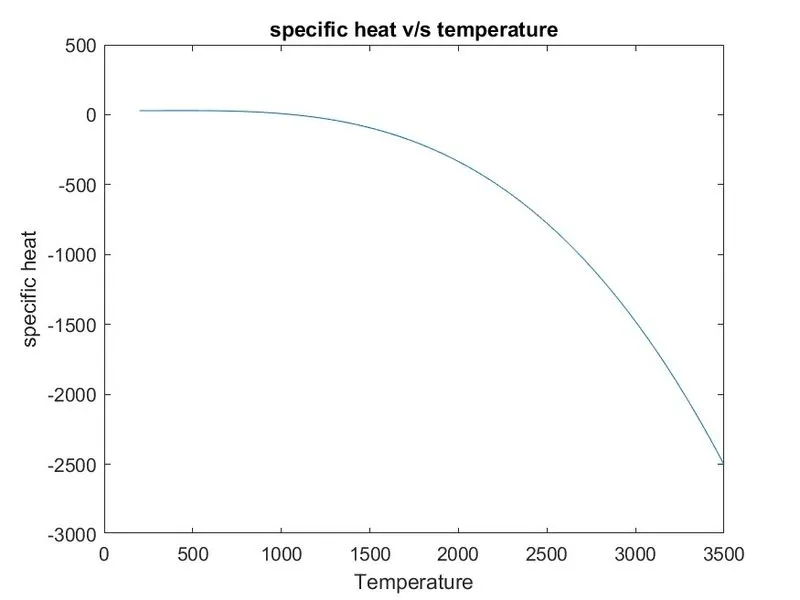
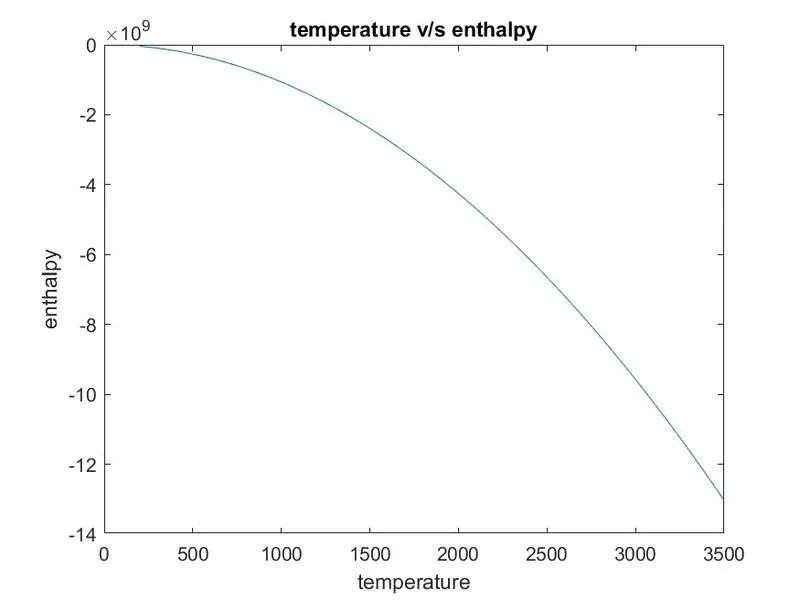
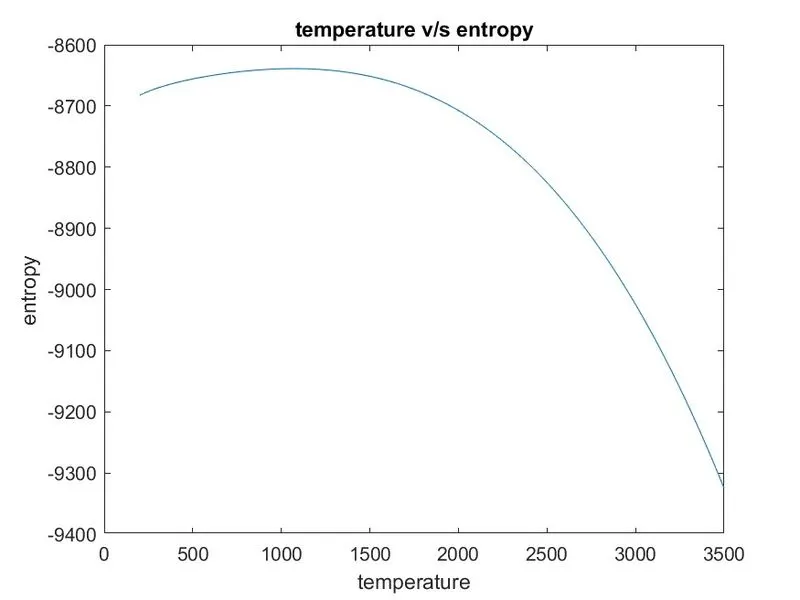
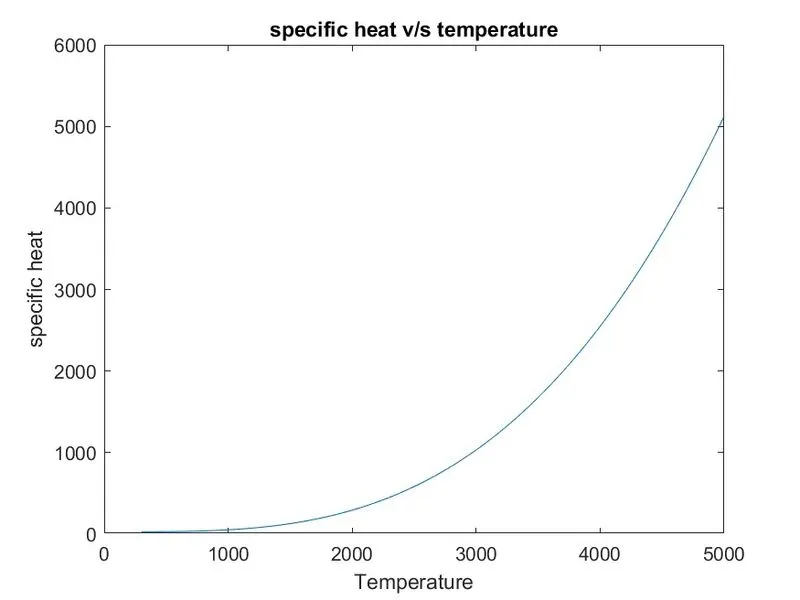
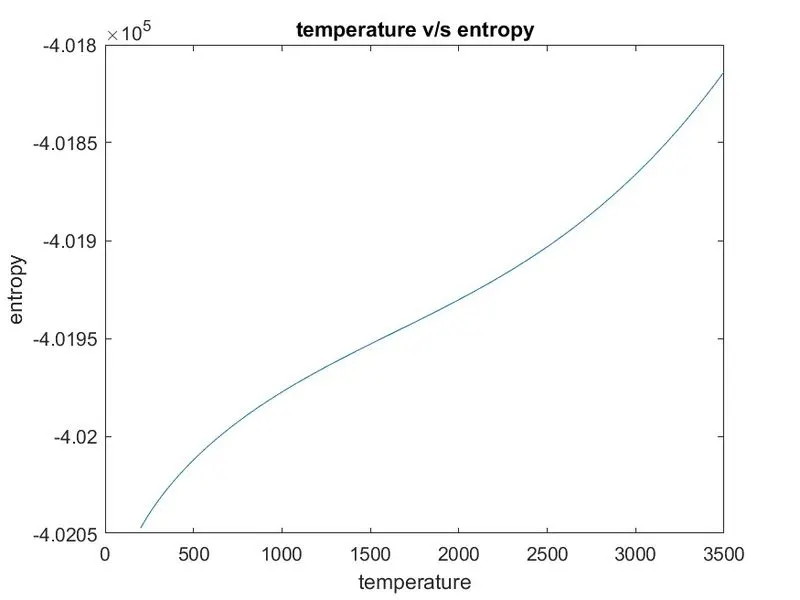
3. Plot the Cp, Enthalpy and Entropy for the local temperature range (low temperature : high temperature) specific for each species.
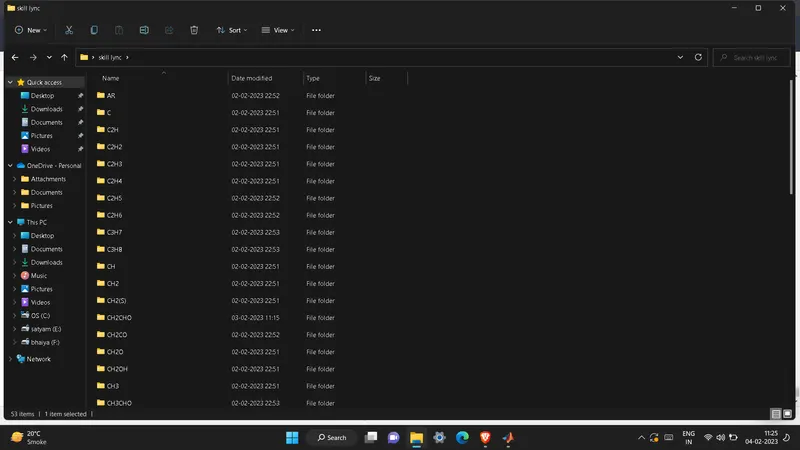
4. Save the plots as images with appropriate names and dump them in separate folders for each species with suitable name. All these should be generated automatically.
5. The main program that you will submit will just take the "THERMO.dat" file as an input and generate Cp, H and S plots.
6. Please write a detailed report to describe your logic.
Attachments needed:
- Screenshot of the window where all the folders are saved.
- Plots for o2, N2 and Co2 species (your program should be case insensitive, if it is going to take the species name as an input.
What is file parsing;
> This deals with the field of computational linguistics where it commonly defines the natural language processing.
> Natural language processing is concerned with programming the computers to process and analyse the human written language.
> Parser helps to split the large input data in to smaller data and will process the data.
Why file parsing;
> Parsing is necessary because diffrent application needs the data to be in diffrent forms.Parsing allows tranforming the data in a way that can be understood by a specific software.The obvious example is a
program - they are written by the humans but they must be executed by the computers.
> Parsing helps to automate the certain things and also reduces the human effort.
> Can be used for the application of machine learning,automation etc.
PROBLEM approach;
1) FILE READ; The file should be loaded and opened in the scriptusing "fopen" command.and the line necessary for the calculation should be get from the file using 'fgetl'.
2) EXTRACTION OF LOCAL TEMPERATURE; The temperature values available in the header line of every species is known as local temperature.
> it include low,high,middle temperature as in the order.
> these local temperature are used for the calculation of the cp,h,s.
3) EXTRACTION OF COEFFICIENTS VALUES;
Extract the coefficients from the thermo.dat file by deciding the referece as exp "E" and use the command called "strfind" this command will find out the position of "E" and based on that command we will extract the diffrent coefficients.
4) calculation of the cp,h,s at the diffrent temperature values.
5) Plotting and saving the program.
6) calculation of molecular weight.
> DIFFRENT COMMANDS USED;
1) fopen; This command is used for the loading and opening the file in to the script.
Syntax
Syntax
3) str2num; this command is used for converting the string in to number.
Syntax
4) str2double;Syntax
X = str2double( converts the text in str)str to double precision values. str contains text that represents real or complex numeric values. str can be a character vector, a cell array of character vectors, or a string array. If str is a character vector or string scalar, then X is a numeric scalar. If str is a cell array of character vectors or a string array, then X is a numeric array that is the same size as str.
Text that represents a number can contain digits, a comma (thousands separator), a decimal point, a leading + or - sign, an e preceding a power of 10 scale factor, and an i or a j for a complex unit. You cannot use a period as a thousands separator, or a comma as a decimal point.
If str2double cannot convert text to a number, then it returns a NaN value.
5) strsplit;
Syntax
C = strsplit(str,delimiter)str at the delimiters specified by delimiter.
If str has consecutive delimiters, with no other characters between them, then strsplit treats them as one delimiter. For example, both strsplit('Hello,world',',') and strsplit('Hello,,,world',',') return the same output.
6) strcmpi;
Syntax
Description
tf = strcmpi(s1,s2)s1 and s2, ignoring any differences in letter case. The function returns 1 (true) if the two are identical and 0 (false) otherwise. Text is considered identical if the size and content of each are the same, aside from case. The return result tf is of data type logical.
The input arguments can be any combination of string arrays, character vectors, and cell arrays of character vectors.
7) sprintf:
Syntax
Description
str = sprintf(formatSpec,A1,...,An)A1,...,An using the formatting operators specified by formatSpec and returns the resulting text in str. The sprintf function formats the values in A1,...,An in column order. If formatSpec is a string, then so is the output str. Otherwise, str is a character vector.
To return multiple pieces of formatted text as a string array or a cell array of character vectors, use the compose function.
PROGRAM CODE;
clear all
close all
clc

R = 8.314;

% OPEN AND LOADING THE THERMO.dat file.

f = fopen('THERMO.dat','r');

% skipping the 4 lines of starting and reach out to the header file.

for i =1:5
    fgetl(f);


end

% use the for loop as we have to rum the same code fot the diffrenr 53
% species those are present inside the THERMO.dat file.

   for i = 1:53

% get the line which contains all the local temperatures.
A = fgetl(f);

% split all the individual characters using the strsplit command.

b = strsplit(A,' ');

species_name = b{1};

% Extracting the local,mid and high temperature by the assuming the referce
% from the back side.

low_local_temp =str2num(b{length(b)-3});
mid_local_temp = str2num(b{length(b)-1});
high_local_temp = str2num(b{length(b)-2});

% Extracting the coefficients for the calculation of the cp,h,s.

coefficient_line1 = fgetl(f);

pos_e = strfind(coefficient_line1,'E');

a1 = str2num(coefficient_line1(1:pos_e(1)+3));
a2 = str2num(coefficient_line1((pos_e(1)+4):(pos_e(2)+3)));
a3 = str2num(coefficient_line1((pos_e(2)+4):(pos_e(3)+3)));
a4 = str2num(coefficient_line1((pos_e(3)+4):(pos_e(4)+3)));
a5 = str2num(coefficient_line1((pos_e(4)+4):(pos_e(5)+3)));


coefficient_line2 = fgetl(f);
pos_e1 = strfind(coefficient_line2,'E');

a6 = str2num(coefficient_line2(1:pos_e1(1)+3));
a7 = str2num(coefficient_line2((pos_e1(1)+4):(pos_e1(2)+3)));
a8 = str2num(coefficient_line2((pos_e1(2)+4):(pos_e1(3)+3)));
a9 = str2num(coefficient_line2((pos_e1(3)+4):(pos_e1(4)+3)));
a10 = str2num(coefficient_line2((pos_e1(4)+4):(pos_e1(5)+3)));


coefficient_line3 = fgetl(f);
pos_e2 = strfind(coefficient_line3,'E');

a11 = str2num(coefficient_line3(1:pos_e2(1)+3));
a12 = str2num(coefficient_line3((pos_e2(1)+4):(pos_e2(2)+3)));
a13 = str2num(coefficient_line3((pos_e2(2)+4):(pos_e2(3)+3)));
a14 = str2num(coefficient_line3((pos_e2(3)+4):(pos_e2(4)+3)));

% form the two arrays for temperature based on the midddle value where the
% 1st array contains the temperature ranges between low to mid and the
% second arrays contains the temp from mid to high.

LTR = linspace(low_local_temp,mid_local_temp,100);
HTR = linspace(mid_local_temp,high_local_temp,100);

for i = 1:length(LTR)

%calculation of cp,H,S

cp1(i) = (a8 + a9.*LTR(i) + a10.*LTR(i).*LTR(i) + a11.*LTR(i).^3 + a12.*LTR(i).*4)*R;

H1(i) = (a8 + (a9.*LTR(i))/2 + (a10.*LTR(i).*LTR(i))/3 + (a11.*LTR(i).^3)/4 + (a12.*LTR(i).*4)/5 + a13*LTR(i))*LTR(i);

S1(i) = ((a8*log(LTR(i)) + a9.*LTR(i) + (a10.*LTR(i).*LTR(i))/2 + (a11.*LTR(i).^3)/3) + ((a12.*LTR(i).*4)/4) + a13)*R;

end

for i = 1:length(HTR)

  cp2(i) = (a8 + a9.*HTR(i) + a10.*HTR(i).*HTR(i) + a11.*HTR(i).^3 + a12.*HTR(i).*4)*R;

H2(i) = (a8 + (a9.*HTR(i))/2 + (a10.*HTR(i).*HTR(i))/3 + (a11.*HTR(i).^3)/4 + (a12.*HTR(i).*4)/5 + a13*HTR(i))*HTR(i);

S2(i) = ((a8*log(HTR(i)) + a9.*HTR(i) + (a10.*HTR(i).*HTR(i))/2 + (a11.*HTR(i).^3)/3) + ((a12.*HTR(i).*4)/4) + a13)*R;

end
% make the directory where we will store all the plots of diffrent species
% inside the folder name "species name".

mkdir(['C:\Users\Amit\Desktop\skill lync\',species_name]);

T = [LTR HTR];
cp = [cp1 cp2];
H =  [H1,H2];
S = [S1,S2];

% % calculation of molecular weight,
[molecular_wt] = mw(species_name)

figure(1);
plot(T,cp);
xlabel('Temperature')
ylabel('specific heat')
title('specific heat v/s temperature')

figure(2)
plot(T,H)
xlabel('temperature')
ylabel('enthalpy')
title('temperature v/s enthalpy')

figure(3)

plot(T,S)
xlabel('temperature')
ylabel('entropy')
title('temperature v/s entropy')

cd(['C:\Users\Amit\Desktop\skill lync\',species_name])
saveas(1,'cp','jpg')
saveas(2,'h','jpg')
saveas(3,'s','jpg')

end
> mw.program for the calculation of molecular weight;
function [molecular_wt] = mw(species_name)

elements = ['H','C','N','O','A'];
atomic_wt = [1,12,14,16,40];
molecular_wt = 0;

for i = 1:length(species_name)
    for j = 1:length(elements)
        if strcmpi(species_name(i),elements(j))
            molecular_wt = molecular_wt + atomic_wt(j);
            position = j;
        end
    end
    f = str2double(species_name(i))
    if f>=1
        molecular_wt = molecular_wt + atomic_wt(position)*(f-1);
    end
end
sprintf('Molecular weight of %s:%f', species_name,molecular_wt)
end
> command window;
Warning: Directory already exists.
> In file_parsing_updated (line 104)

f =

   NaN


ans =

    'Molecular weight of O:16.000000'


molecular_wt =

    16

Warning: Directory already exists.
> In file_parsing_updated (line 104)

f =

   NaN


f =

     2


ans =

    'Molecular weight of O2:32.000000'


molecular_wt =

    32

Warning: Directory already exists.
> In file_parsing_updated (line 104)

f =

   NaN


ans =

    'Molecular weight of H:1.000000'


molecular_wt =

     1

Warning: Directory already exists.
> In file_parsing_updated (line 104)

f =

   NaN


f =

     2


ans =

    'Molecular weight of H2:2.000000'


molecular_wt =

     2

Warning: Directory already exists.
> In file_parsing_updated (line 104)

f =

   NaN


f =

   NaN


ans =

    'Molecular weight of OH:17.000000'


molecular_wt =

    17

Warning: Directory already exists.
> In file_parsing_updated (line 104)

f =

   NaN


f =

     2


f =

   NaN


ans =

    'Molecular weight of H2O:18.000000'


molecular_wt =

    18

Warning: Directory already exists.
> In file_parsing_updated (line 104)

f =

   NaN


f =

   NaN


f =

     2


ans =

    'Molecular weight of HO2:33.000000'


molecular_wt =

    33

Warning: Directory already exists.
> In file_parsing_updated (line 104)

f =

   NaN


f =

     2


f =

   NaN


f =

     2


ans =

    'Molecular weight of H2O2:34.000000'


molecular_wt =

    34

Warning: Directory already exists.
> In file_parsing_updated (line 104)

f =

   NaN


ans =

    'Molecular weight of C:12.000000'


molecular_wt =

    12

Warning: Directory already exists.
> In file_parsing_updated (line 104)

f =

   NaN


f =

   NaN


ans =

    'Molecular weight of CH:13.000000'


molecular_wt =

    13

Warning: Directory already exists.
> In file_parsing_updated (line 104)

f =

   NaN


f =

   NaN


f =

     2


ans =

    'Molecular weight of CH2:14.000000'


molecular_wt =

    14

Warning: Directory already exists.
> In file_parsing_updated (line 104)

f =

   NaN


f =

   NaN


f =

     2


f =

   NaN


f =

   NaN


f =

   NaN


ans =

    'Molecular weight of CH2(S):14.000000'


molecular_wt =

    14

Warning: Directory already exists.
> In file_parsing_updated (line 104)

f =

   NaN


f =

   NaN


f =

     3


ans =

    'Molecular weight of CH3:15.000000'


molecular_wt =

    15

Warning: Directory already exists.
> In file_parsing_updated (line 104)

f =

   NaN


f =

   NaN


f =

     4


ans =

    'Molecular weight of CH4:16.000000'


molecular_wt =

    16

Warning: Directory already exists.
> In file_parsing_updated (line 104)

f =

   NaN


f =

   NaN


ans =

    'Molecular weight of CO:28.000000'


molecular_wt =

    28

Warning: Directory already exists.
> In file_parsing_updated (line 104)

f =

   NaN


f =

   NaN


f =

     2


ans =

    'Molecular weight of CO2:44.000000'


molecular_wt =

    44

Warning: Directory already exists.
> In file_parsing_updated (line 104)

f =

   NaN


f =

   NaN


f =

   NaN


ans =

    'Molecular weight of HCO:29.000000'


molecular_wt =

    29

Warning: Directory already exists.
> In file_parsing_updated (line 104)

f =

   NaN


f =

   NaN


f =

     2


f =

   NaN


ans =

    'Molecular weight of CH2O:30.000000'


molecular_wt =

    30

Warning: Directory already exists.
> In file_parsing_updated (line 104)

f =

   NaN


f =

   NaN


f =

     2


f =

   NaN


f =

   NaN


ans =

    'Molecular weight of CH2OH:31.000000'


molecular_wt =

    31

Warning: Directory already exists.
> In file_parsing_updated (line 104)

f =

   NaN


f =

   NaN


f =

     3


f =

   NaN


ans =

    'Molecular weight of CH3O:31.000000'


molecular_wt =

    31

Warning: Directory already exists.
> In file_parsing_updated (line 104)

f =

   NaN


f =

   NaN


f =

     3


f =

   NaN


f =

   NaN


ans =

    'Molecular weight of CH3OH:32.000000'


molecular_wt =

    32

Warning: Directory already exists.
> In file_parsing_updated (line 104)

f =

   NaN


f =

     2


f =

   NaN


ans =

    'Molecular weight of C2H:25.000000'


molecular_wt =

    25

Warning: Directory already exists.
> In file_parsing_updated (line 104)

f =

   NaN


f =

     2


f =

   NaN


f =

     2


ans =

    'Molecular weight of C2H2:26.000000'


molecular_wt =

    26

Warning: Directory already exists.
> In file_parsing_updated (line 104)

f =

   NaN


f =

     2


f =

   NaN


f =

     3


ans =

    'Molecular weight of C2H3:27.000000'


molecular_wt =

    27

Warning: Directory already exists.
> In file_parsing_updated (line 104)

f =

   NaN


f =

     2


f =

   NaN


f =

     4


ans =

    'Molecular weight of C2H4:28.000000'


molecular_wt =

    28

Warning: Directory already exists.
> In file_parsing_updated (line 104)

f =

   NaN


f =

     2


f =

   NaN


f =

     5


ans =

    'Molecular weight of C2H5:29.000000'


molecular_wt =

    29

Warning: Directory already exists.
> In file_parsing_updated (line 104)

f =

   NaN


f =

     2


f =

   NaN


f =

     6


ans =

    'Molecular weight of C2H6:30.000000'


molecular_wt =

    30

Warning: Directory already exists.
> In file_parsing_updated (line 104)

f =

   NaN


f =

   NaN


f =

     2


f =

   NaN


f =

   NaN


ans =

    'Molecular weight of CH2CO:42.000000'


molecular_wt =

    42

Warning: Directory already exists.
> In file_parsing_updated (line 104)

f =

   NaN


f =

   NaN


f =

   NaN


f =

   NaN


ans =

    'Molecular weight of HCCO:41.000000'


molecular_wt =

    41

Warning: Directory already exists.
> In file_parsing_updated (line 104)

f =

   NaN


f =

   NaN


f =

   NaN


f =

   NaN


f =

   NaN


ans =

    'Molecular weight of HCCOH:42.000000'


molecular_wt =

    42

Warning: Directory already exists.
> In file_parsing_updated (line 104)

f =

   NaN


f =

     2


f =

   NaN


f =

   NaN


ans =

    'Molecular weight of H2CN:28.000000'


molecular_wt =

    28

Warning: Directory already exists.
> In file_parsing_updated (line 104)

f =

   NaN


f =

   NaN


f =

   NaN


ans =

    'Molecular weight of HCN:27.000000'


molecular_wt =

    27

Warning: Directory already exists.
> In file_parsing_updated (line 104)

f =

   NaN


f =

   NaN


f =

   NaN


ans =

    'Molecular weight of HNO:31.000000'


molecular_wt =

    31

Warning: Directory already exists.
> In file_parsing_updated (line 104)

f =

   NaN


ans =

    'Molecular weight of N:14.000000'


molecular_wt =

    14

Warning: Directory already exists.
> In file_parsing_updated (line 104)

f =

   NaN


f =

   NaN


f =

   NaN


ans =

    'Molecular weight of NNH:29.000000'


molecular_wt =

    29

Warning: Directory already exists.
> In file_parsing_updated (line 104)

f =

   NaN


f =

     2


f =

   NaN


ans =

    'Molecular weight of N2O:44.000000'


molecular_wt =

    44

Warning: Directory already exists.
> In file_parsing_updated (line 104)

f =

   NaN


f =

   NaN


ans =

    'Molecular weight of NH:15.000000'


molecular_wt =

    15

Warning: Directory already exists.
> In file_parsing_updated (line 104)

f =

   NaN


f =

   NaN


f =

     2


ans =

    'Molecular weight of NH2:16.000000'


molecular_wt =

    16

Warning: Directory already exists.
> In file_parsing_updated (line 104)

f =

   NaN


f =

   NaN


f =

     3


ans =

    'Molecular weight of NH3:17.000000'


molecular_wt =

    17

Warning: Directory already exists.
> In file_parsing_updated (line 104)

f =

   NaN


f =

   NaN


ans =

    'Molecular weight of NO:30.000000'


molecular_wt =

    30

Warning: Directory already exists.
> In file_parsing_updated (line 104)

f =

   NaN


f =

   NaN


f =

     2


ans =

    'Molecular weight of NO2:46.000000'


molecular_wt =

    46

Warning: Directory already exists.
> In file_parsing_updated (line 104)

f =

   NaN


f =

   NaN


f =

   NaN


f =

   NaN


ans =

    'Molecular weight of HCNO:43.000000'


molecular_wt =

    43

Warning: Directory already exists.
> In file_parsing_updated (line 104)

f =

   NaN


f =

   NaN


f =

   NaN


f =

   NaN


ans =

    'Molecular weight of HOCN:43.000000'


molecular_wt =

    43

Warning: Directory already exists.
> In file_parsing_updated (line 104)

f =

   NaN


f =

   NaN


f =

   NaN


f =

   NaN


ans =

    'Molecular weight of HNCO:43.000000'


molecular_wt =

    43

Warning: Directory already exists.
> In file_parsing_updated (line 104)

f =

   NaN


f =

   NaN


f =

   NaN


ans =

    'Molecular weight of NCO:42.000000'


molecular_wt =

    42

Warning: Directory already exists.
> In file_parsing_updated (line 104)

f =

   NaN


f =

   NaN


ans =

    'Molecular weight of CN:26.000000'


molecular_wt =

    26

Warning: Directory already exists.
> In file_parsing_updated (line 104)

f =

   NaN


f =

   NaN


f =

   NaN


f =

   NaN


ans =

    'Molecular weight of HCNN:41.000000'


molecular_wt =

    41

Warning: Directory already exists.
> In file_parsing_updated (line 104)

f =

   NaN


f =

     2


ans =

    'Molecular weight of N2:28.000000'


molecular_wt =

    28

Warning: Directory already exists.
> In file_parsing_updated (line 104)

f =

   NaN


f =

   NaN


ans =

    'Molecular weight of AR:40.000000'


molecular_wt =

    40

Warning: Directory already exists.
> In file_parsing_updated (line 104)

f =

   NaN


f =

     3


f =

   NaN


f =

     8


ans =

    'Molecular weight of C3H8:44.000000'


molecular_wt =

    44

Warning: Directory already exists.
> In file_parsing_updated (line 104)

f =

   NaN


f =

     3


f =

   NaN


f =

     7


ans =

    'Molecular weight of C3H7:43.000000'


molecular_wt =

    43

Warning: Directory already exists.
> In file_parsing_updated (line 104)

f =

   NaN


f =

   NaN


f =

     3


f =

   NaN


f =

   NaN


f =

   NaN


ans =

    'Molecular weight of CH3CHO:44.000000'


molecular_wt =

    44

Warning: Directory already exists.
> In file_parsing_updated (line 104)

f =

   NaN


f =

   NaN


f =

     2


f =

   NaN


f =

   NaN


f =

   NaN


ans =

    'Molecular weight of CH2CHO:43.000000'


molecular_wt =

    43

>>
> Diffrent plots of cp,h,s for the diffrent species;
1) O2
2) N2:
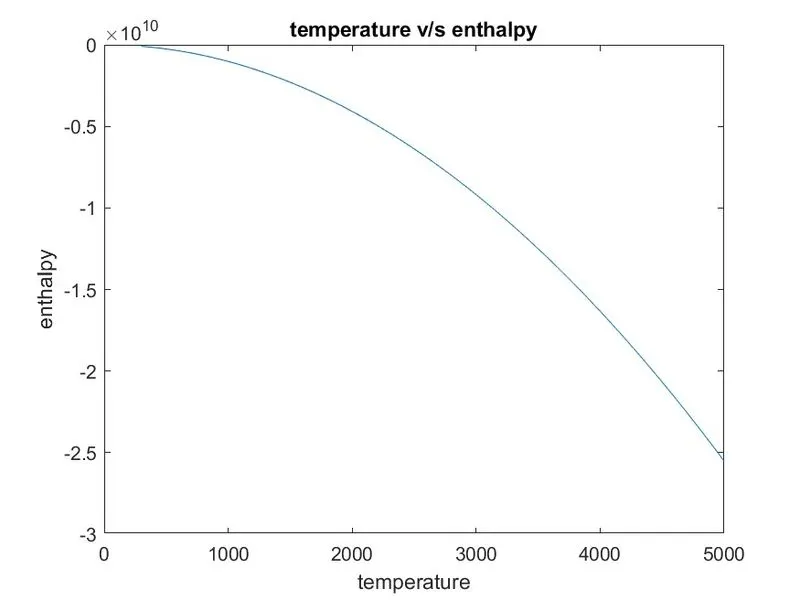
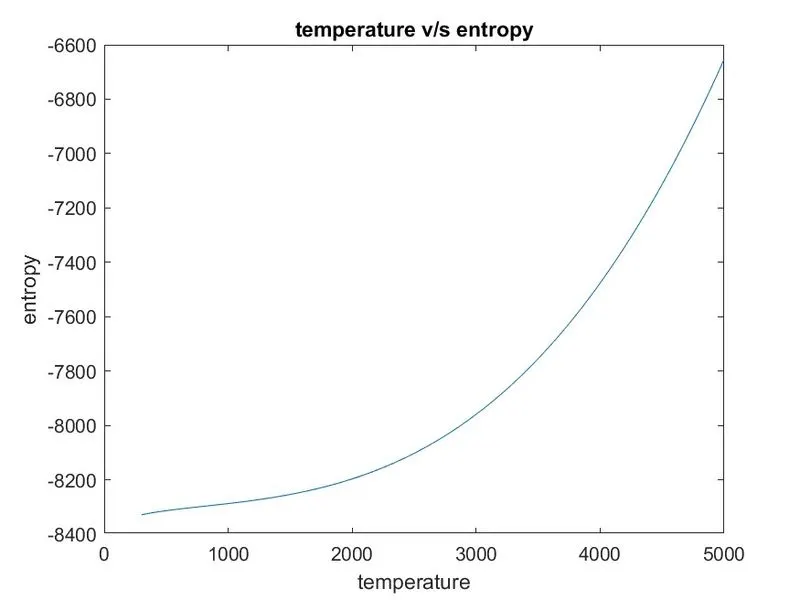
3) CO2;
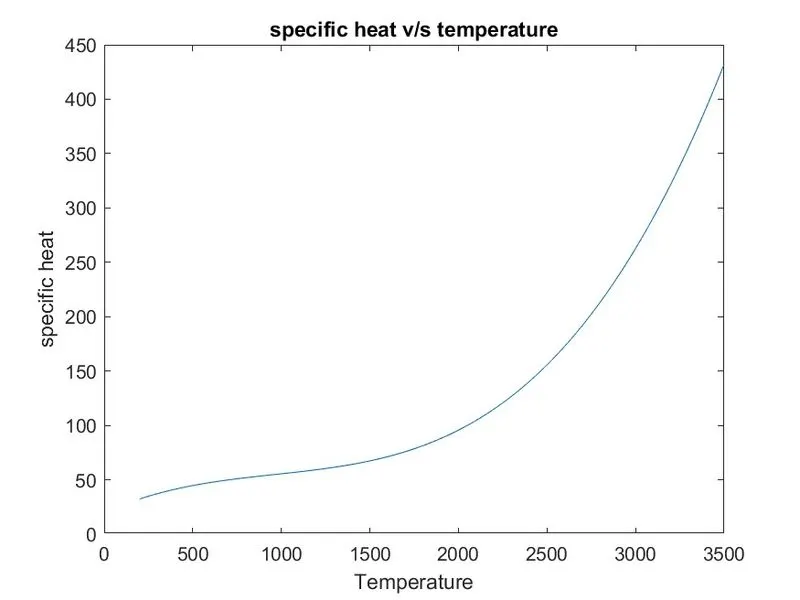
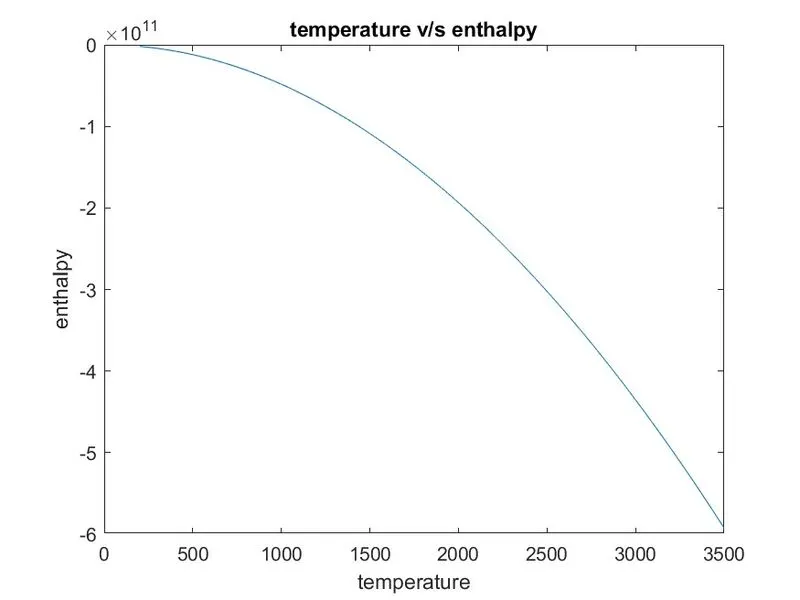
> SCREENSHOT OF THE FOLDER WHERE ALL THE PLOTS OF DIFFRENT 53 SPECIES ARE PRESENT.
PROGRAM LOGIC;
First load the thermo.dat and open that file in to the matlab using the fopen commnad.Then read the line of the thermo.dat file using the fgetl command abd assignes in the array called A.Then skip the first five lines of the thermo.da file using the for loop and jump directlt to the header filr which contains the species name and temperature values.split the individuals characters of Arrar "A" using the command called strsplit and used space as delimiter abd syore all of them in to the array called b.
extract the species name from the cell array "b".
extract all the value of temperature from the cell array b initialially firdt when we extract them from the cell array so they are in the strings to convert them in to the numbers used the command called str2num.We rae converting the strings to the number because strings will not used in the calculation.
Go the the coefficient_line1 using the command called the fgetl. Then find the position of exponent using the command called "strfind" and based on the position of "E" extract the values for the coefficients as there are five coefficients present in the first line.
then for going to the nest line use the command "fgetl(f)" and store this in to the variable called coefficient_line2.Then find the position of the "E" in the coefficient_line2 using the command called strfind and store the position of "E" in the variable pos_e1. Then extract the coefficients from the line 2 with the help of indexing. for example-
_d save all the plots inside that folder naming species_name.