Project 1 - Parsing NASA thermodynamic data
Objective -
1. Write a function that extracts the 14 coefficients and calculates the enthalpy, entropy, and specific heats for all the species in the data file. The formulae are shown below.
Here R is the universal gas constant, T is the temperature
The FIRST 7 coefficients are HIGH-temperature coefficients and the SECOND 7 coefficients are LOW-temperature coefficients.
Also use the LOCAL TEMPERATURE RANGES which are unique for each individual species, not the GLOBAL TEMPERATURE RANGE.
2. Calculate the molecular weight of each species and display it in the command window.
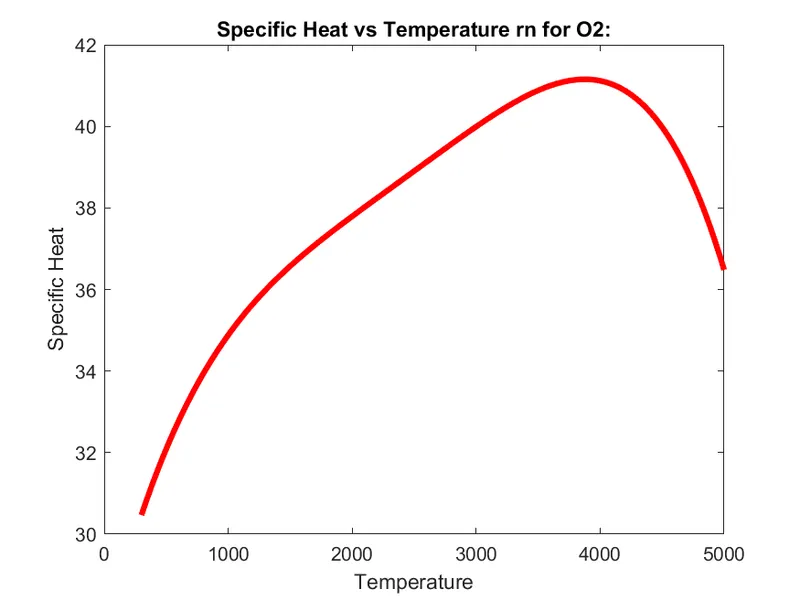
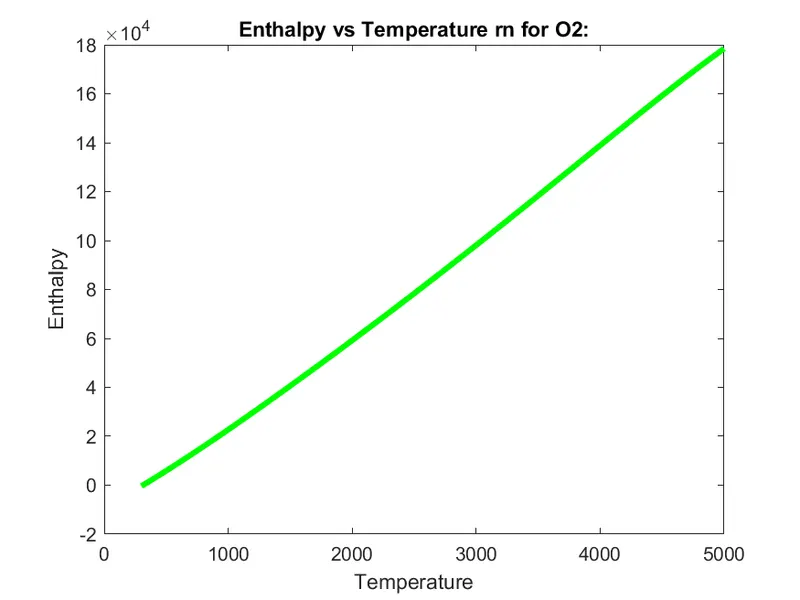
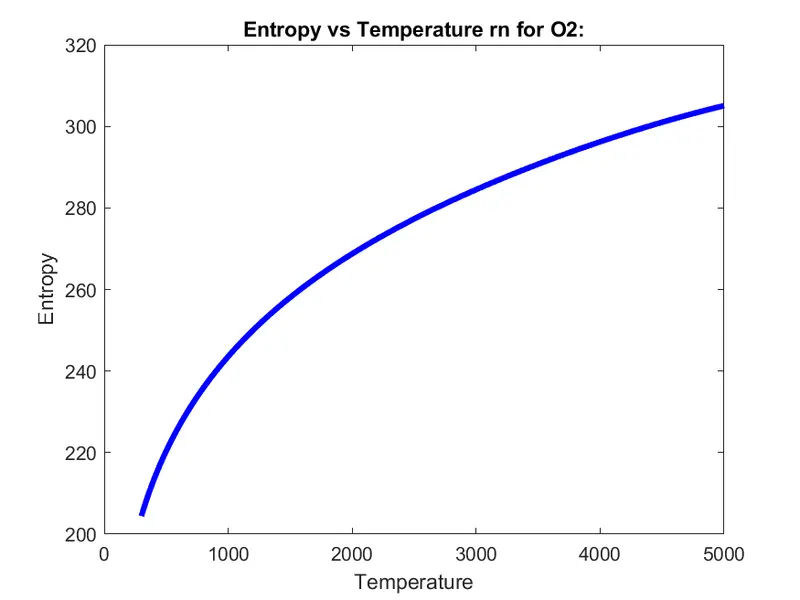
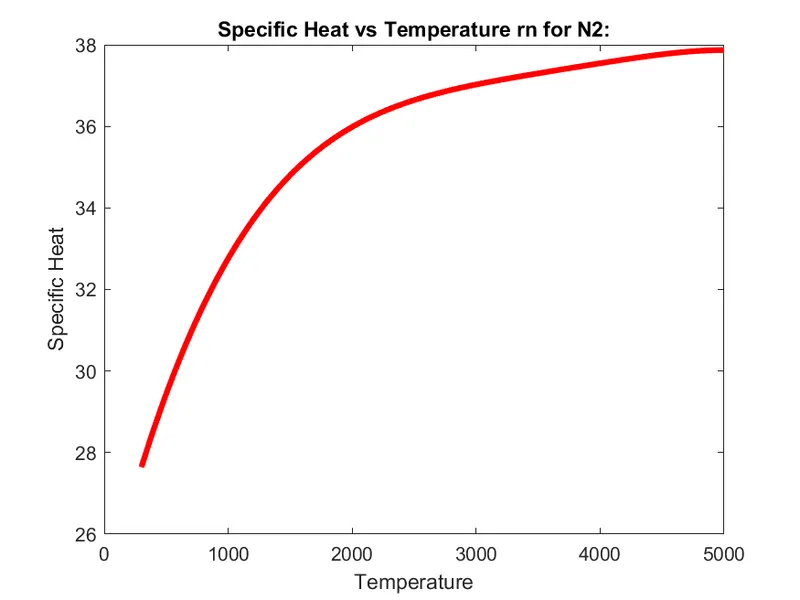
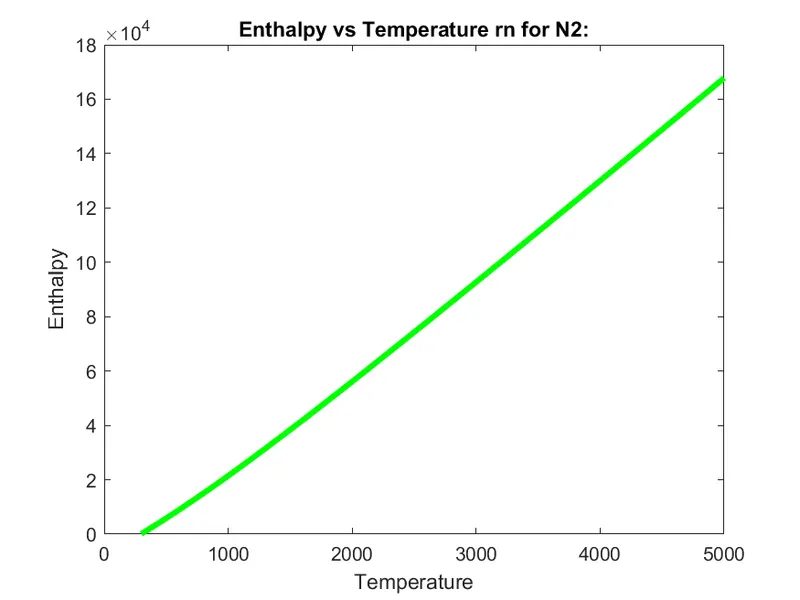
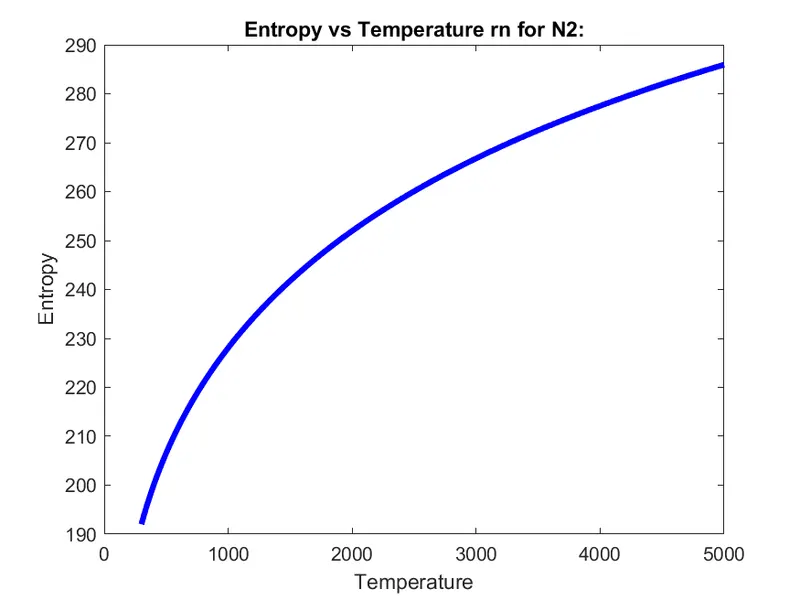
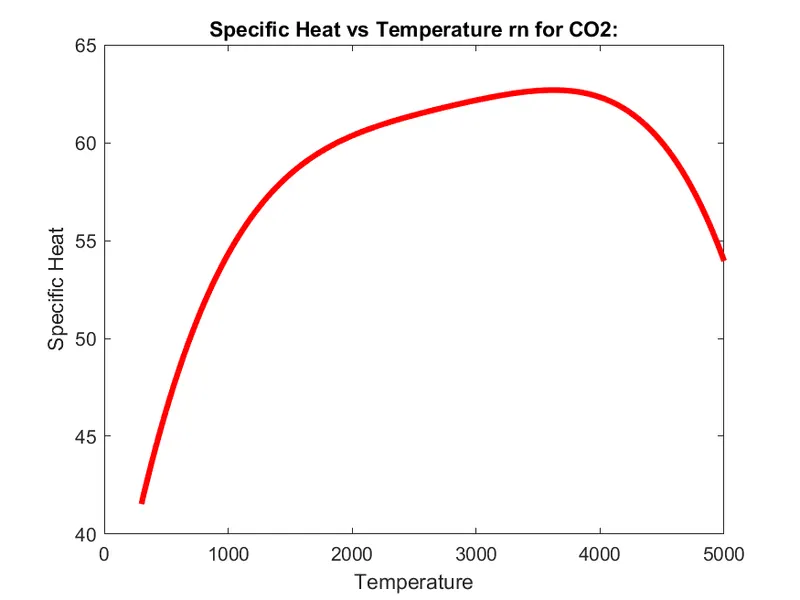
3. Plot the Cp, Enthalpy, and Entropy for the local temperature range (low temperature: high temperature) specific for each species.
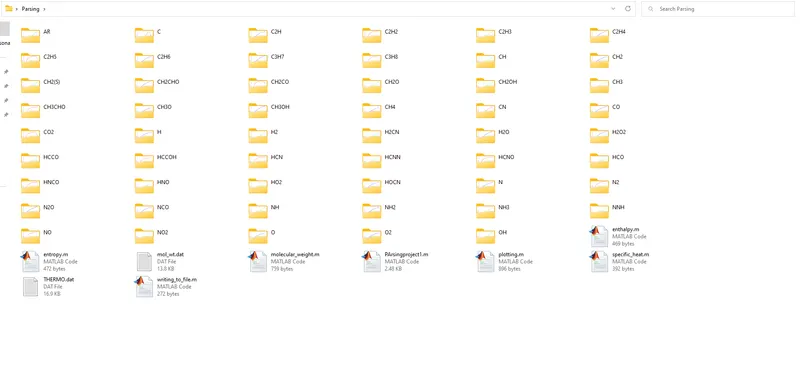
4. Save the plots as images with appropriate names and dump them in separate folders for each species with a suitable name. All these should be generated automatically.
5. The main program that you will submit will just take the "THERMO.dat" file as an input and generate Cp, H, and S plots.
Procedure -
We have been provided with a NASA thermodynamic file named THERMO.dat.
In this file, there are 53 species that have 14 coefficients and temperature ranges, with the help of these we find the Cp (specific heat), H (enthalpy), and S (entropy).
Formulae's :

We create functions to find these parameters.
Function to find the Specific Heat (Cp):
%Function to calculate specific heat function

function c_p = specific_heat(a1,a2,a3,a4,a5,a6,a7,a8,a9,a10,a11,a12,a13,a14,R,Temp,global_low_temp,global_high_temp,global_mid_temp)
     if Temp<=global_mid_temp
       c_p = R*(a8 + a9.*Temp + a10.*(temp.^2) + a11.*(Temp.^3) + a12.*(Temp.^4));
    else
        c_p = R*(a1 + a2.*Temp+a3.*(Temp.^2) + a4.*(Temp.^3) + a5.*(Temp.^4));
end
The coefficients used in the function from a1 to a14.
a1 to a7 are high-temperature coefficients.
a8 to 14 are low-temperature coefficients.
We use the if and else function to specify what temperature range and coefficients are used in the code.
If the temperature <= global_mid_temp, we use the lower temperature coefficients.
If the temperature is greater than the mid-temperature we use the higher temperature coefficients.
Function to find the H(Enthalpy) :
%Function to calculate enthalpy function

function H = enthalpy(a1,a2,a3,a4,a5,a6,a7,a8,a9,a10,a11,a12,a13,a14,R,Temp,global_low_temp,global_high_temp,global_mid_temp)
     if Temp <=global_mid_temp

        H = R.*Temp.*(a8 + a9.*(Temp./2) + a10.*((Temp.^2)./3) + a11.*((Temp.^3)./4)+ a12.*((Temp.^4)./5) + a13./Temp);
    else
        H = R.*Temp.*(a1 + a2.*(Temp./2) + a3.*((Temp.^2)./3) + a4.*((Temp.^3)./4) + a5.*((Temp.^4)./5) + a6./Temp);

end
a1 to a7 are high-temperature coefficients.
a8 to 14 are low-temperature coefficients.
We use the if and else function to specify what temperature range and coefficients are used in the code.
If the temperature <= global_mid_temp, we use the lower temperature coefficients.
If the temperature is greater than the mid-temperature we use the higher temperature coefficients.
Function to find the S(Entropy):
%Function to calculate entropy function

function S = entropy(a1,a2,a3,a4,a5,a6,a7,a8,a9,a10,a11,a12,a13,a14,R,Temp,global_low_temp,global_high_temp,global_mid_temp)
    if Temp<=global_mid_temp

        S = R*(a8.*log(Temp) + a9.*Temp + a10.*(Temp.^2)./2 + a11.*(Temp.^3)./3 + a12.*(Temp.^4)./4 + a13);
   else
        S = R*(a1.*log(Temp) + a2.*Temp + a3.*(Temp.^2)./2 + a4.*(Temp.^3)./3 + a5.*(Temp.^4)./4 + a7);

 end
a1 to a7 are high-temperature coefficients.
a8 to 14 are low-temperature coefficients.
We use the if and else function to specify what temperature range and coefficients are used in the code.
If the temperature <= global_mid_temp, we use the lower temperature coefficients.
If the temperature is greater than the mid-temperature we use the higher temperature coefficients.
Function to find the Molecular weight of Different Species :
%Function for calculating molecular weight
function [w] = molecular_weight(element_name)

s = {'H' 'C' 'N' 'O' 'AR'};

%atomic weight of each element
atomic_wt = [1.008 12.011 15.999 14.007 39.948 32.065];
w = 0;

for i = 1:length(element_name)
for j = 1:length(s)
if strcmp(element_name(i), s(j))
 w= w + atomic_wt(j);

%storing the position of the matched element
position = j;

end

end

n = str2double(element_name(i));
if n > 1
w = w + atomic_wt(position)*(n-1);

end

end

end
The main components of all 53 arrays are stored in the array named s = {'H' 'C' 'N' 'O' 'AR'}.
The atomic weights are searched on the internet and stored in an array named as atomic_weight.
Then we will assign molecular starting range w=0 and then create a for loop, which runs to the length of the element_names, and another for loop which runs to the length of the string (s).
Then we will use the if condition and use strcmp command to compare the species and element_name strings to calculate molecular masses if, by comparison, both strings are found the same then we will assign their molecular weight.
Now, we use the str2num command & assign it to n.
Then we use the if loop to find whether the species contains more than one element.
If n>1 then we will increment the atomic weight by the multiplication of position and n-1 to the atomic_weight array.
Function to Write the molecular elements to a file:
%Writing molecular weight of elements to a file
function writing_to_file(element_name,weight)

dir_name = element_name;
mol_file = fopen('mol_wt.dat','a+');
fprintf(mol_file, 'Molecular weight of %s is %f n', dir_name,weight);
fclose(mol_file);

end
Inputs - element name & molecular weights.
Output - writes the molecular weight of each element in a file.
Main Code :
close all
clear
clc

%Inputs
R= 8.314;

f1 =fopen('THERMO.dat','r');
fgetl(f1)
global_temp_string=fgetl(f1);
global_temp=strsplit(global_temp_string,' ');
global_low_temp=str2double(global_temp{2});
global_mid_temp=str2double(global_temp{3});
global_high_temp=str2double(global_temp{4});

for i= 1:3
    fgetl(f1)
end


 % now we create the temperature values for lower and higher temperature

   Temp= linspace(global_low_temp,global_high_temp,500);

%to read the species data
    for i=1:53
    %Reading the first line which includes the information for species
    l=fgetl(f1);

    %Reading the name of the species
    element_name=strtok(l);

    %Reading the three lines which contain 7 high temp coefficients & 7 low temp
    %coefficients
    l2=fgetl(f1);
    l3=fgetl(f1);
    l4=fgetl(f1);

    %Finding the position of E so that we can extract the coefficients
    a=strfind(l2,'E');
    b=strfind(l3,'E');
    c=strfind(l4,'E');

%Extracting high temp coefficient
    a1=str2double(l2(1:a(1)+3));
    a2=str2double(l2(a(1)+4:a(2)+3));
    a3=str2double(l2(a(2)+4:a(3)+3));
    a4=str2double(l2(a(3)+4:a(4)+3));
    a5=str2double(l2(a(4)+4:a(5)+3));
    a6=str2double(l3(1:b(1)+3));
    a7=str2double(l3(b(1)+4:a(2)+3));

%Extracting low temp coefficient
    a8=str2double(l3(b(2)+4:a(3)+3));
    a9=str2double(l3(b(3)+4:a(4)+3));
    a10=str2double(l3(b(4)+4:a(5)+3));
    a11=str2double(l4(1:c(1)+3));
    a12=str2double(l4(c(1)+4:a(2)+3));
    a13=str2double(l4(c(2)+4:a(3)+3));
    a14=str2double(l4(c(3)+4:a(4)+3));

   % Calculating Cp, Enthalpy & entropy for lower and higher temperatures

    %Calculating specific heat
    c_p = specific_heat(a1,a2,a3,a4,a5,a6,a7,a8,a9,a10,a11,a12,a13,a14,R,Temp,global_low_temp,global_high_temp,global_mid_temp)

    %Calculalting enthalpy
     H = enthalpy(a1,a2,a3,a4,a5,a6,a7,a8,a9,a10,a11,a12,a13,a14,R,Temp,global_low_temp,global_high_temp,global_mid_temp)

    %calculating entropy
    S = entropy(a1,a2,a3,a4,a5,a6,a7,a8,a9,a10,a11,a12,a13,a14,R,Temp,global_low_temp,global_high_temp,global_mid_temp)

    %Plotting graphs
    plotting(c_p,H,S,Temp,element_name);

    %Calculating molecular weights
    mol_wt(i) = molecular_weight(element_name);
    disp(mol_wt(i));
    Molucular_Weight = strcat(mol_wt(i),element_name)

    %Function to write molecular weight to a file
    weight = mol_wt(i);
    writing_to_file(element_name, weight);

end
fclose(f1)
Syntax Used:
fopen = opens the file.
fgetl = reads the line from a file, removing the newline characters.
strtok = parses str from left to right, using whitespace characters as delimiters, and returns part or all of the text in token.
str2double = str contains text that represents real or complex numeric values. str can be a character vector, a cell array of character vectors, or a string array.
Text that represents a number can contain digits, a comma (thousands separator), a decimal point, a leading + or - sign, an e preceding a power of 10 scale factor, and an i or a j for a complex unit. You cannot use a period as a thousands separator, or a comma as a decimal point.
If str2double cannot convert text to a number, then it returns a NaN value.
It has been used to extract co efficients in our code.
strfind = Find strings within other strings. Used to find position of 'E' in our code, which is then used to extract coefficients.
Results :
Plots for Required Species:
O2:
N2:
CO2:
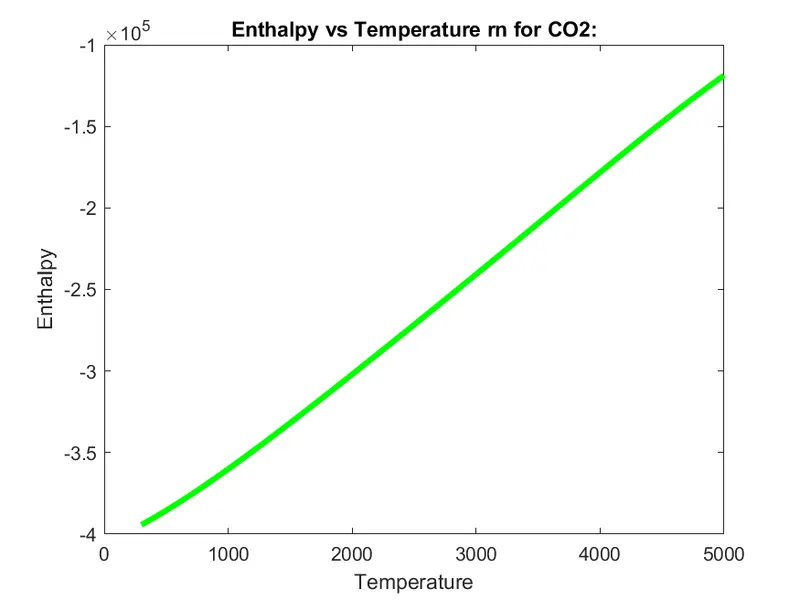
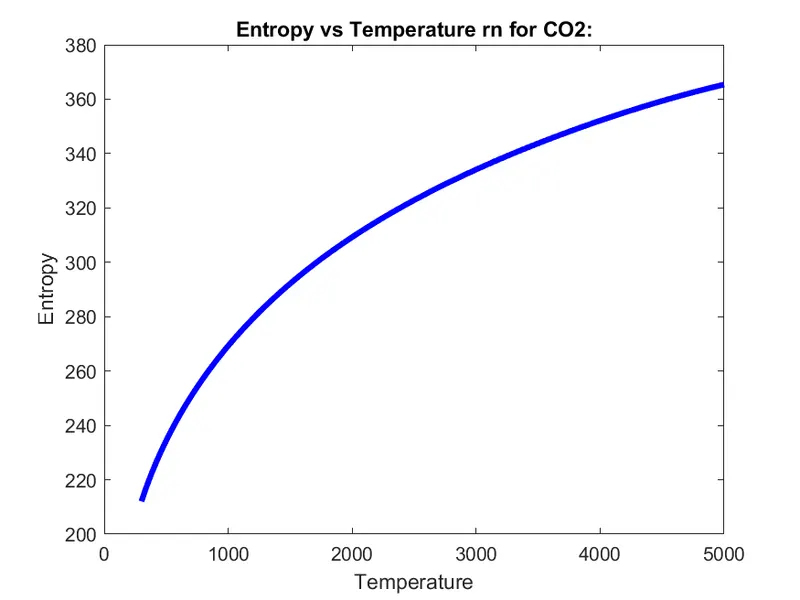
Molecular weight data file is attached.