Project 1 - Parsing NASA thermodynamic data
AIM:
- Write a function that extracts the 14 co-efficient and calculates the enthalpy, entropy and specific heats for all the species in the data file.
- Calculate the molecular weight of each species and display it in the command window.
- Plot the Cp, Enthalpy and Entropy for the local temperature range (low temperature: high temperature) specific for each species.
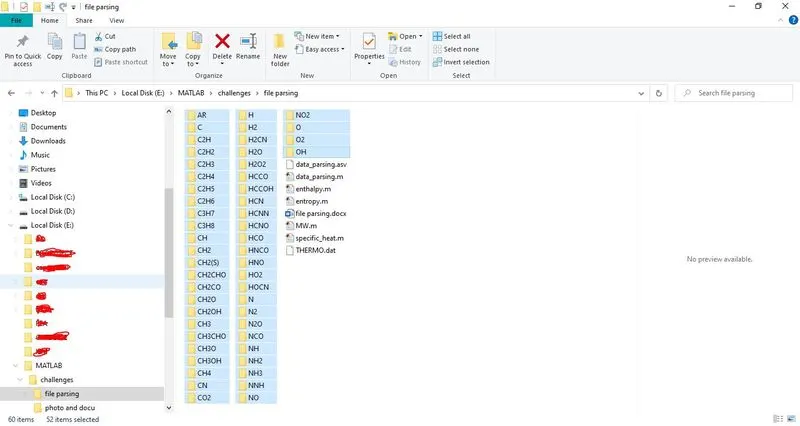
- Save the plots as images with appropriate names and dump them in separate folders for each species with suitable name. All these should be generated automatically.
- The main program that you will submit will just take the "THERMO.dat" file as an input and generate Cp, H and S plots.
OBJECTIVE:
- To write a function that extracts the 14 co-efficient and calculates the enthalpy, entropy and specific heats for all the species in the data file.
- To Calculate the molecular weight of each species and display it in the command window.
- To Plot the Cp, Enthalpy and Entropy for the local temperature range (low temperature: high temperature) specific for each species.
- To Save the plots as images with appropriate names and dump them in separate folders for each species with suitable name. All these should be generated automatically.
GOVERNING EQUATIONS FOR-
- specific heat
- Enthalpy
- Entropy

Where,
T=local temperature
b1-b7=high temperature coefficient
b8-b14=low temperature coefficient
R=Gas constant=8.314
Definitions:
File parsing: parsing a file means to spilt a file or other input into pieces of data that can easily store or manipulated. So, we are splitting a string into parts then recognizing the parts to convert it into something simpler than a string.
Enthalpy: A thermodynamic quantity equivalent to the total heat content of a system. It is equal to the internal energy of the system plus the product of pressure and volume.
Entropy: A thermodynamic quantity representing the unavailability of a system thermal energy for conversion into mechanical work, often interpreted as the degree of disorder of randomness in the system.
Specific heat: It is the amount of heat per unit mass required to raise the temperature by one degree Celsius.
Molecular weight: Molecular weight is the weight of a given molecule.
Atomic mass: The mass of an atom of a chemical expressed in atomic mass units. It is approximately equivalent to the number of protons and neutrons in the atom or to the average number allowing for the relative abundances of different isotopes.
MAIN CODE WITH EXPLANATION:
Firstly, to read the data file fopen command is used, and to get the information fgetl is used.
Using strsplit we get the global temperatures and then using fgetl command we skip the lines which are not required.
Loop command is created to get the values of all the temperatures and coefficients present in the file
To get temperatures and coefficients values we used strfind to specify them accurately.
So, the data is in string format in order to convert it into a numbers str2double command is used.
The function of the formula is called here for calculation.
To make a folder mkdir command is used by specifying the directory.
Then plotting is taken place using the command plot.
For changing directory, we use the command cd in order to save the plots of specific heat, entropy, enthalpy in each individual file of species.
Then the molecular weight is calculated by calling the molecular weight calculation function.
and the file is closed using the command fclose
clear all
close all
clc


%reading data from the file
thermo = fopen('THERMO.dat','r')
fgetl(thermo);
tempdat = fgetl(thermo);
A = strsplit(tempdat,' ');
%Extracting the global temperature range
LowGt = str2num(A{2});
MidGt = str2num(A{3});
HighGt = str2num(A{4});

%Defining variable to store the input from end-user
get = input(' Enter Species Name','s');

while ~feof(thermo)
    data = fgetl(thermo);
    a = strsplit(data,' ');
    b = a(1);

    %Comparing input and data of molecule
     match = strcmpi(b , get)
     if match == 1
         disp('Species Data Available')
         %Extracting coefficients of desired moecule
         Line1 = fgetl(thermo);
         SL1 = findstr(Line1,'E');
             Coef1 = Line1(1:SL1(1)+3);
             Coef2 = Line1(SL1(1)+4:SL1(2)+3);
             Coef3 = Line1(SL1(2)+4:SL1(3)+3);
             Coef4 = Line1(SL1(3)+4:SL1(4)+3);
             Coef5 = Line1(SL1(4)+4:SL1(5)+3);
             a1 = str2num(Coef1);
             a2 = str2num(Coef2);
             a3 = str2num(Coef3);
             a4 = str2num(Coef4);
             a5 = str2num(Coef5);

         Line2 = fgetl(thermo);
         SL2 = findstr(Line2,'E');
             Coef6 = Line2(1:SL2(1)+3);
             Coef7 = Line2(SL2(1)+4:SL2(2)+3);
             Coef8 = Line2(SL2(2)+4:SL2(3)+3);
             Coef9 = Line2(SL2(3)+4:SL2(4)+3);
             Coef10 = Line2(SL2(4)+4:SL2(5)+3);
             a6 = str2num(Coef6);
             a7 = str2num(Coef7);
             a8 = str2num(Coef8);
             a9 = str2num(Coef9);
             a10 = str2num(Coef10);
         Line3 =fgetl(thermo);
         SL3 = findstr(Line3,'E');
             Coef11 = Line3(1:SL3(1)+3);
             Coef12= Line3(SL3(1)+4:SL3(2)+3);
             Coef13 = Line3(SL3(2)+4:SL3(3)+3);
             Coef14 = Line3(SL3(3)+4:SL3(4)+3);
             a11 = str2num(Coef11);
             a12 = str2num(Coef12);
             a13 = str2num(Coef13);
             a14 = str2num(Coef14);
             %Extracting the local temperature range of the input molecule
             mlt = a(end-1);
             midlt = str2double(mlt);
             hlt = a(end-2);
             highlt = str2double(hlt);
             llt = a(end-3);
             lowlt = str2double(llt);

             break
     elseif match == 0
         disp('Species Data Not Available')
     else
         continue
     end
end

f = upper(get);

%Displaying Molecular Weight of the input molecule.
moleWeight = MW(get);
disp('Molecule Entered')
disp(f)
disp('Molecular Weight')
disp(moleWeight)
TRange = linspace(100,10000,9000);
R = 8.314;
%Obtaining value of SPECIFIC HEAT
cp = specific_heat(a1,a2,a3,a4,a5,a8,a9,a10,a11,a12,midlt,TRange,R);
%Obtaining value of ENTROPY
s = entropy(a1,a2,a3,a4,a5,a7,a8,a9,a10,a11,a12,a14,midlt,TRange,R);
%Obtaining value of ENTHALPY
h = enthalpy(a1,a2,a3,a4,a5,a6,a8,a9,a10,a11,a12,a13,midlt,TRange,R);

%creating directory to store the plots
mkdir(f)
%Plotting Cp v T
figure(1)
plot(TRange,cp,'linewidth',3,'color','r')
grid on
xlabel('Temperature')
ylabel('Specific Heat (J/K)')
title(f)

%Plotting S v T
figure(2)
plot(TRange,s,'linewidth',3,'color','b')
grid on
xlabel('Temperature')
ylabel('Entropy  (J/K)')
title(f)

%Plotting h v T
figure(3)
plot(TRange,h,'linewidth',3,'color','g')
grid on
xlabel('Temperature')
ylabel('Enthalpy (J/kg)')
title(f)

%Defining current folder
cd(f)

%Saving the images to current folder in specified formats
saveas(figure(1),'Cp vs T.jpg')
saveas(figure(2),'S vs T.jpg')
saveas(figure(3),'h vs T.jpg')

%Defining current folder back as parent folder
cd('E:\')
%Closing the open files
fclose('all');
CODE FOR MOLECULAR WEIGHT WITH EXPLANATION:
In this molecular weight is calculated using function command here atomic name and atomic weight are given as inputs to the species. A loop is created for calculating molecular weight of species individually, strcmp is used to compare species with the elements and calculate their molecular weight. Then string is converted in to number using str2num command.
%Creating funcion for MOlecular weight
function Mol_Weight = MW(get)
 Weight = 0;
 % input as molecule name
 % atoms dealt with H C N O Ar
 % atomic mass   1 12 14 16 40 respectively
 %to find molecular weight, we have to compare the atomsbfrom input

  atoms = ['H','C','N','O','A'];
  %Only A taken for Ar since A&R will be contained two positions in get
  mass = [1,12,14,16,40];
  %Since we have to compare each characters for mass, using 2 for loop
  for i = 1:length(get)
      for j = 1:length(atoms)
          if strcmpi(get(i),atoms(j))
          Weight = Weight + mass(j);
          y = j;
          end
CODE FOR Cp, ENTHALPY AND ENTROPY WITH EXPLANATION:
In this coding using function command, the formula is developed.
Here temperatures vary from each species where the first 7 will be local high temperature and the rest 7 species will the local low temperature. So here we use if and else command to calculate both temperatures.
function h_val = enthalpy(a1,a2,a3,a4,a5,a6,a8,a9,a10,a11,a12,a13,midlt,TRange,R)
if (TRange>midlt)
   h_val = ( a1+ ((a2 .* TRange)./2) + ((a3.*(TRange.^2))./3) +((a4 .*(TRange.^3))./4) + ((a5 .* (TRange.^4))./5) + (a6./TRange)).* (R.*TRange);
else
    h_val = ( a8+ ((a9 .* TRange)./2) + ((a10.*(TRange.^2))./3) +((a11 .*(TRange.^3))./4) + ((a12 .* (TRange.^4))./5) + (a13./TRange)).* (R.*TRange);
end
end


function s_val = entropy(a1,a2,a3,a4,a5,a7,a8,a9,a10,a11,a12,a14,midlt,TRange,R)

if (TRange>midlt)
    s_val= ((a1*log(TRange)) + (a2 *TRange)  + ((a3*(TRange.^2))/2) + ((a4*(TRange.^3)) /3) + ((a5*(TRange.^4))/4) + (a7))*R;
else
    s_val= ((a8*log(TRange)) + (a9 *TRange)  + ((a10*(TRange.^2))/2) + ((a11*(TRange.^3)) /3) + ((a12*(TRange.^4))/4) + (a14))*R;
end
end


function cp_val = specific_heat(a1,a2,a3,a4,a5,a8,a9,a10,a11,a12,midlt,TRange,R)

if (TRange>midlt)
cp_val = ( a1+ (a2*TRange) + (a3 *(TRange.^2)) + (a4*(TRange.^3)) + (a5 * (TRange.^4)))*R;
else
    cp_val = ( a8+ (a9*TRange) + (a10 *(TRange.^2)) + (a11*(TRange.^3)) + (a12 * (TRange.^4)))*R;
end
end
RESULTS FOR O2, N2 , CO2
Molecular weight of above gases respectively-32 , 28, 44
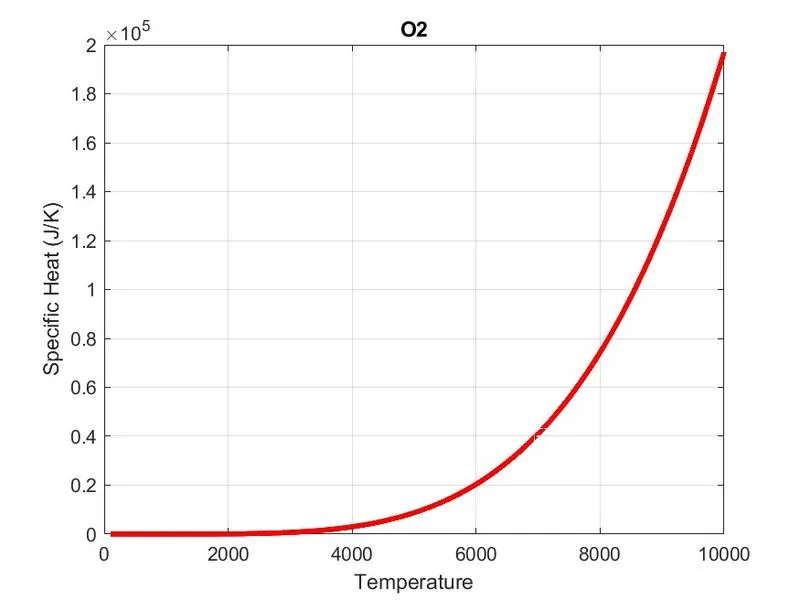
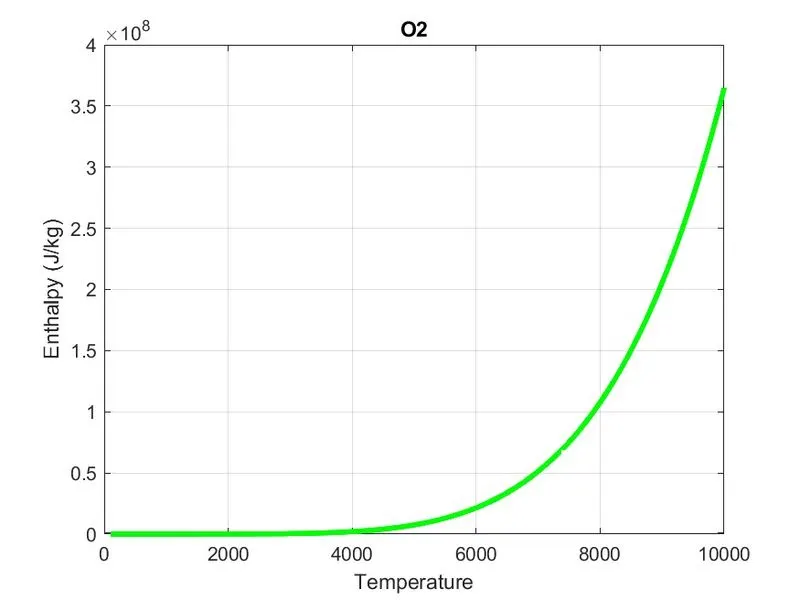
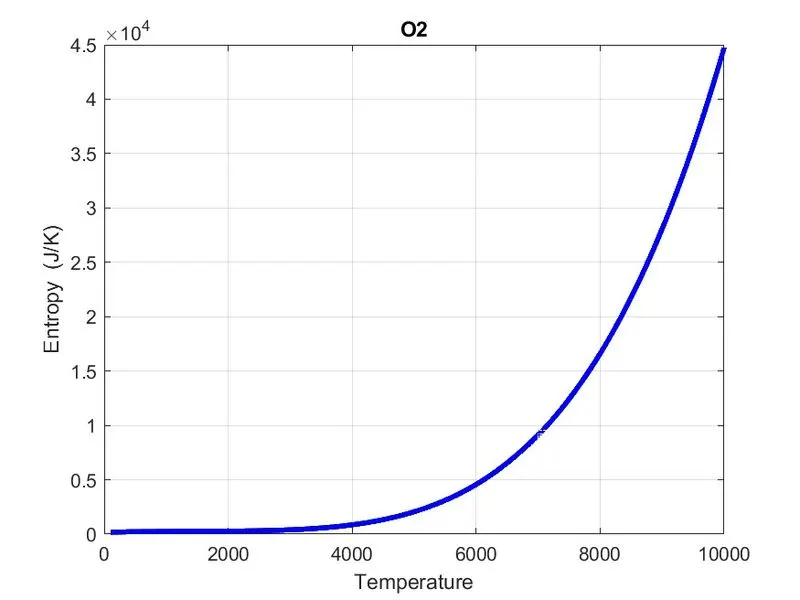
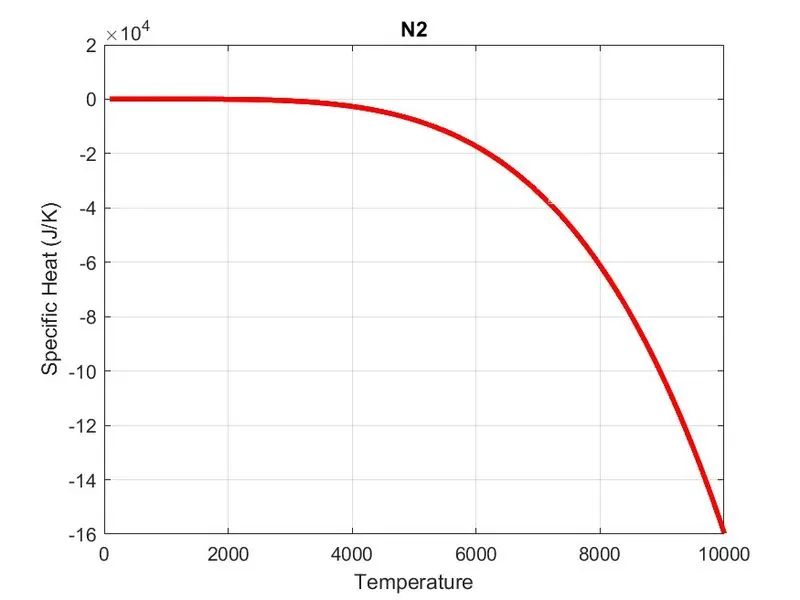
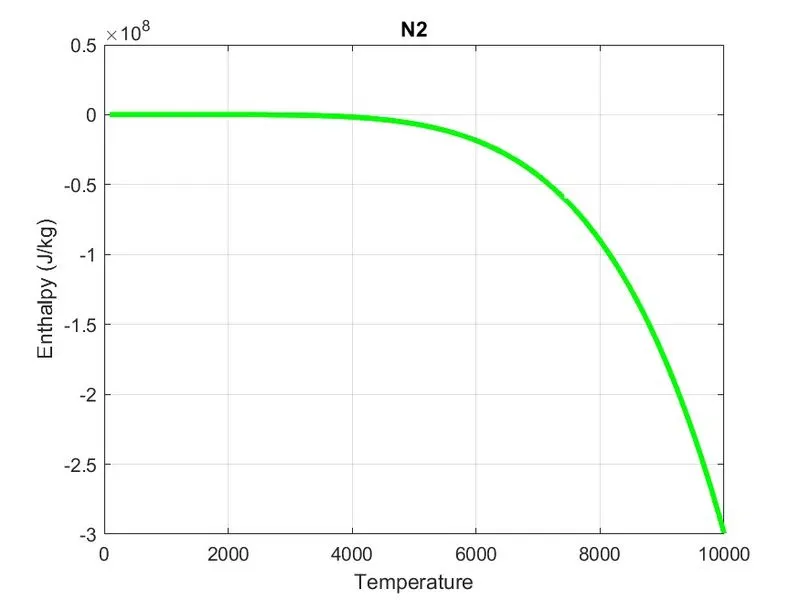
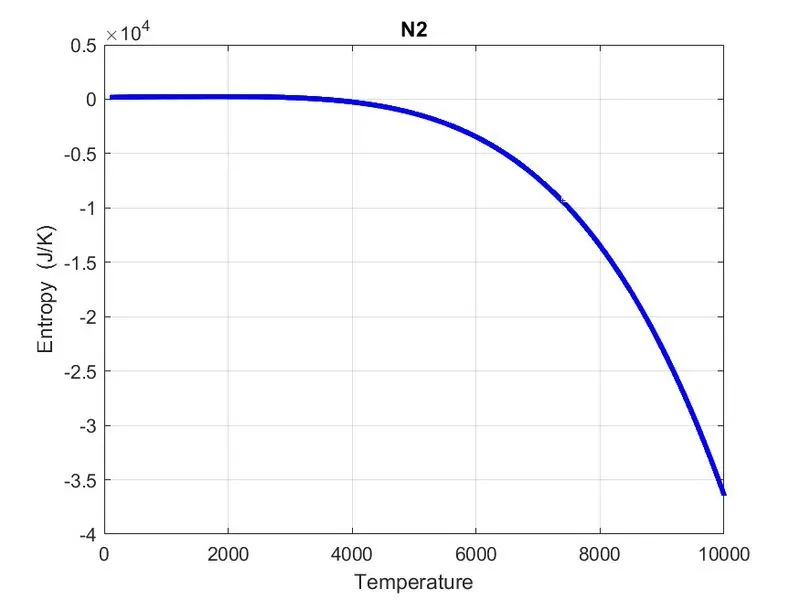
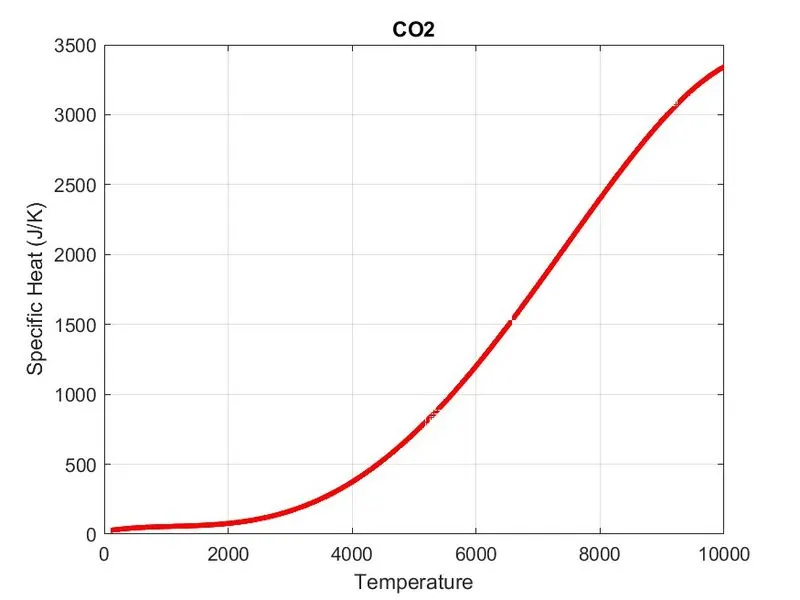
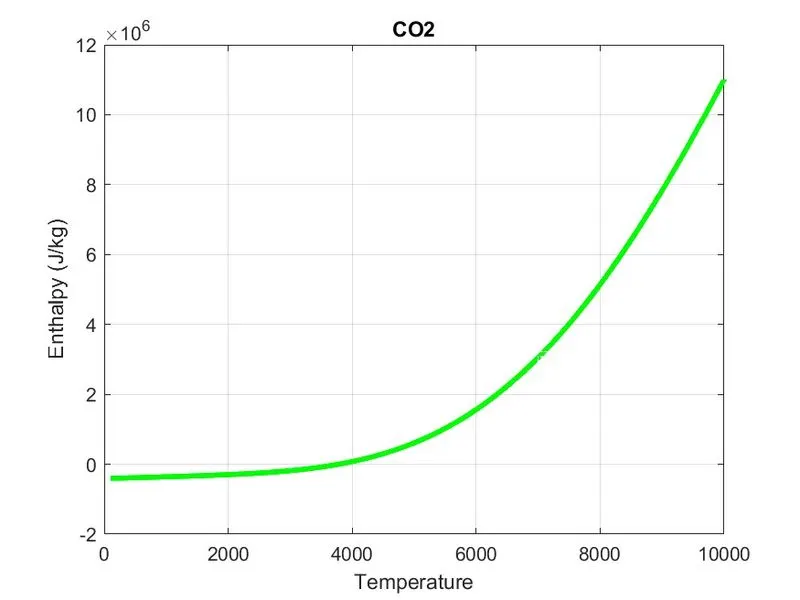
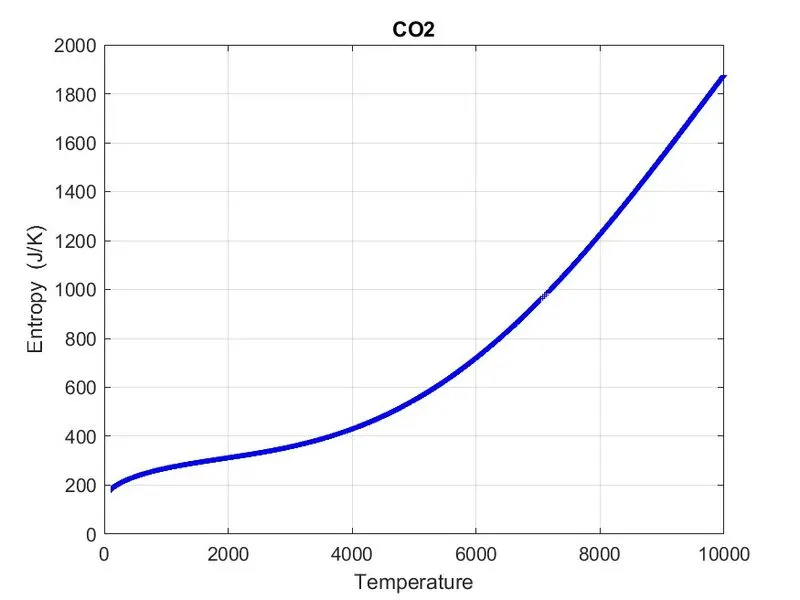
Image shows 52 folders
CONCLUSION:
- I have Write a function that extracts the 14 co-efficient and calculated the enthalpy, entropy and specific heats for all the species in the data file.
- Calculated the molecular weight of each species
- Plotted the Cp, Enthalpy and Entropy for the local temperature range (low temperature: high temperature) specific for each species.
- Saved the plots with appropriate names and dump them in separate folders for each species with suitable name.