Project 1 (Mini Project on Vehicle Direction Detection
OBJECTIVE :
The objective of project are as follow :
- Development of MATLAB Simulink model as per requirement.
- Tag the requirements to the simulink model; tagging requirement 1 & requirement 2 to their corresponding subsystems is fine.
- MBD compliant changes, Data Dictionary creation & code generation is added advantage, and that is not scope of this project.
- Choose sample time for all signals as 0.01s.
GENERAL OVERVIEWS :
Identifying the direction of the vehicle is one of the important & diverse features in Autonomous driving & Advanced Driver Assistance Features. This particular sub-feature of identifying the direction of vehicle is basically identifying the direction the vehicle is taking based on the camera input.
Camera reads the road signs & stores into its memory with unique values for left turn, right turn & straight drive. Depending on the direction it is taking, final indication is given to the driver – as an indication if he is driving in the recommended direction or not.
DEVELOPMENT OF SIMULINK MODEL :
Creation of simulink Data Dictionary file (SLDD ) :
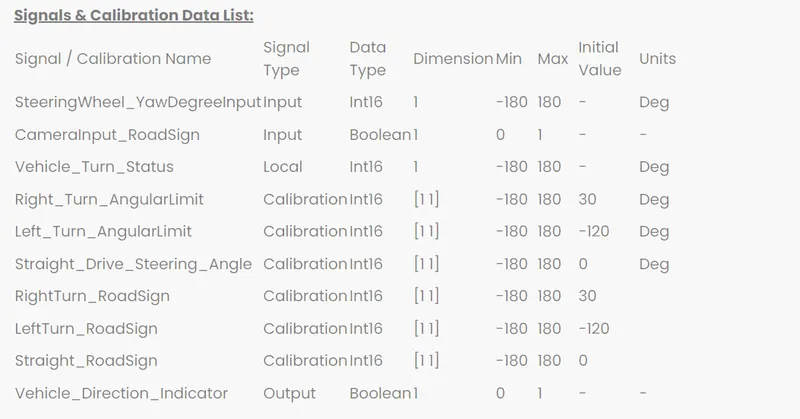
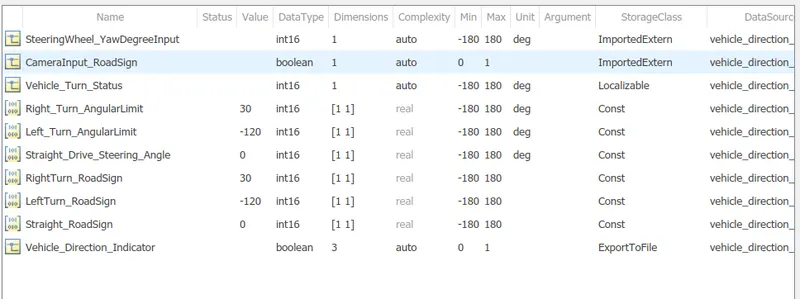
- A SLDD files is created that store the input signals , output signals and calibration parameters used in model .
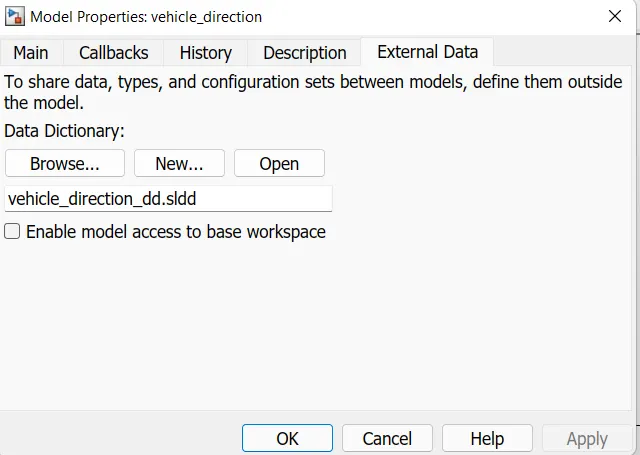
- To create SLDD file , click on modeling , then model properties ,then external data and specifying a file name from the data dictionary .
- Below are the output and input signals and calibration parameters , from which we have to create SLDD file
SIMULINK MODEL:
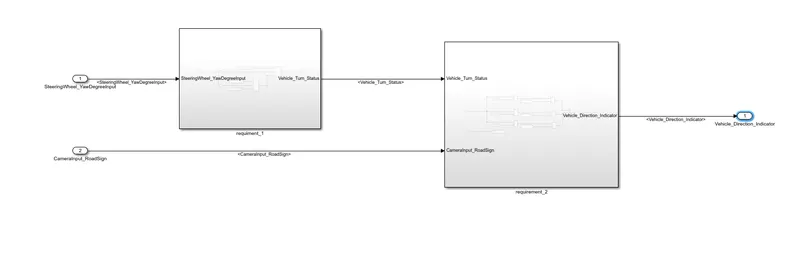
- Below is the main subsystem of Vehicle_direction .
- Here there are two input signals and one output signal.
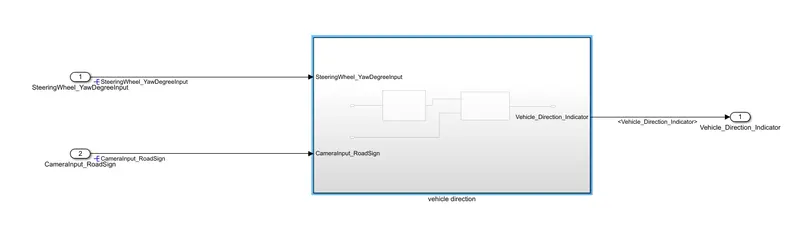
The main subsystem 'Vehicle_direction' further has two more subsystem which are 'Requirement 1 ' and ' Requirement 2' as shown below :
Requirement - 1:
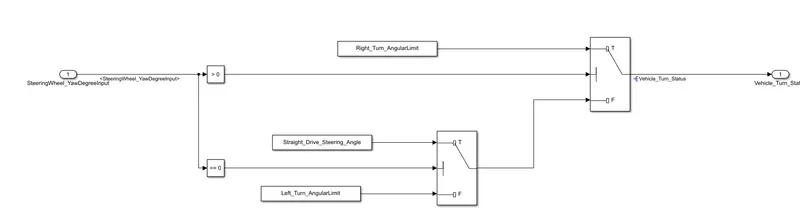
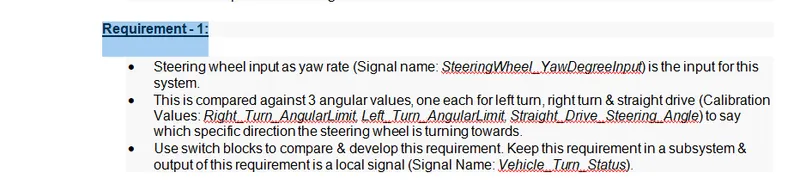
- Steering wheel input as yaw rate (Signal name: SteeringWheel_YawDegreeInput) is the input for this system.
- This is compared against 3 angular values, one each for left turn, right turn & straight drive (Calibration Values: Right_Turn_AngularLimit, Left_Turn_AngularLimit, Straight_Drive_Steering_Angle) to say which specific direction the steering wheel is turning towards.
- Use switch blocks to compare & develop this requirement. Keep this requirement in a subsystem & output of this requirement is a local signal (Signal Name: Vehicle_Turn_Status).
Requirement – 2:
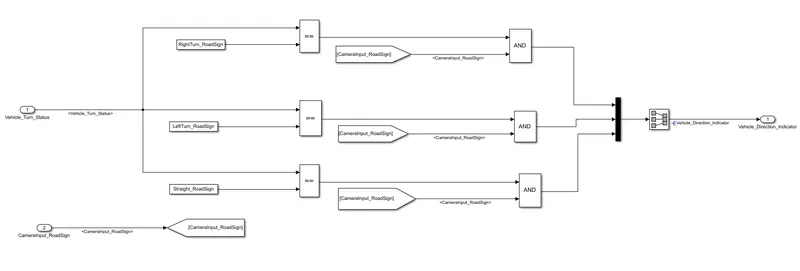
- Keep this requirement as a separate subsystem. Inputs to this requirement are local signal from requirement 1 (Signal Name: Vehicle_Turn_Status) & an input signal from camera (Signal Name: CameraInput_RoadSign), which confirms the occurrence of a road sign.
- Signal Vehicle_Turn_Status is compared against calibration values (Calibration Values: RightTurn_RoadSign, LeftTurn_RoadSign, Straight_RoadSign), if each of them is found equal, then each of the three corresponding output is compared against the camera input signal,
- Using a logical operator block, only one among them is finally given as output signal (Signal Name: Vehicle_Direction_Indicator).
REQUIREMENT TAGGING OF SIMULINK MODEL :
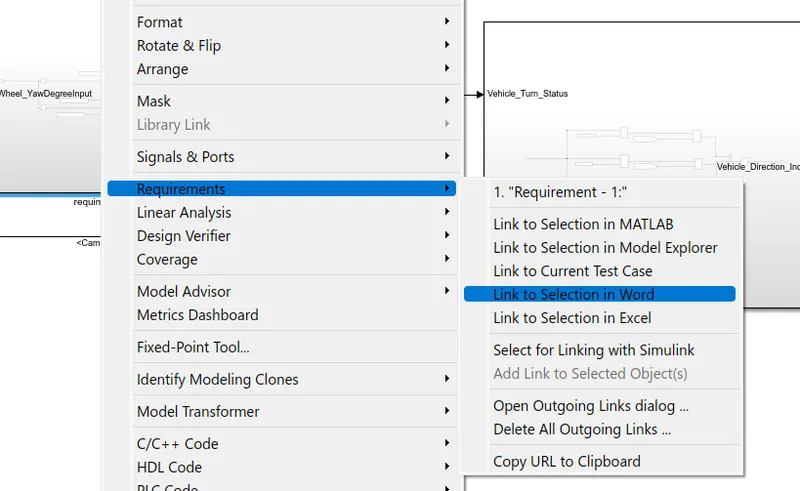
The requirements 'Requireent 1 ' and 'Requirement 2 ' as proided in the requirement word document are tagged to their corresponding subsystem in the simulink model.
Steps in tagging are as follow :
- First highlight he requirement statement in the word document , then right click on the subsystem in the model that has to be tagged , then select 'Requirement ' and then 'Link to selection in word'
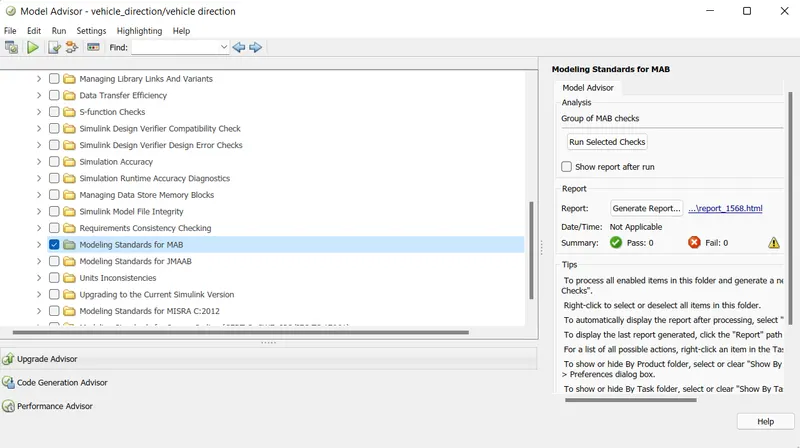
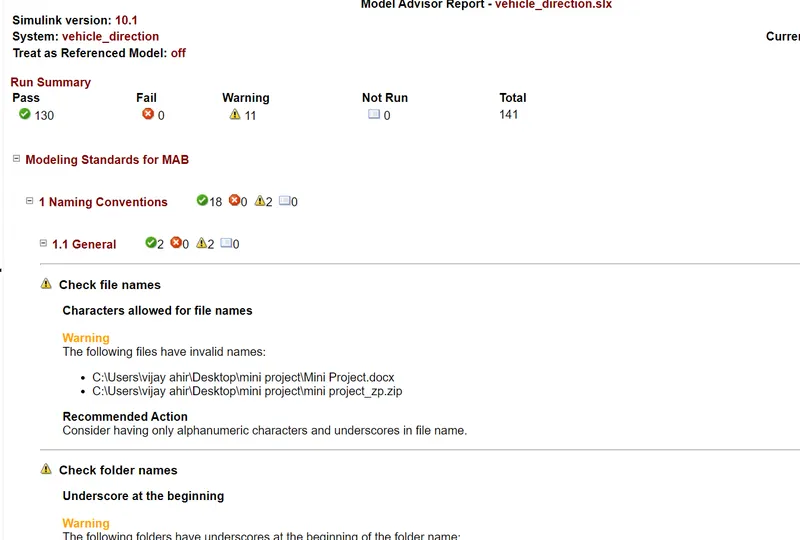
MAB Guldelines in model advisor :
A check is performed using 'Model Advisor ' tool in simulink o see whether the developed model meets the modeling standard for matlab.
CODE GENERATION:
To generate code , go to app ,then embadded coder , then click build .
/*
 * File: vehicle_direction.c
 *
 * Code generated for Simulink model 'vehicle_direction'.
 *
 * Model version                  : 1.8
 * Simulink Coder version         : 9.3 (R2020a) 18-Nov-2019
 * C/C++ source code generated on : Thu May 26 09:53:22 2022
 *
 * Target selection: ert.tlc
 * Embedded hardware selection: Intel->x86-64 (Windows64)
 * Code generation objectives: Unspecified
 * Validation result: Not run
 */

#include "vehicle_direction.h"
#include "vehicle_direction_private.h"

/* Exported data definition */

/* Definition for custom storage class: ExportToFile */
boolean_T Vehicle_Direction_Indicator[3];/* '/Signal Conversion' */

/* Const memory section */
/* Definition for custom storage class: Const */
const int16_T LeftTurn_RoadSign = -120;/* Referenced by: '/Constant1' */
const int16_T Left_Turn_AngularLimit = -120;/* Referenced by: '/Constant2' */
const int16_T RightTurn_RoadSign = 30; /* Referenced by: '/Constant' */
const int16_T Right_Turn_AngularLimit = 30;/* Referenced by: '/Constant' */
const int16_T Straight_Drive_Steering_Angle = 0;/* Referenced by: '/Constant1' */
const int16_T Straight_RoadSign = 0;   /* Referenced by: '/Constant2' */

/* Real-time model */
RT_MODEL_vehicle_direction_T vehicle_direction_M_;
RT_MODEL_vehicle_direction_T *const vehicle_direction_M = &vehicle_direction_M_;

/* Model step function */
void vehicle_direction_step(void)
{
  /* local block i/o variables */
  int16_T Vehicle_Turn_Status;

  /* Switch: '/Switch' incorporates:
   *  Constant: '/Constant'
   *  Constant: '/Constant2'
   *  Constant: '/Constant'
   *  Constant: '/Constant'
   *  Inport: '/SteeringWheel_YawDegreeInput'
   *  RelationalOperator: '/Compare'
   *  RelationalOperator: '/Compare'
   *  Switch: '/Switch1'
   */
  if (SteeringWheel_YawDegreeInput > 0) {
    Vehicle_Turn_Status = Right_Turn_AngularLimit;
  } else if (SteeringWheel_YawDegreeInput == 0) {
    /* Switch: '/Switch1' incorporates:
     *  Constant: '/Constant1'
     */
    Vehicle_Turn_Status = Straight_Drive_Steering_Angle;
  } else {
    Vehicle_Turn_Status = Left_Turn_AngularLimit;
  }

  /* End of Switch: '/Switch' */

  /* SignalConversion: '/Signal Conversion' incorporates:
   *  Constant: '/Constant'
   *  Constant: '/Constant1'
   *  Constant: '/Constant2'
   *  Inport: '/CameraInput_RoadSign'
   *  Logic: '/AND'
   *  Logic: '/AND1'
   *  Logic: '/AND2'
   *  RelationalOperator: '/Relational Operator'
   *  RelationalOperator: '/Relational Operator1'
   *  RelationalOperator: '/Relational Operator2'
   */
  Vehicle_Direction_Indicator[0] = ((Vehicle_Turn_Status == RightTurn_RoadSign) &&
    CameraInput_RoadSign);
  Vehicle_Direction_Indicator[1] = ((Vehicle_Turn_Status == LeftTurn_RoadSign) &&
    CameraInput_RoadSign);
  Vehicle_Direction_Indicator[2] = ((Vehicle_Turn_Status == Straight_RoadSign) &&
    CameraInput_RoadSign);
}

/* Model initialize function */
void vehicle_direction_initialize(void)
{
  /* (no initialization code required) */
}

/* Model terminate function */
void vehicle_direction_terminate(void)
{
  /* (no terminate code required) */
}

/*
 * File trailer for generated code.
 *
 * [EOF]
 */