Project 1 - Interfacing a 16*2 LCD with Arduino using I2C protocol
Aim: To implement the Code for “Interfacing a 16*2 LCD with two Arduino’s (one for Master and one for Slave) using Inter-Integrated Circuit (I2C) communication protocol” by sending the message to LCD using I2C communication protocol and displaying the message on LCD screen.
Theory:
The LCD can be interfaced with Arduino Uno using the I2C which will utilize fewer Arduino digital I/O pins. The I2C uses serial communication using the SDA and SCL terminals of Arduino and transfers the data on an LCD.
The I2C is a serial communication protocol, it has two terminals, one is for the clock and the other is for serial data communication. This device is an example of the serial protocol and can be used with other electronic devices to communicate through serial communication.
The I2C has the SDA and SCL terminals, the SCL is the clock line that transfers data depending on its High and Low states whereas the SDA is a data line, which contains the data to be sent or received to any device according to the states of a clock.
The other two terminals are of Vcc and the ground which is used to complete the circuit of the I2C on the other side of the board, there are pins known as LED, which are connected to the potentiometer (embedded in the board) and can vary the resistance of the I2C circuit. We can also use these terminals to control the resistance of the circuit of I2C by some other methods like using an LDR or transistor.
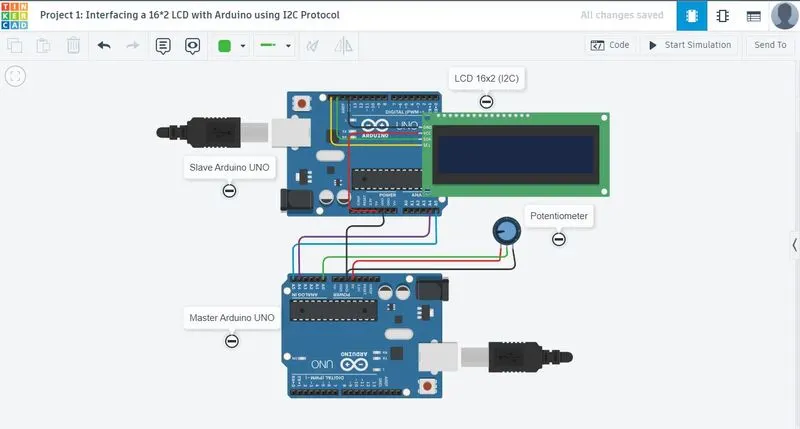
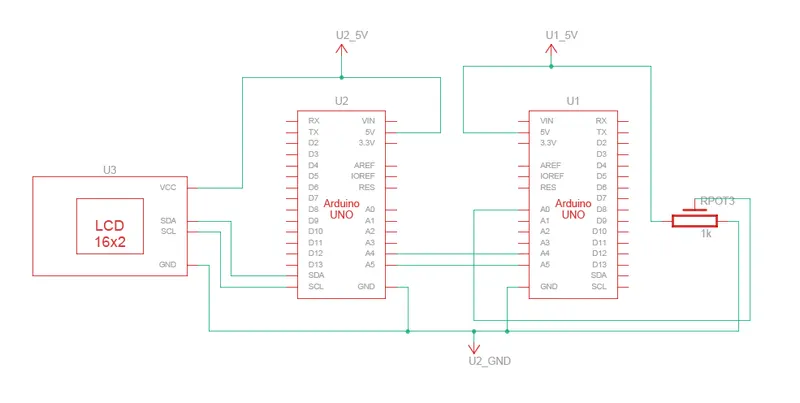
Arduino Uno, which has the A4 pin for SDA and the A5 pin for SCL, so by connecting these pins with the pins of I2C, we can start the I2C communication with LCD.
Code:
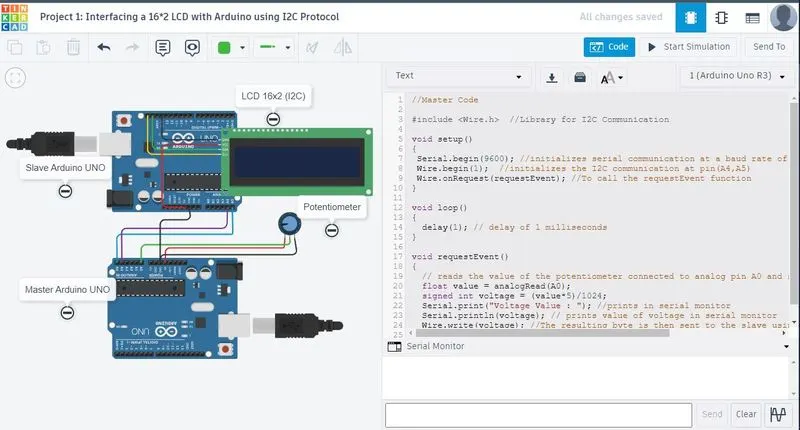
//Master Code

#include <Wire.h>  //Library for I2C Communication

void setup()
{
 Serial.begin(9600); //initializes serial communication at a baud rate of 9600.
 Wire.begin(1);  //initializes the I2C communication at pin(A4,A5)
 Wire.onRequest(requestEvent); //To call the requestEvent function
}

void loop()
{
  delay(1); // delay of 1 milliseconds
}

void requestEvent()
{
  // reads the value of the potentiometer connected to analog pin A0 and stores it in the value variable.
  float value = analogRead(A0);
  signed int voltage = (value*5)/1024;
  Serial.print("Voltage Value : "); //prints in serial monitor
  Serial.println(voltage); // prints value of voltage in serial monitor
  Wire.write(voltage); //The resulting byte is then sent to the slave using the Wire.write() function
}
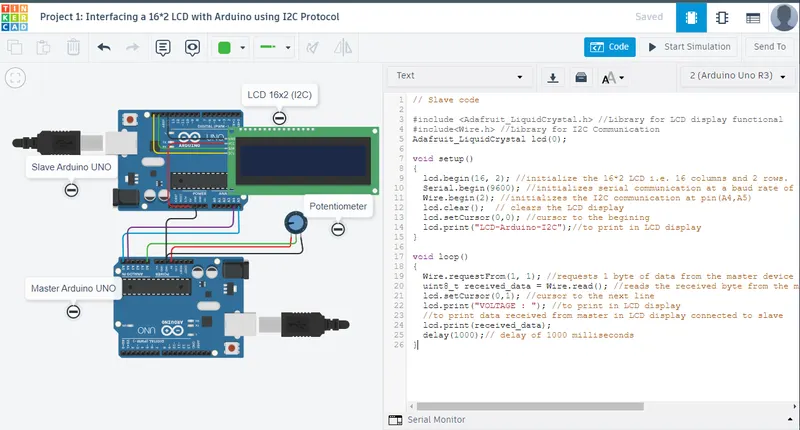
// Slave code
#include <Adafruit_LiquidCrystal.h> //Library for LCD display functional
#include<Wire.h> //Library for I2C Communication
Adafruit_LiquidCrystal lcd(0);
void setup()
{
lcd.begin(16, 2); //initialize the 16*2 LCD i.e. 16 columns and 2 rows.
Serial.begin(9600); //initializes serial communication at a baud rate of 9600.
Wire.begin(2); //initializes the I2C communication at pin(A4,A5)
lcd.clear(); // clears the LCD display
lcd.setCursor(0,0); //cursor to the begining
lcd.print("LCD-Arduino-I2C");//to print in LCD display
}
void loop()
{
Wire.requestFrom(1, 1); //requests 1 byte of data from the master device with the address 1
uint8_t received_data = Wire.read(); //reads the received byte from the master and stores it in the received_data variable
lcd.setCursor(0,1); //cursor to the next line
lcd.print("VOLTAGE : "); //to print in LCD display
//to print data received from master in LCD display connected to slave
lcd.print(received_data);
delay(1000);// delay of 1000 milliseconds
}
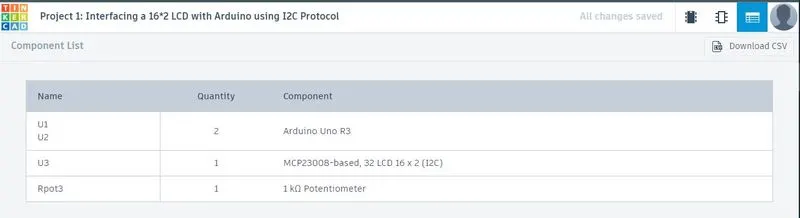
TinkerCAD:
Output:
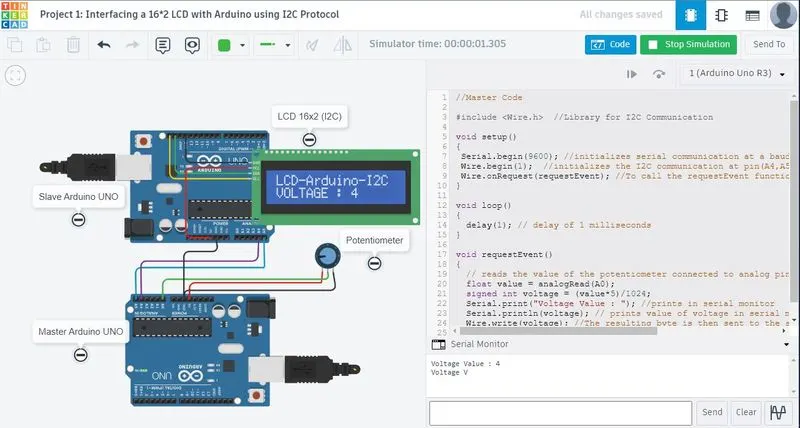
Result:
- Two Arduino’s are connected to the LCD display and the communication is executed using the I2C protocol between Arduino and the LCD display.
- The message sent by the Master and received by the slave is displayed by the 16*2 LCD.