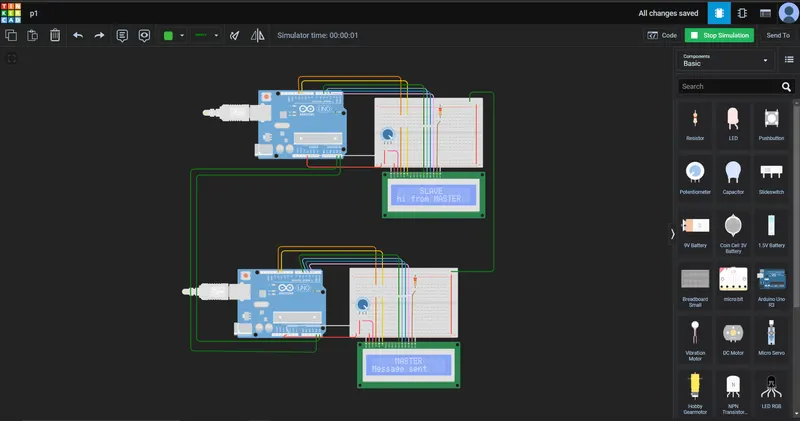
//MASTER
#include <LiquidCrystal.h>
#include<Wire.h>


LiquidCrystal lcd_1(12, 11, 5, 4, 3, 2);

void setup()
{
  lcd_1.begin(16, 2);
  Serial.begin(9600);
Wire.begin(1);
Wire.onRequest(send);   // write the called function
 }
void loop()
{
  lcd_1.setCursor(5, 0);
  lcd_1.print("MASTER");   //lcd display
  lcd_1.setCursor(0,1);
  lcd_1.print("Message sent");
  delay(1000);
}
void send()             //declaring called function
{
char ch[15]= "hi from MASTER";
Wire.write(ch);
 }


//SLAVE
#include <LiquidCrystal.h>
#include<Wire.h>


LiquidCrystal lcd_1(12, 11, 5, 4, 3, 2);
char SLAVERecieve[15];
void setup()
{
  lcd_1.begin(16, 2);  //assigning lcd
  Serial.begin(9600);
  Wire.begin(); //initiating wire library

}

void loop()
{
  Wire.requestFrom(1,14);    //request function from address and bytes
  lcd_1.setCursor(5,0);
  lcd_1.print("SLAVE");  // writing message in 1st row
  lcd_1.setCursor(0, 1);
  int i=0;
  while(0<Wire.available())        // it will return the bytes that are recieved by read function
{
 SLAVERecieve[i]=Wire.read();// it will read the bytes that are recieved by request function
 i++;                     // it will write the bytes by byte
}
  lcd_1.print( SLAVERecieve);
  delay(1000);
  Wire.end();          // ending wire function
}