Project 1 - Interfacing a 16*2 LCD with Arduino using I2C protocol
Objective:To send a meaasge from slave to master using Inter-Integrated Circuit (I2C) communication protocol in arduino and display the message on 16*2 LCD screen.
The analog pins A4 and A5 in arduino are used for used for I2C communication. The digital pin 2 is connected to RS of LCD. Digital pin 3 connected to E of LCD. The Digital pins 4, 5, 6, 7 are connected to DB1, DB2, DB3, DB4 of LCD. Input supply 5v and Gnd are connected to the LCD from arduino. The potentiometer is used to turn ON and OFF the LCD.
CIRCUIT:
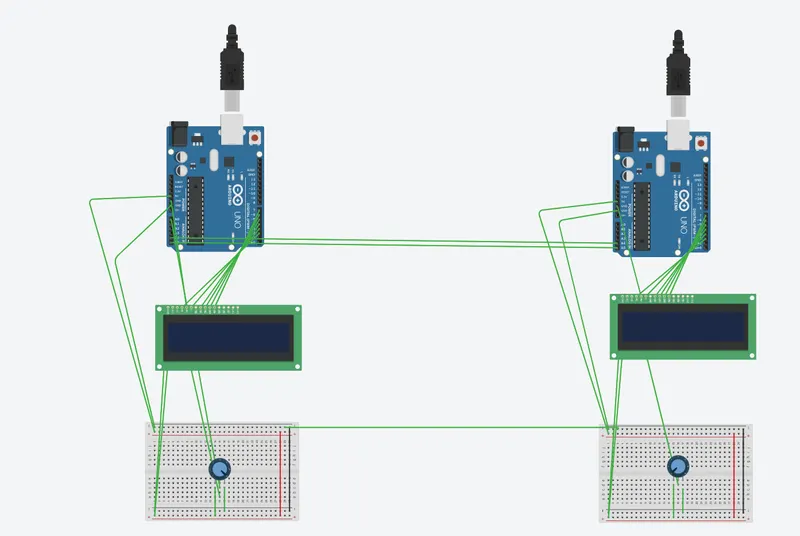
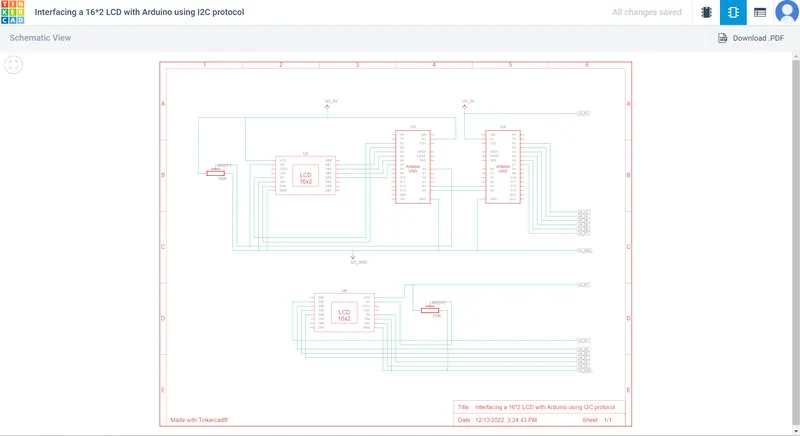
#MASTER:-
#include // Header to use LCD functions
#include // Header to use I2C communication
LiquidCrystal lcd(2,3,4,5,6,7); //pins connected to LCD
char MasterReceive[16]; //String to get the message
void setup()
{
Serial.begin(9600);
Wire.begin(); //To begin I2C communication
lcd.begin(16,2);
lcd.clear();
}
void loop()
{
Wire.requestFrom(8,16); //8 address 16 characters
lcd.setCursor(0,0); //To move the cursor to the begining
lcd.print("MASTER"); //To print in display
lcd.setCursor(0,1); //To move the cursor to the next line
int i=0;
while(0
{
MasterReceive[i]=Wire.read(); //To print character by character
i++;
}
lcd.print(MasterReceive); //To print the received message
delay(1000); //Delay for 1 second
Wire.end(); //To end the I2C transmission
}
#SLAVE:-
#include // Header to use LCD functions
#include // Header to use I2C communication
LiquidCrystal lcd(2,3,4,5,6,7); //pins connected to LCD
void setup()
{
Serial.begin(9600);
Wire.begin(8); //To begin I2C communication
Wire.onRequest(send); //To call the send function
lcd.begin(16,2); //To start the LCD display
lcd.clear(); //To clear the display
}
void loop()
{
lcd.setCursor(0,0); //To move the cursor to the begining
lcd.print("SLAVE"); //To display in LCD
lcd.setCursor(0,1); //To move the cursor to the next line
lcd.println("Message sent "); //To display in LCD
}
void send()
{
char ch[17]="Slave Message ";//creating string
Wire.write(ch); //To send message to Master
}
Your portfolio, nextShip work like this