Project 1 - Interfacing a 16*2 LCD with Arduino using I2C protocol
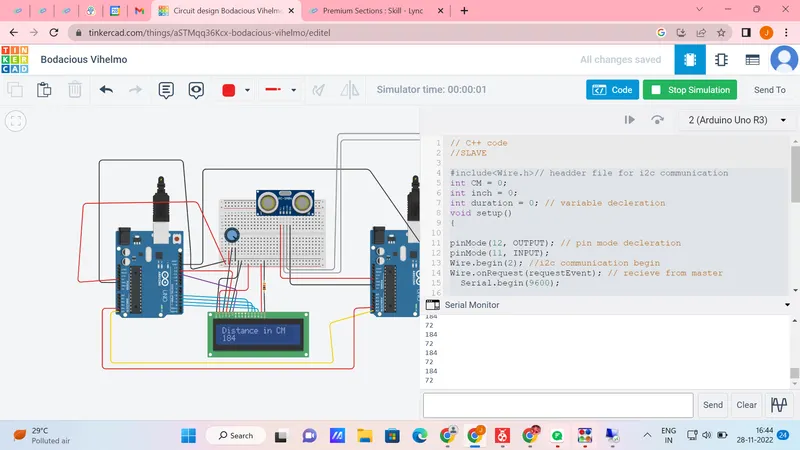
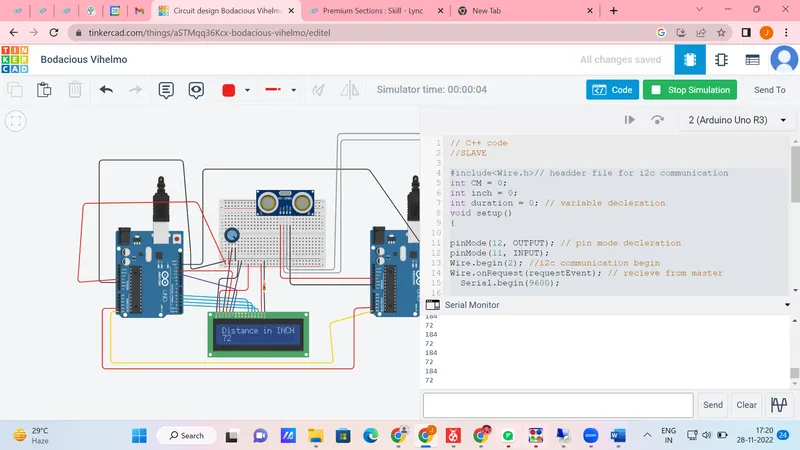
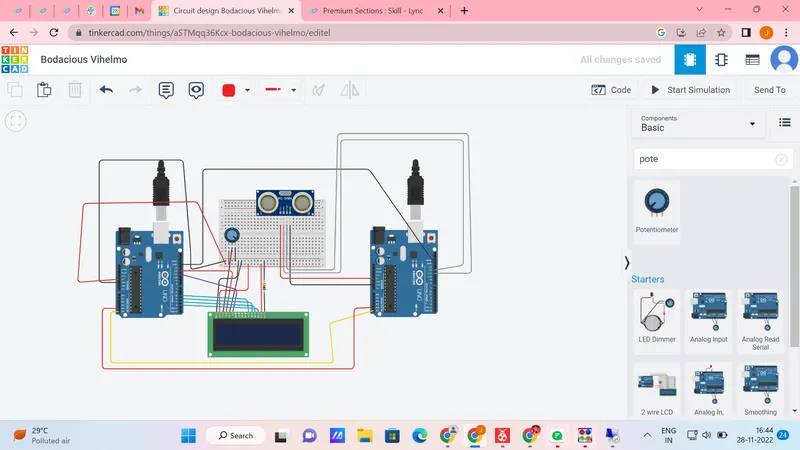
In this project implementing the Code for “Interfacing a 16*2 LCD with two Arduino’s (one for Master and one for Slave) using Inter-Integrated Circuit (I2C) communication protocol” by sending the message to LCD using I2C communication protocol and display the message on LCD screen.
MASTER CODE:
//MASTER
#include//i2c communication hedder file
#include//lcd disply headder file
LiquidCrystal lcd(12,11,5,4,3,2);
void setup()
{
lcd.begin(16,2);
lcd.setCursor(0,0);
lcd.print("Ultrasonicsensor");
delay(100);
lcd.clear();
Wire.begin(); //enable the I2C communication
Serial.begin(9600);
}
void loop()
{
Wire.requestFrom(2,8); //address of slave and bytes quatity
byte CMReceive = Wire.read();//receive data from slave
lcd.begin(16,2);
lcd.setCursor(0,0);
lcd.print("Distance in CM");
lcd.setCursor(0,1);
lcd.print(CMReceive);
Serial.println("Distance in CM");
Serial.println(CMReceive);
delay(2000);
lcd.clear();
byte INCHReceive = Wire.read();//receive from slave
lcd.begin(16,2);
lcd.setCursor(0,0);
lcd.print("Distance in INCH");
lcd.setCursor(0,1);
lcd.print(INCHReceive);
Serial.println("Distance in INCH");
Serial.println(INCHReceive);
delay(500);
//lcd.clear();
}
SLAVE:
#include// headder file for i2c communication
int CM = 0;
int inch = 0;
int duration = 0; // variable decleration
void setup()
{
pinMode(12, OUTPUT); // pin mode decleration
pinMode(11, INPUT);
Wire.begin(2); //i2c communication begin
Wire.onRequest(requestEvent); // recieve from master
Serial.begin(9600);
}
void loop()
{
}
void requestEvent() // isr fun
{
digitalWrite(12, LOW);
delayMicroseconds(2);
digitalWrite(12, HIGH);
delayMicroseconds(2);
digitalWrite(12, LOW);
duration = pulseIn(11, HIGH); //ultrosonic wave time travel
CM = 0.01723 * duration;// formula to convert the cm
Serial.println(CM);
Wire.write(CM);//write the value in wire
inch = (CM / 2.54); // inch conversion
Wire.write(inch);//write the value in wire
Serial.println(inch);
}
CIRCUITS:
EXECUTION: