Project 1 - Interfacing a 16*2 LCD with Arduino using I2C protocol
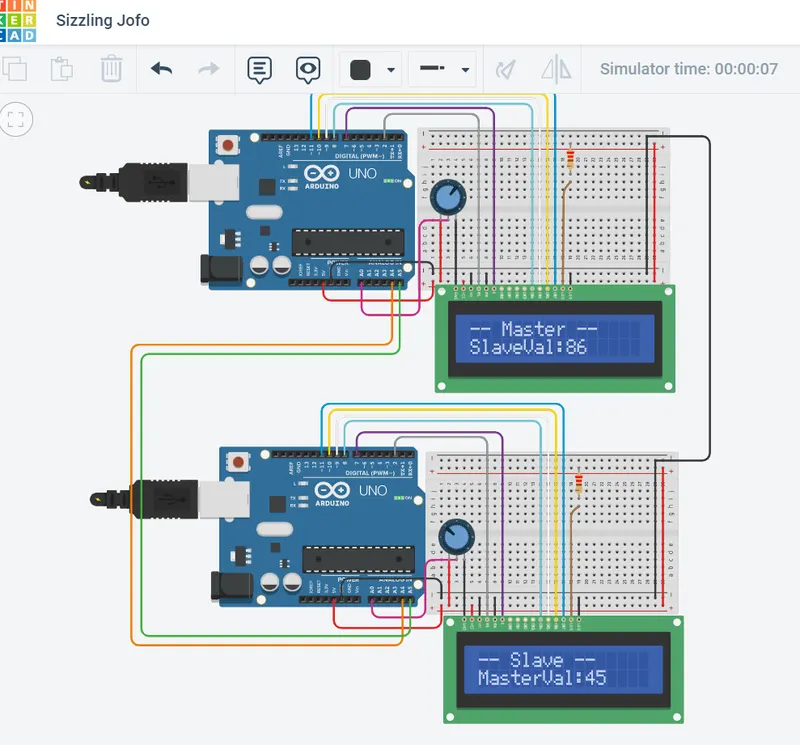
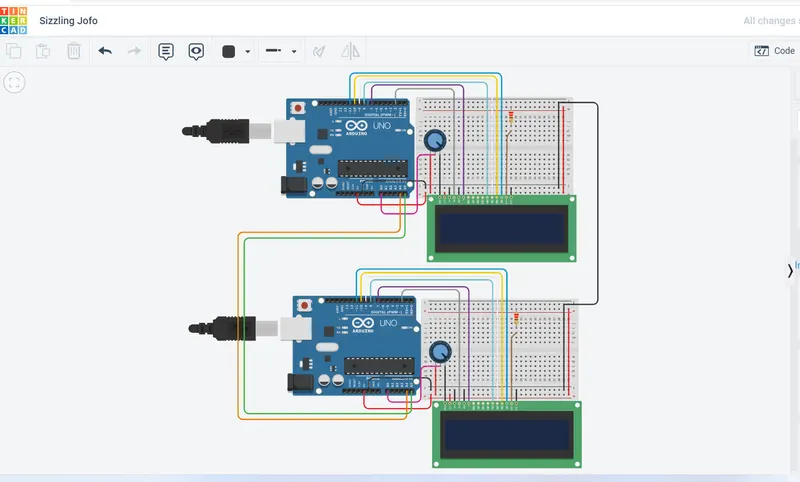
Aim: To implement the Code for “Interfacing a 16*2 LCD with two Arduino’s (one for Master and one for Slave) using Inter-Integrated Circuit (I2C) communication protocol” by sending the message to LCD using I2C communication protocol and display the message on LCD screen.
Key Highlights of the Project:
- Using the inter-integrated circuit communication protocol, transferring the data i.e. the message we want to display is sent to the LCD.
- Two Arduino’s connected to the LCD display and the communication is executed using I2C protocol between Arduino and the LDC display.
Model:
Code:
Master Arduino Programming
// Master Code
#include<Wire.h> //Library for I2C Communication functions#include<LiquidCrystal.h> //Library for LCD display function
LiquidCrystal lcd(2, 7, 8, 9, 10, 11); //Define LCD Module Pins (RS,EN,D4,D5,D6,D7)
void setup() {
lcd.begin(16,2); //Initilize LCD display lcd.setCursor(0,0); //Sets Cursor at first line of Display lcd.print("Circuit Digest"); //Prints CIRCUIT DIGEST in LCD
lcd.setCursor(0,1); //Sets Cursor at second line of Display lcd.print("I2C 2 ARDUINO"); //Prints I2C ARDUINO in LCD
delay(5000); //Delay for 5 seconds lcd.clear(); //Clears LCD display
Serial.begin(9600); //Begins Serial Communication at 9600 baud rate
Wire.begin(); //Begins I2C communication at pin (A4,A5)
}
void loop(){
Wire.requestFrom(8,1); // request 1 byte from slave arduino (8)
byte MasterReceive = Wire.read(); // receive a byte from the slave arduino and store in MasterReceive
int potvalue = analogRead(A0); // Reads analog value from POT (0-5V)
byte MasterSend = map(potvalue,0,1023,0,127); //Convert digital value (0 to 1023) to (0 to 127)
// next send those converted values so we begin the transmission with slave arduino with 8 address. Wire.beginTransmission(8); // start transmit to slave arduino (8) Wire.write(MasterSend); // sends one byte converted POT value to slave Wire.endTransmission(); // stop transmitting
// now display those received value from the slave arduino with a delay of 500 microsec.
lcd.setCursor(0,0); //Sets Currsor at line one of LCD lcd.print("-- Master --"); //Prints -- Master -- at LCD
lcd.setCursor(0,1); //Sets Cursor at line two of LCD lcd.print("SlaveVal:"); //Prints SlaveVal: in LCD lcd.print(MasterReceive); //Prints MasterReceive in LCD received from Slave
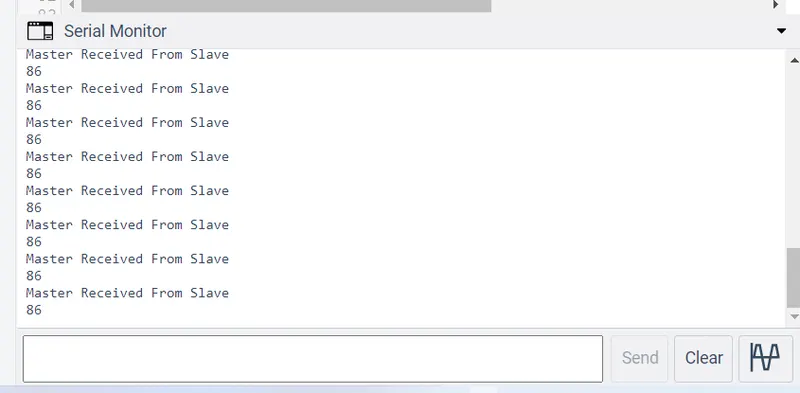
Serial.println("Master Received From Slave"); //Prints in Serial Monitor Serial.println(MasterReceive);
delay(500); lcd.clear();
}
Slave Arduino Programming
//Slave Code

#include<Wire.h>    //Library for I2C Communication functions
#include<LiquidCrystal.h>     //Library for LCD display function

LiquidCrystal lcd(2, 7, 8, 9, 10, 11);    //Define LCD Module Pins (RS,EN,D4,D5,D6,D7)
byte SlaveReceived = 0;

void setup()
{

// Initialize LCD display module in 16*2 mode and display the message and clear after 5 seconds.

lcd.begin(16,2);    //Initilize LCD display
lcd.setCursor(0,0);     //Sets Cursor at first line of Display
lcd.print("Circuit Digest");     //Prints CIRCUIT DIGEST in LCD

lcd.setCursor(0,1);     //Sets Cursor at second line of Display
lcd.print("I2C 2 ARDUINO");    //Prints I2C ARDUINO in LCD

delay(5000);    //Delay for 5 seconds
lcd.clear();      //Clears LCD display

Serial.begin(9600);    //Begins Serial Communication at 9600 baud rate

Wire.begin(8);     //Begins I2C communication with Slave Address as 8 at pin (A4,A5)

Wire.onReceive(receiveEvent);     //Function call when Slave receives value from master
Wire.onRequest(requestEvent);    //Function call when Master request value from Slave
}

void loop(void)

{

//Display the received value from master continuously in the LCD display module.

lcd.setCursor(0,0);       //Sets Currsor at line one of LCD
lcd.print("-- Slave --");       //Prints  massage at LCD

lcd.setCursor(0,1);            //Sets Cursor at line two of LCD
lcd.print("MasterVal:");        //Prints MasterVal: in LCD
lcd.print(SlaveReceived);     //Prints SlaveReceived value in LCD received from Master

Serial.println("Slave Received From Master:");     //Prints in Serial Monitor
Serial.println(SlaveReceived);

delay(500);
lcd.clear();
}


void receiveEvent (int howMany)     //This Function is called when Slave receives value from master
{
SlaveReceived = Wire.read();    //Used to read value received from master and store in variable SlaveReceived
}


void requestEvent()       //This Function is called when Master wants value from slave
{
int potvalue = analogRead(A0);      // Reads analog value from POT (0-5V)
byte SlaveSend = map(potvalue,0,1023,0,127);     // Convert potvalue digital value (0 to 1023) to (0 to 127)
Wire.write(SlaveSend);        // sends one byte converted POT value to master
}
Output: