Project 1 - English Dictionary App & Library Book Management System-
English Dictionary App
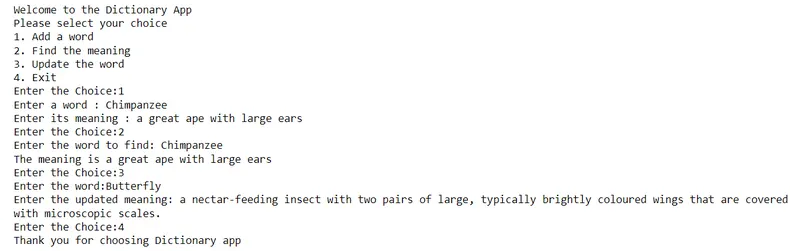
In this program the item 1 is selected, it prompts for a word and then accept its meaning. This pair of word and its meaning is stored in a file called ‘words.txt’. When item 2 is selected, it again prompt for a word, search that word in the file ‘words.txt’ and return the meaning if it is found. If the meaning is not found, it displays an appropriate message. Similarly, when choice 3 is entered, it accepts a word and update its meaning. In all the above three cases, the prompt returns to the main menu. The words and their meanings was stored as a dictionary in words.txt, using the concept of serialization. If choice 4 is selected, a graceful exit was performed.
import json
print('Welcome to the Dictionary App')
print('Please select your choice')
print('1. Add a word')
print('2. Find the meaning')
print('3. Update the word')
print('4. Exit')
f = open('words.txt','w')
coll_words = {}
json.dump(coll_words,f)
f.close()
while True:
n = int(input('Enter the Choice:'))
if n == 1:
import json
f = open('words.txt','w')
word = input('Enter a word : ')
meaning = input('Enter its meaning : ')
coll_words[word] = meaning
json.dump(coll_words,f)
f.close()
elif n == 2:
import json
f = open('words.txt','r+')
dic = json.load(f)
find = input('Enter the word to find: ')
if find in coll_words:
print('The meaning is',coll_words.get(find))
else:
print('Sorry the word is not found')
json.dump(coll_words,f)
f.close()
elif n == 3:
import json
f = open('words.txt','w')
word1 = input('Enter the word:')
update_meaning = input('Enter the updated meaning: ')
coll_words[word1] = update_meaning
json.dump(coll_words,f)
f.close()
elif n == 4:
print('Thank you for choosing Dictionary app')
break
else:
print('Please enter the mentioned choice')
print('1. Add a word')
print('2. Find the meaning')
print('3. Update the word')
print('4. Exit')
Output-
Library Book Management System
In this project, a Library Book Management System is implemented with the front end GUI developed using Tkinter and the backend database implemented in SQLite. It is a single window tkinter GUI application which will implement CRUD( create, read, update, delete) operations on a ‘books’ database, in SQLite. The window will contain text widgets to accept / display book title, author, year of publication, ISBN (optional) and a large text area/ list box to display the records which match the search criteria.
# db.py
import sqlite3
def init_db():
'''
call me, i'll initiate and give you a connection and a cursor to my database
'''
connection = sqlite3.connect("LBMS.db")
cursor = connection.cursor()
print("Database connection established successfully")
create_table(cursor)
return(connection, cursor)
def term_db(connection):
'''
give me a database connection i'll terminate it
'''
connection.close()
print("Database connection de-established successfully")
def create_table(cursor):
'''
give me a cursor to database i'll create book table in it
'''
sql_command = """CREATE TABLE if not exists books (
title varchar(60) not null,
author varchar(30) not null,
year INTEGER not null,
ISBN INTEGER,
unique (title, author, year, ISBN)
);"""
cursor.execute(sql_command)
def read_table(cursor):
'''
give me a cursor to database, i'll read it all and send you
'''
sql_command = "SELECT * FROM books"
cursor.execute(sql_command)
data = cursor.fetchall()
return(data)
def add_to_table(cursor, title, author, year, isbn):
'''
give me a cursor to database, and a book, i'll add it to the books table
'''
sql_command = f"INSERT INTO books VALUES ('{title}', '{author}', {year}, {isbn});"
try:
cursor.execute(sql_command)
return(0, "success")
except sqlite3.IntegrityError as e:
return(111, e)
except sqlite3.OperationalError as e:
return(112, e)
def remove_from_table(cursor, title, author, year, isbn):
'''
give me a cursor to database, and a book, i'll remove it.
'''
try:
sql_command = f'''DELETE FROM books WHERE title="{title}";'''
cursor.execute(sql_command)
sql_command = f'''DELETE FROM books WHERE author="{author}";'''
cursor.execute(sql_command)
sql_command = f'''DELETE FROM books WHERE year="{year}";'''
cursor.execute(sql_command)
sql_command = f'''DELETE FROM books WHERE isbn="{isbn}";'''
cursor.execute(sql_command)
except:
return(-1)
def search_from_table(cursor, title, author, year, isbn):
'''
give me a cursor to database, and a book, i'll search it.
'''
try:
cursor.execute("SELECT * FROM books WHERE title=?", (title,))
searched_titles = cursor.fetchall()
cursor.execute("SELECT * FROM books WHERE author=?", (author,))
searched_authors = cursor.fetchall()
cursor.execute("SELECT * FROM books WHERE year=?", (year,))
searched_years = cursor.fetchall()
cursor.execute("SELECT * FROM books WHERE ISBN=?", (isbn,))
searched_isbns = cursor.fetchall()
return(searched_titles + searched_authors + searched_years + searched_isbns)
except:
return(-1)
def save_changes(connection):
'''
give me a connection to database i'll save the changes
'''
connection.commit()
# database_gui_interface
def list_all_books(listArea):
connection, cursor = init_db()
print("listing books")
books = read_table(cursor)
listArea.delete('0','end')
for i in range(len(books)):
listArea.insert(i,f"{books[i][0]}, {books[i][1]}, {books[i][2]}, {books[i][3]}")
term_db(connection)
def search_book(listArea, title, author, year, isbn):
connection, cursor = init_db()
print("search book")
title = title.get()
author = author.get()
year = year.get()
isbn = isbn.get()
res = search_from_table(cursor, title, author, year, isbn)
if res==-1:
messagebox.showerror("Error!", "something went wrong!")
if res!=-1:
listArea.delete('0','end')
for i in range(len(res)):
listArea.insert(i,res[i])
term_db(connection)
def add_book(title, author, year, isbn):
connection, cursor = init_db()
print("adding book")
title = title.get()
author = author.get()
year = year.get()
isbn = isbn.get()
code, error = add_to_table(cursor, title, author, year, isbn)
if code==111:
messagebox.showerror("Error!", f"Book Already Exists!\n\nerror code: {code}\nerror:{error}")
if code==112:
messagebox.showerror("Error!", f"Please, fill in the input fields appropriately.\n\ntitle: string, author: string, year: integer, year: integer.\n\nerror code: {code}\nerror:{error}")
save_changes(connection)
term_db(connection)
def issue_book(title, author, year, isbn):
connection, cursor = init_db()
print("issue book")
messagebox.showwarning("Undefined", "this function is not yet defined!")
term_db(connection)
def delete_book(title, author, year, isbn):
connection, cursor = init_db()
print("delte book")
title = title.get()
author = author.get()
year = year.get()
isbn = isbn.get()
code = remove_from_table(cursor, title, author, year, isbn)
if code==-1:
messagebox.showerror("Error!", "something went wrong!")
messagebox.showinfo("Deleted!", f"Deleted the book: {title}, {author}, {year}, {isbn}")
save_changes(connection)
term_db(connection)
# gui
from tkinter import *
from tkinter import ttk
from tkinter import messagebox
def gui():
# 1. root
root = Tk()
root.title("LBMS | Library Book Management System")
# 2. widgets
title = StringVar()
author = StringVar()
year = StringVar()
isbn = StringVar()
title_label = Label(root, text="title:", padx=10)
author_label = Label(root, text="author:", padx=10)
year_label = Label(root, text="year:", padx=10)
isbn_label = Label(root, text="isbn:", padx=10)
title_entry = Entry(root, textvariable=title)
author_entry = Entry(root, textvariable=author)
year_entry = Entry(root, textvariable=year)
isbn_entry = Entry(root, textvariable=isbn)
scrollbar = Scrollbar(root, orient="vertical")
listArea = Listbox(root, bg='grey', width=100, yscrollcommand=scrollbar.set)
list_all_btn = Button(root, text="List All", command=lambda:list_all_books(listArea))
search_btn = Button(root, text="Search", command=lambda:search_book(listArea, title, author, year, isbn))
add_btn = Button(root, text="Add", command=lambda:add_book(title, author, year, isbn))
issue_btn = Button(root, text="Issue", command=lambda:issue_book(title, author, year, isbn))
del_btn = Button(root, text="delete", command=lambda:delete_book(title, author, year, isbn))
exit_btn = Button(root, text="Exit", command=root.destroy)
scrollbar.config(command=listArea.yview)
title_label.grid(row=0, column=0)
author_label.grid(row=0, column=2)
year_label.grid(row=0, column=4)
isbn_label.grid(row=0, column=6)
title_entry.grid(row=0, column=1)
author_entry.grid(row=0, column=3)
year_entry.grid(row=0, column=5)
isbn_entry.grid(row=0, column=7)
listArea.grid(row=1, column=0, columnspan=8, sticky="nsew")
scrollbar.grid(row=1, column=9, sticky="ns")
list_all_btn.grid(row=2, column=0)
search_btn.grid(row=2, column=1)
add_btn.grid(row=2, column=2)
issue_btn.grid(row=2, column=3)
del_btn.grid(row=2, column=4)
exit_btn.grid(row=2, column=7)
# 3. loop
print("GUI loop INITIATING")
root.mainloop()
print("GUI loop TERMINATED")