Project 1- Creating your own openFOAM solver
Scalar Transport Equation
For solving the scalar transport equation
`(deltaT)/(deltat)+nabla.(uT)=0`
we are using the icoFoam solver
1. Copying the icoFoam solver from the solvers to the applications directory
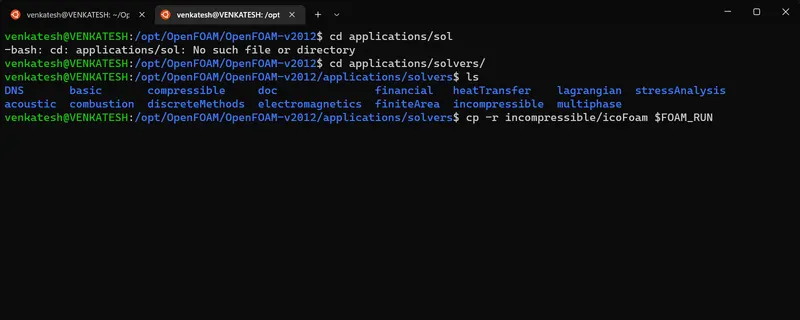
2. Now we change the name from icoFoam to scalarFoam by using the command
mv icoFoam.C scalarFoam.c

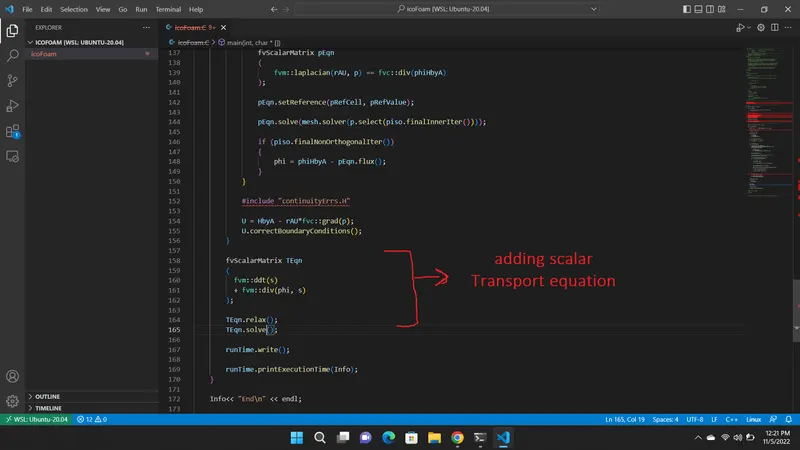
3. adding the scalar Transport equation after the piso loop
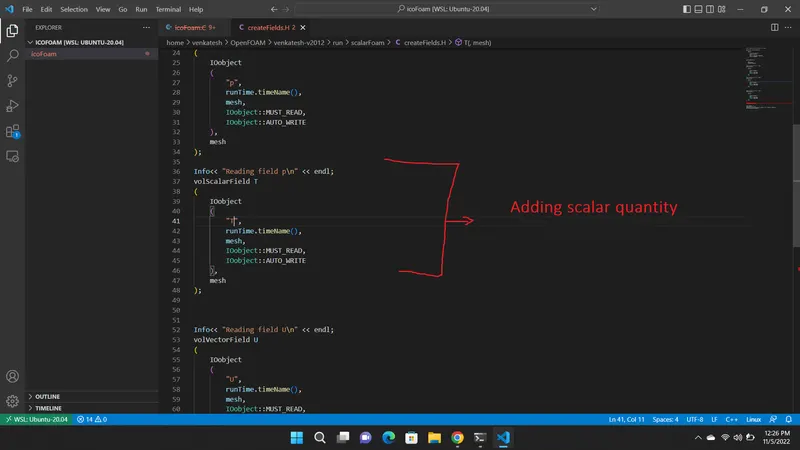
4. For the new variable T, if we want to read and write for that we need to mention it in createFields.H
5. To run the solver, we need to Edit the Make files 
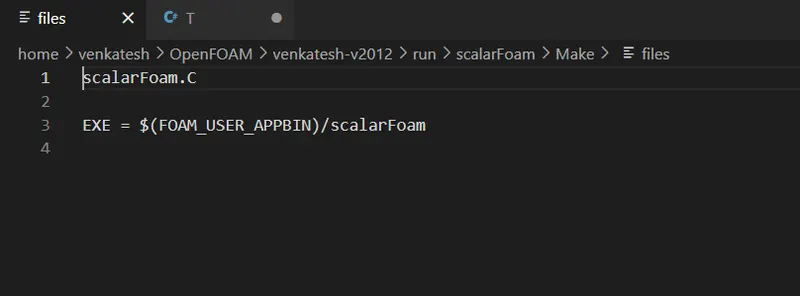
here we changed the "icoFoam" to "scalarFoam" and "FOAM_APPBIN" to "FOAM_USER_APPBIN", to run our own solver
6. Now we compline the solver by following command
"wmake"
after compline the solver, we check our solver in bin files

7. after completing the solver part, now we copy cavity case files to the user system
later on, we change the name from "cavity" to "scalarcavity"
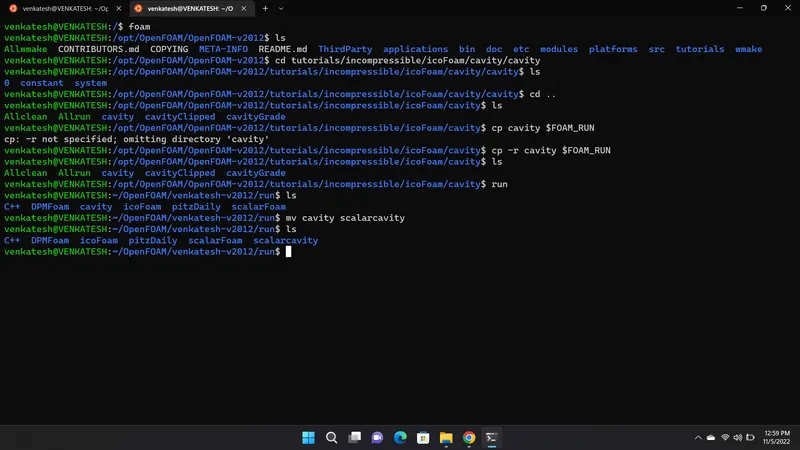
8. Now add the temperature file in 0 folders of the scalarCavity case
/*--------------------------------*- C++ -*----------------------------------*
| =========                 |                                                 |
| \      /  F ield         | OpenFOAM: The Open Source CFD Toolbox           |
|  \    /   O peration     | Version:  v2012                                 |
|   \  /    A nd           | Website:  www.openfoam.com                      |
|    \/     M anipulation  |                                                 |
*---------------------------------------------------------------------------*/
FoamFile
{
    version     2.0;
    format      ascii;
    class       volScalarField;
    object      T;
}
// * * * * * * * * * * * * * * * * * * * * * * * * * * * * * * * * * * * * * //

dimensions      [0 0 0 0 0 0 0];

internalField   uniform 0;

boundaryField
{
    movingWall
    {
        type             zeroGradient;

    }

    fixedWalls
    {
        type             zeroGradient;
    }

    frontAndBack
    {
        type            empty;
    }
}

// ************************************************************************* //
9. next, we need to change the system/controDIct file, to show the type of solver we need to use
instead of
application icoFoam;
and we need to save it
10. to solve the scalar transport equation we need to add div(phi, T) to the divergence schemes used in "fvSchemes"
divSchemes
{
    default         none;
    div(phi,U)      Gauss linear;
    div(phi,T)      Gauss upwind;
}
and save it
11. in the system fvSolution we need to add the type of solver for T
 T
    {
        solver          PBiCGStab;
        preconditioner  DILU;
        tolerance       1e-06;
        relTol          0.05;
    }
12. Now we are adding a setfields directory to understand the effect of the scalar more clearly
/*--------------------------------*- C++ -*----------------------------------*
| =========                 |                                                 |
| \      /  F ield         | OpenFOAM: The Open Source CFD Toolbox           |
|  \    /   O peration     | Version:  v2012                                 |
|   \  /    A nd           | Website:  www.openfoam.com                      |
|    \/     M anipulation  |                                                 |
*---------------------------------------------------------------------------*/
FoamFile
{
    version     2.0;
    format      ascii;
    class       dictionary;
    location    "system";
    object      setFieldsDict;
}
// * * * * * * * * * * * * * * * * * * * * * * * * * * * * * * * * * * * * * //

defaultFieldValues
(
    volScalarFieldValue T 0
);

regions
(
    sphereToCell
    {
        centre (0.05 0.05 0);
        radius 0.03;
        fieldValues
        (
            volScalarFieldValue T 1
        );
    }
);


// ************************************************************************* //
13. Now we are all set to run the case, firstly generating the mesh by using the blockMesh command, which generates the mesh, and now using the solver scalarFoam we run the scalarcavity case
Results
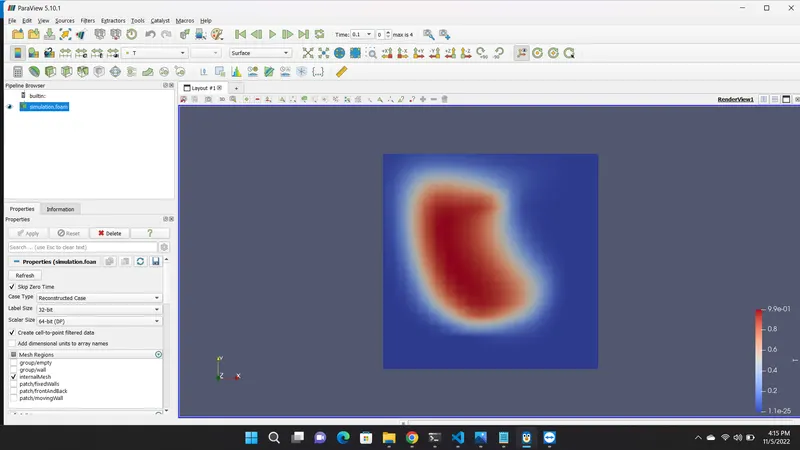
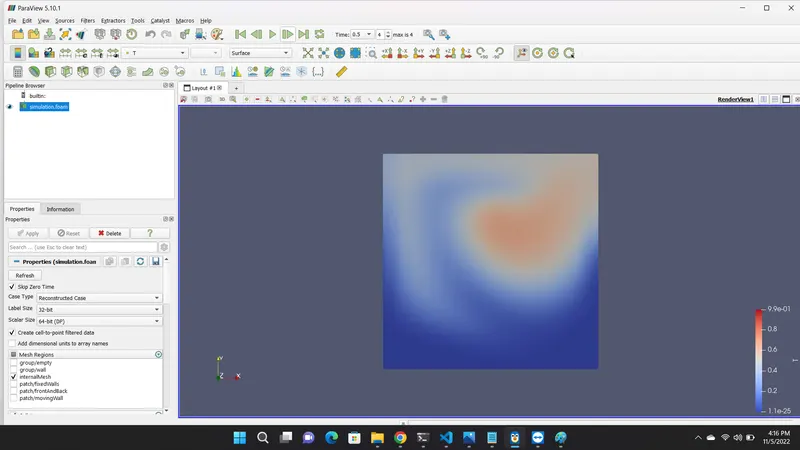
Since we have only considered the advection term, we are unable to observe the diffusion of the scalar in the domain, but we can see how the scalar amount has dispersed in the domain due to the presence of the velocity.