Project 1- Creating your own openFOAM solver
step1:- at first we have copied a icoFoam solver from the appication folder to run folder by running thye command
cp -r incompressible/icoFoam/
step2:- we have renamed the solver as scalarFoam.
in that we have files called createFields.H/make/and we have renamed the icofoam.c file as scalarFoam.c
step3:- in above mentioned files at first we need to open an file called createFields.H file added in a scalar term to it (its an temperature parameter)
here how it looks after adding an parameter 's' to it the createFields.H
Info<< "Reading transportProperties\n" << endl;

IOdictionary transportProperties
(
    IOobject
    (
        "transportProperties",
        runTime.constant(),
        mesh,
        IOobject::MUST_READ_IF_MODIFIED,
        IOobject::NO_WRITE
    )
);

dimensionedScalar nu
(
    "nu",
    dimViscosity,
    transportProperties.lookup("nu")
);

Info<< "Reading field p\n" << endl;
volScalarField p
(
    IOobject
    (
        "p",
        runTime.timeName(),
        mesh,
        IOobject::MUST_READ,
        IOobject::AUTO_WRITE
    ),
    mesh
);
Info<< "Reading field s\n" << endl;
volScalarField s
(
    IOobject
    (
        "s",
        runTime.timeName(),
        mesh,
        IOobject::MUST_READ,
        IOobject::AUTO_WRITE
    ),
    mesh
);
dimensionedScalar su
(
    "su",
    dimViscosity,
    transportProperties.lookup("su")
);
Info<< "Reading field U\n" << endl;
volVectorField U
(
    IOobject
    (
        "U",
        runTime.timeName(),
        mesh,
        IOobject::MUST_READ,
        IOobject::AUTO_WRITE
    ),
    mesh
);


#include "createPhi.H"


label pRefCell = 0;
scalar pRefValue = 0.0;
setRefCell(p, mesh.solutionDict().subDict("PISO"), pRefCell, pRefValue);
mesh.setFluxRequired(p.name())
step4:- after this above steos we need to add an main scalaer equation in a scalarFoam.C file this were all the test equatuon present.
here how its looks aftwer adding the scalar equation to slover
/---------------------------------------------------------------------------\
  =========                 |
  \\      /  F ield         | OpenFOAM: The Open Source CFD Toolbox
   \\    /   O peration     | Website:  https://openfoam.org
    \\  /    A nd           | Copyright (C) 2011-2018 OpenFOAM Foundation
     \\/     M anipulation  |
-------------------------------------------------------------------------------
License
    This file is part of OpenFOAM.

    OpenFOAM is free software: you can redistribute it and/or modify it
    under the terms of the GNU General Public License as published by
    the Free Software Foundation, either version 3 of the License, or
    (at your option) any later version.

    OpenFOAM is distributed in the hope that it will be useful, but WITHOUT
    ANY WARRANTY; without even the implied warranty of MERCHANTABILITY or
    FITNESS FOR A PARTICULAR PURPOSE.  See the GNU General Public License
    for more details.

    You should have received a copy of the GNU General Public License
    along with OpenFOAM.  If not, see <http://www.gnu.org/licenses/>.

Application
    scalarFoam

Description
    Transient solver for incompressible, laminar flow of Newtonian fluids.

\---------------------------------------------------------------------------/

#include "fvCFD.H"
#include "pisoControl.H"

// * * * * * * * * * * * * * * * * * * * * * * * * * * * * * * * * * * * * * //

int main(int argc, char *argv[])
{
    #include "setRootCaseLists.H"
    #include "createTime.H"
    #include "createMesh.H"

    pisoControl piso(mesh);

    #include "createFields.H"
    #include "initContinuityErrs.H"

    // * * * * * * * * * * * * * * * * * * * * * * * * * * * * * * * * * * * //

    Info<< "\nStarting time loop\n" << endl;

    while (runTime.loop())
    {
        Info<< "Time = " << runTime.timeName() << nl << endl;

        #include "CourantNo.H"

        // Momentum predictor

        fvVectorMatrix UEqn
        (
            fvm::ddt(U)
          + fvm::div(phi, U)
          - fvm::laplacian(nu, U)
        );

        if (piso.momentumPredictor())
        {
            solve(UEqn == -fvc::grad(p));
        }

        // --- PISO loop
        while (piso.correct())
        {
            volScalarField rAU(1.0/UEqn.A());
            volVectorField HbyA(constrainHbyA(rAU*UEqn.H(), U, p));
            surfaceScalarField phiHbyA
            (
                "phiHbyA",
                fvc::flux(HbyA)
              + fvc::interpolate(rAU)*fvc::ddtCorr(U, phi)
            );

            adjustPhi(phiHbyA, U, p);

            // Update the pressure BCs to ensure flux consistency
            constrainPressure(p, U, phiHbyA, rAU);

            // Non-orthogonal pressure corrector loop
            while (piso.correctNonOrthogonal())
            {
                // Pressure corrector

                fvScalarMatrix pEqn
                (
                    fvm::laplacian(rAU, p) == fvc::div(phiHbyA)
                );

                pEqn.setReference(pRefCell, pRefValue);

                pEqn.solve();

                if (piso.finalNonOrthogonalIter())
                {
                    phi = phiHbyA - pEqn.flux();
                }
            }

            #include "continuityErrs.H"

            U = HbyA - rAU*fvc::grad(p);
            U.correctBoundaryConditions();
        }

	//scalar transport equation
	fvScalarMatrix sEqn
	(
		  fvm::ddt(s)
		+ fvm::div(phi, s)
		- fvm::laplacian(su, s)
	);


	sEqn.relax();
	sEqn.solve();

        runTime.write();

        Info<< "ExecutionTime = " << runTime.elapsedCpuTime() << " s"
            << "  ClockTime = " << runTime.elapsedClockTime() << " s"
            << nl << endl;
    }

    Info<< "End\n" << endl;

    return 0;
}


// ************************* //
step 5:- after adding a slover to the scalarFoam.C file we need to save this solver in an USER_APPBIN folder my makeing changes in 'Make' file that to in Files folder by writing the EXE file like this
scalarFoam.C
EXE = $(FOAM_USER_APPBIN)/scalarFoam.
step6:- after make changes in the all required files we need to run a command called wmake.by this means our own solver is created and its ready to use in any case
step7:- in this stage we need to copy a case from tutoriouls folder to run folder and rename it as scalarcavity.after copying the file to run folder we need to create a 's' file in '0' folder
below code shows the 's' file in zero folder its been adited as per required
/--------------------------------- C++ -----------------------------------\
  =========                 |
  \\      /  F ield         | OpenFOAM: The Open Source CFD Toolbox
   \\    /   O peration     | Website:  https://openfoam.org
    \\  /    A nd           | Version:  9
     \\/     M anipulation  |
\---------------------------------------------------------------------------/
FoamFile
{
    format      ascii;
    class       volScalarField;
    object      s;
}
// * * * * * * * * * * * * * * * * * * * * * * * * * * * * * * * * * * * * * //

dimensions      [0 0 0 1 0 0 0];

internalField   uniform 300;

boundaryField
{
    movingWall
    {
        type            fixedValue;
        value		uniform 350.0;
    }

    fixedWalls
    {
         type            fixedValue;
        value		uniform 300.0;
     }

    frontAndBack
    {
        type            empty;
    }
}

// ************************* //
step8:- in this we need to go to the system folder and look for fvschemes to add up our parameter after adding the required parameters in to the fvschemes file.. this is how it looks
/--------------------------------- C++ -----------------------------------\
  =========                 |
  \\      /  F ield         | OpenFOAM: The Open Source CFD Toolbox
   \\    /   O peration     | Website:  https://openfoam.org
    \\  /    A nd           | Version:  9
     \\/     M anipulation  |
\---------------------------------------------------------------------------/
FoamFile
{
    format      ascii;
    class       dictionary;
    location    "system";
    object      fvSchemes;
}
// * * * * * * * * * * * * * * * * * * * * * * * * * * * * * * * * * * * * * //

ddtSchemes
{
    default         Euler;
}

gradSchemes
{
    default         Gauss linear;
    grad(p)         Gauss linear;
}

divSchemes
{
    default         none;
    div(phi,U)      Gauss linear;
    div(phi,s)      Gauss linear;
}

laplacianSchemes
{
    default         Gauss linear orthogonal;
}

interpolationSchemes
{
    default         linear;
}

snGradSchemes
{
    default         orthogonal;
}


// ************************* //
step9:- below file shows the fvsolution after adding needed parameter in to that to file
/--------------------------------- C++ -----------------------------------\
  =========                 |
  \\      /  F ield         | OpenFOAM: The Open Source CFD Toolbox
   \\    /   O peration     | Website:  https://openfoam.org
    \\  /    A nd           | Version:  9
     \\/     M anipulation  |
\---------------------------------------------------------------------------/
FoamFile
{
    format      ascii;
    class       dictionary;
    location    "system";
    object      fvSolution;
}
// * * * * * * * * * * * * * * * * * * * * * * * * * * * * * * * * * * * * * //

solvers
{
    p
    {
        solver          PCG;
        preconditioner  DIC;
        tolerance       1e-06;
        relTol          0.05;
    }

    pFinal
    {
        $p;
        relTol          0;
    }

    U
    {
        solver          smoothSolver;
        smoother        symGaussSeidel;
        tolerance       1e-05;
        relTol          0;
    }
    s
    {
        solver          PBiCG;
        preconditioner  DILU;
        tolerance       1e-07;
        relTol          0.0;
    }

}

PISO
{
    nCorrectors     2;
    nNonOrthogonalCorrectors 0;
    pRefCell        0;
    pRefValue       0;
}


// ************************* //
setp10:- in this steps we are editing the contolDict file for requirement.. here how it looks after editing
/--------------------------------- C++ -----------------------------------\
  =========                 |
  \\      /  F ield         | OpenFOAM: The Open Source CFD Toolbox
   \\    /   O peration     | Website:  https://openfoam.org
    \\  /    A nd           | Version:  9
     \\/     M anipulation  |
\---------------------------------------------------------------------------/
FoamFile
{
    format      ascii;
    class       dictionary;
    location    "system";
    object      controlDict;
}
// * * * * * * * * * * * * * * * * * * * * * * * * * * * * * * * * * * * * * //

application     scalarFoam;

startFrom       startTime;

startTime       0;

stopAt          endTime;

endTime         0.5;

deltaT          0.005;

writeControl    timeStep;

writeInterval   20;

purgeWrite      0;

writeFormat     ascii;

writePrecision  6;

writeCompression off;

timeFormat      general;

timePrecision   6;

runTimeModifiable true;


// ************************* //
transportproperties file:-
 /--------------------------------- C++ -----------------------------------\
  =========                 |
  \\      /  F ield         | OpenFOAM: The Open Source CFD Toolbox
   \\    /   O peration     | Website:  https://openfoam.org
    \\  /    A nd           | Version:  9
     \\/     M anipulation  |
\---------------------------------------------------------------------------/
FoamFile
{
    format      ascii;
    class       dictionary;
    location    "constant";
    object      transportProperties;
}
// * * * * * * * * * * * * * * * * * * * * * * * * * * * * * * * * * * * * * //

nu              [0 2 -1 0 0 0 0] 0.01;
su              [0 2 -1 0 0 0 0] 0.002;


// ************************* //
step11:- in this step after doing all the required changes into the files we need to run the command of the solver name that is scalarFoam in the terminal window. after that be nned to run a command called blockMesh to create a blockmesh file.
we can check visualy by running a command called paraFoam
below figure shows the result of scalar quantity 's'
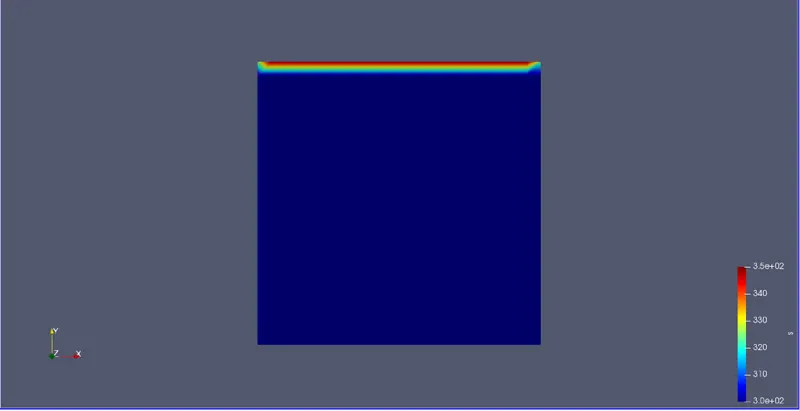
above figure show the variable 's' at its intial conditions
figure2:- this is the figure in which the variable 's' in its last time step
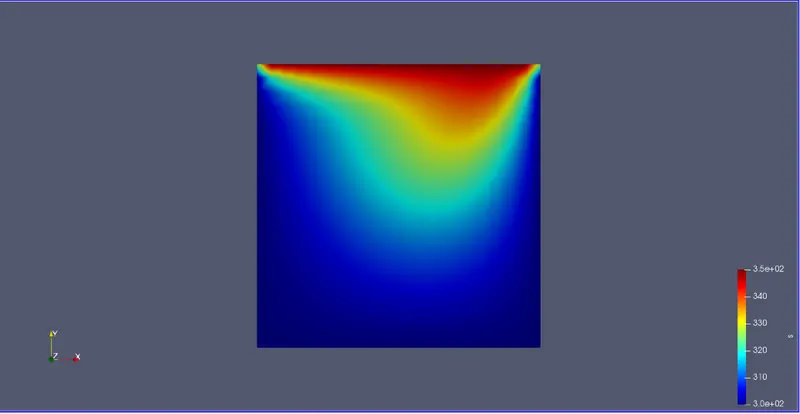
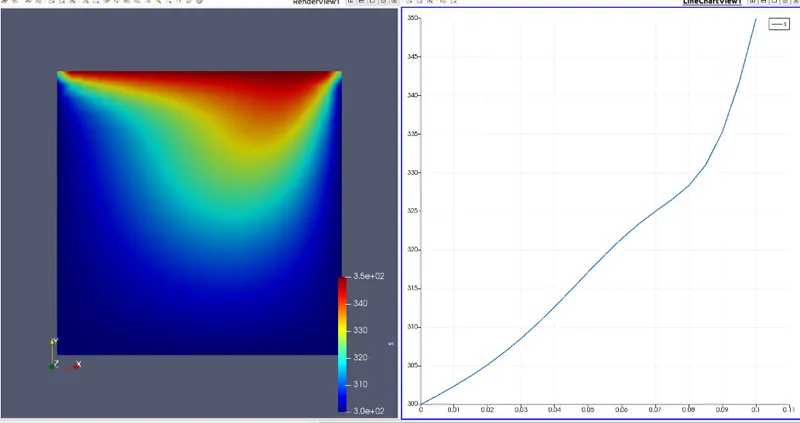
figure3:- out put of variable 's' and its graph here 's' is considered as temperature