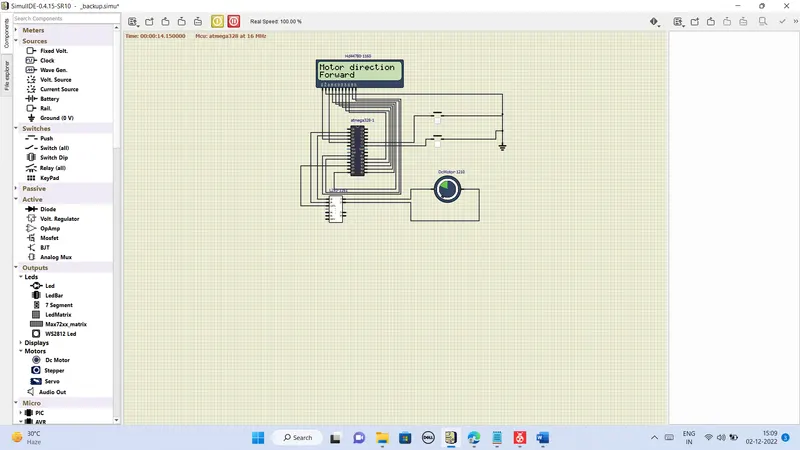
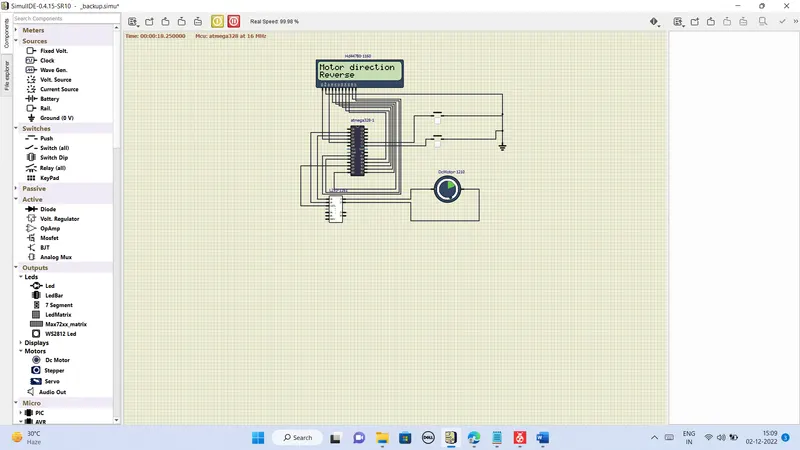
Project 1 - Controlling a DC motor using PWM and monitoring its Running status
Implement a system on the simulator for controlling a DC motor using L293 motor driver, monitor its status and print the running status of motor on the LCD Display.
#include <avr/io.h>
#define F_CPU 16000000L
#include <util/delay.h>
#include <avr/interrupt.h>

#define port PORTD //output port for motor
#define out1 1<<0 //d0 is pin 1
#define out2 1<<1 //d1 is pin 2

#define LCDPORT PORTB //macros
#define RS_LOW PORTD &=~(1<<2);
#define RS_HIGH PORTD|=(1<<2);
#define EN_LOW PORTD &=~ (1<<3);
#define EN_HIGH PORTD|=(1<<3);

void motor(int a,int value) //function for motor direction and speed
{
	OCR0A=(256/100)*value;
	if (a==1) //forward
	{
		port |=(out1);
		port &=~ (out2);
	}
	if (a==0) //off
	{
		port &=~(out2);
		port &=~(out1);
	}
	if (a== -1) //reverse
	{
		port |=(out2);
		port &=~(out1);
	}
}

void motor_timer0()
{
	DDRD =0xff; //d6 is PWM output
	TCCR0A = 0b10000011; //set prescale mode select
	TCCR0B = 0b00000001;
	OCR0A = 50;
	motor(0,100);
}

void lcd_cmd(unsigned char cmd)
{
	LCDPORT =cmd;
	RS_LOW; //set to command mode
	EN_LOW; // create clock signal
	_delay_ms(1);
	EN_HIGH;
}

void lcd_data(unsigned char data) //function for data
{
	LCDPORT = data;
	RS_HIGH; //set to data
	EN_LOW; //create clock signal
	_delay_ms(1);
	EN_HIGH;
}

void lcd_init()
{
	lcd_cmd(0x38); _delay_ms(5);
	lcd_cmd(0x38); _delay_ms(5);
	lcd_cmd(0x38); _delay_ms(5);
	lcd_cmd(0x38); _delay_ms(5);
	lcd_cmd(0x0c); _delay_ms(5);
	lcd_cmd(0x01); _delay_ms(5);
	lcd_cmd(0x06); _delay_ms(5);
	lcd_cmd(0x80); _delay_ms(5);
}

void cursorpos(char a, char y)
{
	if((a<1||a>2)||(y<1||y>16))
	{
		a=1;
		y=1;
	}
	if(a==1)
	{
		lcd_cmd(0x7f+y);
	}
	else
	{
		lcd_cmd(0xbf+y);
	}
}

void lcd_out(char a,char b,char *str)// function for cursor and data
{
	cursorpos(a,b);// function call
	while(*str)
	{
		lcd_data(*str); //string input
		str++;
	}
}

int main(void)
{
	DDRC = 0x00; // port c as a input
	PORTC= 0xff; //pullup activate
	motor_timer0(); //function call
	lcd_init();
	int pwm = 50; //speed value
	while (1)
	{
		if((PINC & (0b00000001))==0) //button one is pushed
		{
			motor(1,pwm);
			lcd_cmd(0x01);
			lcd_out(1,1,"Motor direction");
			lcd_out(2,1,"Forward");
			_delay_ms(250);
		}
		if((PINC & (0b00000010))==0) //buttong two is pressed
		{
			motor(-1,pwm);
			lcd_cmd(0x01);
			lcd_out(1,1,"Motor direction");
			lcd_out(2,1,"Reverse");
			_delay_ms(250);
		}
	}
}OUTPUT:
LCD displays the direction of the motor